This is topic Creating a Macro to call test pattern on NEC NC2000C and GDC in forum Digital Cinema Forum at Film-Tech Forum ARCHIVE.
To visit this topic, use this URL:
https://ft-forum.com/ft/cgi-bin/ubb/ultimatebb.cgi?ubb=get_topic;f=16;t=003249
Posted by Justin Hamaker (Member # 2165) on 03-09-2018, 04:04 PM:
I'm curious if there is a way to create a macro on an NEC projector which will call a test pattern. We have recurring private showings for a handful of groups and I like to put a welcome message up on the screen. In one instance I loaded a still as a test pattern and manually loaded this prior to the group arriving. I wanted to see if it was possible to call the test pattern with a macro so I could then automate this from the GDC server.
I realize creating a DCP is probably the easier way to handle this, but the macro would also create a quick way to call up a framing chart.
Posted by Steve Guttag (Member # 268) on 03-09-2018, 04:34 PM:
I'm not aware on the NEC of a way to include the test pattern on a preset. I'd have to think about it. On Barco, it is easy because of how they set up their Macros but NEC is more rigid.
Perhaps there is a way to call it via Ethernet but I'd have to see what the NEC command set is to find out if that is doable.
Posted by Marcel Birgelen (Member # 6801) on 03-09-2018, 04:40 PM:
I really think you should go the DCP route on this one, at least that's how I would likely try to solve it.
I've done some automated DCP generation for similar cases, using some Python scripting, PIL (Python Image Library) and DCP-o-Matic. You put in a few lines of text and configuration and on the other side, a fully fledged, customized DCP rolls out.
Posted by Justin Hamaker (Member # 2165) on 03-09-2018, 04:56 PM:
Marcel
Currently Python is beyond my skill set. I am going to work on learning it in the near future, but right now it's beyond me.
Posted by Mark Gulbrandsen (Member # 72) on 03-09-2018, 05:05 PM:
It's very easy to place the color bars on an preset in an NEC. The only down side is they are going to be full frame and will not reflect masking' etc. I believe you can apply a lens setting to it separately.
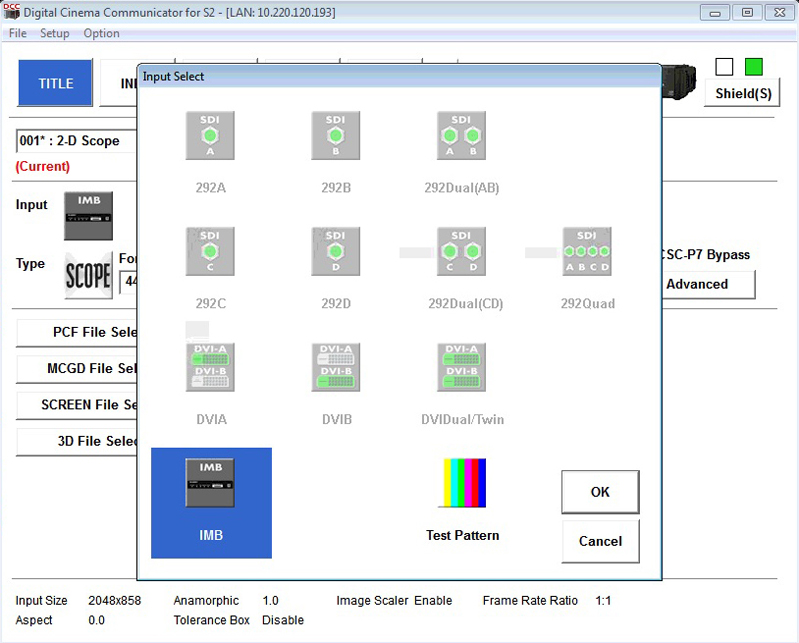
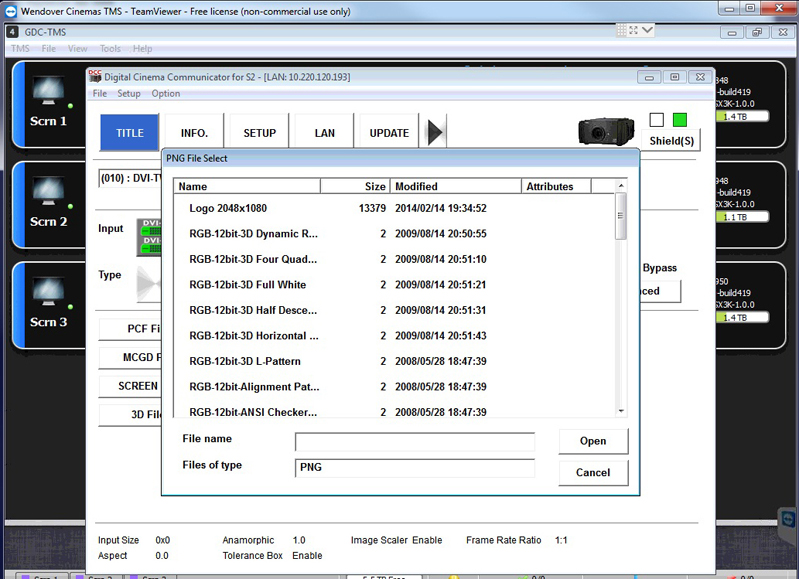
Next, select which pattern you want.
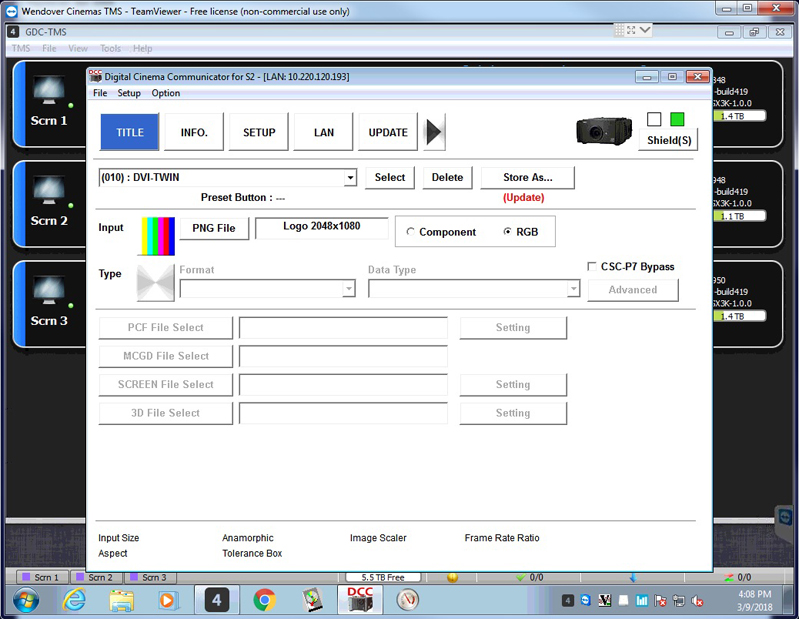
Next, click the Store As button to save your setting.
Posted by Monte L Fullmer (Member # 2797) on 03-09-2018, 05:26 PM:
I'm kinda pointing to the DCP DCP-o-Matic thing also being the easiest route..and the projector gets left alone.
Posted by Carsten Kurz (Member # 5396) on 03-10-2018, 07:55 AM:
I remember I put a custom png on the nc900 I service into a macro, so that it can be called by one of the hardware buttons on the projector. In this case, it's the cinema logo they bring up on screen during admission (no preshow). Also useful to have it as a projector-side macro and hardware button if for some reason you have to reboot your server while an audience is present.
It wasn't a big deal with the NEC S2 DCC tool. I think I needed to upload the custom png first with the S2 file explorer. If I remember right, someone told me in this forum how to do it. In this case, it will be shown with the configured masking. As the logo is universal (full frame backdrop), it will work both in flat and scope. Did the same with an intermission slide. Both have also been converted to DCP for easy use in a playlist.
Haha, I found that thread where I learnt to load my own test pattern into a NEC - it was YOU Justin who educated me back then...
http://www.film-tech.com/ubb/f16/t002015.html
So, you use the TI ICP service software to upload the PNG (conform to 2048/1080), then use S2 DCC to create a Macro using it. Just select a test pattern instead of a signal input as Marc shows above.
@Marcel & Justin: While most people use DCP-o-matic in the GUI version, there is also a commandline version included in the package. It basically works by invoking the commandline executable with source file(s), conversion parameters, target name, etc, then it will just create the DCP. Few people know about this option, but it can be used to create DCPs automatically, scripted, etc.
For the occasional slide, the GUI is perfectly okay and more intuitive.
- Carsten
Powered by Infopop Corporation
UBB.classicTM
6.3.1.2