This is topic Schedule triggering wrong playlist. in forum Digital Cinema Forum at Film-Tech Forum ARCHIVE.
To visit this topic, use this URL:
https://ft-forum.com/ft/cgi-bin/ubb/ultimatebb.cgi?ubb=get_topic;f=16;t=003250
Posted by Gronw Roberts (Member # 9141) on 03-10-2018, 05:07 AM:
I've noticed that the server (Doremi Showvault) occasionally gets a bit confused when following a schedule. Earlier today I had been testing a film and left it loaded in Playback (CineLister), after I finished I switched it over to the schedule for todays playback but when it came to starting the first film it ignored the schedule and started playing back the film I had been testing from the point I left it, I suddenly heard the audio playing.
What's going on here? It hardly ever happens but it has happened before, which is a pain because there are times during the week when my co worker and I are not here during some films.
Posted by Dave Macaulay (Member # 813) on 03-10-2018, 09:45 PM:
Are you sure you ejected the playlist? I think I've seen this where a test playlist was paused but not ejected. I got in the habit of going to editor and hitting "new" after testing when returning to schedule mode.
Posted by Gronw Roberts (Member # 9141) on 03-13-2018, 12:09 PM:
In the instance I mentioned above I had not ejected the playlist on the playback screen. It's happened before, after a film had finished (it's set to eject after playing) and instead of shutting down the projector (the next thing on the schedule) you could hear that something started playing instead (I wasn't there at the time, most problems seem to happen when I'm not there!). I'll make sure to hit 'new' on the Editor screen from now on after testing.
Posted by Carsten Kurz (Member # 5396) on 03-13-2018, 12:23 PM:
Hi Gronw,
next time you're there, please check the software version (probably something like 2.6.x or 2.8.x) running on the server.
- Carsten
Posted by Gronw Roberts (Member # 9141) on 03-13-2018, 12:26 PM:
It's 2.6.4-0 Carsten.
Posted by Carsten Kurz (Member # 5396) on 03-13-2018, 07:56 PM:
I may have read something about that in some release notes, have to dig it up. Should qualify as a bug. I guess what is scheduled, should play, at least if the current state is 'Stop'. Of course you don't want an ongoing screening to be interrupted by a consecutive scheduled one. But from stopped state, I see no reason not to follow the schedule. Even more so since the server DOES follow the schedule, but with the wrong content.
- Carsten
Posted by Gary Benn (Member # 7858) on 03-31-2018, 02:45 PM:
Anyone know why when editing a schedule the playlists are in total random order. They are not in numerical or alphabetical order - just random. It's so annoying, especially when you have lots of playlists.
Posted by Dave Macaulay (Member # 813) on 03-31-2018, 05:34 PM:
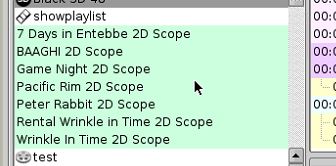
What server? I just checked a Doremi DCP2000 and the playlists are definitely listed in alphabetical order:
Posted by Gary Benn (Member # 7858) on 04-05-2018, 05:52 AM:
DCP2000.
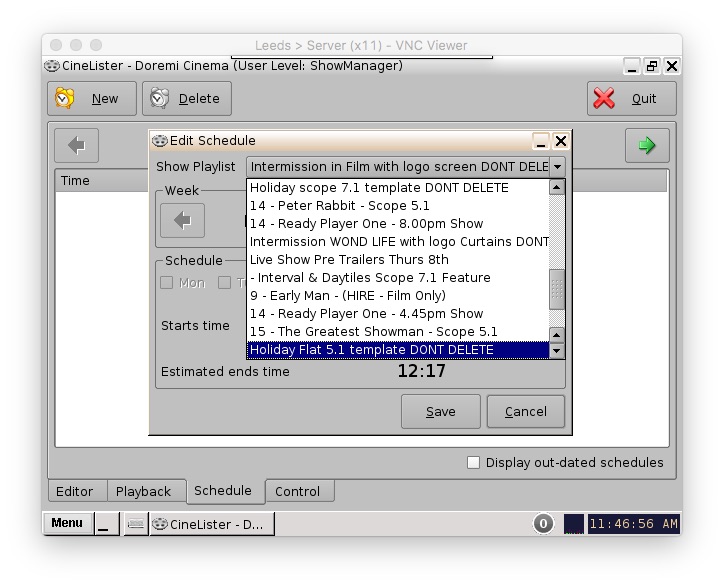
I don't mean in cinelister Editor which are correct. I mean in the drop down when scheduling shows. It's so annoying.
Posted by Dave Macaulay (Member # 813) on 04-05-2018, 08:37 PM:
The scheduling page is a septic abortion in all ways. Maybe the webGUI is better? Luckily for those with no POS linked TMS who have to manually schedule, it's usually only a once a week ordeal.
Posted by Gary Benn (Member # 7858) on 04-06-2018, 02:42 AM:
Oh Absolutely.
Why they have made the week start on a Monday when cinemas run from a Friday is beyond me.
We don't have webgui, we're still on 2.6.4-0, not sure if it's available for this version.
Posted by Dave Macaulay (Member # 813) on 04-06-2018, 06:25 AM:
Well, you can change the start-of-week day. And the gui is/was available as a separate package although I would just install 2.8.19 and get the latest version.
Posted by Gary Benn (Member # 7858) on 04-07-2018, 05:24 AM:
ohh, that's interesting, where do you change the start of the week day? Never seen that anywhere.
Posted by Victor Liorentas (Member # 5272) on 04-07-2018, 08:17 AM:
I have tested a movie and put it back on schedule for the days shows. The schedule almost always takes over and plays the correct content. A couple times lately,it has simply froze up at showtime and switched itself back to manual. So nothing happens as opposed to the tested content being played again.
To avoid this happening,I simply eject the movie when I'm done testing it.
In other words I eject the title I've tested and only then do I switch back to schedule.
Posted by Dave Macaulay (Member # 813) on 04-07-2018, 09:52 AM:
Schedule start day is set in /doremi/etc/defaults/cinelister.config (I think) - you need root to edit it and to make the flash r/w. The file is commented well so the change is pretty easy.
If that makes sense and seems like something you want to mess with then have at her. If it's greek to you then I recommend you don't, you can really mess up the server by editing config files.
The server has vi and emacs if you like confusion, adie and nano if you can live with ridicule.
Posted by Carsten Kurz (Member # 5396) on 04-07-2018, 03:48 PM:
You can also cmdline-start the graphical xedit editor and save from there.
- Carsten
Posted by Gary Benn (Member # 7858) on 04-07-2018, 06:23 PM:
Thanks so much Dave!
All done! Works a treat! ![[Big Grin]](biggrin.gif)
Had to copy the cinelister.config.sample as it hadn't been created.
Powered by Infopop Corporation
UBB.classicTM
6.3.1.2