This is topic V/I N tracks in forum Digital Cinema Forum at Film-Tech Forum ARCHIVE.
To visit this topic, use this URL:
https://ft-forum.com/ft/cgi-bin/ubb/ultimatebb.cgi?ubb=get_topic;f=16;t=003259
Posted by Richard May (Member # 2627) on 03-14-2018, 01:40 PM:
Where would you pick this track up from to send it to the QSC UPC 28C? I'm coming off the Dolby processors H/I outputs for H/I as most of our DCP's do not come with the CC H/I V/I tracks.
Posted by Dave Macaulay (Member # 813) on 03-14-2018, 03:50 PM:
What Dolby processor? The CP750 can do some weird magic with HI/VI but I've never used it and the description in the release notes is just confusing to me. Maybe activating this configuration puts the decoded ch 7+8 HI/VI on AUX 1 & 2? The notes say the 750 can still do 7.1 but I can't figure out how with only 6 digital audio channels left from a server, maybe this is only for encoded digital from blu-ray etc?
Anyway maybe easiest is to use an external S/PDIF decoder and connect it to 7/8 (AES pair 4) which is HI and VI, then do as you wish with the analog output. You can get a 7.1 adapter card from Odyssey that swaps 11/12 - BLS and BRS - to the 750's 7/8 input (for 7.1) and has an output connection to use 7/8 this way.
Posted by Harold Hallikainen (Member # 5405) on 03-14-2018, 04:25 PM:
As Dave notes, a processor model would help. Meanwhile, see http://ftp.uslinc.com/ftp/Products/IRC-28/Documents/Technical/Cinema%20Sound%20Processor%20to%20IRC%20Interface%20161025.pdf . On the CP750 with the latest firmware, the digital 2 input can be configured to continuously drive the CH7 and CH8 outputs. Therefore, for 7.1, AES/EBU pairs 1, 2, 3,and 6 go to the digital 1 input while pair 4 goes to the digital 2 input (with appropriate interface circuitry to change balanced to unbalanced and convert impedance). You then use CH8 for VI. You can use the HI output of the CP750 (LCR mix) to drive the HI input of the IRC-28C, or you can use the CH7 output of the CP750. The HI output will always be active, but the CH7 output is only active if the DCP has HI audio. CH7 is also a studio HI mix instead of being locally generated.
Let me know of any questions on the IRC-28C.
Thanks!
Harold
Posted by Max Hayman (Member # 8726) on 03-14-2018, 06:23 PM:
We just installed a StarSound Infrared 2 Channel system (and an induction loop) which we send HI/VI data from our CP750.
We have a Soundweb system in the middle to do some DSP.
Inputs:
H/I
AUX 7
AUX 8
VI goes directly to one of the channels on the StarSound.
And we switch between AUX7 or H/I depending on if the DCP has it which is sent to the other channel on the StarSound and the Induction Loop.
The stuff from H/I isn't that great. Also you loose digital 2.
Posted by Richard May (Member # 2627) on 03-14-2018, 06:45 PM:
Yeah, this is where is gets a little complicated I think. 3 theaters have CP750's (2 running 7.1, 1 running 5.1). The 4th theater has a CP650 with the upgraded card for 7.1.
Posted by Carsten Kurz (Member # 5396) on 03-14-2018, 07:03 PM:
You need to get the latest software and installation manual for the CP750 (I think, the manual is issue 5). And I remember there are passages on 7.1+HI/VI-N operation in the latest software release (1.2.8.3 I believe) documentation as well. Reading it, it appears a bit like tweaking the ultimate bits and pieces out of the CP750, but, once wired and setup properly, it should work as flawlessly as a CP750 permits.
- Carsten
Posted by Richard May (Member # 2627) on 03-14-2018, 07:27 PM:
We are on 1.2.8.3 so that's a start.
Posted by Sean McKinnon (Member # 612) on 03-16-2018, 08:00 AM:
Richard,
You will need some type of splitter/AES Decoder for the CP-650 House. You can leave your HI coming from the CP-650 mix down and use something like a USL DAX-202 to take the HI/VI pair and decode it to a balanced analog signal that you can connect right to your IR-28C.
Depending on what type of media block you are using you may need to either make or get a custom cable (RJ45 to DB25) or use an adapter. We have had good luck with the Audiocom adapters that you can pin out yourself. Feel free to give me a call if you need any more information.
If you want you can call Mark G. and ask him about the DAX-202 let him know that I sent you! ![[Wink]](wink.gif)
Posted by Richard May (Member # 2627) on 03-16-2018, 11:44 AM:
Thanks guys. Does anyone have the latest manual for the CP750? It definitely is very confusing reading all the stuff about the 750 sending VI to aux out and what not but I think I understand it mostly. Lol.
Posted by Richard May (Member # 2627) on 03-16-2018, 04:28 PM:
According to the CP750 release notes, the latest is 1.2.8.3 but 1.2.8.2 made the changes with how the AUX output behaves. Like Dave said, it's confusing. The way I read it and interpreted it, if you're running 5.1, it takes output 7/8 and sends it to the AUX out. If you're running 7.1, you still need to send 7/8, or whatever HI/VI are on, to Digital Input 2. It then sends it to AUX out.
Posted by Matt Fields (Member # 3211) on 03-16-2018, 05:25 PM:
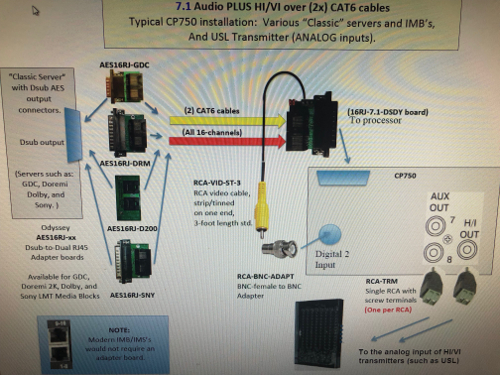
Contact Odyssey Products...they can get you everything you need to do the 7.1 CP750/USL install.
Here is how we normally do it:
Posted by Carsten Kurz (Member # 5396) on 03-16-2018, 06:12 PM:
Yup. To get the wiring right is actually more complicated than to set up the CP750 for 7.1+HI/VI-N.
Richard - If I remember right, you need to have both the latest (issue5) CP750 manual as well as the 1.2.8.3 release notes to get the full picture. I'll dig them up...
I assume you have access to the latest CP750 setup software as well?
- Carsten
Posted by Dave Macaulay (Member # 813) on 03-16-2018, 07:20 PM:
In the setup software where the configuration is selected, it directs you to the release notes...
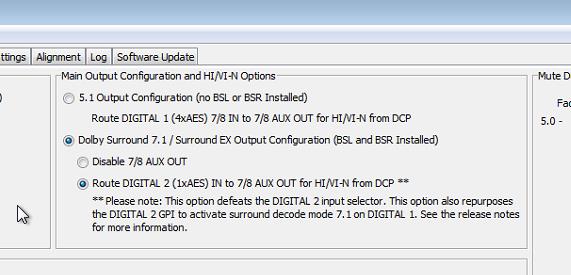
v1.2.8.3 release notes:
HiN/ViN routing is now configurable via the Setup Application (version 1.3.2.0 or later) between the following two options:
Route Digital 1 input pair 7/8 to Aux 7/8 output (the default option)
Route Digital 2 input to Aux 7/8 output. In this mode, the Digital 2 input is not selectable. This option provides the same behavior as the 1.2.7.3 release.
When routing Digital 2 to Aux 7/8, the Digital 2 GPI will activate Dolby 7.1 decode mode (since the Digital 2 input is not available in this mode)
The CP750 manual v5 is not much help:
HI and VI-N Channels:
With the introduction of Dolby Surround 7.1, AES pair 4 inputs to the CP750 are required for routing the Bsl and Bsr channels into the cinema processor. If these CP750 inputs are currently being used for routing hearing impaired (HI) or visually impaired narration (VI‐N, also known as audio description) channels, an external digital‐to‐analog (D/A) converter will be required for the HI/VI‐N channels. You may use aftermarket cables or adapters to fit your installation.
There is a newer version of the setup software for PC but I believe it is actually unchanged from the previous one (from 2016 I think), but with a USB driver that you can install into Windows Vista/8/10 without needing to jump through flaming hoops.
Posted by Richard May (Member # 2627) on 03-16-2018, 08:00 PM:
Ah!!!!!! So basically here is the process........
You have 2 Cat6 cables from the IMB (AES1-4 on one of them, AES 5-8 on the other) going to the board from Odyssey that plugs into the Digital 1 input on the CP750. The board takes AES pair 6 (BLS & BRS) from the IMB and routes it to AES 4 input on CP750. The board also pulls the HI/VI AES pair 4 from the IMB and gives you an AES output to send to Digital 2 on the CP750. The 750 then converts that to analog HI/VI and sends it to the AUX OUT 1&2, but you have to configure that in the 750 software. Seems like their should have been a better way to design it.
BTW, I do have the latest 750 set up software and latest 750 firmware so I should be good.
Thanks again everyone for running through this.
Posted by Harold Hallikainen (Member # 5405) on 03-16-2018, 10:36 PM:
I think 7.1 with VI was an afterthought, but tbey came up with a solution. The CP750 does AES/EBU decoding in an FPGA (or CPLD), so they were able to have a total of 10 digital input channels simultaneously (between digital 1 and 2). The USL JSD-60 uses 4 DIR/SRC chips for a total of 8 channels that get switched around between 8 channel AES, coax, Toslink, etc. So, in a 7.1 auditoium, a DAX-202 is needed to get VI. The CP750 was able to avoid this, but the wiring gets a little strange.
Harold
Posted by Stephan Shelley (Member # 8587) on 03-17-2018, 12:00 AM:
The Dolby made 7.1 cables had a breakout wire with a BNC connector on it for channels 7 & 8. You could put it on digital 2 on a CP750 or the USL D to A unit.
Posted by Carsten Kurz (Member # 5396) on 03-17-2018, 11:18 AM:
Guess it depends a bit on how you went to HI/VI-N and/or 7.1.
If you started with 5.1+HI/VI-N on output channel 7+8, you may have a different wiring than you'd have if you'd started with a 5.1+7.1 setup. IMBs may be a bit easier to wire straight since they have two separate AES1-4/5-8 RJ45 connectors, that way you could patch out all DCP main channels to the first connector, and have HI/VI-N on the second one to BNC/RCA.
- Carsten
Powered by Infopop Corporation
UBB.classicTM
6.3.1.2