This is topic Christie projector interlock error in forum Digital Cinema Forum at Film-Tech Forum ARCHIVE.
To visit this topic, use this URL:
https://ft-forum.com/ft/cgi-bin/ubb/ultimatebb.cgi?ubb=get_topic;f=16;t=003278
Posted by Peter Foyster (Member # 9599) on 04-02-2018, 10:13 AM:
My Christie CP2000ZX has twice in the past three nights had the lamp go out about an hour or so into the show.
When I get back to the bio box an interlock error is displaying on the CDP and the red light flashing. The fans are still running and the vane switch in the duct is working.
I acknowledge the error and after a couple of minutes restart the projector and re-strike the lamp. The show continues uninterrupted to the end.
The lamp has done barely 100 hours and all the extraction fans appear to be working. Short of watching the projector for the entire show to see what happens, I am at a loss as to why it has started doing this. The temperature sensor in the exhaust ducting sits on about 34 degrees Celsius maximum.
If anyone has had a similar problem and can suggest what to look for or action to take, I would be most grateful. It seems I just get over one problem and another crops up. I could probably limp through the next few weeks to the end of the outdoor screening season but it is not very good form to stop a show every night for 5 minutes to fix an issue.
Posted by Gordon McLeod (Member # 33) on 04-02-2018, 10:16 AM:
possibly a door switch
Posted by Mark Gulbrandsen (Member # 72) on 04-02-2018, 11:41 AM:
The vane switches are also known to fail. I'd bypass each switch one at a time with a clip lead until the lamp stays lit. Then you know where your problem is at.
Mark
Posted by Brad Miller (Member # 2) on 04-02-2018, 12:07 PM:
What is the exact wording of the error?
On series 2 Christies (2220, 2230, 4220, 4230) if you leave the key in the side door panel for changing the bulb, over time with gravity's assistance it can turn just enough to trigger the interlock alarm and turn off the bulb. This is why we tell people after changing a bulb to move the key to the TOP lock and leave it there, or keep the key on a string attached to the rear foot of the projector or something.
Posted by Steve Guttag (Member # 268) on 04-02-2018, 01:17 PM:
Look at the interrogator logs to determine WHAT caused the lamp to go off, then look at whatever that is.
If it says lamp exhaust sensor or words to that effect. Check the updraft and plan on changing the switch. It should be noted that for the current models (CP2220), Christie has a UV kit that shields that switch, which sits right above the reflector) and re-routes its cables up and over rather than around the lamp area. We've had that switch/door interlock fail due to UV exposure. If the switch is pasty white, change it!
Posted by Alexandre Pereira (Member # 9295) on 04-02-2018, 01:51 PM:
CP2000ZX similiar to the CP2000SB it could be the right side squirrel cage fan interlock. I had the same thing happen where the bulb would go off and the interlock warning came up.
Turns out the squirrel cage fan was failing and evently stopped working - it started to make loud whacking sounds. The plastic blades tend to brake as they become brittle from the UV light dry roasting them.
A simple fix if the problem persists and the fan fails is to remove the squirrel cage fan assembly - tape up the interlock to stay in the open position and point a powerful floor stand fan into the opening. This will give you time to get a replacement and keep the show going. I believe the replacement fans are approximately $400.00 US.
Posted by Peter Foyster (Member # 9599) on 04-03-2018, 05:15 AM:
Thanks gentlemen,
The tech should be coming out in the next couple of days to check it out so I will post the results here. It is good to get your input so as I know what to be looking for.
I assume I would need administrator status to be be able to view detailed diagnostic logs.
Peter
Posted by Dave Macaulay (Member # 813) on 04-03-2018, 07:55 AM:
No, no special access required. You can take a report as normal operator, I think.
Interrogator reports - you should not need "enhanced" to see this problem - are ".7z" archives that can be opened by many "unzip" type programs, I use WinRAR. The logs are in a nested .7z folder, I think the "operational" logs would have lamp-off errors?
Posted by Peter Foyster (Member # 9599) on 04-03-2018, 09:22 AM:
OK. Thanks for that. Hopefully we will be able to discover the cause and rectify it before the next screening on Friday night.
Posted by Randy Stankey (Member # 64) on 04-03-2018, 11:39 AM:
quote: Brad Miller
...move the key to the TOP lock and leave it there, or keep the key on a string attached to the rear foot of the projector or something.
Get a 10-32 thumb screw and use it to attach the key to an empty spot in the equipment rack.
When I worked on the stage at Mercyhurst, we often had equipment or drawers and things that required a particular key to operate or access them. That was the way I made sure the necessary key(s) were accessible when needed but not stored in the lock where they could get broken off or otherwise damage the lock.
Posted by Bradley J Sime (Member # 9423) on 04-04-2018, 04:26 PM:
We had this same problem a few years ago on our 2210. Extremely frustrating. You likely need a new interlock switch system. If my memory serves, it wasn't too dear, and fixed the problem.
Posted by Peter Foyster (Member # 9599) on 04-04-2018, 08:58 PM:
Actually I notice that the key has been in the top lock since I acquired the projector so it can't be that.
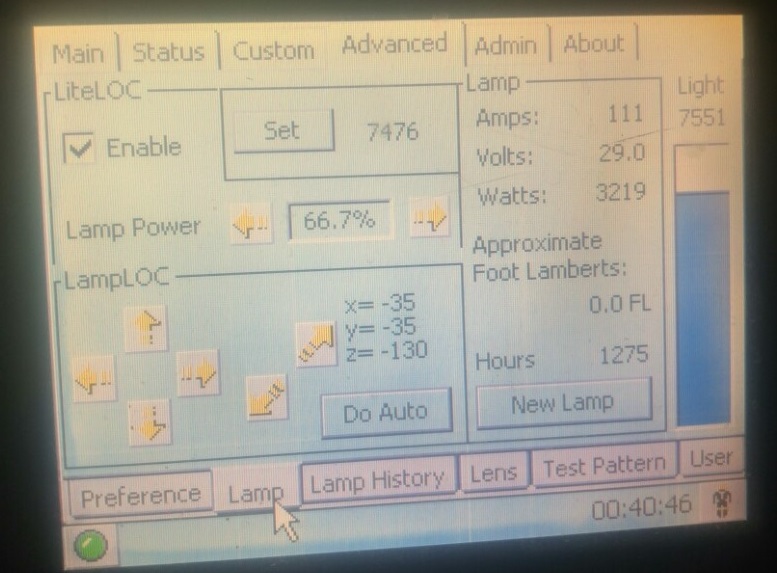
When setting up the weekend's shows last night I see that on flat, the lamp (CDXL-30) power reading varies between 1250 and 1270 watts. I understand that the lamp has a very wide operating range but this seems very low. I would not be surprised if this was a factor. I was not altogether happy with the light output so that will be rectified (pun unintended) smartly.
Posted by Alexandre Pereira (Member # 9295) on 04-04-2018, 09:43 PM:
Are you running a 2K bulb?
Posted by Peter Foyster (Member # 9599) on 04-04-2018, 10:05 PM:
No, the CDXL-30 is a 3K lamp to suit the Christie CP2000ZX projector.
Posted by Alexandre Pereira (Member # 9295) on 04-04-2018, 10:18 PM:
I am running FLAT of The Shape of Water right now and this is what I get on a 3K bulb - I have set it to auto.
Posted by Stephan Shelley (Member # 8587) on 04-04-2018, 10:18 PM:
I have had the airflow (vane) switches go bad. So far only the exhaust one.
Posted by Bradley J Sime (Member # 9423) on 04-05-2018, 09:27 PM:
You should take the key OUT of the lock. If it jiggles while it is in there, that could set off the interlock.
Posted by Peter Foyster (Member # 9599) on 04-05-2018, 10:05 PM:
We checked out everything on the projector and there is nothing untoward occurring in the interlock system.
As I had mentioned earlier, the lamp, which has done 150 hours to date, was running at about 42% capacity which we deduced was sufficiently low to cause it to go out without much provocation. Lamp power was increased to 75% and has made a huge difference to the light on the screen as you can imagine. LiteLOC has been disabled and we will manually adjust lamp settings as required.
The logs have been downloaded and will be checked, however it is unlikely that it will reflect any sort of malfunction. All the temperatures are within spec and the projector is functioning normally.
Posted by Ioannis Syrogiannis (Member # 3235) on 04-05-2018, 11:51 PM:
I had no recollection that a lamp could been set to 42 percent on a ZX.
Then again, the leap from 42 to 75 percent is quite a big one.
If it was me, I would first go for a 60 to 65 percentage and check if the issue reoccurs.
Apart from that, if you find that the colors are washed out with the new setting, you could reduce the output of the light power a little bit by slightly "unfocusing". By slightly setting the z coordinates of the lamp away from the optimum output spot. It's not what you would call a typical course of action, and it's a waste of energy none the less, but when there is a shortage of xenon lamps (in order to properly replace with lower rated ones that have longer lives), that can be a last resort measure.
Ideally, that should be done with a light meter in hand.
If the 42 percent rating wasn't an issue with the recently changed settings of the lamp (due to the change) and gave you a well lit flat, it might be the case that you actually need a smaller rated bulb that would give you a longer life along with a somewhat smaller price.
Posted by Peter Foyster (Member # 9599) on 04-05-2018, 11:59 PM:
Well, the lamp being used on the previous projector, an NEC 1600C (may it rest in peace) was a 4K lamp set to about 72% and the light and picture were quite acceptable.
The test pattern was run with the new settings, as well as some commercial content and it looked fine on screen.
I will, however, take note of your comments and set the output lower if necessary.
Posted by Carsten Kurz (Member # 5396) on 04-06-2018, 03:29 PM:
42% (if at all possible) is certainly asking for trouble. While this shouldn't trigger an interlock error but simply make the lamp go off, I would most certainly use something in the 60% range as the minimum lamp current.
- Carsten
Posted by Peter Foyster (Member # 9599) on 04-06-2018, 08:56 PM:
Running at 75% last night I had no problems and the light was excellent.
Considering that we used to run a 4K lamp, I would not want to reduce it any further.
Having said that, the screen is in dire need of a repaint and the light will dramatically improve when that is done for our next season.
Powered by Infopop Corporation
UBB.classicTM
6.3.1.2