This is topic Christie Light Engine Replacement in forum Digital Cinema Forum at Film-Tech Forum ARCHIVE.
To visit this topic, use this URL:
https://ft-forum.com/ft/cgi-bin/ubb/ultimatebb.cgi?ubb=get_topic;f=16;t=003283
Posted by Kelly Aubey (Member # 10417) on 04-06-2018, 12:04 PM:
Hi everyone!
First time posting here -- been lurking and learning from you all for years:-)
I've been having a problem with what was determined to be the light engine for my Christie Solaria One + for almost a year now. A subtle discoloration of the image was noticed and over time it became not-so-subtle. Apparently the glue the binds the prisms together in the light engine was going bad. Researched how to change the light engine and determined it didn't seem out of my capability to change, so I ordered a new one. I might have been wrong. After installing the new light engine and firing the projector up, the image was completely hosed. The black background of the test pattern showed as red and the image, in general, was a bit "snowy" like a TV channel tuned to a channel with no station. I turned the projector off, checked the connections of the three ribbon cables and fired it up again to the same effect. Christie said it wasn't impossible that I got a defective light engine. I decided to roll back to the old light engine till I could figure out what was going on with the new one and upon testing it, found that the image liked the same as with the new light engine. So, at this point, I'm assuming it's not a problem with the light engines.
Here's a short clip of what's going on on screen:
YouTube Video
Any idea what could be going on?
Thanks, in advance, for any advice.
Posted by Alan Gouger (Member # 543) on 04-06-2018, 12:34 PM:
If you re-installed all cable connections properly it is possible you damaged one of the pins in the connector on the back plane removing or re seating the cables.
By process of elimination, unplug the cable feeding the red channel connector on the back plane and feed that with the blue cable. The image will still be red but if you see your test pattern then odds are your back plane needs to be replaced. You have to be very careful removing and re-seating all cables and connectors.
Posted by Kelly Aubey (Member # 10417) on 04-06-2018, 12:46 PM:
Yea, that crossed my mind. I appreciate the response. I'll have a closer look!
Posted by Marco Giustini (Member # 4544) on 04-06-2018, 01:56 PM:
I would also re-seat all the boards - but maybe the best solution for you would be to call a qualified engineer? This may cost you more than the money you are trying to save!
Posted by Kelly Aubey (Member # 10417) on 04-06-2018, 02:03 PM:
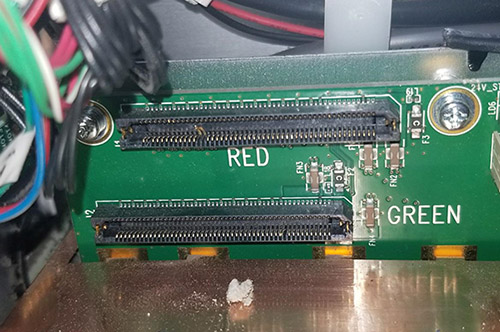
At this point, that crossed my mind, too:-) I've found a couple of bent pins and will see if I can bend them back. If not, I'll call it quits.
Posted by Mark Gulbrandsen (Member # 72) on 04-06-2018, 02:42 PM:
Be sure to clean the cigarette butts out of the projector too! Eeek....
Posted by Kelly Aubey (Member # 10417) on 04-06-2018, 03:03 PM:
Smoking helps me keep a steady hand. :-)
Posted by Marcel Birgelen (Member # 6801) on 04-06-2018, 04:29 PM:
I'm pretty sure those two bent pins on the RED DMD connector are causing your troubles. Be careful to bend them back though. Use a fine tool like a pincet or very fine screwdriver to bend them back and make sure they don't break off.
Powered by Infopop Corporation
UBB.classicTM
6.3.1.2