This is topic Updating Network Addresses on Digital Cinema Auditorium in forum Digital Cinema Forum at Film-Tech Forum ARCHIVE.
To visit this topic, use this URL:
https://ft-forum.com/ft/cgi-bin/ubb/ultimatebb.cgi?ubb=get_topic;f=16;t=003330
Posted by Justin Hamaker (Member # 2165) on 06-03-2018, 08:18 AM:
In the near future I need to change the network addresses for the devices at my drive-in. We have a Barco 32B with a GDC IMB (the HFR IMB where the server is external) and USL JSD 60.
I know I need to change the ethO and eth1 address of my server, but does the eth2 address need to change?
When I change the addresses of the projector and JSD60 in the GDC, will I need to rebuild the automation cues?
This is a standalone server which we are going to tie into our theatre network via fiber optic connection. Anything else I should watch out for? I installed all the equipment, but it's been 5 years since I did all of this.
Posted by Steve Guttag (Member # 268) on 06-03-2018, 11:58 AM:
NO!
That network is just for the server and the IMB to talk to each other (the content moves from the server to the IMB on that NIC. So it stays exactly the same. In fact, all SX2000ARs (the model you just described) have the same Ethernet address on that NIC.
It should be that ETH1 is the address that doesn't change though (192.168.1.13)
It is ETH0 (management NIC) and ETH2 (Media) NICs that change with IP schemes.
Posted by Justin Hamaker (Member # 2165) on 06-03-2018, 02:34 PM:
Ok, thanks Steve. I wasn't looking at the server when I asked. I was just thinking about the eth0 and eth1 on our non-imb servers.
Posted by Justin Hamaker (Member # 2165) on 06-09-2018, 04:35 PM:
Steve, if you don't mind me being a pest, perhaps you can provide some more insight.
As I mentioned our Cinema network is addressed as 10.194.184.11x for eth0 and 10.195.184.11x for eth1. These are all SX-2001 non-imb servers.
On the SX-2000 AR drive-in server I understand that I would change eth0 to 10.194.184.11x (currently 10.0.129.36) to match the management network. But I'm concerned about how to address eth2. Currently it is addressed as 10.0.129.1. Both eth0 and eth2 go to the same network switch.
Besides the addressing, will I need to add as switch to eth2? Part of what concerns me is eth2 is plugged into a NIC which is identified as IMB Interface.
Posted by Leo Enticknap (Member # 534) on 06-09-2018, 08:05 PM:
I installed a 2000AR a few months ago, and hit the same issue. If I remember correctly, the eth2 interface having a label that says it's the IMB NIC is incorrect (I'm guessing the label is correct when the same model of chassis is used for the non-HFR version of the server, or something like that). Steve is right: eth0 = management, eth1 = server to IMB, eth2 = media.
It's a good idea to have separate switches for the media network throughout the system (and in the case of PCs used to manage the system, separate NICs for the two networks rather than multiple identities on the same NIC), but if they're on totally different subnets and masked from each other, it's not strictly necessary.
Posted by Steve Guttag (Member # 268) on 06-09-2018, 11:10 PM:
Leo is correct that the chassis is labeled wrong for a 2000AR.
ETH0 remains the management port, ETH1 (only on the AR) becomes the mediablock NIC only and ETH2 becomes the Media network.
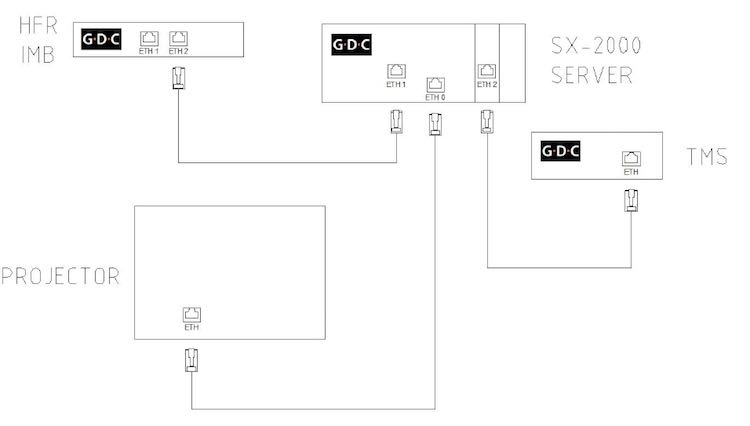
The layout on the chassis is in the image above.
Posted by Justin Hamaker (Member # 2165) on 06-10-2018, 03:47 AM:
I did all my changes today and it all worked flawlessly. Was able to set my Cinema servers as Ftp sources and connected with no problem. Automation and everything else worked perfectly.
The only thing that would make this easier is if I didn't have to turn on the projector to connect to the server with VNC, but I guess that's an issue I can't get around with the IMB.
Posted by Steve Guttag (Member # 268) on 06-10-2018, 09:53 AM:
You shouldn't need to turn the projector on to get to the server with the SX-2000AR. The server will merely complain about the missing SM.
Posted by Leo Enticknap (Member # 534) on 06-10-2018, 10:45 AM:
If Justin is using the little three-port switch on the side of the projector as a management network switch (server eth0 in one of the jacks, PC used for management functions in another), that would explain why he doesn't have VNC access unless the projector is powered up.
If that is what's happening, the solution is to get another switch (a $30 four-port one will do - doesn't even need to be gigabit for management), into which the projector, PC and GDC eth0 are plugged.
But yes, the 2000 is not like the 3000 (which, although GDC calls it an IMB, is in reality an IMS, only with the hard drive RAID in an external box rather than built onto the board a la Barco or Dolby), which does need the projector to be powered up in order to use the server at all.
Posted by Justin Hamaker (Member # 2165) on 06-11-2018, 03:06 PM:
I need to verify my setup, but I believe eth0 goes to the same network switch as the projector and the JSD-60. It would certainly make life easier if I was able to access the server without having to turn the projector on.
Posted by Justin Hamaker (Member # 2165) on 06-11-2018, 04:46 PM:
Turns out eth0 on the GDC was directly plugged in to the projector, but it threw me off because there was another connection between the projector and the management switch. After I fixed this I was able to connect with the projector off.
Powered by Infopop Corporation
UBB.classicTM
6.3.1.2