This is topic TMS Windows computer and NTP in forum Digital Cinema Forum at Film-Tech Forum ARCHIVE.
To visit this topic, use this URL:
https://ft-forum.com/ft/cgi-bin/ubb/ultimatebb.cgi?ubb=get_topic;f=16;t=003353
Posted by Gunnar Asgeirsson (Member # 3882) on 06-20-2018, 03:34 PM:
Finally after almost 5 year without TMS i have install TMS server in the cinema. Everything works well and it is much easier to manage the screening rooms.
The TMS server is actually Windows 10 Pro computer with the spec for the Dolby TMS software but i went to the Cinedigital TMS instead and are running it on Windows.
And the TMS works very well and no problem at all.
But now i would like to use this Windows 10 Pro computer also as NTP server so i can configure the screening servers to use the ip address of this computer for the NTP service.
Those who have been doing it.. what is the best way. Use the build in Windows NTP service or is some additional software better?
Posted by Carsten Kurz (Member # 5396) on 06-21-2018, 07:05 PM:
I assume you use Dolby (DSS) servers, and their clocks drift like mad?
Google 'Win32Time' - this windows service can be configured to act as either client or server.
You should also search this forum for 'Dolby NTP' - Steve has written loads of tips on Dolby DSS time issues.
- Carsten
Posted by ChunGui Lyu (Member # 10502) on 06-22-2018, 02:18 AM:
Have you tried aam screenwriter?
Posted by Gunnar Asgeirsson (Member # 3882) on 06-22-2018, 03:24 AM:
No, can that be run on a regular computer or am i going to need dedicate server from them?
Posted by Carsten Kurz (Member # 5396) on 06-22-2018, 06:59 AM:
You can use any regular machine for setting up an NTP server.
- Carsten
Posted by Mark Gulbrandsen (Member # 72) on 06-22-2018, 11:04 AM:
Setting up NTP is pretty easy if you know the requirements of the device receiving the commands. First, point your TMS at one of the Atomic Clocks so it stays in sync with master time. Then once you properly set up the NTP settings in Windows registry then all the other servers should stay in sync.
Mark
Posted by Steve Guttag (Member # 268) on 06-22-2018, 12:51 PM:
If you copy/paste the following into a text file and then change the extension to ".reg" you'll get a tried and true NTP server from your Windows computer. This is a registry modification so USE AT YOUR OWN RISK.
Note, this file will point the server to us.pool.ntp.org as your NTP source. You can change that to any NTP server you choose and use either the name (presuming you have a good DNS) or the IP address.
quote:
Windows Registry Editor Version 5.00
[HKEY_LOCAL_MACHINE\SYSTEM\CurrentControlSet\Services\W32Time\Config]
"MaxNegPhaseCorrection"=dword:00000e10
"MaxPosPhaseCorrection"=dword:00000e10
"AnnounceFlags"=dword:00000005
[HKEY_LOCAL_MACHINE\SYSTEM\CurrentControlSet\Services\W32Time\Parameters]
"NtpServer"="us.pool.ntp.org,0x1"
"Type"="NTP"
[HKEY_LOCAL_MACHINE\SYSTEM\CurrentControlSet\Services\W32Time\TimeProviders\NtpClient]
"SpecialPollInterval"=dword:00000384
[HKEY_LOCAL_MACHINE\SYSTEM\CurrentControlSet\Services\W32Time\TimeProviders\NtpServer]
"Enabled"=dword:00000001
I've had the win32time service stop on me. I've found that if you open a command line prompt and enter the following:
quote:
sc triggerinfo w32time start/networkon stop/networkoff
That it should keep the timer service going so long as there is network activity.
Good luck and again, use at your own risk. I've used them on Windows server 2003, 2008, Win7 (both pro and home).
Posted by Greg Routenburg (Member # 1742) on 06-22-2018, 01:04 PM:
Steve, what do you use for your Windows Firewall settings? Do you just allow Inbound and Outbound UDP traffic on port 123?
Posted by Mark Gulbrandsen (Member # 72) on 06-22-2018, 03:48 PM:
A f ew years back I had it stop on me and you see that happen by various servers starting to drift to different times in a week or two period. But in the last few years I have not had that issue at all. Perhaps a W-7 update took care if it.
On the firewall, I allow both inbound and outbound, although I think that only outbound is really necessary.
Mark
Posted by Scott Norwood (Member # 30) on 06-22-2018, 04:28 PM:
NTP requires port 123, both tcp and udp, inbound and outbound to work properly.
Posted by Steve Guttag (Member # 268) on 06-22-2018, 04:57 PM:
I only open up UDP port 123 (never have had to open TCP). And yes, I open it inbound and outbound.
It is possible Microsofties changed something to "fix" the problem but the sc triggerinfo command did the trick for me.
Posted by Scott Norwood (Member # 30) on 06-22-2018, 04:59 PM:
Steve is right--port 123 tcp is assigned for NTP, but not actually used for that purpose.
Posted by Michal Matys (Member # 8614) on 06-25-2018, 05:25 AM:
Does this work with Doremi servers as well if I set it up on the PC and just put the PC IP into the NTP settings?
Posted by Steve Guttag (Member # 268) on 06-25-2018, 06:36 AM:
Yes. Once you set up a windows computer to be an NTP time source, all DCinema servers should be able to clock off of it.
Remember, the Windows server STILL needs to get its time from something valid or all servers downstream will know it isn't valid NTP.
Posted by Mark Gulbrandsen (Member # 72) on 06-25-2018, 10:30 PM:
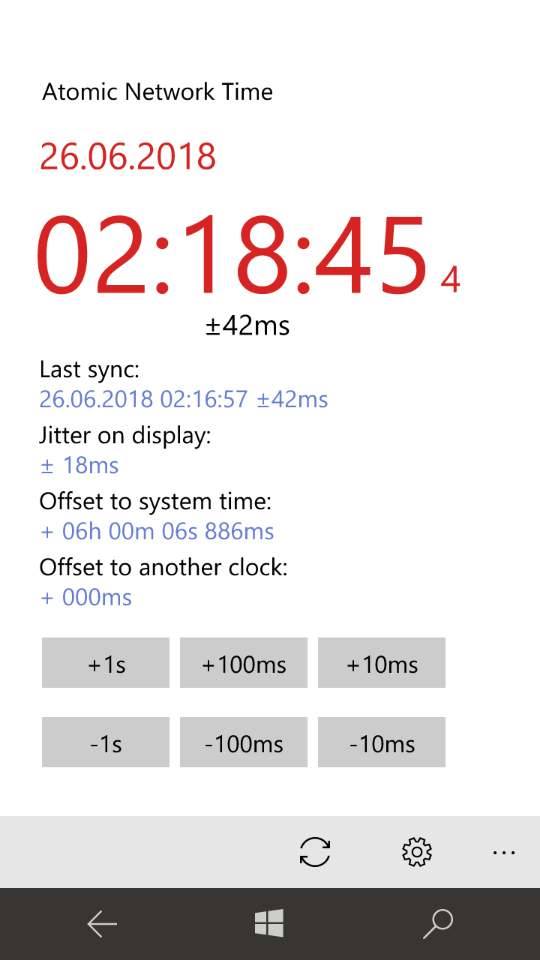
I havce a cool app on my phone where I can use the phone to sync up other devices via NTP over any network. I have not tried it on a server yet, but I will the next chance I get. You can select from a number of Atomic clocks or enter one thats not in the list yor self. It also does Standard time or UTC. I would think that other phones offer a similar app.
Powered by Infopop Corporation
UBB.classicTM
6.3.1.2