This is topic doremi ShowVault Hard Drive Disk not detected in forum Digital Cinema Forum at Film-Tech Forum ARCHIVE.
To visit this topic, use this URL:
https://ft-forum.com/ft/cgi-bin/ubb/ultimatebb.cgi?ubb=get_topic;f=16;t=003360
Posted by Herlius Dewata (Member # 9961) on 06-28-2018, 12:42 AM:
Hai Everyone
my Doremi ShowVault have problem that HDD not detected
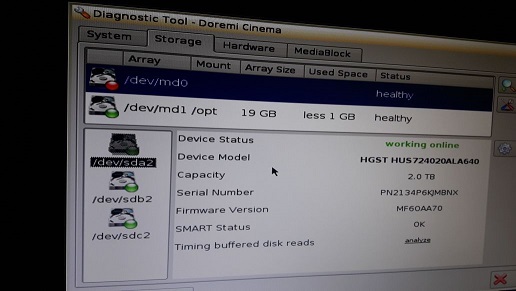
i already try to reseat the drive & clean server.
still no result.
re-initialize the raid is only the way to solve it ?
thanks for the help
Posted by Marco Giustini (Member # 4544) on 06-28-2018, 04:35 AM:
your drives are all detected. The red one is the main RAID partition. I guess you lost it somehow - I assume you do not see any content on your server?
Did you re-seat your drives with the server on?
I think the only solution is to re-initialise your RAID.
Posted by Carsten Kurz (Member # 5396) on 06-28-2018, 06:38 AM:
Why does it show 'healthy', if its shown red? I would try a repair, but if that doesn't help, you may need to reinitialize. There is a tutorial from Doremi on fixing raid issues. Reading through it, you will also understand why in this case it is not a failing individual disc. Both md0 and md1 use the same set of discs. If one of them is okay, there can not be a physical problem with one disc, as then both raid partitions would be affected.
- Carsten
Posted by Dave Macaulay (Member # 813) on 06-28-2018, 07:44 AM:
Red for dead and orange for troubled are not such different colors.
It is odd that all three drives show green but the /data volume shows orange/red.
Pull a diagnostic report and run it through the online analyzer at http://loganalyzer.dolbycustomer.com/ - the "storage" tab should give some details on any problem with dirves. You can also send it to Dolby tech support to get their opinion - cinemasupport@dolby.com
Replacing a single drive is not too difficult. I have seen drives where something does affect only one of the two volumes.
Once you know which drive is causing the problem, try "repair" anyway: if it lets you "replace" the problem drive (you don't actually replace it, just run through the process as if you have) then it might be OK, might still show trouble which means a new drive is needed. Note you MUST have the problem drive selected before starting repair, or you will lose all content and have to reinitialize the RAID.
I don't think reinitializing is a good idea now. Repair will try and return a drive to operation without deleting the content.
Posted by Marcel Birgelen (Member # 6801) on 07-06-2018, 04:11 PM:
I've seen odd cases were the software RAID itself was "perfectly healthy", but the filesystem on it was defective.
Now, if there is anything on it that's worth recovering and can't be easily re-ingested, I would try to fix it or otherwise I would just re-initialize the RAID following Doremi's guidelines.
Powered by Infopop Corporation
UBB.classicTM
6.3.1.2