This is topic Problem with ICP on Barco DP2K-20C in forum Digital Cinema Forum at Film-Tech Forum ARCHIVE.
To visit this topic, use this URL:
https://ft-forum.com/ft/cgi-bin/ubb/ultimatebb.cgi?ubb=get_topic;f=16;t=003373
Posted by Nguyen Jack (Member # 7530) on 07-13-2018, 03:10 AM:
Dear all,
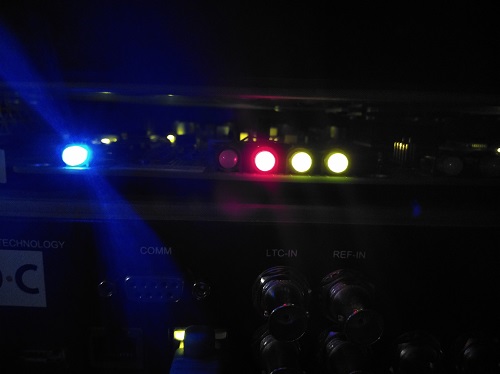
i get problem with ICP on Barco DP2K-20C, The Peojector can't booting up, Blue flashing, I see led on ICP OS Start is red.
Please help me and let me know solution to fix error.
Thanks.
Posted by German Marin (Member # 918) on 07-13-2018, 03:37 AM:
You must do a Recovery ICP via cmd in ICP boot mode. I guess you need to do a Barco course to have those files.
Posted by Stephan Shelley (Member # 8587) on 07-13-2018, 08:33 PM:
They are available on the my.barco site or you could contact Barco about it. They are not for the faint at heart. Plan on several hours doing it it is slow loading. You will need to know how to reset security on the projector. On this if in doubt call a tech.I have had to do it once. You have to be very patient.
Posted by Nguyen Jack (Member # 7530) on 07-13-2018, 10:14 PM:
Thanks German
I will try to do it on boot mode.
Hi, Stephan
How can i reset security on the projector? Could you guide me?
Posted by Stephan Shelley (Member # 8587) on 07-13-2018, 10:50 PM:
You need the dallas key. Put it in the circular socket.The number keys will turn yellow. With the number keys type in the passcode. If successful the number keys will flash green. You may have to do it a couple of time. We are not allowed to post passwords here. You will need to get it from Barco. As you have to pull out the ICP and remove the cover plate and put it back in with the cover plate off so you can hold down a button on the board while it boots up. Lots of room for error here that will brick the ICP.
If you have a recent clone of the projector setting good you will need them. If not make as much of a clone as possible. You will have to redo screen files and color files as they are stored on the ICP and will be lost in the recover process. If you have a clone with them on you can just restore them.
Posted by Nguyen Jack (Member # 7530) on 07-13-2018, 11:27 PM:
Thanks Stephan,
I will try to do it.
Posted by Marcel Birgelen (Member # 6801) on 07-14-2018, 12:02 AM:
Only try this if you can get the images from the My Barco site or from your service representative, or else it has no use to get into command mode on the bootloader.
Also, if you've never done this, and you have somebody you can call, who has, I'd call him or her if I were you.
If you brick your ICP, it's going to get really expensive.
Posted by Dave Macaulay (Member # 813) on 07-14-2018, 07:06 AM:
Maybe reseating the ICP and CCB will resolve this.
I would use the TI "ICP/Enigma Control Program" to reload the latest version in a slot. Or the Barco software installer if you don't have the TI program but you need the package file as well as this can't reinstall a version already in one of the board's update slots.
There is an ICP recovery tool software package that reformats the ICP storage, loads a base program, and loads a fairly recent software version. If that fails ... you do not need to have the faceplate off to try it, if it does fail then using the internal button is the next step but I haven't had to (yet). Instructions are in the package zipfile.
Barco support will probably send the packages if you call them, they prefer working with trained techs but have helped end users. Here in North America, anyway... you can try emailing them at dc.noc@barco.com ... I don't know the policy on supporting anyone outside of their sales zone. Good guys, though!
There are passwords for many of the programs and, of course, I can't post any here.
Posted by Nguyen Jack (Member # 7530) on 07-17-2018, 10:51 PM:
Thanks Dave,
I have file Package sip file IcpUpdateRecover-1.0.5, i will do it.
Posted by Dave Macaulay (Member # 813) on 07-18-2018, 08:34 AM:
If you don't ingest a clone (full clone is best) previously taken from your projector, after recovery you won't have most of the test patterns, the screen files, or the MCGD files. You should always take a clone after doing screen or MCGD files. It's worthwhile to delete the useless pattern files (all 4K since you have a 2K projector plus the Barco logo and the dual projector setup images) - these are large files and make the full clone save process take about twice as long. (and it's pretty dang slow)
Barco has base clones with all the files that come on a new projector, you still need to do screen files and MCGD. Lens files should be OK as these are stored in the CCB. These base clones don't seem to be on my.barco... I can't find them at least, so you have to ask Barco support for them. They are specific for projector series and input type (SDI, IMB, ICMP) - you must use the correct one.
The recovery tool installs a TI software version, you should still install the latest version afterwards even if it's the same and definitely if it isn't the latest. Current now is v4.5.454. Read the release notes, if the recovery tool you have is really old you may need to go through some step releases.
Posted by Mark Gulbrandsen (Member # 72) on 07-23-2018, 11:02 AM:
I was told recently that the ICP recovery no longer works on the later ICP's after you go past a certain firmware version. I do know this is true of NEC ICP's, not sure of Barco.
Mark
Posted by Steve Guttag (Member # 268) on 07-23-2018, 12:31 PM:
Um, no. The ICP recovery tool works on all versions, including NEC. It is the same ICP and runs the same ICP software.
The ICP recovery tool one may have might only get them to say 4.2 (or less) but one can then update to current from there (4.5.454, as of this writing).
Barco's ICP recovery tool on non Barco projectors will work but not with a clean exit, has been my experience. But again, running a normal update to get the ICP to current. Ideally, one would use the ICP recover utility for their specific projector brand.
Where the ICP recovery may not work are on series 3 projectors were it isn't an off-the-shelf TI ICP anymore.
Posted by Mark Gulbrandsen (Member # 72) on 07-23-2018, 09:12 PM:
I was told by NEC not to attempt it. I will go back and copy over the email I got about that...
Mark
Powered by Infopop Corporation
UBB.classicTM
6.3.1.2