This is topic Doremi server SMPTE audio channel routing in forum Digital Cinema Forum at Film-Tech Forum ARCHIVE.
To visit this topic, use this URL:
https://ft-forum.com/ft/cgi-bin/ubb/ultimatebb.cgi?ubb=get_topic;f=16;t=003381
Posted by Carsten Kurz (Member # 5396) on 07-21-2018, 12:58 PM:
Taken from here: http://www.film-tech.com/ubb/f16/t003065.html
No Leo, I mean this:
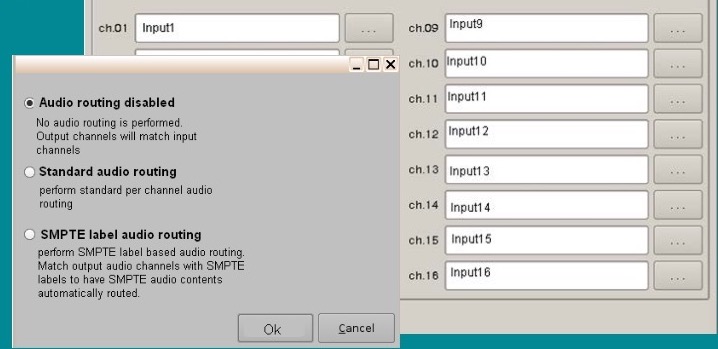
It's from an older training slide, it looks like the traditional Doremi GUI, it makes perfect sense to offer these three options - but I can't find it in 2.6.4 or 2.8.x ?
These settings haven't changed since many years, I read through the Doremi installer manuals many times, but I also don't understand why the set of channels is doubled in the custom mapping options below. I would understand the input numbers mean static routing for Interop, and the label names refer to SMPTE labels, but I don't think it works like this. Aside from the fact that most predefined mapping templates there do not make much sense anyway and a passthrough routing with hard wired or CP based soft routing looks more predictable.
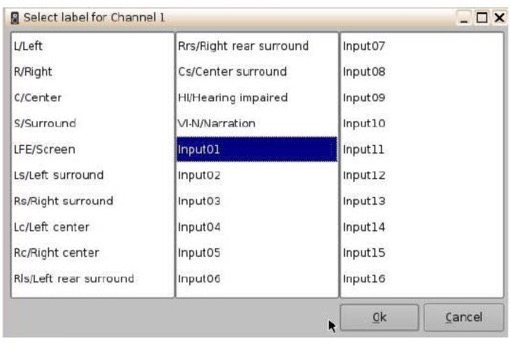
- Carsten
Posted by Leo Enticknap (Member # 534) on 07-22-2018, 11:20 AM:
As both of the Dolremi UIs with recent software versions simply don't mention SMPTE, I'm guessing the channel assignments you can set in the dialog screen I pasted in the other thread refer to output channels.
For example, if you choose the ISDCF template, then it will look at the channel metadata on an SMPTE DCP, and send LFE to 4, left back surround to 11, etc, regardless of where they are on the actual DCP. For Interop DCPs, and SMPTE ones that do not have channel labels, the server will not know which channel has what content anyways. If you want to re-route, all you can do is to say "send channel 7 on the DCP to output channel 15" (for example).
I'm puzzled as to what the difference is between "disabled" and "passthrough" on those options is, though - they both sound like they do the same thing.
Powered by Infopop Corporation
UBB.classicTM
6.3.1.2