This is topic DSS200 FTP Oddness in forum Digital Cinema Forum at Film-Tech Forum ARCHIVE.
To visit this topic, use this URL:
https://ft-forum.com/ft/cgi-bin/ubb/ultimatebb.cgi?ubb=get_topic;f=16;t=003399
Posted by Steve Kraus (Member # 476) on 08-05-2018, 11:50 PM:
So this happened today; hopefully it's just "one of those things."
Dolby DSS200 with internal medial block (Cat.862) running 4.3.5.13
Server stays on all the time. I reboot it every couple of months; the last time was a couple of weeks ago.
Projector is turned off when not in use. Was off at the time. (In case it matters it's an NEC NC1200C.)
There is no library server.
I usually load keys from home. I do not make the server (or projector) accessible from outside so what I do is use "desktop sharing software" to connect to the booth PC, upload the key(s) to that computer's HD, and then run Core FTP on the PC to connect to the server and transfer the key. I look at the server via a VNC program on the booth PC.
Today I went to load a key and the transfer from booth PC to Dolby server, normally a second or two, would just hang. After about 4 minutes it would complete but variously showed the file name with 0 bytes or sometimes 28K on the server. But, as seen over VNC, even when it was 28K there was no key recognized by the server.
So I traveled to the booth in person and brought along a couple of keys on a thumb drive. The one I need and also, as test, one for another version of the movie which I had not ingested.
Thumbdrive was recognized and keys loaded normally. On the Existing keys page both were shown with the unneeded one marked UNKNOWN instead of FEATURE as it did not match any content.
I had a couple of movies to ingest so I put one drive in the CRU bay, it was recognized, and I clicked to start the transfer. Progress bar showed nothing happening. I tried to cancel but that did nothing nor did pulling the drive out.
I rebooted, pulling power cords and waiting 45 seconds.
After reboot, things seem back to normal though I have not yet tried loading a key via FTP. The ingest ran but it just seemed slower than normal though that could be my imagination.
Hoping it was just an odd glitch put to rest with the reboot.
Posted by Leo Enticknap (Member # 534) on 08-06-2018, 10:20 PM:
I've occasionally had DSS and DSL servers go a bit buggerish when it comes to FTP, and, unless the cause was a LAN problem outside the server, a reboot has almost always fixed it. You can do this through the remote access PC using a SSH client (e.g. PuTTY). Log in using the administrator username and password (you can find these in the DSS manual), and then enter the command "reboot." Wait about 10 minutes, then reconnect via FTP, VNC, or whatever.
If you're uploading actual DCPs into it via the route described above, as well as KDMs, though, you should get a speed boost by putting an extra NIC in the remote access PC, with a crossover cable going from it directly into the theatre network jack of the DSS (assuming that the theatre network NIC on the server is unused, as it normally would be in a single screen setup). Call the extra NIC in the PC 192.168.241.X, where X is something other than 3, and you're good to go.
This will have the advantage that, when uploading, say, a 100GB feature from your remote access PC into the server, it won't be trying to send it through the same NIC as you're connecting to it from the internet through, and so both processes should gain a significant speed advantage.
Posted by Steve Kraus (Member # 476) on 08-07-2018, 09:37 AM:
Thanks. I really need to get more up to date DSS software.
I only ingest via the CRU bay and USB, the latter if I have more than one to load and don't want to stick around, I will dig out the CRU cap & cables and leave it hooked up as I won't care if takes hours.
If I were to ingest via FTP, do I just copy over everything on the transport drive? What about the verification step the normal ingest process does?
I was curious / concerned why it seemed to ingest slower. As I said, I could be imagining it, but on an average size movie it's usually 30-35 minutes of copying and 10 minutes of verification. The CRU bay ingest after reboot took about an hour in total. I really need to take notes on times & DCP sizes so I can judge objectively.
Posted by Leo Enticknap (Member # 534) on 08-08-2018, 04:28 PM:
You're on version 4.3, which is pre-DCI. If you're using it with a cat862 and a Series 1 projector, I'd suggest checking that the projector will accept Cinelink I or Cinelink II TLS link encryption before updating the cat862 to a DCI-compliant firmware. You can't downgrade it back again if the projector can only use Cinelink II DH (the cat862, on post-4.3 firmware versions, cannot use DH).
As for FTP ingests, it certainly does some sort of verification, because if any of the files are corrupt, the content tab will show the CPL with a red X in the content type icon during the ingestion: if the red X doesn't go away shortly after the incoming FTP transfer is complete, either one or more of the DCP files has been found to be bad, or the server cannot play that DCP (for example, because you've ingested it into a DSS/DSP100, and the frame rate is not 24).
If you copy everything on the transport drive, that will work. Deluxe Technicolor have an annoying habit of putting everything in the root folder, even when multiple CPLs are present on the same drive. So unless you go through the individual files (which are often named by UUID rather than the CPL name) and just copy the ones you want, you will end up ingesting everything on the drive that way. But you can always delete the CPLs you don't want afterwards.
Posted by Frank Cox (Member # 6258) on 08-08-2018, 04:39 PM:
quote: Leo Enticknap
So unless you go through the individual files (which are often named by UUID rather than the CPL name) and just copy the ones you want, you will end up ingesting everything on the drive that way. But you can always delete the CPLs you don't want afterwards.
What is the easiest way to sort out the contents of those trailer drives if you wanted to save the data for just one trailer onto a separate flash drive for any reason?
You would have to save each of the files that individual trailer requires, but how do you know which those are?
Posted by Leo Enticknap (Member # 534) on 08-08-2018, 10:54 PM:
If you have a Dolby DSS running version 4.9, or any flavor of Doremi server, the easiest way is to ingest from the Deluxe/Technicolor, drive and then outgest just the CPL you want to archive onto another external drive.
If you have a Dolby DSS running an earlier version than 4.9, you can outgest via FTP from the generatedPackages folder. Find the UUID of the DCP you want (right-click > properties in Show Manager), then FTP the folder named with that UUID string out of the server. If you outgest using the Show Manager GUI on a pre-4.9 version, it won't copy all the files, with the result that you will only be able to reingest it into another DSS server.
You may be able to outgest from other models of server and IMS, but I couldn't advise on this (at least, not without hitting the manuals first).
Posted by Dave Macaulay (Member # 813) on 08-08-2018, 11:15 PM:
With Doremi you can export a CPL with "Content Manager" in control panel.
CPLs are listed by title, select what you want and use the "actions" icon and select export.
You can export to a USB drive, the server will write to EXT2 or a few Windows formats... NOT NTFS. FAT16 or FAT32 should be OK.
Note this is dead slow saving. You can do it a lot faster with terminal commands but the CPLs are saved with UUID numbers - easy to find once you figure out the UUID of the CPL you want but I don't advise anyone with limited Linux skill to fiddle around in a terminal session. It's super easy to mistype a command and kill the server. You need at least the admin login and possibly root login to remount the USB drive to read/write and do the copying. Maybe admin, and definitely root, have access to commands that can really screw up a server such that only a new SSD will revive it.
I think you have GDC though, I'm not sure how to export from these.
Posted by Steve Kraus (Member # 476) on 08-09-2018, 10:53 AM:
In response to a comment above, the projector, NC1200C, is Series 2 and the link connection is Cinelink II TLS.
Cat.862 software is 4.3.0.11.
Suppose I was not imagining it that ingests are taking longer? What could be the cause? The system tab shows zero reallocated sectors. Is that surprising after several years of operation on this set of drives? Is it possible the RAID system can have a problem and it just doesn't report it?
Once upon a time I had a drive go bad. Somehow the system didn't seem to know enough to work around it because it caused freeze ticks on screen during a show. I had an ingest going on and I pulled the drive and the ticks stopped. After the show I rebooted and only then did it show a bad drive, with the drive LED flashing red. I live-played the next screening to minimize use of the degraded array. At the time I still had an older, smaller set of four drives just as they were when I pulled them so I put them back and used them until I obtained a replacement drive.
Posted by Leo Enticknap (Member # 534) on 08-09-2018, 12:54 PM:
If you're already using TLS, you can upgrade to whatever you like without a problem.
Is your content RAID more than about 80% full? This can cause slowdowns of the sort you describe.
Posted by Steve Kraus (Member # 476) on 08-09-2018, 05:13 PM:
I don't think so. 4 1TB drives. Capacity is shown on the server as 2778 GB. I delete unneeded content when available space drops much below 1000 GB. Right now I have 809 free which is typical.
If it is slower--and that is not certain--it affects the verify stage as well as I was seeing those happen in roughly 10 min and that now seems to take 20 min. That would be a RAID or processor issue, not issues with the CRU drive.
I will probably reboot when I get a chance.
Posted by Leo Enticknap (Member # 534) on 08-12-2018, 09:38 AM:
Hmm ... my experience with DSS200s with 4x1TB is that once Show Manager is saying less than around 500GB free, then you can start to get playback glitches, slow ingestions, etc. Is Show Manager showing any reallocated sectors on any of the drives?
Gut feeling is that a clean reinstall and reinitialization of the RAID would make these problems go away.
Afterthought: pulling a log file package onto a USB stick and then uploading it to Dolby Log Analyzer might shed some light on what is going on. It'll likely splash a lot of digital red ink over the screen because of the old software version, but it might also give us some specifics that could be useful. If you could post a link to the log analysis here, we can all take a look.
Posted by Steve Kraus (Member # 476) on 08-16-2018, 07:09 AM:
I did the log analysis thing and aside from many times telling me the software was out of date, it did not show any issues.
I did find this curious though. The first drive seems slower than the others.
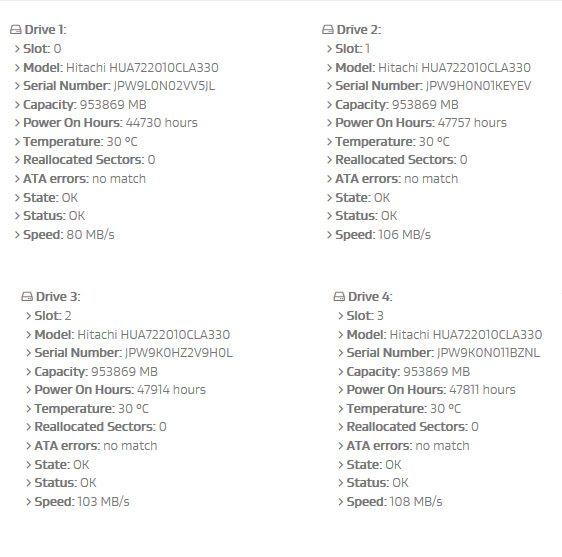
Tuesday morning I ingested a 159GB movie. (And watched another while that was happening---no issues.) Copy phase was about 31 minutes which was what I would expect. But verification took about 18 minutes. Again, maybe I am imagining but I would have expected about half that.
Posted by Leo Enticknap (Member # 534) on 08-17-2018, 01:50 PM:
Those times look about right to me for a 159GB DCP into a DSS200 from a CRU drive.
Not sure what to make of the slower speed on drive #1. If you're willing to put up with the disruption of a complete software reinstall and RAID re-initialization, you could shuffle the drives into different slots, and see if the slow one moves. 47k is quite high mileage for RAID drives (about six years of spinning 24/7): that server must have been kept clean and well ventilated for them to have lasted this long without picking up any bad sectors.
Posted by Steve Kraus (Member # 476) on 08-20-2018, 12:00 AM:
I do have a spare drive of that same type. How does that work if I wanted to replace the one? Power down, replace drive, power back up and hopefully it boots and reconfigures the RAID? Or are these hot swappable? Maybe I should just leave it be but it's curious.
Posted by Carsten Kurz (Member # 5396) on 08-20-2018, 08:02 AM:
First, I would perform a reboot and create another log to see if these numbers are persistent. If no other issues show up, I wouldn't see a reason to swap the drive now. But to keep an eye on it. The drives can be hotswapped.
- Carsten
Posted by Leo Enticknap (Member # 534) on 08-20-2018, 09:16 AM:
You can hot swap, but the RAID won't start to rebuild automatically afterwards. Somewhere in the system settings tab is a sub-tab that has a "start RAID rebuild" button, which you have to press after swapping drives.
Powered by Infopop Corporation
UBB.classicTM
6.3.1.2