This is topic Ultra Viewer Remote Software in forum Digital Cinema Forum at Film-Tech Forum ARCHIVE.
To visit this topic, use this URL:
https://ft-forum.com/ft/cgi-bin/ubb/ultimatebb.cgi?ubb=get_topic;f=16;t=003423
Posted by Mark Gulbrandsen (Member # 72) on 08-30-2018, 08:25 AM:
I recently tried this out and am adding it to some of my locations. It works fine and will transfer files, etc just like Team Viewer does. Since I do mainly just GDC servers, some times GDC support has to use their QS version of Team Viewer to get in which the normal Team Viewer has to be disabled for that to work. But Ultra Viewer does not interfere with the use of the QS version of Team Viewer so you can stay logged in and know when Tech Support has come and gone. Anyone else here tried it yet? It is also 100% free for one connection (at a time) use.
https://ultraviewer.net/en/
Mark
Posted by Dennis Benjamin (Member # 1137) on 08-30-2018, 09:10 AM:
I've been using IM PC Remote
IMPCREMOTE
Posted by Steve Guttag (Member # 268) on 08-30-2018, 10:00 AM:
Both sound interesting. I have to ask though...if they don't charge for it, how does the company stay in business?
Posted by Mark Gulbrandsen (Member # 72) on 08-30-2018, 12:32 PM:
quote: Steve Guttag
if they don't charge for it, how does the company stay in business?
Exactly what I am wondering, but I think if you want more than one connection at the same time you would have to pay them for it. But for just one connection like most of us do on here, it is free so far.
It looks like IMPC Remote does things much the same way, although theirs does work under Mac and Ultra Viewer does not. IMPC is also free for one connection at a time or pay for multiple simultaneous connections.
Mark
Posted by Dennis Benjamin (Member # 1137) on 08-30-2018, 01:34 PM:
IMPCREMOTE costs $30 a year for a single license. If you are planning to be logged into more than one computer at a time remotely, you have to buy another license. Pretty clear cut.
From what I understand, the guys that came up with this software were developers for Teamviewer.
Posted by Mark Gulbrandsen (Member # 72) on 08-30-2018, 04:31 PM:
$30 a year is way cheaper than $49 a month that Team Viewer dings us for! But I will continue with Ultra Viewer for now... until they start charging for single connection... then see what their fee is, if there ever is one. And then I'll make up my mind from there. As long as I can transfer files to do upgrades I am fine with it.
Ultra Viewer is located in Viet Nam... Not that in this day and age that's a bad thing. Viet nam is a very up and coming country.
Mark
Posted by Frank Cox (Member # 6258) on 08-30-2018, 05:21 PM:
I don't do remote administration for digital cinema stuff but I do administer some application servers and the like and I just use ssh, and TigerVNC if I need a remote desktop.
I'm curious as to what these cost-you-money solutions give you that ssh and TigerVNC don't?
Posted by Mark Gulbrandsen (Member # 72) on 08-30-2018, 06:49 PM:
They provide a secure form of VPN access to any other computer from anywhere you happen to be in the world with simple fixed log on code and password. Aside from my home desktops, I have a cellular enabled iPad and laptop that I use if I am traveling to be able to have access a customers projector, server, etc.
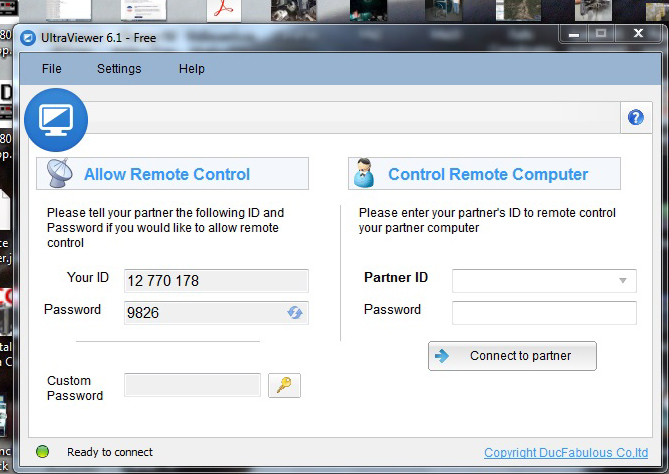
This is the Ultra Viewer app on my laptop screen. If you had Ultra Viewer on yours you would simply enter the ID and password shown on my computer on the right half of your screen and then you could access my computer.
Mark
Posted by Stephan Shelley (Member # 8587) on 08-30-2018, 07:23 PM:
Looks very similar to teamviewer
Posted by Steve Guttag (Member # 268) on 08-30-2018, 09:18 PM:
Yeah, it looks like they referenced Teamviewer on it.
Does it work on Android or iPad (as the device remoting in, not at the computer host)?
I'm not looking to replace Teamviewer...we are licensed commercially with it and there are no annual fees...only if you buy the next version or adopt their new subscription system (starting with version 13). We have opted not to since we haven't seen anything in 13 that would improve our use of it.
As Mark indicated, the value of Teamviewer (and like products) is that from any device (just about...I have it on my android phone, iPad, Windows 7 laptop, iMac and Windows PCs) I can support our theatres from just about anywhere, including planes, trains, automobiles and cruise ships (have done all). Whatever device is with me can be used and no special VPN need be set up as that is covered in-house with Teamviewer. It is also very thrifty on bandwidth despite the amount of detail and control one has.
I'm looking for a back up system since Teamviewer's server itself can/has gone down or gone partially down (I've seen groups of our clients go off line at the same time). I have used Logmein as a back up (not as good an interface but its graphic qualities are better) to ensure our customers are never out of reach.
Ultra Viewer or IMPCREMOTE would be more than sufficient (providing they run on the devices I use) as a backup to Teamviewer. And, in a backup, I wouldn't need it for more than one site at a time. Teamviewer, on the other hand, I could be on many sites at once. When I'm in an "update" cycle, I'll stage several theatres at once so I'm not waiting on updates.
Honestly, $49/month isn't a huge expense for the potential amount of use but again, our Teamviewer plan is perpetual. I don't know if you can still do that with version 13 since we opted out of it but one of the reasons we settled on Teamviewer over Logmein was the pricing plan was more suited to us. Once they get you on a recurring fee, they can jack up up to whatever they want unless there is a suitable alternative. Teamviewer is almost defacto now. Most of the vendors are willing to remote in on Teamviewer and most have a version of it themselves.
Posted by Mark Gulbrandsen (Member # 72) on 08-30-2018, 10:17 PM:
Well like I mentioned Ultra Viewer and Team Viewer can run simultaneously, so you can keep an eye on those renegade GDC remote techs! Er I mean so you know when they have finished up their certificate update or what ever they are in there to do that we can't.
Mark
Posted by Dennis Benjamin (Member # 1137) on 08-31-2018, 10:14 AM:
Obviously I use Teamviewer occasionally, some machines have both installed....
With IMPCREMOTE, it can run on Windows, Linux (including Android) and iOS.
So, there's that.
Posted by Steve Guttag (Member # 268) on 08-31-2018, 10:37 AM:
I checked on Teamviewer and its terms have become much less favorable. They only show the per/month terms and one has to get a quote for an "Enterprise" grade set up. Also, the first two tiers of the current Teamviewer offerings are just one remote open at a time, the highest tier can have up to 3 open at a time (which would work for me though I have probably had up to four open). Our plan is unlimited open. I just tried it and so far, 6 open without issue.
It almost seems like Teamviewer is going down the Logmein route of pricing themselves out. I'm sure for most, one open at a time is sufficient and $588/year isn't too big a hit for what it provides but the deal used to be MUCH MUCH better.
I'm definitely going to check out IMPCREMOTE as my back up system. Thanks for the tip, Dennis!
Posted by Carsten Kurz (Member # 5396) on 08-31-2018, 06:04 PM:
I was a big fan of Teamviewer once because of the multi-platform approach, but when they started to charge big money for every upgrade, with no new features (or, 'symbolic ones') other than being able to connect to more recent client versions (and abandoning compatibility with older ones for no technical reason), I stopped that nonsense and stayed on Teamviewer 7 and supply the working QS clients to my customers/remote locations myself.
Teamviewer went the Adobe way to make big money once users had grown comfortable with it.
The functionality is very good, but they want you to pay big money every year for the same functionality. And hey, even the basic commercial license was never cheap. Come on, it's neither WIN 10 nor Office 2017, it's just a remote control software.
It's good some competition is there.
- Carsten
Posted by Steve Guttag (Member # 268) on 09-01-2018, 05:51 AM:
It all depends. I'd say, Teamviewer is about as important a program, if not more so, than any other we use. Our support service, Cardinal Care, relies on it heavily. As such, we are a commercial license holder for it.
As for token updates...some were more token than others. Being able to keep track of remote ins/ how long one was there, leaving a comment as to WHY one remoted in...etc. were valuable reporting tools and Teamviewer's original sales pitch was that you didn't have to buy the new version every year. If nothing improved (for you), stick with what you have. And, for commercial license holders, you get a customized version of Host and QS that you can link to customers so YOUR version what what they get so not version conflicts. So the fact that we are not on version 13 is a non-issue.
Note too, we don't use it like an IT support company would. There are features there, like OS updates that we defeat that an IT support company would value. We also don't use the VTC features of it either. So quite a bit of what they boast about on their feature updates doesn't apply. Though we have appreciated the faster file transfer speeds as well as the better drag-n-drop transfers.
Probably the biggest annoyance in the UI, for me, is that their tab for the TV window is in the lower-right corner and is right where a "down scroll arrow" is likely to be on a full screen. Yeah, you can move it (or could, I haven't tried lately) but still...Logmein put it on the top like a RDP.
Posted by Steve Guttag (Member # 268) on 04-09-2019, 03:19 PM:
Did Ultraviewer go bust? I can't get to their web site, at the moment.
Posted by Steve Guttag (Member # 268) on 04-09-2019, 05:00 PM:
It seems to be up again.
Posted by Mark Gulbrandsen (Member # 72) on 04-09-2019, 05:55 PM:
I just tried and it does seem to be down. They came out with a 6.2 version not too long ago.
I was able to down load 6.1 here:
http://ultraviewer.findmysoft.com/download/
Mark
Posted by Mark Gulbrandsen (Member # 72) on 04-10-2019, 08:43 AM:
The actual Ultraviewer site is back up this morning. Get it while you can!!
Ultra Viewer Download
Posted by Brad Miller (Member # 2) on 04-10-2019, 11:27 AM:
Here you go Mark:
UltraViewer version 6.2 download link from Film-Tech servers
At least this link won't break in the future.
Posted by Mark Gulbrandsen (Member # 72) on 04-10-2019, 05:12 PM:
Good idea Brad!
Posted by Kevin Fairchild (Member # 4985) on 04-11-2019, 01:19 AM:
I find Zoho Assist very affordable and user friendly.
Powered by Infopop Corporation
UBB.classicTM
6.3.1.2