This is topic NetGear NAS RAID configuration (IMB S2) in forum Digital Cinema Forum at Film-Tech Forum ARCHIVE.
To visit this topic, use this URL:
https://ft-forum.com/ft/cgi-bin/ubb/ultimatebb.cgi?ubb=get_topic;f=16;t=003447
Posted by Steve Guttag (Member # 268) on 09-29-2018, 12:15 PM:
So I get this frantic call about a NAS that has gone down on THREE drives (in a 4 drive system). This isn't a site I normally support their server since they are part of the Scrabble/Christie thing but Christie apparently bailed on them and said to call back on Monday since the NAS is out of warranty! (nice).
Anyway...using the NetGear program, sure enough three drives are listed as "Dead"
I've skimmed through the formatting procedure and also the Christie instructions where they begin with...make sure the system already is formatted RAID-5 (pretty standard stuff for DCinema).
However NetGear likes to use "their" X2 formatting scheme and I checked the other screen (twin drive-in) and that one is formatted X2 so have the rules changed since the IMB-S2 manual was published? Is the X2 formatting now preferred? And, if so, should one tick the 2-drive failure mode? I ask because if it took three drive failures to take this one down, I presume that it was indeed in X2 mode with dual drive failure before the third one died (and they didn't notice that two had already gone). A RAID-5 would have crashed on the second drive giving up.
Just curious. I intend to match the other screen but don't know what makes the IMB-S2 happiest with these NAS units. We don't have the IMB-S2 anywhere else due to its 100% failure rate...we avoided it.
Any advice on NAS configuration (at least as far as setting up the RAID goes, would be appreciated. I'm heading there with a set of new HGST 2TB drives (what we stock).
Posted by Adam Martin (Member # 641) on 09-29-2018, 11:52 PM:
Netgear's X-RAID formats are auto-expanding such that you can operate the NAS on one drive with no redundancy, add a second drive for redundancy, and then add more drives (even different sizes) to add capacity. It sounds like if you have the two-drive-fail mode selected, you just get less and less space until you're dead.
I don't see why any of these players (like the Christie IMB) that use externally managed outboard storage should care what format the data is in, so long as when it asks for a file it's delivered.
Posted by Steve Guttag (Member # 268) on 09-30-2018, 11:43 AM:
Well, when the third drive died, it died.
So, yesterday, I delivered four 2TB drives and told it to keep the X2 formatting and allow for dual drive failure (seemingly that is how it was configured). We are at 16 hours of formatting and still it is chugging along but has not returned to usefulness. All that RAIDar says is that it is "healthy" but hasn't returned to knowing it is a ReadyNAS 2100. It is currently a product unknown but the disc access LED is winking like it is doing its thing since the time it started the RAID creation process.
Posted by Mark Gulbrandsen (Member # 72) on 10-01-2018, 07:55 AM:
I have never heard of a raid that will not let you utilize it while it is initializing. On all raids I have used over the last 20 years that initialization is always done in the background. Same for raid rebuilding. The only thing that should happen is slightly slower read/write speeds,
Mark
Posted by Sean McKinnon (Member # 612) on 10-01-2018, 08:07 AM:
The netgear ReadyNAS is a terrible product in my opinion. I have had nothing but trouble with it. I recently had one that indicated dead drives like yours Steve but after replacing the drives it would not initialize. In the end we had to replace it.
Posted by Steve Guttag (Member # 268) on 10-01-2018, 08:35 AM:
Thanks Sean. That may very well be the case. I have an Iomega RAID that I've verified to be operational that will likely go in before this weekend. I saw elsewhere on the internet that it can take up to 60-hours for this thing to initialize.
And Mark, I agree...I've never had a RAID behave like this one...just "go-away I'm busy." For all I know, the drives may not have failed and it was the unit all along.
I have very little experience with the Christie IMBs and their associated NAS systems so I have no point of reference for it. But so far, I don't like it one bit.
Posted by Dave Macaulay (Member # 813) on 10-01-2018, 12:54 PM:
Well, I've never seen one that was usable while initializing.
Posted by Steve Guttag (Member # 268) on 10-01-2018, 03:30 PM:
Dolby's RAID is completely usable during initializing (DSS series). Transfers are slower but shows run and content may be moved about.
Posted by Martin McCaffery (Member # 37) on 10-01-2018, 03:37 PM:
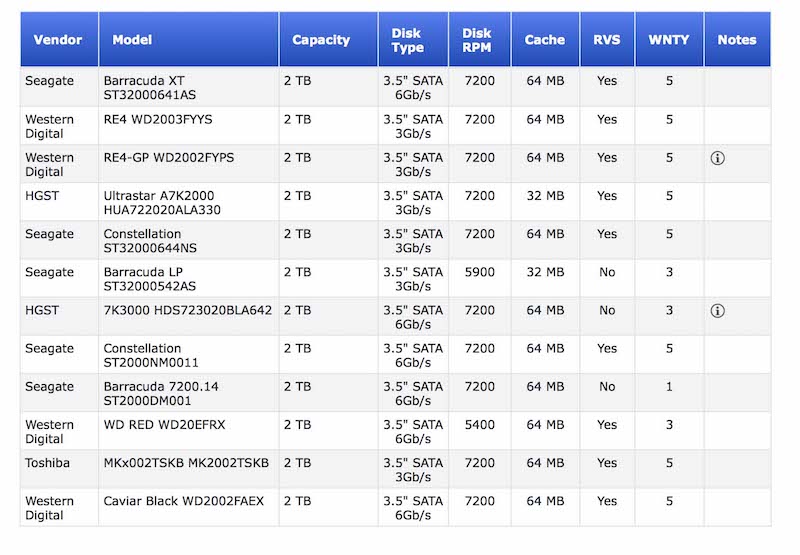
Planning to switch out my ReadyNAS 2100 hard drives when we close in December. Steve is using HGST, just wondering if anyone has another preference among the NetGear approved disks. WD, Seagate?
Posted by Steve Guttag (Member # 268) on 10-02-2018, 06:20 AM:
I looked for the approved list and I come up with broken links.
My recommendation is to change out one at a time and let it rebuild after each one. BTW...just shy of 60-Hours...still doing unknown things.
Posted by Martin McCaffery (Member # 37) on 10-02-2018, 09:10 AM:
They don't make it easy to find. In fact, I didn't bookmark it, but copied the list because it was so hard to find. But here's a screenshot of the compatible list:
Posted by Mark Gulbrandsen (Member # 72) on 10-02-2018, 10:05 AM:
HGST first then Worstern Digital is the preference. Stay away from Seagate!!
All high end RAIDS can do multi duty while initializing. Some can even do a fast initialization and get it over with in a big hurry, like under a minute. All Dell and HP Raid controllers are able to do a fast initialization. But if you are installing brand new drives they recommend doing a standard initialization first. But you can still load and move content while it's initializing.
Mark
Posted by Dennis Benjamin (Member # 1137) on 10-02-2018, 10:12 AM:
Hey, look at that. Installing three of these this week.
Yay.
Posted by Steve Guttag (Member # 268) on 10-02-2018, 06:52 PM:
It's not current either. Try to get a non 6Gb/s drive now. WD is up to the 2005 (Gold) series.
Posted by Martin McCaffery (Member # 37) on 10-03-2018, 01:51 PM:
This appears to be the full list
https://kb.netgear.com/20641/ReadyNAS-Hard-Disk-Compatibility-List
Posted by Steve Guttag (Member # 268) on 10-03-2018, 07:29 PM:
While the drive type may be the issue...I'm not convinced that choosing one of those drives would allow the RAID to build and I'm non-plussed to spend the money to find out.
I used the drives we stocked for every other server (GDC, Dolby and Doremi), which are not on the list. Perhaps if the problem was glitchy performance but the outright refusal to build up is another.
Posted by Martin McCaffery (Member # 37) on 10-31-2018, 01:49 PM:
So, how did this story end?
And hard earned advice for those who will have to do this soon?
Posted by Steve Guttag (Member # 268) on 10-31-2018, 07:17 PM:
at the moment, our loaner Iomega NAS is in use. It would appear that Christie has re-badged Netgear NAS as their own. When I have time I'll see if I can resurrect the Netgear unit.
Powered by Infopop Corporation
UBB.classicTM
6.3.1.2