This is topic Barco Communicator 5.12 released, with workaround for bad keypads in forum Digital Cinema Forum at Film-Tech Forum ARCHIVE.
To visit this topic, use this URL:
https://ft-forum.com/ft/cgi-bin/ubb/ultimatebb.cgi?ubb=get_topic;f=16;t=003465
Posted by Leo Enticknap (Member # 534) on 10-13-2018, 12:49 PM:
Had a notification email just now - 5.12 available for download on MyBarco. Thought I'd mention this because of what looks like a very useful addition: "Added an option to input the authorization pin code for marriage via Communicator. Proving local presence via Dallas iButton or projector button is still required."
This means that if you have to clear a tamper on an early Series 2 Barco with the nipple-type keypads on which the number keys tend to go bad, you now have a workaround for the bad buttons other than changing the combo to 44444444 (for example), which itself is only an option if at least one of the buttons is still good. I have encountered projectors on which all of the number keys are bad, on which the tamper couldn't be cleared until the keypad was replaced.
Posted by Stephan Shelley (Member # 8587) on 10-13-2018, 01:26 PM:
Thanks for the alert on a very useful feature.
Posted by Steve Guttag (Member # 268) on 10-13-2018, 02:48 PM:
Note 2.7.76 was released too for lamp based projectors. I believe it should also "fix" the "manual discovery" feature of Communicator (I believe the claim was that the projector's router was causing it to fail to discover the projectors...I'm going to check on a site with the issue tomorrow).
Posted by Ioannis Syrogiannis (Member # 3235) on 10-14-2018, 03:21 PM:
Is there someone that can verify the new feature is present upon connection to series one projectors like DP2000?
Posted by Dave Macaulay (Member # 813) on 10-15-2018, 10:15 AM:
I can't find where in Communicator you do this regardless of projector series.
Posted by Brad Miller (Member # 2) on 10-15-2018, 11:38 AM:
One of my techs was testing this and noted the function is on the diagnostics tab under ICP status. Unfortunately it uses a different pin code and Barco support does not know what that pin is, so for the moment the new feature is useless. ![[Frown]](frown.gif)
Posted by Dave Macaulay (Member # 813) on 10-15-2018, 07:25 PM:
OK, I found it in the diags/actual page
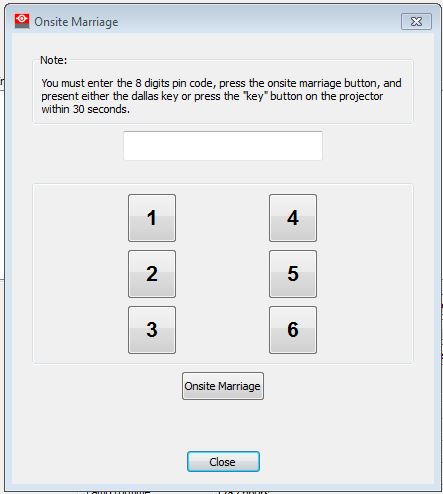
You have to use a programmed Dallas key or the 6/8/10 key button. The projector I'm on is up in the ceiling and I'm not willing to try getting up the ladder in 30 seconds... but it would make sense to use the passcode programmed for the Dallas key you're using, or programmed for the key button on a small projector? I will give this a try next time I'm working on one in a booth.
Posted by Brad Miller (Member # 2) on 10-15-2018, 11:51 PM:
The passcode for the Dallas key did not work. It is apparently something else.
Posted by Steve Guttag (Member # 268) on 10-16-2018, 11:14 AM:
Out of curiosity, did you follow directions? That is, this is out of order from the normal. In this scheme, you seem to enter the PIN, press create marriage...THEN you apply the Dallas Key. The only PIN that would work (or should work) would be for the Dallas Key since that is, ultimately, what is doing the security check but, again, based on the directions, that info has to be pre-loaded before applying the dallas key so it can be verified.
Also, since this came out around the same time...have you tried loading 2.7.76 since they might be interdependent?
Posted by Sergey Morozov (Member # 9911) on 10-18-2018, 05:27 AM:
As Brad said, it's something else.
I've just tried to check this, but got this message
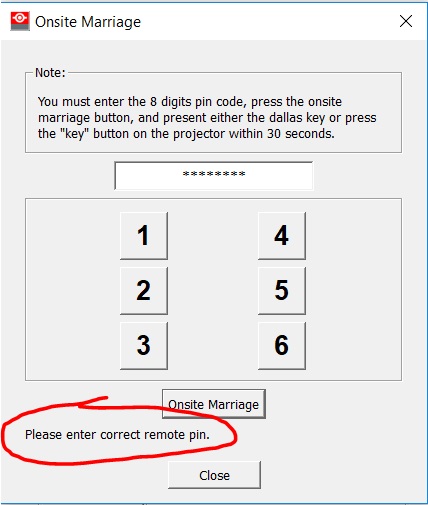
I've upgraded the projector to latest 2.7.76 SW before checking.
Perhaps this "remote pin" is different than security code.
BTW does anybody see the Release Notes for new 2.7.76 software?
Posted by Leo Enticknap (Member # 534) on 10-18-2018, 06:09 AM:
This is on MyBarco, and appears to be all there is:
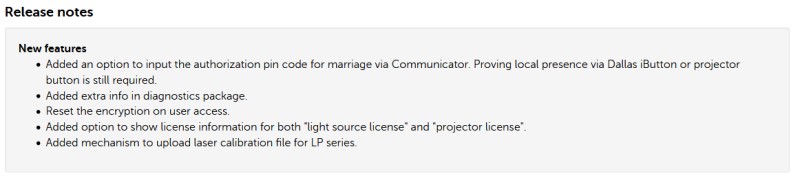
There is no PDF in the zip file - just the .bin code file.
Posted by Sergey Morozov (Member # 9911) on 10-18-2018, 12:23 PM:
Leo, this is info for Communicator software 5.1.12, but i asked about new projector software 2.7.76)
Posted by Leo Enticknap (Member # 534) on 10-19-2018, 05:01 PM:
quote: Ioannis Syrogiannis
Is there someone that can verify the new feature is present upon connection to series one projectors like DP2000?
I think not. Just tried with a DP3000, and can't see any "Onsite Marriage" button in diagnostics > actual:
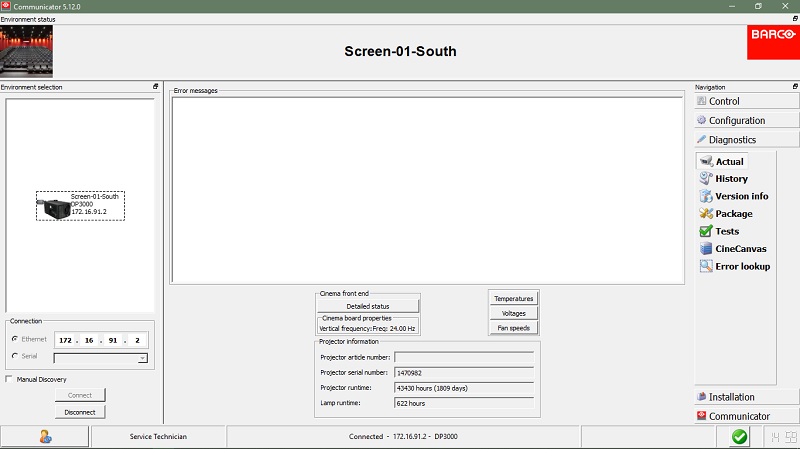
I can't find anything in installation > advanced > manage security keys, either.
Can't find any release notes for B & C series firmware 2.7.76 - sorry.
Posted by Dave Macaulay (Member # 813) on 10-19-2018, 05:11 PM:
Odd, the second part at least. I know I've changed the passcode on S1 projectors to work around dead buttons.
Posted by Steve Guttag (Member # 268) on 10-19-2018, 07:23 PM:
You can change the passcode in the normal place (Advanced section) on series 1s...including the DP100 but the DP100 had to be on the right version for it to work with the "modern" Communicator.
Whereas Barco has stopped all development on the series 1s, they aren't going to test new features on them either. They haven't done anything with regard to new lamps (models) for them either and that would be pretty painless to do.
Let's face it, it has been 9 years since the last one came off the line. It wouldn't surprise me if they all stop fooling with them altogether next year for their 10th year past end of production.
Posted by Leo Enticknap (Member # 534) on 10-19-2018, 10:31 PM:
Sure, you can change the code to work around dead numeral buttons on Series 1 and Series 2 Barcos using Communicator, in exactly the same way. It's just this new feature to enter the tamper clear code through Communicator rather than the keypad, that doesn't seem to have been implemented for Series 1 machines.
quote: Steve Guttag
Let's face it, it has been 9 years since the last one came off the line. It wouldn't surprise me if they all stop fooling with them altogether next year for their 10th year past end of production.
However, there are a lot of them still in revenue-earning service, and as long as that situation continues, it would be very bad PR for any of the projector manufacturers to adopt a "we won't even talk to you" approach to supporting these machines. The situation is further complicated by the fact that many of them were installed under VPF or leasing arrangements. I was recently told about an 18-plex full of Series 1 NECs, which were installed under a lease arrangement that the theater is locked into until 2022. This is growing into a major problem for all concerned, because the leasing company is unable to maintain them to an acceptable standard of reliability, because they can't source the parts they need.
To give kudos to Barco where kudos is due, on both of the two occasions I've had to call them for help fixing a Series 1 projector, they were very supportive and helpful. They had to elevate my query to tier 2 support almost immediately, because the helpdesk operator who initially answers the phone doesn't seem to have gone through any high level training on DP1500, 2000 and 3000 projectors. But on both occasions, I have eventually been able to speak to someone who had, and they were able to give me the support I needed to get the projector working again.
The fact that the 1500, 2000 and 3000 use the same model of coolant pump as the B and C series is a very big help, given that faults with the pressurized cooling system are by far the biggest weak point with them, in my (admittedly limited) experience. That was why I was called out to work on the 3000 this afternoon (UV damaged hose had sprung a leak).
Posted by Steve Guttag (Member # 268) on 10-20-2018, 10:32 AM:
The only series 1 projector Barco doesn't really want to talk to you about is the DP100 (and DP90). However, it shares quite a bit with the DP3000 so there is that.
As for PR...it varies...GDC only wants to talk to you for money on their servers and, starting next year, most of their legacy models will become unrepairable if a mediablock goes. There is little support for the Dolby DSS100/DSP100 beyond what is available for the traditional Supermicro server part. I don't know if DSP100 service is available anymore via 3rd party; Dolby dropped that support years ago. Servers are not projectors but either will bring you down...it is just cheaper to replace a server. Remember though, these exhibitors NEVER replaced film projectors (or platters) and they cost peanuts compared to this stuff.
Posted by Michal Matys (Member # 8614) on 10-22-2018, 02:40 AM:
I wrote to Barco about this, apparently this feature works only on the flagship L series for now, and should be availible on other models in a future (s2 only i guess). The pin is the one linked to the dallas key.
Michal
Posted by Tom Bert (Member # 5719) on 10-31-2018, 07:49 AM:
The feature was supposed to work on all models; but lacked an embedded SW upgrade to work on B/C series. We'll be releasing v2.8 next week that makes the Communicator 5.12 feature work across all models
Posted by Steve Guttag (Member # 268) on 10-31-2018, 09:00 AM:
Thanks Tom!
Posted by Chase Taylor (Member # 778) on 11-02-2018, 08:46 AM:
I'm glad they did this. It was much needed.
Posted by Leo Enticknap (Member # 534) on 11-02-2018, 10:10 AM:
I could have done with it on Tuesday. DP2K-19B in a rabbit hutch enclosure in a Bel-Air Circuit installation (high profile individual, so cannot post a picture for obvious reasons), with literally 2-3 inches between each side of the projector and the side wall of the enclosure. Air bubbles had got into the cooling system, and it needed a flush out and refill.
As if the contortion act needed to get the light engine cover off and attach the hoses to flush and refill the cooling system wasn't bad enough, it took me, literally, 40 minutes to clear the tamper afterwards. I had to feel for the position of the Dallas key reader, and only the left row of numeral buttons was even visible, let alone reachable with a finger. Eventually, and after setting the combo to 333333333 (because that was the only button I stood a vegan in an abattoir's chance chance of getting to and pressing eight times within the timeout limit, after fumbling with the Dallas key), I just managed to do it. If the ability to enter the code on the laptop had been working, I would have saved around half an hour.
Posted by Tom Bert (Member # 5719) on 11-22-2018, 12:55 AM:
quote: Tom Bert
The feature was supposed to work on all models; but lacked an embedded SW upgrade to work on B/C series. We'll be releasing v2.8 next week that makes the Communicator 5.12 feature work across all models
v2.8 is in internal approval flow and should come online in the next days
Posted by Leo Enticknap (Member # 534) on 11-22-2018, 01:28 PM:
Sorry to be a pain, but I've found what might possibly be another bug in 2.7.76. I can't update the ICP software on a projector that is running 2.7.76. The first time it happened (on a DP4K-19B), I thought it was a bad ICP, and Corey advised me to do the ICP recovery procedure. Both using the Barco updater and the TI ICP and Enigma tool, it said error uploading to slot A, and wouldn't let me go any further.
I couldn't do the ICP recovery procedure, because the projector was in an enclosure (the one I mentioned above) that made it impossible to pull the ICP out of the card cage without removing the projector from its enclosure. As I didn't have enough people and ladders to do that safely, I left that ICP on 4.2.
A little while later, I was working in a 'plex with 11 projectors (mix of B and C series, plus one DP3000) that needed upgrading from 2.5.57 to 2.7.76. Some of them still had ICPs on 4.2, and exactly the same problem happened when I tried to upgrade the projector software and then the ICP (on this one, I did do the recovery procedure, and that did enable me to install 4.5 successfully). However, on another projector, I updated the ICP while the projector was still on 2.5.57 without any problem, then updated the projector to 2.7.76 - again without any problem, and both the projector and the ICP were fine afterwards.
Could there be a glitch in 2.7.76 that is preventing ICP updates? Per Meadow's Law, once could be anything, but twice is suspicious.
Posted by Steve Guttag (Member # 268) on 11-23-2018, 06:31 PM:
I have found an odd corruption (only noticed it on Barco projectors) where the ICP will get into a bad state whereby you can't even pulling logs without it hanging at the "Front End" (ICP). The only way I've found to get out of that bad state is to run the ICP Recover. Note, the ICP seems to function just fine in this condition. You don't realize there is a problem until you pull the logs.
Whereas all of our ICPs were up to 4.5.454 before projector 2.7.76, I have not encountered the problem you are describing. I have found that starting around projector 2.3ish, any custom lamp files will be deleted on the software update. This is true on version 2.7.76 (I have issued a complaint about it to Barco/Tom).
Another complaint I have is that Barco does not recognize the actual warranties for the USA market (e.g. DXL-12BAF is a 3500 hour lamp and the DXL-22BAF is a 2000 hour lamp). This is one of the reasons I have "custom" files in the first place.
Posted by Dave Macaulay (Member # 813) on 11-24-2018, 09:12 AM:
I have had several Barcos with the ICP crash on diagnostic save problem. No answer from Barco as to why. All have been on 4.5.454 for some time without issues. No pattern... in multiplexes with 10 projectors that have had identical maintenance, maybe 3 or 4 do it.
Two failed in recovery step 5. Barco told me to replace them ($$$$$$). One was replaced (NOC warranty😁) and one completed recovery on the third try, so don't give up easily.
Posted by Tom Bert (Member # 5719) on 11-26-2018, 03:10 AM:
quote: Leo Enticknap
Sorry to be a pain, but I've found what might possibly be another bug in 2.7.76. I can't update the ICP software on a projector that is running 2.7.76.
We could not reproduce this inhouse. Could you (via our service desk and a service ticket, for traceability) provide your installation update log file?
Posted by Steve Guttag (Member # 268) on 11-26-2018, 07:52 AM:
quote: Leo Enticknap
I couldn't do the ICP recovery procedure, because the projector was in an enclosure (the one I mentioned above) that made it impossible to pull the ICP out of the card cage without removing the projector from its enclosure.
I've found that the need to remove the ICP to put it into Boot Mode is very, very rarely needed. So long as you can communicate with the ICP, you can skip pulling the card to run a recovery procedure. In the recovery process, it will put the ICP into "boot mode" on step 1.
If you have a malfunctioning ICP but can still communicate to it via the ICP/Enigma program, you can put into boot mode from there. In the Connection screen, select "System Reset" and choose to reset it into boot mode.
Using the hard button is something I've found is only needed for that rare case of a non-communicating ICP and then it is a crap-shoot if you can recover it (depends how it got into that state).
Posted by Stephan Shelley (Member # 8587) on 11-28-2018, 07:01 PM:
Tom, did you get my email?
Posted by Tom Bert (Member # 5719) on 11-29-2018, 11:22 AM:
quote: Stephan Shelley
Tom, did you get my email?
Yes. Did you get my reply?
(this is starting to look like a supernatural conversation ![[Big Grin]](biggrin.gif) )
)
Posted by Leo Enticknap (Member # 534) on 12-03-2018, 05:27 PM:
quote: Tom Bert
We could not reproduce this inhouse. Could you (via our service desk and a service ticket, for traceability) provide your installation update log file?
Apologies for the delayed response. I'm afraid that both these incidents were at one-time service calls, and I don't have access to the sites to pull a diagnostic package from after the failed ICP update. The next time it happens, I will, though.
Posted by Steve Guttag (Member # 268) on 12-20-2018, 06:55 AM:
The fix for non-laser projectors is here in the form of projector software/firmware 2.8.83.
Powered by Infopop Corporation
UBB.classicTM
6.3.1.2