This is topic Barco ICMP Atmos Error in forum Digital Cinema Forum at Film-Tech Forum ARCHIVE.
To visit this topic, use this URL:
https://ft-forum.com/ft/cgi-bin/ubb/ultimatebb.cgi?ubb=get_topic;f=16;t=003480
Posted by Tacky Ting (Member # 8686) on 10-27-2018, 04:55 AM:
Player error: player - immersive sound renderer error - immersive sound inactive
warning SMS: SMS- Dolby Atmos OMB client disconnected from 131.1.1.2, trying to reconnect...
err SMS: SMS- SMS(DolbyAtmos) TLS client handshake failed: timeout of 0 ms
warning SMS: SMS- AtmosTlsClient::connect: connection failed: error=6.
We want Reboot ICMP to get back to normal. Have you expected this problem?
ICMP V. 1.3.4.3
CP850 V. 2.3.0.3
Posted by Carsten Kurz (Member # 5396) on 10-27-2018, 10:13 AM:
Other than that being an occasional glitch...you already took part in that thread about alchemy/atmos issues a while ago, and the software you are running seems to be the best choice currently:
http://www.film-tech.com/cgi-bin/ubb/ultimatebb.cgi?ubb=get_topic;f=16;t=003331#000000
Ah, well, there is a brandnew 1.3.5.1 for the ICMP now, but the release notes do not mention Atmos.
- Carsten
Posted by Marcel Birgelen (Member # 6801) on 10-27-2018, 11:31 AM:
Unfortunately, those things keep popping up once in a while. It would be great if Barco and Dolby would get their heads together and start to fix this once and for good, even though they're competitors in the "immersive sound" arena...
Try to reboot both your ICMP and your CP850. If it still doesn't work afterwards, I guess it's worthwhile to continue debugging here.
Posted by Stephan Shelley (Member # 8587) on 10-27-2018, 01:44 PM:
Usually reloading the SPL in the player will clear the error.You might have to load something else first and then back to the SPL you want to play.
Posted by Magnus Eriksson (Member # 6085) on 10-28-2018, 06:56 AM:
I just tried ICMP 1.3.5.1. Did a remote update on a site where they had problems with loading playlists where some clips were corrupt. No red "X" on them, they just wouldn't load. This update was supposed to skip corrupt clips.
After updating to 1.3.5.1 NOTHING played. Playlists and clips could now be loaded, play command was accepted, "playing" was indicated, but nothing more happened. Nothing on screen, the counter was frozen and the kids in the auditorium was crying :-(
/M.E.
Posted by Tacky Ting (Member # 8686) on 10-28-2018, 09:15 PM:
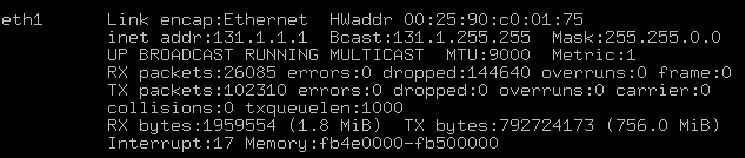
I found that when using the DSS220, its eth1 131.1.1.2 will have a dropp situation. This is the CP850 Atmos input network port. I suspect this will cause ICMP with Atmos error.
Posted by Anders Nordentoft-Madsen (Member # 3334) on 10-29-2018, 05:24 AM:
Problem can be mostly attributed to CP850. We a currently testing a dev version with fix for this with, so far, good results. Hopefully this should be out soon.
Posted by Carsten Kurz (Member # 5396) on 11-09-2018, 04:53 AM:
Looks as if Barco has pulled 1.3.5.1 and 1.3.4.3 is the most current release again.
The last release notes appeared a bit puzzling to me:'Allow to play DCPs with 16Bit audio','Allow to play shows with corrupt clips in them'- REALLY?
- Carsten
Posted by Tom Bert (Member # 5719) on 11-13-2018, 10:01 AM:
quote: Carsten Kurz
Looks as if Barco has pulled 1.3.5.1 and 1.3.4.3 is the most current release again.
It was not pulled? Maybe a cache thing? Also see other forum thread on ICMP
Posted by Anders Nordentoft-Madsen (Member # 3334) on 11-14-2018, 05:32 AM:
Allowing to play SPL's with corrupt CPL's: the server will skip any corrupt CPL's in a SPL, instead of just refusing to play the hole thing, unless the corrupt CPL is encrypted and over 30 min (AKA the feature in most cases). So if you have one, say trailer or ad, that is corrupted the playlist will still run, it will just skip that trailer or ad.
Posted by Tom Bert (Member # 5719) on 11-15-2018, 04:34 AM:
quote: Anders Nordentoft-Madsen
Allowing to play SPL's with corrupt CPL's: the server will skip any corrupt CPL's in a SPL, instead of just refusing to play the hole thing, unless the corrupt CPL is encrypted and over 30 min (AKA the feature in most cases). So if you have one, say trailer or ad, that is corrupted the playlist will still run, it will just skip that trailer or ad.
Correct. It was requested by our good friends of Nordisk, you might know them ![[Wink]](wink.gif)
Posted by Tacky Ting (Member # 8686) on 05-19-2019, 05:52 AM:
Dolby DSS220 + CP850
It was normal to play DarkPhoenix & DolbyHorizon30sec at the time.
Atmos error occurs when playing back Avengers
DSS220 version 4.9.1.22
CP850 version 2.3.1.4
Posted by Tacky Ting (Member # 8686) on 05-21-2019, 12:44 AM:
Do you have any questions about this when using Atmos?
Posted by Stephan Shelley (Member # 8587) on 11-20-2019, 05:19 PM:
Thought I would pass along an issue I ran into recently.
First know that there are two key (KDMs) used for Atmos sound with an ICMP. One for picture and normal sound and a second for the immersive sound. The ICMP passes the Atmos key on to the CP850 allowing it to decode the Atmos track. The sound key uses the secure clock in the CP850 to determine the time window it can play back.
This was a special screening with tight key times. Rehearsal show right after key unlocked. While the ICMP was ready the secure clock on the CP850 was a half hour slow and would not allow Atmos playback till a half hour later. Did not realize that was the case at the time.
Solution is that the latest software allows adjustment of the clock with the help of Dolby tech support. Procedure is in the release note of the latest software
Posted by Leo Enticknap (Member # 534) on 11-20-2019, 05:43 PM:
Plus, it's a good idea to configure an NTP server into the CP850 during installation, if one is available on the management LAN (e.g. the TMS computer), or if the CP850 has access to a gateway and the Internet (e.g. 128.138.140.44).
Presumably the CP850 does the same thing as a DCP server, i.e. it constantly corrects the Atmos cat1600 media block's secure clock after syncing with its NTP source, as long as it's within the annual six-minute DCI "budget" for doing so.
Posted by Pete Naples (Member # 761) on 11-21-2019, 04:28 AM:
Unique TMS, I have seen this cause Atmos playback issues.
It polls the equipment for status far too frequently by default, something like 5 times per second, per piece of kit.
Basically it's flooding the network with staus requests. I found that by reducing polling frequency to something like once in 5 seconds, Atmos playback was resumed.
Posted by Sean McKinnon (Member # 612) on 11-21-2019, 08:15 AM:
This may have been stated but currently AFAIK the Alchemy is the only server that actually uses the KDM for Atmos though I understand the other server manufacturers will be adding support for that in eventually.
Posted by Marcel Birgelen (Member # 6801) on 11-22-2019, 01:33 AM:
quote: Leo Enticknap
Presumably the CP850 does the same thing as a DCP server, i.e. it constantly corrects the Atmos cat1600 media block's secure clock after syncing with its NTP source, as long as it's within the annual six-minute DCI "budget" for doing so.
Yes, it does. At least ours does, so I assume others do as well.
Powered by Infopop Corporation
UBB.classicTM
6.3.1.2