This is topic barco IMCP database corruption in forum Digital Cinema Forum at Film-Tech Forum ARCHIVE.
To visit this topic, use this URL:
https://ft-forum.com/ft/cgi-bin/ubb/ultimatebb.cgi?ubb=get_topic;f=16;t=003492
Posted by Stephan Shelley (Member # 8587) on 11-07-2018, 03:04 PM:
Twice in two months have had the database corrupt and had to initialize the RAID to fix. First time two months ago when one booted up it would go into a long file system check. 2 plus hours. When finished nothing was fixed and database info was not available in commander. Communicator showed the raid has healthy. Tried all the tools to fix the drives but had to resort to initializing. End of last week only the clip index was bad. SPLs were fine. Shows already built up would load in the player and play but the clips did not show on timeline but it did play. Try to load a SPL in the edit no luck. Shows would ingest but the CPL list just said database error. Tried all the tools including file system check. Ran at normal speed but did not find any errors. Initialize once again. In both cases logs sent to Barco support but they found little to explain what is going on. They are sending the logs to Belgium but I have found that to be a black hole that one never hears from again.
Anyone else experience this and have any solutions?
Posted by Carsten Kurz (Member # 5396) on 11-07-2018, 04:16 PM:
All I can say is that I supervise three ICMPs and never had that issue turn up so far. Did you always run the same software version when these issues occurred, and which? Maybe try to replace discs?
- Carsten
Posted by Stephan Shelley (Member # 8587) on 11-07-2018, 04:56 PM:
It was version 1.3.4.3 at the time. Two months ago when this happened the first time it was the most current software. As part of the troubleshooting it has been upgraded to the latest release 1.3.5.1 but this was after the second time.
As this does not seem to be wide spread I suspect a hardware issue. The Projector and Alchemy were installed new at the beginning of April this year. So dives are 6 month old. Barco tech support has the diagnostic package for both times. They did not mention a drive problem.
Posted by Carsten Kurz (Member # 5396) on 11-09-2018, 04:52 AM:
Looks as if Barco has pulled 1.3.5.1 and 1.3.4.3 is the most current release again.
The last release notes appeared a bit puzzling to me:'Allow to play DCPs with 16Bit audio','Allow to play shows with corrupt clips in them'- REALLY?
- Carsten
Posted by Steve Guttag (Member # 268) on 11-09-2018, 06:14 AM:
Yeah, I could see that. Dolby's DSS servers would allow a missing/corrupt clip in it...it would merely jump over the offending clip rather than refuse to play the entire show.
In these more automated times...if an ad or preview hadn't transferred...would you want a show to not start and cause everything to be delayed? So I could definitely see that as a decent feature.
Posted by Dave Macaulay (Member # 813) on 11-09-2018, 08:27 AM:
I'm not sure about the 16 bit audio thing.The DCI spec is 24 bit but also allows different bit depth, the wording is "DSM Audio Material having other bit depths shall be justified to the most significant bit per [AES3-2003 Section 4.1.1]".
So what does this new ability contribute?
Skipping corrupt content is fine I suppose... but hopefully it is not the feature! Better that failing to load or play a show if an ad or trailer is bad. An error should show up so the operator can correct the problem.
Posted by Carsten Kurz (Member # 5396) on 11-09-2018, 10:24 AM:
DCI/SMPTE audio is strictly 24bit. Non-24Bit material needs to be conformed by padding/truncating or dithering. I remember that Dolbys refused to play DCPs with 16Bit audio, don't know if they still do.
Just wondering what lead to this. SMPTE is coming, and there is a manufacturer relaxing specs...
Now, there is not much more in these 1.3.5.1 release notes, and THAT 'relax-release' had to be pulled...go figure...
- Carsten
Posted by Dave Macaulay (Member # 813) on 11-09-2018, 12:44 PM:
ICMP v1.3.5.1 is still available, has not been pulled. The ICMP product page still lists the previous version, but click the link above the yellow icon (instead of the "download" link) and you get a listing of all versions - and 1.3.5.1 is at the top.
Posted by Tom Bert (Member # 5719) on 11-13-2018, 09:57 AM:
To help you guys crack the puzzle: the 16bit audio feature is for an advertising use case in India ![[Wink]](wink.gif)
And skipping corrupt/bad clips is only for:
- un-encrypted content
- preshow content (<30' long)
Posted by Leo Enticknap (Member # 534) on 11-13-2018, 01:46 PM:
I appear to have discovered another 1.3.5.1 bug, possibly related to database corruption. After updating from 1.3.4.3 and rebooting, the dashboard display of how much space is used and remaining on the RAID has gone away:
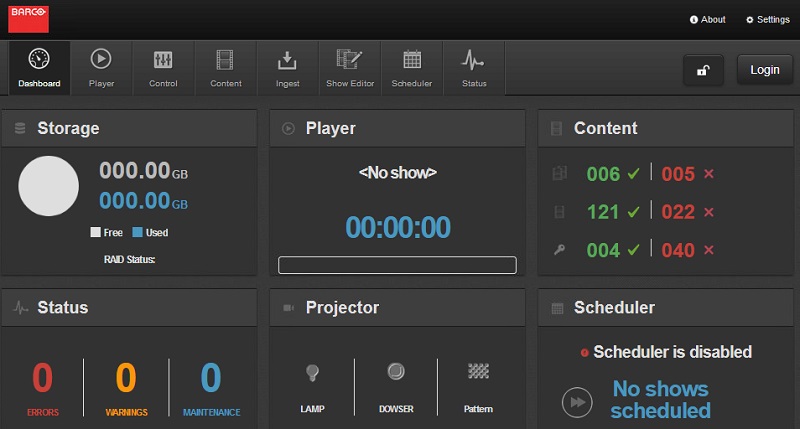
I can still see it in Communicator (media server > maintenance > RAID), though.
Posted by Marin Zorica (Member # 1716) on 11-14-2018, 04:22 PM:
A few days ago i had similar issue. A brand new 10Sx came, after installation operator called me with same issue, he pressed play and it was stating PLAY but no picture, no time going......after restart it solved problem. Also, had same issue few months ago, but also restart solved issue. On tis latest i am sure RAID was built lately as i did it because of added 4TB space (3X2TB hdd's). So two different systems with this issue and first was 4-5 month old back than, latest is brand new. Also all status were ok. I doubt this have any issue with RAID itself, maybe some ICMP player bug?!?
Also, one strange thing happend during installation......i went to room while raid was building and did format settings, macros, color calibration etc.....than after raid was build and ok i ingested some trailers to try it out. Since i did wait some 15-20 mins after calibration to raid to finish i plug laptop via HDMI and picture was ok, tried both A and B inputs all ok......after ingest i went to room, take my laptop and started clip i ingested just now, it was dolby 7.1 advert......it started, sound ok, no picture.....time going, i was hmmm??? resterted show, same thing.....tried another clip also the same, since laptop was still connected in booth, i switched to preset for HDMI, also no picture, test patter was ok......swaped to input B, no picture (and both were working 5min ago). rebooted projector completly, the same......reseat cards, clean contact, reinstall software and firmware 2x, reseat again.....tried all you can do, but the same, no picture, except test pattern. I take logs and send to barco and went to sleep as it was 5AM! In morning i remebered some info-t about currupted dci or something.....i want to room tried again, reseated boards again, but same.....since i lost picture after playing that dolby adver in dcp i erased it from content, i tried to play clip after 3 min and WOW, there were picture, also HDMI, all presets were ok.....i rebooted few times, all ok.... I was suprised, later did wrote that to Barco, they wanted file and now just waiting answer from them. Sorry for bit offtopic, but did you ever came up with problem like this? It could be coincidance, but i doubt....i even try to get all settings to default and there were no picture untill i erased that dcp from content. Only thing that was on screen is blink of picture for 1/10 of second in moment when i would presss stop, you could just see scene for 1/10 and nothing more.....
Posted by Stephan Shelley (Member # 8587) on 11-14-2018, 07:27 PM:
That is a lot like the first time. The zero disk space shown is like it was. Don't remember if it showed number of clips and such or not. I see yours does. With mine the it took several hours to do a file system check and then if you went to another screen once it finished the file system check you got a failed to mount message.
And some screen shots from the second time when only the clip database was effected. Note in the play the show is loaded and will play but the individual clips do not show nor does the time indicator move when it is playing.
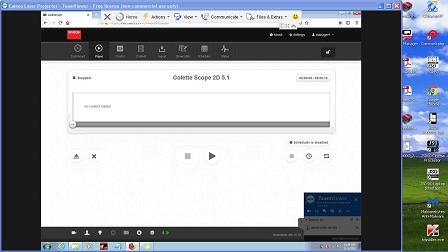 ]http://www.film-tech.com/uploads/uploads0503/Screen18.jpg[/IMG]
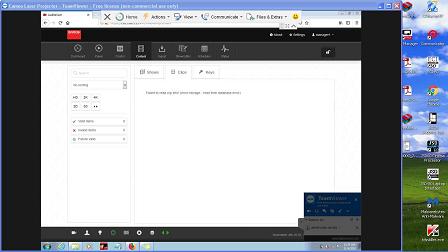 ]http://www.film-tech.com/uploads/uploads0503/screen17.jpg[/IMG]
Posted by Leo Enticknap (Member # 534) on 11-16-2018, 03:06 PM:
I had a response from Sacramento this morning: this bug is a new one on them, and they're passing my screenshot and description to the development team for further investigation. I asked if they suggested rolling back the affected unit to 1.3.4.3 in the meantime, but was asked to wait for some feedback from Belgium.
Posted by Stephan Shelley (Member # 8587) on 11-16-2018, 07:14 PM:
My issues have been sent to Belgium as well. I have found in other cases that that tends to be a bit of a black hole. Never hear anything back. I am going to keep on the local folks.
Posted by Tom Bert (Member # 5719) on 11-18-2018, 12:44 AM:
I can confirm that Leo's ticket has reached the development team, aka "the black hole" ![[Razz]](tongue.gif)
Posted by Stephan Shelley (Member # 8587) on 11-18-2018, 02:25 AM:
Tom, never did hear back from the development team on the first incident. I can get you the ticket number as well as the more current one if you would like to follow up. The first one was over two months ago. Hence like a black hole it goes in but never comes back out.
Posted by Leo Enticknap (Member # 534) on 11-18-2018, 11:49 AM:
My ticket is only a few days old, so I'm willing to give them a little longer before following up. But the anecdotal evidence on this thread at least raises the possibility that there are some significant bugs in 1.3.5.1, and therefore some guidance from Barco sooner rather than later would be welcome. My customer who is having problems is a very high profile establishment in Hollywood, and so I don't want to try a rollback if this risks causing problems as well as solving them.
Posted by Marin Zorica (Member # 1716) on 11-18-2018, 12:12 PM:
True!
ICMP is very tricky for unknown reason.....i have some that newer reported any problems....and other that started strange from install (like one i described few days ago) and one installed year ago....some problems like not starting to play rtc time going off in few months etc.....
Posted by Marin Zorica (Member # 1716) on 11-18-2018, 05:08 PM:
Also i can confirm that upgrading to 1.3.5.1. losses raid data in commander, while in communicator it shows corectly.
Posted by Tom Bert (Member # 5719) on 11-19-2018, 04:48 AM:
quote:
I can confirm that Leo's ticket has reached the development team, aka "the black hole" [Razz]
the little green men in the big black hole have informed me that a fix is implemented in v1.3.5.2. To be released next week.
quote: Stephan Shelley
Tom, never did hear back from the development team on the first incident. I can get you the ticket number as well as the more current one if you would like to follow up.
Can you send me that ticket nr; I'll inquire internally
Posted by Marcel Birgelen (Member # 6801) on 11-19-2018, 05:06 AM:
I guess it's worth waiting for the little green men to push out 1.3.5.2, but has anybody downgraded from 1.3.5.1 to e.g. 1.3.4.3 without issues?
Posted by Leo Enticknap (Member # 534) on 11-19-2018, 07:27 AM:
I didn't want to without advice from a Barco tech that there was no extra risk involved. My fear is that if 1.3.5.1 has caused any corruption to the back end database, another software version waking up and not seeing a valid database structure might just refuse to work at all. At present, my customer's installation appears to be working OK apart from the dashboard glitch.
Tom - many thanks for following up.
Posted by Marin Zorica (Member # 1716) on 11-21-2018, 02:28 PM:
I also did leave two ticket with similar issues on Barco support. Anyway i do not think corruted raid has do anything with 1.3.5.1 version. I have one that wake up with error and always is something bad with raid....after check it says it is ok, but after next power on, same again.....it was same with old version (a year old, cannot remember number) and now after upgrade with latest. Waiting for operator to do backup of files as this is single screen, so we can do raid initialization.
Posted by Stephan Shelley (Member # 8587) on 11-21-2018, 08:13 PM:
Important to note that both my problems happened prior to upgrading to 1.3.5.1.
Tom, I will send the numbers to you privately. It maybe that because the reinitialization of the RAID eliminated the problem the case was closed the first time.
Posted by Tom Bert (Member # 5719) on 11-22-2018, 12:43 AM:
quote: Stephan Shelley
Tom, I will send the numbers to you privately. It maybe that because the reinitialization of the RAID eliminated the problem the case was closed the first time.
feel free to send them via email: first-name dot last-name @barco.com
Posted by Carsten Kurz (Member # 5396) on 12-03-2018, 05:56 PM:
ICMP 1.3.5.2 is out:
----
build: 20787
Changes:
Improve Pause Positioning behavior for MPEG2 content.
Improve handling of SMB share on Apple Device (macOS).
Fix CPL status if the first clip of a show is corrupted (was seen as valid, now correctly marked as corrupted).
Improve upscaling of PNG subtitles.
Fix an error where the available storage size on the dashboard page was marked to 0.0.
Improve the way a CPL is checked after ingest (in order to always display the most accurate status).
----
Posted by Marin Zorica (Member # 1716) on 12-06-2018, 03:23 PM:
Going to try it out for weekend in cinema where i had strange storage coruption issuee like Stephan from thread start.
Powered by Infopop Corporation
UBB.classicTM
6.3.1.2