This is topic QSC DCP processors coax (S/PDIF) input reversed in forum Digital Cinema Forum at Film-Tech Forum ARCHIVE.
To visit this topic, use this URL:
https://ft-forum.com/ft/cgi-bin/ubb/ultimatebb.cgi?ubb=get_topic;f=16;t=003494
Posted by Steve Guttag (Member # 268) on 11-08-2018, 08:42 PM:
How many people are using the QSC DCP line of Digital Cinema Processors? Of you that do, how many are using the S/PDIF input (RCA type coax) for alternative content?
Of that group, how many are just using consumer based equipment like a DVD or Blu-ray player with a short RCA/RCA connector/cable? Is your player grounded?
We've stumbled upon what is likely a mistake in design whereby the RCA connector on these units are wired such that the center pin is grounded and the shell is what carries the signal. If your source equipment is grounded (particularly true if professionally based) then your results will likely be erratic, if it works at all. One can make an RCA phase inverter to get around the issue.
I know we didn't pick it off until we were using a professional HDMI/VGA extender over CAT cable where things were well grounded and didn't work. We didn't think about the DCP design because we hadn't had issues before either.
Posted by Leo Enticknap (Member # 534) on 11-10-2018, 01:30 PM:
I installed a DCP300 a few months ago, but did not hook up any alternative content (this wasn't part of the job as specified by the customer).
It could have been a manufacturing or QC glitch in that one specific unit, rather than a design issue: someone just got confused at the end of a long shift, and soldered the wrong wire to the wrong pin. If anyone else has access to a unit, it would be interesting to look at it and see if these poles are reversed. If they are, it would suggest, as you suspect, that they got crossed on the schematic, CAD file, or whatever document was used to inform the manufacturing process. If they're not, it would suggest that there is a bug in your unit that, for whatever reason, wasn't caught in QC.
Posted by Carsten Kurz (Member # 5396) on 11-10-2018, 01:40 PM:
Did anyone ever open a DCPxxx and had a look at how that RCA socket is actually connected internally? If it sits on a PCB, it has to be a design error. If there is a cable, there may be a connector that has been plugged or wired the wrong way, and there should be a way to correct this.
Wondering wether Harold can take this question to QSC's tech support/developers directly.
- Carsten
Posted by Steve Guttag (Member # 268) on 11-10-2018, 01:42 PM:
Leo,
Nope, it is a confirmed hardware mistake (affects ALL DCP units, regardless of model or manufacture date). I've been informed (since making my post and also informing the manufacturer) that a tech bulletin is to be coming and they indicated that there will be a "fix" for it too though those details were not shared with me. For that, I would leave it for the manufacturer (QSC) to explain and distribute. The purpose of my post was merely to inform others that may have inadvertently stumbled upon this in the field and may not have understood why the port wasn't working reliably.
Posted by Carsten Kurz (Member # 5396) on 11-10-2018, 01:47 PM:
How long are these in the market?
I think I never saw one of these in germany, although I know one cinema using them a couple of years ago.
There are easy ways around this issue, but sometimes it's funny how long it takes a flaw to go public.
- Carsten
Posted by Harold Hallikainen (Member # 5405) on 11-10-2018, 04:46 PM:
I never had the opportunity to work on the DCP series, just the JSD series. I imagine that when the schematic symbol and footprint for the connector were first being defined in the CAD system, a couple pins got reversed. It would be interesting to know if this issue also made it to other products since part libraries are generally shared. While release test procedures are very extensive, there's always something else to check for. Good catch, Steve!
Harold
Posted by Steve Guttag (Member # 268) on 11-10-2018, 06:50 PM:
It wasn't so much a "catch" as "Why doesn't this damn thing work reliably, it does elsewhere!" In truth, my boss, Neal caught it and rewired a coax, in the field, to reverse the polarity!!!
Any of our other sites using this processor, I'll put a polarity switcher via a male/female connector with the wires crossed so it will be plug-n-play.
As someone that did design hardware (PCBs), I'm sure Harold is correct. It is pretty easy to do. You define a schematic symbol for a piece and in that symbol you define pin 1 on up (I generally always made pin-1 square for THD) to also aid in it). Then you define the actual component that will be on the PCB and again, you define the pins and that is when the two get matched up.
Another one that can get you is mirror (x or y flips). This is particularly true with Dsubs where they look the same in correct or mirror orientation (just the gender changes) but if you aren't careful, you could get a male connector wired female (or vice-versa).
The layout person has the added reality that they will work on both sides (of each layer, in a multi-layer board) so seeing something flipped isn't necessarily uncommon, yet correct, including writing where you want the bottom layer to "read" correctly.
I am in no way trying to embarrass anyone here. It is strictly for information for those that might have problems in the field. As some have pointed out...how long did it take for this to show up? I think it is dumb luck because I'm sure most don't have anything connected to it and those that do have something that is typically not grounded so it wouldn't show itself.
I ran into a similar thing on a Panastereo piece (CM230EX monitor) where pin 1 on an RS232 connector was referenced instead of Pin-5 (one of those simple x-flip mistakes). If you were in the same rack as the unit, you'd likely not notice because everything is probably using the same ground reference. But if the thing controlling is isn't or is totally floating, then there is no return path for the RS232 and it wouldn't work. A simple mistake with a simple fix but easy to get through QC.
Posted by Leo Enticknap (Member # 534) on 11-10-2018, 08:53 PM:
quote: Steve Guttag
I've been informed (since making my post and also informing the manufacturer) that a tech bulletin is to be coming and they indicated that there will be a "fix" for it too though those details were not shared with me. For that, I would leave it for the manufacturer (QSC) to explain and distribute.
Short of shipping them to Costa Mesa for a factory fix (something you're not likely to want to do if your processor is in daily use at your theater), the only option I can think of for units already in the field would be the one your boss came up with: to offer to supply an RCA coaxial cable with the poles swapped at one end (or a male to female adapter that does the swapping).
I'm guessing that this hasn't been discovered until now because the S/PDIF and TOSlink nonsync jacks are little used features on a typical cinema audio processor. I used the latter for a CD player for nonsync on the Egyptian's AP20, but am guessing that most installers wouldn't bother, and just go with a stereo analog RCA pair. I'd always go for optical over coax given the choice, because it avoids all EMI issues and the sort of problem you encountered.
Posted by Steve Guttag (Member # 268) on 11-11-2018, 07:41 AM:
I think the bulk of the systems that use the coax input (no optical on the DCP series) are for Blu-ray players that lack analog outputs (a very high percentage now). Providing that those players are ungrounded (as most consumer equipment is with just 2-prong AC inputs) and possibly using transformer coupled outputs (possible though less likely since transformers cost money and consumer gear often is value engineered), people haven't hit upon it.
The fix is simple enough, in terms of making a polarity flipping adapter. I'd say the harder question for QSC is what to do for new units. Are you really going to "Rev" the fiberglass on a mature product like the DCP where the percentage of complaints is miniscule (with respect to the Coax input, at least). Do you spend the time/money on a modification to all new units for again the off chance of the right circumstances that show the problem? Or do you document it and, if the customer requests, provide an adapter that corrects the problem on an as-needed basis? I think this option is what will be chosen. Again, I have zero knowledge of this, it is just my guess.
I think people will start migrating to the DPM line of processors and QSYS like of DSP processors rather than continue with the DCP line, not because of this problem but because the newer processors will better fit their needs and cost-effectiveness. The DCP line is now a bit mature and based on really their last generation of equipment, like Basis (it is only Cobranet capable, not Dante or AES67) and Cobranet has fast fallen by the wayside...unfortunately, since Cobranet is about as rock solid as network audio gets. But it is VERY mature now.
Posted by Leo Enticknap (Member # 534) on 11-11-2018, 10:50 AM:
quote: Steve Guttag
I think the bulk of the systems that use the coax input (no optical on the DCP series) are for Blu-ray players that lack analog outputs (a very high percentage now).
Why wouldn't you use the HDMI in that situation? You can take eight channels of PCM that way, whereas S/PDIF or TOSlink gives you the bandwidth for two of uncompressed, only allowing more if you take the audio out of the player using a compressed codec (e.g. AC3 or DTS), and decode it in the processor.
The only situation in which I'd use S/PDIF or TOSlink for BD audio is if the player didn't have 7.1 analog out, and/or the processor could not accept HDMI audio in. The DPM300 falls into that category (and furthermore lacks an optical input, according to the specs page), as does the CP750, so you're probably right in that some users could want the S/PDIF input for a DVD/BD player.
But if it were me, I'd try to dissuade someone from making that choice of processor if they wanted to use it in an installation that was going to play DVDs or BDs more than once in a blue moon. I don't know if the DCP line can decode AC3 or DTS, but if it can't, then if you choose this processor, either you're stuck with L/R stereo, or you'd have to use an external HDMI to AES converter, and use AES channels 9 through 16 for the input.
Posted by Steve Guttag (Member # 268) on 11-11-2018, 02:18 PM:
The DCP doesn't handle DTS or Dolby but will do a prologic decode. Your HDMI scheme presumes that there is a device that has an HDMI input (like an IMB/IMS). Then again, using an IMB for its HDMI input is awkward since it has to be switched to somehow (some require you run a "show" that switches the input. And some, like the CAT745, you also have to change color space.
The new QSC DPMs have an HDMI option as does QSYS and they can decode Dolby and DTS.
Posted by Leo Enticknap (Member # 534) on 11-11-2018, 02:53 PM:
quote:
Steve Guttag]Your HDMI scheme presumes that there is a device that has an HDMI input (like an IMB/IMS).
Are there any d-cinema projectors out there that have no means at all of getting DVI or HDMI into them? All the Series 1 models that I've encountered won't do HDCP and require the use of an external HDCP zapper if you want to hook a DVD/BD player to them, but I've never encountered a projector that you can't get HDMI or DVI into at all.
quote: Steve Guttag
Then again, using an IMB for its HDMI input is awkward since it has to be switched to somehow (some require you run a "show" that switches the input. And some, like the CAT745, you also have to change color space.
True, but that switching can all be automated down to a one-click by the operator. And using S/PDIF for the audio wouldn't make that any simpler, because you still have the video to take care of.
Posted by Steve Guttag (Member # 268) on 11-11-2018, 03:21 PM:
Getting HDMI to the projector's DVI input doesn't address the sound. As for getting it into the IMS...no, it isn't just a single button for them, unless it is the Barco ICMP. And note, that isn't a cut and dried ride either. Barco has HDMI come out channel for channel on HDMI so BLs and BRs come out on channels 7 and 8...something DCPs often have HI/VI on while 11 and 12 have the back surrounds.
I'd much rather deal with the audio separately since, no matter how you cut it, you are likely going to have to specially configure the HDMI or require two events to get all configured.
Posted by Carsten Kurz (Member # 5396) on 11-11-2018, 03:26 PM:
quote: Steve Guttag
The new QSC DPMs have an HDMI option as does QSYS and they can decode Dolby and DTS.
http://www.film-tech.com/ubb/f2/t005129.html
'We ordered in 3 QSC DPM 100H processors and were going to put in a client's home. Turns out we had some issues with consumer content going through them.'
Do we know what these problems are?
- Carsten
Posted by Leo Enticknap (Member # 534) on 11-11-2018, 04:45 PM:
quote: Steve Guttag
As for getting it into the IMS...no, it isn't just a single button for them, unless it is the Barco ICMP.
With an external automation system in use (either one specifically designed for movie theaters such as, dare I say it, ours, or one for a/v installations and high end home theaters such as Crestron, AMX or Q-Sys), the two or three switching operations involved in routing HDMI through an IMB can be combined into a one-cue or one-press as far as the end user is concerned. That is how the vast majority of our installations do it.
I'm not arguing with you that HDMI is a pain in the bum to use in a professional theater installation, but to make one able to play DVDs or BDs it's almost unavoidable (are there any disc players in existence that have an HD-SDI output?), and does at least have the advantage of allowing you to take eight channels of uncompressed PCM audio out of a consumer-grade player.
Posted by Steve Guttag (Member # 268) on 11-12-2018, 06:56 AM:
I'm not saying it can't be done with automation but now you've added another requirement and, if you are using say a GDC IMB...how are you selecting/cueing up the HDMI show, specifically to have it switch its input? On the Dolby/Doremi IMS...I don't recall if one can directly cue it to switch inputs either. The Dolby DSS line and the Barco line, you can. Crestron/AMX type external automation is not going to go into any but the most sophisticated theatres that, quite frankly, will likely have an operator to guide the show. Having a pedestrian automation handle switching picture and sound is no biggie.
As for Carsten's post, no, no mention of what their issues were...for all we know, they don't handle HDMI 2.0 (likely don't). Aside from that, likely whatever issues they have, they are software problems that can be corrected. I have not played with the DCIO-H yet but I did pop its lid and it has a big chip in there with both the Dolby and DTS logo so it isn't like QSC is reengineering something from scratch. There is a FB group I belong to where they have shown the DCIO-H decoding DTS Master HD (which QSC doesn't claim it can do...just the next tier down of DTS-HD...no-master).
There could have been other reasons for them to ditch the DPM in a residential/consumer application too. You'd have to ask them. The DPM is a digital cinema processor first and foremost. The HDMI input is the accommodation for consumer and alternative content stuff.
Posted by Sean McKinnon (Member # 612) on 11-15-2018, 10:28 AM:
I have installed a few of the DCIO-H's (with core 110's and 510's) and the HDMI decoding/routing has been painless. The decoding of Dolby or DTS-HD is automatic if the bit stream is received by the unit so simply setting your blu ray player (or whatever device) to that track or setting is all thats needed. There are no special Q-Sys modules involved. As anyone who is familiar with Q-Sys knows it is also very easy with a router component or matrix mixer and snapshots to set-up whatever kind of routing you may need.
The only caveat is that you cannot use both the HDMI input and the channels 9-16 AES3 input simultaneously but I would be very surprised if that ever becomes an issue!
Posted by Steve Guttag (Member # 268) on 11-16-2018, 07:45 AM:
I come from a world where the same pins on a CPU handed both the DATA and the Address so one had to switch those too via the ALE pin (Address Latch Enable) (Think Intel 8088) and segmented memory. Matrixing the HDMI outputs and the AES outputs isn't a big deal!
With consumer formats, you are going to have to do some channel housekeeping anyway. For them, a 5.1 format doesn't play ANYTHING out of the rear surrounds (like our 7.1 format when someone plays 5.1 with it selected). Also, the surround levels in consumer are not the same as cinema...we, unfortunately, have clung to our legacy of mono surrounds going back to the 1950s so each side is at 82dBc for 5.1, each surround channel is 82dBc for 7.1. Consumers wisely realized that mono surround has no place in the digital world so each channel is the same (surround or stage) so if you set your surrounds to 82dBc, you'll need a 3dB boost to get them up to consumer levels.
I'd presume the DCIO-H doesn't automatically decode 2.0 content via pro-logic so again, some overhead is needed there.
QSC has really be working on QSYS in these areas so you have the tools to do pretty much what your imagination can come up with.
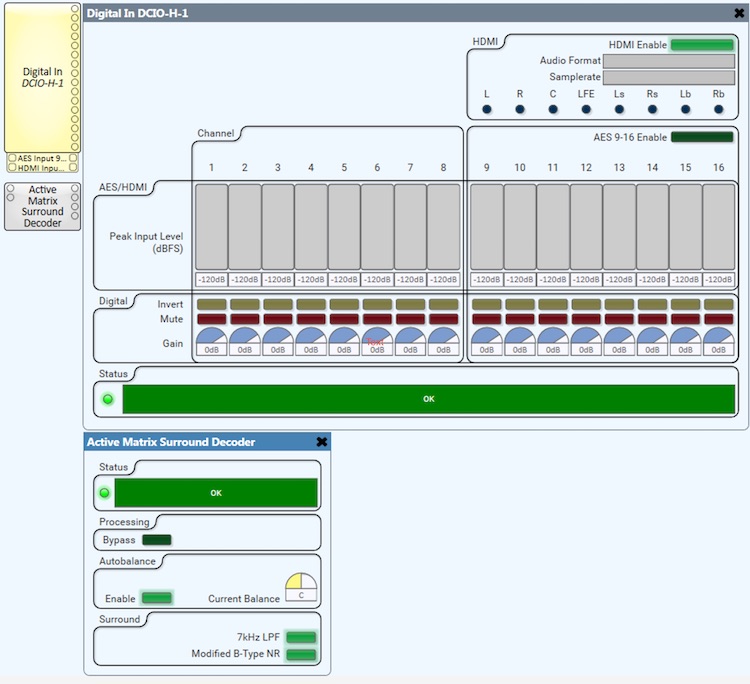
I think other than noise reduction, one can probably do everything an analog film processor does within a QSYS system, including for 70mm formats. I've even been piecing together a Perspecta Stereo decoder in QSYS.
Powered by Infopop Corporation
UBB.classicTM
6.3.1.2