This is topic Master Image 3D Error in forum Digital Cinema Forum at Film-Tech Forum ARCHIVE.
To visit this topic, use this URL:
https://ft-forum.com/ft/cgi-bin/ubb/ultimatebb.cgi?ubb=get_topic;f=16;t=003511
Posted by Matthew Heuer (Member # 9199) on 12-01-2018, 12:33 PM:
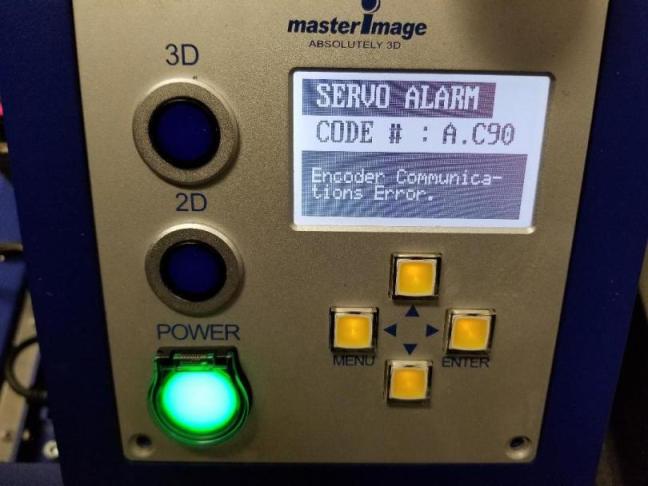
Master Image Clarity 3D unit about 5 years old running version 1.2.4. First issue with any of our units. This one recently started throwing a Servo alarm any time the unit would move from 2D to 3D or vise versa. Rebooting it would allow it to run with no errors. After 2 days of this it will not run now after a reboot and the error prevents accessing the menu to obtain any information. The error is "Servo Alarm" "Code # A.C90" "Encoder Communications error". The manual I have is not very helpful in tracing this out. I cleaned and re-seated all data cables and the error remains including the one CN2 connector that the manual mentions with this error code.
I have a feeling I may be screwed here as parts are no longer available for Master Image 3D. We did stock up on disks and a couple sensor boards and we do have a couple more units so they will not go to waste but I think this one may be a loss. Any thoughts or suggestions.
Posted by Adrian Avram (Member # 7931) on 12-01-2018, 01:00 PM:
Hi Matthew,
I had like five of this units with the same alarm. The problem is the encoder cable inside the lift column. From the up/down movement the wires break. The only solution is the lift column replacement (you cannot disassemble it and replace the wires - I have been told this by a MI technician).
Since parts are no longer available, the solution I found was to cut the encoder cable at both ends (from the bottom of the column to the servo and from the back of the disk motor) to retain the connectors (it is a four wire cable with braided shield) and solder a replacement wire (aprox. 1 meter long), and then run it from the outside of the column. Tested and works perfectly fine.
Hope it helps,
Adrian
Posted by Matthew Heuer (Member # 9199) on 12-01-2018, 02:23 PM:
Thanks Adrian, that sounds logical. I will give it a go once the weekend is over and I have some time to carefully make that modification.
Posted by Matthew Heuer (Member # 9199) on 12-01-2018, 07:19 PM:
Well it was pretty slow today so I made the modifications and it works. Thanks again Adrian! And thanks to film-tech forum! It would of taken me quite some time without a starting point like the one shared here to fix this.
Powered by Infopop Corporation
UBB.classicTM
6.3.1.2