This is topic DSS200 upgrade error in forum Digital Cinema Forum at Film-Tech Forum ARCHIVE.
To visit this topic, use this URL:
https://ft-forum.com/ft/cgi-bin/ubb/ultimatebb.cgi?ubb=get_topic;f=16;t=003515
Posted by Michael Qu (Member # 6702) on 12-04-2018, 09:38 AM:
i got a DSS200 server with system 4.2.1.3
so i try to upgrade it
but both to 4.3 or 4.6,after the executePackage.sh script finish and the server reboot,i will get error like the image:

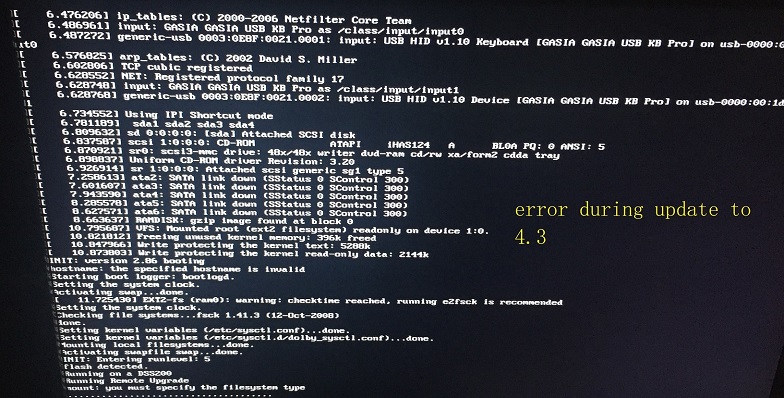
I have call a dolby engineer,he has no idea about this.
So anyone has advise what to do?
Posted by Leo Enticknap (Member # 534) on 12-04-2018, 10:44 AM:
Is there a USB drive inserted into one of the front panel jacks while you ran the updater? That changes the Linux device addresses, and causes an updater to try to write the operating system onto the flash stick, fill it up, and report that error.
If you are using your server with the cat862 (built-in) media block, you will need an update KDM to be issued by Dolby, to allow you to update its software. Without it, the server will update OK, but after the reboot, it will give you an error trying to update the media block, and you won't be able to use the server until you have the KDM and have updated the cat862.
If you have the KDM, do not insert the USB stick containing it until after the updater has run and the server is rebooting.
If you are using your DSS200 with a cat745 IMB, you don't need any update KDM. Just make sure that the projector is on and booted up while you update the server. When it reboots following the update, Show Manager will automatically update the IMB when it comes up. Don't worry if the update process appears to stall at 99% for a long time, and if it does, don't, whatever you do, power cycle either the projector or the server. Wait for it to finish. It will.
If you didn't have any USB storage device inserted, your best bet is probably to run a "clean install" ISO rather than an upgrade.
Posted by Michael Qu (Member # 6702) on 12-05-2018, 10:51 AM:
quote: Leo Enticknap
Is there a USB drive inserted into one of the front panel jacks while you ran the updater? That changes the Linux device addresses, and causes an updater to try to write the operating system onto the flash stick, fill it up, and report that error.
If you are using your server with the cat862 (built-in) media block, you will need an update KDM to be issued by Dolby, to allow you to update its software. Without it, the server will update OK, but after the reboot, it will give you an error trying to update the media block, and you won't be able to use the server until you have the KDM and have updated the cat862.
If you have the KDM, do not insert the USB stick containing it until after the updater has run and the server is rebooting.
If you are using your DSS200 with a cat745 IMB, you don't need any update KDM. Just make sure that the projector is on and booted up while you update the server. When it reboots following the update, Show Manager will automatically update the IMB when it comes up. Don't worry if the update process appears to stall at 99% for a long time, and if it does, don't, whatever you do, power cycle either the projector or the server. Wait for it to finish. It will.
If you didn't have any USB storage device inserted, your best bet is probably to run a "clean install" ISO rather than an upgrade.
Yes,it is with cat862.I have got the KDM from Dolby.
I will try again to make sure if no USB drive inserted.
I have burn an upgrade cd,but the server do not read it when bootup,so I guess the cd-rom may be broken.
Posted by Mike Renlund (Member # 4675) on 12-05-2018, 11:32 AM:
Michael, please contact our support team at CinemaSupport@dolby.com. The team in China will be happy to help.
Mike Renlund
Dolby
Powered by Infopop Corporation
UBB.classicTM
6.3.1.2