This is topic Distorted Picture: Alternative Content / PreShow - Christie CP2210 via DVI in forum Digital Cinema Forum at Film-Tech Forum ARCHIVE.
To visit this topic, use this URL:
https://ft-forum.com/ft/cgi-bin/ubb/ultimatebb.cgi?ubb=get_topic;f=16;t=003523
Posted by Justin DEntremont (Member # 10541) on 12-12-2018, 12:09 PM:
Hi Folks,
So right now we're doing PreShows using DCP's created using DCP-o-Matic, and loading them into the playlist before the show.
This has been working great, but is rather labor intensive in that anytime we or an advertising customer wants to make a change. I have to re-work the slide in Photoshop, export to an image, load their 4 or 5 images into DCP-o-matic, adjust the timings, export the DCP, ingest into each of our 3 servers (No TMS), and then modify the playlist. You know what it's like.
I figured it would be a lot faster to take care of this stuff using the digital signage software system that we use in the lobby. That way I can change slides across the entire complex in a couple of clicks, have some only show at certain times, and some only on certain screens. I can also have it show realtime information like the weather, what movie is playing next on the screen (some customers tend to get lost ![[Roll Eyes]](rolleyes.gif) ).
).
Now, the picture should look like this:

Anyways, my problem stems from getting the projector to display it properly. On one screen, I go from the PreShow computer to a Gefen Cinema Scaler with VGA. I then go from the Gefen to the CP2210 via DVI, and everything works beautifully.
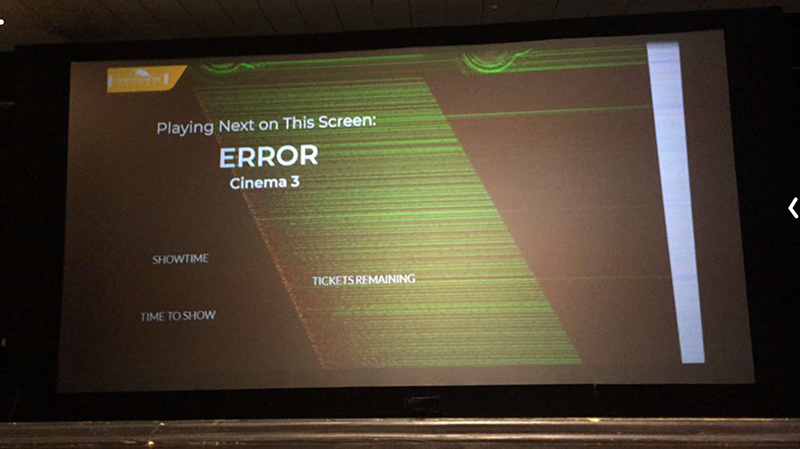
I don't have a Gefen scaler on my other screens, and thus am going from the PreShow computer directly to the projector using a DisplayPort to DVI cable. The boot sequence (BIOS, Windows loading screen etc.) all show up fine one the screen, but once Windows has loaded the image on the screen starts glitching out, and having random lines and pixels appear on the screen, and the color being off as well.
Example:
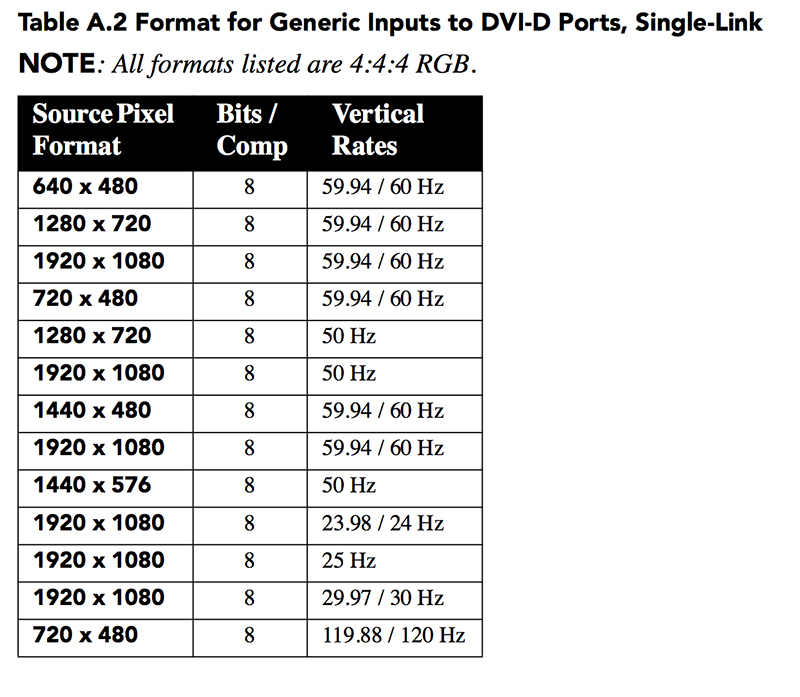
I've consulted the manual for the Christie CP2210, and it says it supports 1920x1080 at 60 Hz.
I've configured the media player computer to output at those specs, but image is still like it is in the image above. Anyone else run into this before? Projector? Computer? Cable?

(I also get the same symptoms on a CP2000-ZX as well, which leads me to believe it's something with the computer or the DisplayPort-to-DVI cable, though the cable works just fine with a desktop monitor.)
Posted by Steve Guttag (Member # 268) on 12-12-2018, 05:03 PM:
It will definitely do 1920x1080p/60 (that is the preferred output) so I'm thinking the source computer too. I'm curious about the 32-bit part...32-bit per pixel? Does it have an 8-bit output? The DVI ports on the projector are single-link and are going to go above 8-Bit. One can "twin-link" to get 10 or 12 bit.
Posted by Dave Macaulay (Member # 813) on 12-13-2018, 05:16 AM:
We support a lot of screens that have a PC providing a full video preshow using its DVI or HDMI/DP (via a converter cable) output into the projector's DVI input (plus sound from the PC's audio output). No problems except with series 1 - the PC video output tends to shut off if those projectors are powered down, requiring a PC reboot. We see the boot crawl at some "yuge" text resolution then there's some screen flashing as it switches to 1080p.
I haven't seen what you have. The video showing on these screens looks normal. If the video cable is bad or too long there is "digital snow" in the image though.
It may be the 32 bit setting. The Christie list shows that you want 8BPP or "24 bit" color for DVI.
And I believe the signal must be progressive but I don't see any reference to that in your Intel image, 1920x1080 at 60fps looks correct but check that there's no 1080p60 setting available.
You should not need a scaler to display a 1080p59.97/60 signal from a DVI or HDMI source. The scaler has a long list of possible output signal specifications. If you enter the setup menu you can see which is selected (on the projection screen) - see if your PC has a resolution setting with the same specs?
Posted by Steve Guttag (Member # 268) on 12-13-2018, 06:12 AM:
He is on progressive (it is in the refresh rate "60p")
Posted by Tony Bandiera Jr (Member # 2365) on 12-13-2018, 10:43 AM:
The problem is indeed as Steve mentioned, the bitrate....had the same issue at UC Irvine with a few laptops on a projector without a scaler ... when I did the D-Cinema upgrade to the new screening room, I found the same problem on CP2210 when I set the scaler's output to the wrong bitrate... (Kramer scaler.)
Try setting the bitrate to 8, that should clear it up.
If not, look for a simple scaler or I THINK there are bitrate converter boxes available...
Posted by Justin DEntremont (Member # 10541) on 12-13-2018, 11:04 PM:
For shits and giggles I swapped out the DisplayPort to DVI cable with a (much more expensive) active DisplayPort to DVI adapter that I had in my office at home and problem went away. Not sure if it was just because the first cable was cheap, or if it has to do with the active circuitry in the new one.
Also figured it seemed like a good time to point out how ridiculous some of the color information terminology is.
As per DisplayPort on Wikipedia:
"8 bpc color depth (24 bit/px or 16.7 million colors) is assumed for all formats in this table. This is the standard color depth used on most computer displays. Please note that some operating systems refer to this as "32-bit" color depth—this is the same as 24-bit color depth. The 8 extra bits are for alpha channel information, which is only present in software. At the transmission stage, this information has already been incorporated into the primary color channels, so the actual video data transmitted across the cable only contains 24 bits per pixel."
Posted by Carsten Kurz (Member # 5396) on 12-14-2018, 02:34 AM:
Alpha Channel is used by modern operating systems for GUI transparency effects, like AERO in Windows, and also in OS X. It is indeed mixed into plain RGB in the LUT stage before leaving the graphic chip towards the chosen output signaling. Some expensive pro cards offer side channels for separate alpha channel signaling. So yes, 24 and 32 bit color always means 24bit on the DVI/HDMI/Displayport (unless the card supports real 10 or 12 bit per color output).
- Carsten
Powered by Infopop Corporation
UBB.classicTM
6.3.1.2