This is topic Doremi Backups in forum Digital Cinema Forum at Film-Tech Forum ARCHIVE.
To visit this topic, use this URL:
https://ft-forum.com/ft/cgi-bin/ubb/ultimatebb.cgi?ubb=get_topic;f=16;t=003534
Posted by Gary Benn (Member # 7858) on 12-30-2018, 09:35 AM:
Hey guys,
Does anyone know a command line I can try to run the backup script on a Doremi DCP2000?
The GUI backup generate isn't working.
Thanks.
Posted by Adrian Avram (Member # 7931) on 12-30-2018, 10:15 AM:
Hi,
You can try ingesting the hotfix for the back-up problem.
dcp2000_sw_hotfix_backup-0.0.1_resigned.pkg
Posted by Gary Benn (Member # 7858) on 12-31-2018, 06:01 AM:
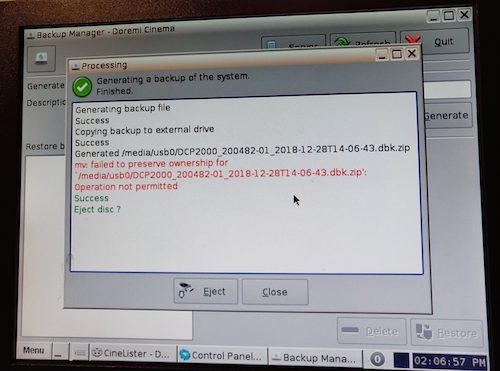
Posted by Dave Macaulay (Member # 813) on 12-31-2018, 09:48 AM:
As root:
sh /doremi/sbin/migrate.sh backup /media/usb0
There are options and switches but that puts a full backup on the usb drive.
You may have to remount the usb drive write enabled but I think the script takes care of that itself.
Posted by Ioannis Syrogiannis (Member # 3235) on 01-01-2019, 09:53 AM:
That's right Dave, it does and it logs the results also.
I would try with a FAT32 thumb drive instead of an NTFS (or other), though and would check the contents of it regardless getting a file ownership fault.
Posted by Carsten Kurz (Member # 5396) on 01-01-2019, 10:59 AM:
Gary - why did you post that screenshot? The error indicated there does not necessarily tell you that the backup failed - it may just indicate that a secondary operation failed that is only intended to work on certain types of target filesystems (e.g. if the target medium is ext2/3 formatted).
- Carsten
Powered by Infopop Corporation
UBB.classicTM
6.3.1.2