This is topic Setup for Barco ICMP and USL JSD-80 in forum Digital Cinema Forum at Film-Tech Forum ARCHIVE.
To visit this topic, use this URL:
https://ft-forum.com/ft/cgi-bin/ubb/ultimatebb.cgi?ubb=get_topic;f=16;t=003578
Posted by Wang Lance (Member # 10758) on 02-02-2019, 09:22 PM:
Hi all,
I have been struggling with the setup for ICMP and JSD-80.
JSD-80 can be reached by its own application and Chrome (web-interface), and also using TeraTerm can successfully send commands.
However with ICMP the connection cannot be established.
IP setting is correct, and the port required for JSD-80 is 10,001 as indicated in its manual.
But it always says"device not connected" while using Communicator to test sending a cue.
Anyone has experience of the setup please can you share it with me. Appreciated!
Posted by Marin Zorica (Member # 1716) on 02-03-2019, 04:49 PM:
Does JSD80 have only RS232 control port? Why are you refering to ip adresses than??? Somebody correct me if i am wrong,.....
Posted by Steve Guttag (Member # 268) on 02-03-2019, 07:43 PM:
I have not set up an ICMP to a JSD80. I have connected a eCNA series automation, GDC SX2001, Dolby DSS200 (running 4.9.x software). All operated as expected. For the JSD80 to operate with Ethernet, on has to have the chassis with the Ethernet port (obviously) an also the last incarnation of the control board with the USB port visible through the front panel...and then set the IP address of the JSD80 to what you want. Again, nothing operated oddly and according to the specification sheet.
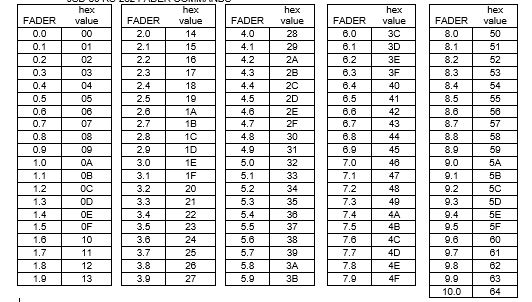
Note, the JSD80 can only support ONE DEVICE at a time on its port so you can't have your computer hooked up and have a server talk to it. The JSD80 volume level is strangely done using text characters but representing a HEX number. So to set the fader to 7.0 you'd issue the command: level 46\r
Posted by Juan Jose Vazquez (Member # 10496) on 02-03-2019, 09:08 PM:
I currently have 4 USL JSD-80 connected via ethernet and controlled by jnniors automation 310. For these to work correctly configure them as raw device using port 10001 and using termination string \r
On Doremi servers they are configured the same.
Posted by Wang Lance (Member # 10758) on 02-03-2019, 11:19 PM:
@Marin,
JSD-80 does have a Ethernet port which can be used for automation commands. You can refer to:
http://ftp.uslinc.com/Products/JSD-80/Documents/Technical/Jsd80AutomationCommands.pdf
@Steve,
Thank you for your reply.
The IP address of my JSD-80 has been pre-configured so that I could see it through Chrome, also I could set ICMP up accordingly. Apparently my JSD-80 does NOT have last incarnation of the control board with the USB port visible through the front panel. Will that be the cause of the failed connection? Whatever commands I send via Communicator only brings back "device not connected"...
BTW, the command I tried was "level 46" instead of "level 46\r ". Did I make it wrong with no "\r"?
@Juan,
We have considered Junior box, but the volume adjustment could not be achieved by using it I suppose.
Posted by Harold Hallikainen (Member # 5405) on 02-03-2019, 11:55 PM:
I did the JSD-80 firmware MANY years ago. The USB connector is on the control board, but does not poke through the front panel. We revised the control board to add USB and Ethernet, so we often ask if USB is there to identify which control board you have. Also, the Ethernet controller is on a daughterboard on the control board. The \r Steve mentions is a carriage return. All commands end with a carriage return. Different systems represent the CR in different ways. As others have mentioned, the JSD-80 only accepts one TCP connection at a time. If something else, like TeraTerm, is connected, the Barco will not be able to connect. Since you said the Barco said it could not connect, it could be this or a network issue. It would be i teresting to ug a conputer running Tera Term into the switch port instead of the Bzrco, then set the computer to the Barco IP address and see if it can connect to the JSD-80. Look at subbet mask gateway, etc.
Good luck!
Harold
Posted by Sergey Morozov (Member # 9911) on 02-04-2019, 01:44 AM:
You should use these values in "value" field of ICMP setting:
for 5.0 level - level\0932\0D
for 6.0 level - level\093C\0D
and so on
\09 means tabulator and \0D means carriage return in ICMP
You need use HEX-values of sound level according to this easy-view table
Posted by Wang Lance (Member # 10758) on 02-04-2019, 02:08 AM:
@Harold,
If the JSD-80 we have comes with Ethernet but without USB, will this different board revision be a problem for TCP connection?
We did use TeraTerm for testing connection, and it is fine.
For now every network setting seems OK, but ICMP just cannot connect the JSD-80. Will give it a try after CNY holidays. Thank you!
@Sergey,
Thank you for the hints. Will try it and hope it works!
Posted by Carsten Kurz (Member # 5396) on 02-04-2019, 04:13 AM:
Wang - if you haven't used a termination character, that is most probably your issue. You probably hit RETURN in TeraTerm and that made it work, but the ICMP is not 'hitting' RETURN automatically, you need to add it to the control string as a so called Escape sequence. Every device has it's own escape character scheme.
For the ICMP, it should be \0D for 'RETURN', as Sergey states.
- Carsten
Posted by Wang Lance (Member # 10758) on 02-04-2019, 04:44 AM:
Carsten,
That could indeed be my issue as setting up control strings for such device is relatively not common to me, comparing with Dolby/ QSC audio processor. Thank you for your reply. Wish me good luck. : )
Posted by Bruce Cloutier (Member # 9615) on 02-04-2019, 06:43 AM:
quote: Wang Lance
We have considered Junior box, but the volume adjustment could not be achieved by using it I suppose.
With the Series 4 JNIOR I'd bet there are a couple of ways that you can do the volume adjustment if we haven't already gotten that done for someone. If anyone has that need in the future be sure to ask us (Rick) about it. It may not seem feasible with the CINEMA application but we can always run something alongside to do just about anything. You just need to challenge us with these things when they come up.
Posted by Steve Guttag (Member # 268) on 02-04-2019, 07:38 AM:
To be more clear...
The USB port is merely visible looking through the right side of the front panel. If you are getting any communication on the Ethernet port, then it would almost have to be there.
On the commands, they are text representing hex, not actual hex commands. So you don't need any escape characters like the backslash "\" before them. It is straight up: level 46\0D
Carsten is correct, for the ICMP, they want the hex value after the backslash. If you don't supply a carriage return, the JSD80 will be waiting for it, forever, to evaluate the string that came before it. When you hit return in a terminal program, most put in the carriage return and line feed automatically so you may have missed the nuance that you have to supply those when issuing commands. Note, the JSD80 just needs the carriage return \0D (other systems use \r and still others use ^M (Extron uses % as their hex escape character). It is always the sending device that sets those rules. The receiving device is really receiving everything as binary words, the ASCII/HEX is merely for human convenience. But you have to tell the device you are working with what you want it to send.
Note, the JSD80 works with a space between the command and the value so: level 46\0D is a valid command. It need not have \20 or a \09 (tab, since the JSD80 works with either) in the text part.
level\2046\0D
should work too (20 Hex = Space).
You could covert the entire thing to hex if you wanted with a "\" before each hex representation of the command. It would take a lot longer for most people to formulate commands that way.
Posted by Wang Lance (Member # 10758) on 02-22-2019, 05:43 AM:
quote: Bruce Cloutier
You just need to challenge us with these things when they come up.
Thanks Bruce. If there is a need I will shout.
quote: Steve Guttag
The USB port is merely visible looking through the right side of the front panel.
I checked the front panel this morning, and the USB port was NOT there for sure.
Unfortunately I got no luck today.
No matter what kind of above commands I tried, all I saw was "device not connected" as formerly reported.
The Status Page of JSD-80 could still be accessed by using Chrome, and the model number was JSD-80 v100329. Not sure if this is too old for connection with ICMP or other servers except GDC...

Posted by Harold Hallikainen (Member # 5405) on 02-22-2019, 06:43 AM:
If you can reach the JSD-80 with Chrome, Ethernet is working. Early firmware did not support ping, so it's possible that it does not respond to ping. Firmware updates and instructions are available at http://ftp.uslinc.com/Products/JSD-80/Software/Firmware/ . Also, if Ethernet is working, there should be a USB connector on the control card, behind the removable front panel. I would first use Tera Term ( http://ftp.uslinc.com/MultiProduct/teraterm-4.83.exe ) to see how the commands work. You should be able to connect to the JSD-80 on port 10001 .
Good luck!
Harold
Posted by Steve Guttag (Member # 268) on 02-22-2019, 07:05 AM:
To be more clear, the USB connector does NOT protrude from the front panel, it is merly visible through the slots on the right side.
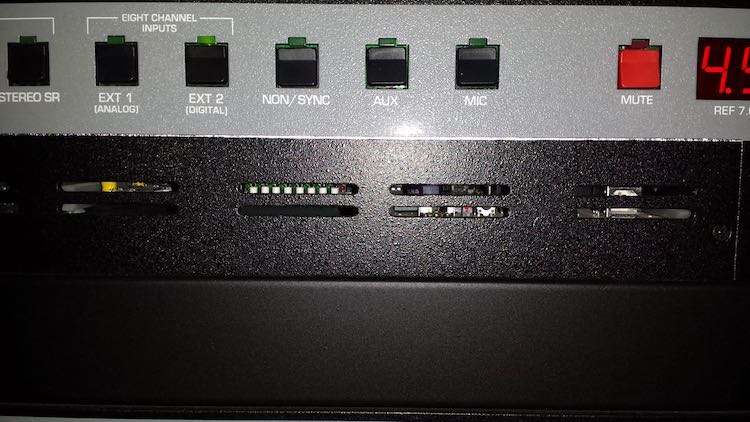
Look below the MUTE button on the right side and through the slots you can see the USB connector (Type-B...aka "square"). You needn't remove the panel to see it clear enough.
Posted by Wang Lance (Member # 10758) on 02-22-2019, 10:35 PM:
quote: Harold Hallikainen
Early firmware did not support ping, so it's possible that it does not respond to ping.
That could indeed be the reason of failed connection. Thanks Harold for the hint.
I also tried Tera Term and the commands worked fine.
quote: Steve Guttag
the USB connector does NOT protrude from the front panel
OK my bad, the USB connector is there. Thanks Steve.
Posted by Carsten Kurz (Member # 5396) on 02-23-2019, 06:23 AM:
If it works with Teraterm, there is no reason it shouldn't work from the Barco. I will just take some time to fiddle around with the command strings and parameters. You could also try sending the same string from the Barco to Teraterm and see wether and how it comes out there.
- Carsten
Posted by Wang Lance (Member # 10758) on 02-23-2019, 09:48 AM:
quote: Carsten Kurz
You could also try sending the same string from the Barco to Teraterm and see wether and how it comes out there.
That is something I must try. Thanks Carsten.
Posted by Stephan Shelley (Member # 8587) on 02-23-2019, 12:43 PM:
I would double check your device settings as well. Make sure you have the right address and port. I expect you are going through the projector LAN port for the commands and not one of the ports on the ICMP. Make sure the projector is on the same network as the JSD-80.
Posted by Wang Lance (Member # 10758) on 02-25-2019, 08:59 AM:
Hi Stephen,
The setting for IP address and port (10,001) has been checked by different people to make sure it is correct. And yes I am going through the projector LAN port for the commands instead of the ones on the ICMP. I can use laptop to access both projector and JSD-80 using the IP addresses on the same network.
Posted by Harold Hallikainen (Member # 5405) on 02-25-2019, 09:08 AM:
Can you insert an Ethernet hub and run Wire Shark to see what's passing between the Barco and the JSD?
Harold
Posted by Carsten Kurz (Member # 5396) on 02-25-2019, 10:51 AM:
Can you still buy hubs? I know I have two 100MBit hubs in my equipment storage, but these are more than 15 years old. I know some more expensive managed switches can copy traffic to ports for monitoring, though. I also guess I have one or two small 10MBit hubs lying around somewhere, ready to be dumped, but I notice that many ethernet ports nowadays do not support 10MBit/s anymore.
- Carsten
Posted by Bruce Cloutier (Member # 9615) on 02-25-2019, 11:11 AM:
The Netgear Dual Speed Hubs are still around and on Amazon for instance. I would suggest grabbing one and keeping one around for this diagnostics use. I actually bought several for INTEG recently just to make sure that we have them around for Wireshark. That was part of the rationale for adding the network capture (compatible with Wireshark) to the JNIOR (Series 4).
All of the PHY chips still support 10MBit/s in auto-negotiation. So I wonder if those Ethernet ports really wouldn't handle it? It is just maybe not worth advertising anymore.
Posted by Carsten Kurz (Member # 5396) on 02-25-2019, 11:27 AM:
Yeah, maybe, I may have just read specs which omitted the '10'.
- Carsten
Posted by Wang Lance (Member # 10758) on 02-26-2019, 07:19 AM:
quote: Harold Hallikainen
Can you insert an Ethernet hub and run Wire Shark to see what's passing between the Barco and the JSD?
Thanks Harold. That's a good point for debugging.
Hopefully I will be able to come back with good news after checking the firmware/ network status.
Posted by Marin Zorica (Member # 1716) on 11-05-2019, 01:49 PM:
I just did play with one DST XD10P on service which i got to have as spare when costumer has dead processor. It has all that needs for backup. Anyway, i was also testing RS232 automation, so did add small arduino to pass me commands from ethernet to RS232, but that is another thing......
I see on last tread there was no solution to get it work with Barco ICMP, maybe because it reads numbers as hex, so, when you send level 46, barco icmp send you ASCII, not hex as I am aware? So, maybe it should work like:
level 0x46\0x0D
Same thing is when i using RealTerm and if i chose to send mixed ascii and hex numbers i must use that way.......and it works.
Posted by Harold Hallikainen (Member # 5405) on 11-05-2019, 03:29 PM:
JSD-80 commands are at http://ftp.uslinc.com/Products/JSD-80/Documents/Technical/Jsd80AutomationCommands.pdf .
Note also that the JSD-80 UART has only an 8 byte FIFO, so it's possible to miss characters if they are sent too fast or if hardware handshake is not used. Details at http://ftp.uslinc.com/Products/JSD-80/Documents/Technical/jsd80handshake.pdf .
Harold
Powered by Infopop Corporation
UBB.classicTM
6.3.1.2