This is topic QSYS Corner in forum Digital Cinema Forum at Film-Tech Forum ARCHIVE.
To visit this topic, use this URL:
https://ft-forum.com/ft/cgi-bin/ubb/ultimatebb.cgi?ubb=get_topic;f=16;t=003590
Posted by Steve Guttag (Member # 268) on 02-12-2019, 01:09 PM:
It would appear that there is starting to be some QSYS discussions (by at least some of us) that probably should have its own topic rather than hijacking others so lets start it here.
Below is a response from another thread:
quote:
It seems to me there are the highly automated multiplex operations that benefit from the automation and then there are the multi-use, specialty venues that Steve and I often deal with. I feel I can provide greater flexibility and ease of use. I also find that from a remote support perspective I can "dial-in" and using the tools available in designer troubleshoot many things and add whatever unique feature may be needed for a one off show where in the past it would not have been worth the effort ($).
It still blows me away that I can sit in Boston and make lights go up and down, masking open and close, movies start etc... on the other side of the country. Granted these things can be done without Q-Sys but I think Q-Sys makes it much easier.
We used to use a lot of Crestron and Symetrix DSP's and the cost and complexity of programming for Crestron is insane. The investment to get stated in Q-Sys is orders of magnitude less.
I'm definitely torn between the redundancy of each theatre is an island versus the unlimited "playground" that is a QSYS type system. That is, you can do most anything (sound and even automation wise) with it. From a cost-effective standpoint, the more screen/core you do the lower your cost/screen, to the point that it is CHEAPER to use QSYS over traditional Cinema Processor topology. It wires faster, troubleshoots easier, sounds as good or more often better.
The complexity is really location dependent. it can be brain-dead simple or, if need be very sophisticated.
I'd like to see a repository of basic designs such that if you want the functionality of a CP750, JSD60 and the like, you can start with that and merely build from there. Any by start with that I mean, I can make the user interface look EXACTLY like those...no extra education involved.
Sean and I already belong to a "sharing" group where plug-ins/user-controls are shared about (things that talk to 3rd party devices like dimmers or microphone systems). Control companies already do a lot of this (like Crestron, AMX and Extron) but then you are bringing in another layer that may not be necessary. At the moment, a good Crestron or AMX programmer is going to be able to do more than QSYS and Extron can certainly get you up and going on a decent control system faster than most any of them but I think QSYS could catch up there and get it to the point where it is a serious competitor to them.
If anyone wants to see an awesome user interface design, check out this thread:
http://www.film-tech.com/cgi-bin/ubb/f16/t002591/p2.html
Posted by Marcel Birgelen (Member # 6801) on 02-13-2019, 04:17 AM:
Well, now I'm here in the Q-Sys Corner, what's there on offer? I hope the coffee is at least still warm? ![[Smile]](smile.gif)
You're not the only one torn between "centralization" and "containerization". It's obvious that centralization offers cost-benefits, as it minimizes overhead and it often also simplifies operation.
Now, we're talking cinema here, we're not talking about potential life-threatening situations if stuff fails, so we may be overthinking it... Although, what happens, for example, you're going to hook up your fire alarm to said system? Even though there will probably still be a primary alarm system, you're potentially creating some kind of liability here.
What I've learned from my work for the theme park industry, especially from those who do have the budget to not cut corners everywhere, is that they like "containerized systems", because they learned from past mistakes. If possible, build the same attraction twice or even 3 times and make sure their control systems can operate independently. Now, those systems may seem inherently more complex than cinema systems, but keep in mind that in the last 15-or-so years, we've added a lot of layers of complexity onto what now constitutes the cinema experience. What one was a mostly mechanical operation often featuring decades old equipment is nowadays a high-tech IT operation...
Getting back at "containerization", you see the same discussion nowadays with e.g. power plants. We used to build large behemoths of power plants, like nuclear power plants with 1.5 MW electrical output per reactor. While such large behemoths are a pretty economical choice, you're also facing problems when something goes wrong. If such a large power plant goes off-line, you're immediately looking at a gap of 1.5 MW to fill. Now, plats that can provide such power, if available, are never able to supply this kind of power at once, so we rely on a lot of smaller plants that can increase their output or fire immediately if such a thing happens. It's only because nowadays we're operating massively synchronized, pan-international grids that we can, mostly, handle the impact of one or two large power generating units going off-line.
So, it's not really surprising that many people think the solution is to try to abandon those behemoth power generating stations in the future and replace them by smaller, more distributed units.
So, although I personally like the idea of centralization, the potential reduction of overhead that comes with it, etc., there still is that little voice nagging at you... The fact that you're building "giant castles" that can come crushing down after a small earthquake, even though everybody assumed the design was safe. Meanwhile, if you'd had built 10 separate villas, probably 8 out of 10 would still be standing after the earthquake.
So, sufficient badly chosen metaphors for today, let's kick at that final open door: Murphy's simplified law of misery: Whatever can go wrong, will go wrong.
quote: Steve Guttag
Control companies already do a lot of this (like Crestron, AMX and Extron) but then you are bringing in another layer that may not be necessary. At the moment, a good Crestron or AMX programmer is going to be able to do more than QSYS and Extron can certainly get you up and going on a decent control system faster than most any of them but I think QSYS could catch up there and get it to the point where it is a serious competitor to them.
I've mentioned Alcorn McBride show controllers in the past, as my favorite brand of "show controller". There isn't any real plugin from Q-Sys yet (and I guess it's not something Alcorn McBride would put their efforts in), but you can control Q-Sys from your show controller.
Posted by Steve Guttag (Member # 268) on 02-13-2019, 06:51 AM:
One thing about QSYS is that you don't have to depend on others to create a plug-in..just make one yourself. They recently added a new Block Controller to aid in doing such things without learning LUA (its scripting language).
That said, I've been asked (multiple times) what plug-ins they should make for the cinema industry. So I see QSC working making QSYS more flexible and easier to use in a cinema environment.
And yes, many other control systems have QSYS drivers of some sort. There is a site (not traditional cinema but had film projection and then DCinema) where I had an Extron Touchlink controller. They needed their microphone and conventional A/V audio updated and I plopped a CORE 110 in and the Touchlink controls it so the user interface didn't change at all (aside from new screens for the touchpanels). The integration is very seamless.
Remember, on the redundancy too, it isn't like having a spare tire, it is like having a spare car. You are VERY heavily backed up.
Note, the CORE110c and DCIO-H, price wise, while more than a CP750, is less than either the Ovation or AP25 (or most of the film sound processors of our prior era). So you could certainly do separate systems for all screens. And, via AES67, you can still stream audio around the complex as desired.
Posted by Sean McKinnon (Member # 612) on 02-13-2019, 11:38 AM:
You may be interested to know Marcel that there are theme parks utilizing a Q-Sys platform. The extent I am not too sure it may just be background music but there is a definitely at least one large theme park operator using them. Rumor even has it that there is a "special" version of designer (like the cinema version) for this operator. Q-Sys has also been used in major stadiums and such. We currently maintain an old Basis system in a major sports complex that in my personal opinion would be a good candidate for upgrade to Q-Sys. One thing Q-Sys has over Basis is it is now adopted widely in many market segments so I think development will continue and these products will be supported for a long time.
As far as redundancy I feel more comfortable having three screens on two core 510's (one redundant) than having three separate processors, why? because in order to lose an auditorium two complete processors and networks have to fail at the same time. This type of common mode failure is extremely rare. With a traditional setup that is albeit much simpler you still run the risk of one bad power supply or one bad cable bringing the screen down. Now of course there are components (DCIO, Server) that are not duplicated in a redundant fashion however their connections to the system can be.
If I were to do a larger multiplex I would make the large houses stand alone with their own core 110's (for Atmos and such) and then split the rest of the screens onto 2 or more cores with redundant backups. So there is still a use case in my opinion for the stand alone "island" type of install even in this brave new world.
As far as control I think Q-Sys can do pretty much anything Crestron can... Now can Crestron do it in a more elegant way? Maybe but to me the biggest limitation of Crestron the fact that to become a programmer at a level that allows you to do things that can be done by a moderate level user in Q-Sys takes a large investment in time and money to get the training. Q-Sys has taken a much more open source type approach that I like.
Posted by Steve Guttag (Member # 268) on 02-13-2019, 02:39 PM:
Consider this, if you do islands with 110c everywhere. You can, in a pinch back up any core with any other core on the network. That is, if you maintain copies of your designs (as any sensible person does), if a core goes down, copy its design into a working core (not while that screen is showing a movie) on its own page (and you get things ready off line). Once the "buddy" theatre goes off screen, upload the new design and you are back going again on both screens until a replacement CORE is installed.
But yeah...going down on two COREs and two networks AT THE SAME TIME is really really bad luck! If you are really worried about the DCIO-H (the thing that would still not be backed up)...buy one for the complex; they are cheaper than most any cinema processor and if you set up your design with dynamic pairing, you could have management make the switch in a couple of minutes (just plug it in).
Posted by Marcel Birgelen (Member # 6801) on 02-13-2019, 06:06 PM:
quote: Sean McKinnon
You may be interested to know Marcel that there are theme parks utilizing a Q-Sys platform. The extent I am not too sure it may just be background music but there is a definitely at least one large theme park operator using them.
In a theme park, distributing audio is a big challenge. You've got all the different areas to cover, with their own audio loops, special effects that need to be mixed in, but you also want to have PA and emergency broadcast systems to be able to use the same infrastructure. Then there are the little things that can drive you mad, like avoiding echo on a street filled with speakers by using narrowly timed echo delays.
Then consider the nastiness that involves transporting analog audio from a central playout location to loads of different speakers: You're facing signal loss, interference and tons of ground loops.
So, Q-Sys is certainly something that fits in this street pretty well and also a primary reason why some of those "big operators" have been using CobraNet for more than 15 years now.
CobraNet had the possibility to become something similar than Q-Sys, but they never realized the potential. Fortunately, QSC offers Q-Sys to CobraNet bridge interfaces.
quote: Steve Guttag
But yeah...going down on two COREs and two networks AT THE SAME TIME is really really bad luck! If you are really worried about the DCIO-H (the thing that would still not be backed up)...buy one for the complex; they are cheaper than most any cinema processor and if you set up your design with dynamic pairing, you could have management make the switch in a couple of minutes (just plug it in).
QSC, now with their feet steadily between the door, should consider teaming up with e.g. Barco or GDC. If they could offer a direct playout to Q-Sys in their IMBs, you wouldn't even need the DCIO-H. Although they would lose their sales on that part, they could recover parts of it via a licensing fee. It would also be a strong competitor to "Atmos Connect".
Combined with either a DTS:X plugin for your Q-Sys Cores or as an optional upgrade for your IMB, it could be THE solution to bring Multi-Dimensional audio to more rooms on a budget.
Posted by Carsten Kurz (Member # 5396) on 02-13-2019, 08:02 PM:
In cinema, I see the biggest chance for QSYS now that the standard for object based audio is finalized and systems based on an open standard need to be built. That is clearly the limit for traditional style cinema processors up to 7.1.
QSC has an MDA renderer in their own IMB, that may be an attractive bundle. But maybe we'll see external renderers in QSYS. I guess even a 110 could be a basic MDA renderer. Then they have all the necessary I/O options. The problem is, MDA renderers, just like ATMOS renderers, need to be SPBs, so, one would need that functionality in a QSYS product. But there certainly is a huge market there for QSC.
- Carsten
Posted by Harold Hallikainen (Member # 5405) on 02-13-2019, 08:11 PM:
A problem with external rendering is that the immersive audio content has to be sent to the external renderer in encrypted form. The external renderer has to provide security similar to an IMB (tamper protection, private key, deal with KDMs, etc.). Therefore, in my opinion, the future is in internal rendering within the IMB. The CMS-5000 ( https://www.qsc.com/cinema/products/media-servers/cms-5000/ ) can render (currently DTS-X) to 64 channels to Q-LAN. This can then drive a Q-SYS system for additional processing and then drive the amplifiers.
Harold
Posted by Marcel Birgelen (Member # 6801) on 02-14-2019, 03:25 AM:
Yeah, it doesn't matter that the 7.1 mix is totally unencrypted. ![[Wink]](wink.gif)
I vaguely remember the imm sound system, also an object based audio system, which got acquired by Dolby.
Their solution was to put the audio files on the processor. I guess that's a piece of overhead nobody really wants.
Yet, to keep stuff modular and for cross-compatibilities sake it would be good to have an open "MDA bitstreaming" standard, where the processing could be done on some external device.
Posted by Steve Guttag (Member # 268) on 02-14-2019, 07:06 AM:
quote: Marcel Birgelen
CobraNet had the possibility to become something similar than Q-Sys, but they never realized the potential. Fortunately, QSC offers Q-Sys to CobraNet bridge interfaces.
Cobranet was awesome and very, very reliable (I've never had a failure with it with either RANE or QSC products). There maybe a reason for the similarities between the two. I believe they came from the same people (I may have my history wrong but I think the same Boulder, CO people developed both...as well as the Media Matrix for Peavey). There is a reason that QSYS remains in Boulder, CO and not Costa Mesa (QSC's home).
In sadder news, the Cobranet Bridge card is out of production. Last I checked, they have inventory but once they are gone, they are gone. I think that you have those installed systems, at first, where you need to bridge the gap but once those people have their bridge, you aren't going to be getting many new systems needing such things. It isn't like Dante where QSYS and Dante are coexisting, for the moment. In fact QSC and Audinate have made some sort of deal that I don't have all of the details on.
quote: Marcel Birgelen
QSC, now with their feet steadily between the door, should consider teaming up with e.g. Barco or GDC. If they could offer a direct playout to Q-Sys in their IMBs, you wouldn't even need the DCIO-H.
A couple of things there. First, they now have their own IMB that has QLAN on board and can decode DTS-X and I would presume, with proper licensing Dolby Atmos but perhaps with the new SMPTE standards, they could decode an Atmos mix and not be able to call it Atmos (like Dolby Stereo with an Ultra Stereo sound processor in the 80s/90s).
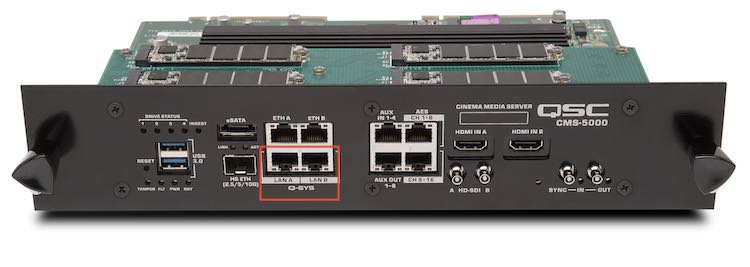
I could see getting GDC on board for licensing a QLAN output though I would think they are going to try and develop their own market for their own IMB first. Barco is a much smaller slice of the pie and they have their own sound processor for their own competing format (though again with the SMPTE standards coming into place, immersive should be getting more uniform in its delivery and decoding methods).
If it were me, I probably wouldn't be eager to license it just yet while I have a new product coming out that could be killed off if it doesn't represent enough of a difference between other products out there.
As for the DCIO-H, it is more than a mere AES audio intake. It handles HDMI audio (both DTS and Dolby), Mic input, stereo line input, monitor output (both line and amplified), HI/VI output (analog line), GPIO including relay outputs to drive things like dimmers or, god forbid, masking/curtains. It is a catch all for each screen in a complex. It also has a front panel knob and button for creating a fader and mute.
Note, Dolby's IMS3000 can connect directly to the QLAN already since it is AES67 though without the redundant QLAN-B.
As for decoding DTS-X in QSYS...it exists, actually in the form of an MDA player. It can support up to 128 outputs. I've seen an example of a design with it. It looked a bit scary.

I suspect that server based decoding will be the norm though.
I see QSYS having potential all over cinema, not just in immersive audio (Which I don't think appeals to beyond 5-10% of the movie going public, at least not willing to pay more for it). It makes system install easier, faster, troubleshooting also is easier/faster. Oh, and it sounds REALLY GOOD too. If you use QSC speakers, they provide intrinsic correction so your sound is essentially flat, out of the box. If you like other brands of speakers, develop your own speaker files (as I have done on several).
Develop your own user control interface (UCI) and have whatever cinema processor/monitor features you want and clone them on each installation. Sure, there is more overhead on the first one but then it is a matter of cloning.
Posted by Sean McKinnon (Member # 612) on 02-14-2019, 09:23 AM:
One thing I have asked them about is releasing a version of the DCIO with some additional soft buttons that could be programmed as "format" buttons or even manual automation buttons that would lower the barrier to entry of cost for some simpler cinema installs that dont really need a fancy UCI and touch panel. Of course they have the option of UCI viewer and the beta web viewer but I have found UCI viewer a bit clunky. Hopefully the web viewer will be a great option.
Posted by Carsten Kurz (Member # 5396) on 02-14-2019, 09:39 AM:
The trouble with the IMB/server internal decoding is the limited choices. I acknowledge that the QSC CMS-5000 has an impressive feature set, but, as with e.g. the CP850, one would prefer to combine any server (system) with any MDA renderer. Only very few current IMBs/IMS have the processing power or I/O modularity to add MDA rendering per software only.
You would think that there is a market for an MDA renderer module that can e.g. be hooked between any server (as it is now possible with most servers supporting ATMOS), and e.g. a suitable QSYS core (or other processor with the necessary I/O). All this MDA renderer would need to have is a few Ethernet ports (and, of course, an SPB certification...) Of course, wishful thinking towards the idea that SMPTE object based audio will bring costs down, and modular systems would add to that because more options mean more competition.
- Carsten
Posted by Steve Guttag (Member # 268) on 02-14-2019, 10:08 AM:
Sean,
My bet is that they will tell you to use the GPI on the back to create up to a 6-button panel for format selection...of course if you are making such things it is adding to the cost and time of installation. Perhaps if a company like Odyssey saw a demand they could fab something up (it would be just switches and a cat cable.
An advantage of them doing it is the ability to perhaps have status LEDs to give confidence on the format selected.
BTW...I agree with you but I'm sure the cost of reving the metal work and fiberglass will be the hurdle in getting it implemented unless enough demand/orders for such at thing justify it.
Carsten, I really think that there isn't a big enough market to justify anyone making an external renderer and going through the DCI compliance testing. What will be left is that smallest of small slivers of people that are not served by the IMS3000, CP850, SX4000, CMS5000 (and probably the SR1000 but I don't recall what its final capabilities will be) ICMP.
I also don't think DTS-X is necessarily gong to take the industry by storm. I think a product like the CMS5000 might get its foot in the door but I, personally, like the holistic approach that Dolby has done with Atmos and, even then, I don't think it applies to more than 10-20 percent of the movie going public and probably 5-10% of the movies made. I think a 7.1 sound track covers such a large area of movies and people and is essentially free over a 5.1 that it will continue to become a defacto standard for things beyond 5.1
Posted by Carsten Kurz (Member # 5396) on 02-14-2019, 11:35 AM:
I agree that a properly spec'd 7.1 system with good full range surround speakers will do most of what even an educated audience will expect from modern cinema sound. If the mix is up to it.
- Carsten
Posted by Harold Hallikainen (Member # 5405) on 02-14-2019, 01:35 PM:
The SMPTE immersive audio bitstream is compatible with Atmos, so there may be a price decrease due to the availability of more renderers from various sources. The Barco APX is an external renderer that accepts the SMPTE bitstream. It also uses SMPTE standard (published and draft) communications between the SMS and the APX (Outboard Media Block).
Harold
Posted by Sean McKinnon (Member # 612) on 02-15-2019, 08:49 AM:
Not to de-rail another thread but I think that the biggest "Bang" for the buck with Atmos is the bass management subwoofers in the surround field. I find this to be such an improvement I am starting to include them in my 7.1 designs where appropriate.This brings another benefit of Q-Sys in that I can build a bass management signal path to cross over the surrounds and send that audio where I want. I can also mix in the regular .1 if I want.
As a matter of fact I did a Q-Sys install recently where I felt the stage channel speakers did not go low enough (this was a specialty install that required unique non-cinema loudspeakers) so I was able to high pass the stage channel and mix all of that information into the subwoofer channel. It sounded GREAT! you COULD NOT tell that the low frequency information wasn't coming from the same place as the high frequency information. Once your ears localized to the HF it all appeared to come from there. I have also done an install where I did a "7-way" loud speaker system which consisted of two seperate High/Mid Boxes (These were flown and are very "high q" speakers so one was for the underbalcony and the other was aimed for the balcony) and a subwoofer for the low end of the channel. I also did the reverse of the above here and mixed the .1 (there were 5 subs three for each screen channel and 2 for the .1) into the screen channel subs and it totally rocked the house!
These are things that I could not have done with a traditional cinema processor easily if at all.
Posted by Harold Hallikainen (Member # 5405) on 02-15-2019, 09:32 AM:
It's also possible to do simple bass management with the JSD-60 by mixing additional channels into the LFE which then passes through the SMPTE 125 Hz LPF.
Harold
Posted by Carsten Kurz (Member # 5396) on 02-15-2019, 10:17 AM:
The AP20 can do that as well in it's output matrix (doubling surround outs and adding low pass filters), and yes, I think with todays more advanced sound tracks, this will certainly pay out and is a comparatively cheap improvement.
- Carsten
Posted by Steve Guttag (Member # 268) on 02-15-2019, 10:55 AM:
The DCP line of processors also offered bass management.
Bass Management can get tricky when you factor time alignment into it since each speaker, relative to the subwoofer will have a positional difference as well as level and you don't want to create a null.
But, like Sean, I have done non-traditional speakers (flown) and wanted to have bass-management as an option and with QSYS you can switch it in/out and decide which works best for the equipment and the venue. Here is one I recently did:
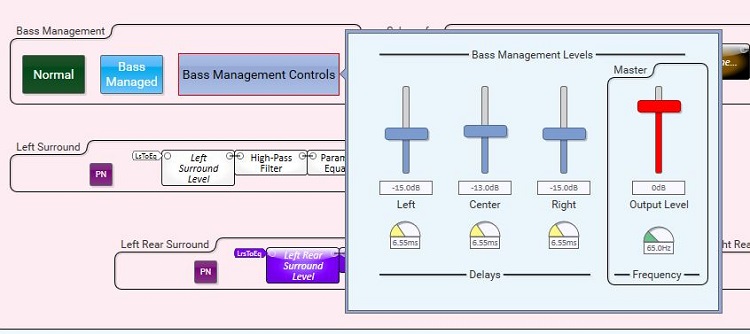
So you can quickly set the turnover frequency, level (per speaker or overall to the LFE) and any necessary delay).
I don't know if I agree with Sean on the benefits of surround LFE or not. I've had surrounds that can get down to 40Hz on their own and some people complaint that they don't hear them. If you make them mid/high centric, people notice them more even at the same SPL. I also think that one shouldn't tune surrounds to the same "X" curve as the stage. Most of what one hears from the surrounds is direct so no large-room type roll off should be applied. (and I'm sure Harold will bring up the current theory that the "X" curve has screen loss built in, but we'll leave that for another discussion). I definately push the roll off on the surrounds out further (flat to 4-8KHz and then a gentle roll). When one listens to a sweep around the room, if surrounds have the same roll as the stage, their timbre gets very dull compared to stage and it shouldn't be the case if not the opposite (they aren't playing through a sheet of vinyl).
That said, I plan to play with Surround LFE a bit to see the benefit they really bring (which I'm sure is soundtrack dependent). They are expensive and require more extensive rigging.
Posted by Sean McKinnon (Member # 612) on 02-15-2019, 11:55 AM:
I am curious what he argument is surrounding the "x" curve having screen pre emphasis built in? Since our measurement is taken beyond the screen and in the far field I can't see how the curve that we are trying to reach would have any built in pre emphasis. Now... since the mixing stage has been calibrated to the same curve and if their speakers are behind a screen I could see how there would be some HF pre emphasis in the actual content so unless your playing your screen channel information through your surrounds you should be ok!
I find that most good surrounds like from QSC, or JBL, or even Klipsch do not need that much adjustment. I have had good results from finding the surround that is closest to the "x" curve out of the box and using that trace as my "target" so that all of the surrounds have the same tonal quality without over eq'ing them.
Posted by Harold Hallikainen (Member # 5405) on 02-15-2019, 12:21 PM:
http://www.screenexcellence.com/downloads/SMPTE_TC_25CSS_B_1_oct_2014.pdf#page=87
Quoting:
The responses of the close-field microphones and the averaged close-field response of the reference cinema are far from flat. In general, the responses of the close field microphones above 1 kHz show strong similarity with both the reference position and average responses. There is a little more high frequency energy in the close field responses, which is consistent with the loss due to air-absorption as the sound travels to the audience area. In other words, the close-field microphones essentially show an X-curve with a little more high frequency response, corroborating the results shown in (2).
e) One component of the change in frequency response described in (8), apparently due to the effect of the reverberant field clearly does not occur here. There is nothing to suggest that the X-curve as measured in the room is a measurement artifact resulting from reverberant buildup; i.e. an artifact resulting from steady-state measurements of typical cinema acoustics.
In addition, venue F in the report above (a dub stage where I was there for the measurements) has a woven screen. Electronic equalization is set to roll off the highs of the screen speakers since the screen does not.
Further, a paper by Brian Long (of Skywalker Sound) and others has frequency response measurements of various perforated screens. They are very close to the X-curve.
Harold
Posted by Steve Guttag (Member # 268) on 02-15-2019, 01:11 PM:
I would say that the paper didn't look at enough rooms to draw the conclusion and I would definitely look at some extremes (large reverberant and small and dead). I have definitely seen large rooms have a steeper drop-off and if corrected, sounded very spitty. I've had the reverse true too...small dead rooms where the HF was dull.
I don't dispute the effect of the screen on the response, or what work the HF driver has to do to compensate but I think the final response is the sum of what the sound went through and by tuning to a common response (dub-stage/cinema) you have taken the screen out of the equation if both rooms have similar screens. What is left are the effects of the room's RT60 and equipment (speakers).
Posted by Carsten Kurz (Member # 5396) on 02-15-2019, 01:13 PM:
Brings us too far off the QSYS corner. But keep in mind, in many constant height/variable width installations, L and R may also suffer additionally from screen masking in flat position.
- Carsten
Posted by Steve Guttag (Member # 268) on 02-15-2019, 03:43 PM:
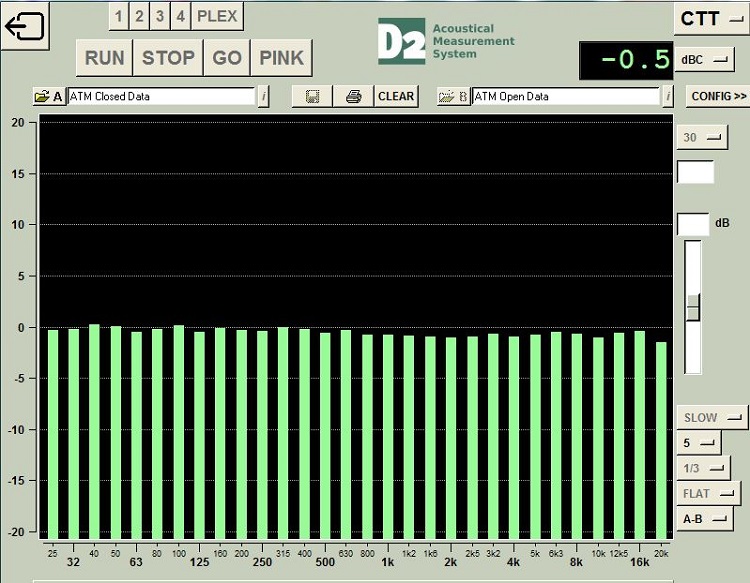
Actually, with DSP like QSYS, you could keep track of masking open/close and adjust according by format! That said, decent masking does very little attenuation. It is about .5dB overall with about a 1dB drop at 20KHz and less the lower in frequency you go.
Posted by Scott Norwood (Member # 30) on 02-16-2019, 09:37 AM:
I don't know much about Q-Sys (I still live in analog-land as far as sound systems are concerned, for better or for worse), but am curious as to what is required on the network side. Does it use IP or its own protocol? Is anything special (MTU sizes, etc.) required in the swtich configuration? Presumably, it should live on its own VLAN, correct?
Posted by Leo Enticknap (Member # 534) on 02-16-2019, 12:52 PM:
It uses what QSC calls a "Q-LAN," which is essentially a physically independent LAN, separate from the management and media networks. All the digital audio data between the core, and input and output points (cards in the core, DCIO, power amps, etc.) travels on the Q-LAN.
The core will connect to the management network as well as the Q-LAN (and is therefore device through which the Q-Sys interacts with external, non Q-Sys devices), but only Q-Sys devices should be connected to the Q-LAN. The Q-LAN uses IPv4, but the subnet is totally different from that of the management or media networks.
The Q-LAN can be redundant: you can choose to have two of them, with separate switches and cables. There are technical specifications for the managed switches in a Q-LAN, and things that have to be configured in them, for it to work. I have these in my notes from the training, but can't remember them off the top of my head. QSC also publishes a list of known good models. The bottom line is that most enterprise grade managed switches will work, but they do have to be configured to do some managing. You could be right in that enabling jumbo packets is one of those settings - I can't remember.
One gotcha, which I found out the hard way at the Egyptian, is that the hardware in the primary and backup Q-LANs have to be of the same model in order for the automatic switching to work if one fails. Shortly after the system was installed, I got a panic phone call: all the stage channels had gone out. This system consisted of power amps for the stage channels behind the screen, and for the surrounds in the booth. The Q-LAN was redundant, with switches in the booth connected to switches behind the screen using two separate fiber runs.
To cut a long story short, it turned out that the model of fiber transceiver being different in the primary and redundant Q-LAN switches at the stage end was what prevented it from changing from the primary to the backup automatically when the power supply board in the primary Q-LAN switch at the booth end failed.
Posted by Steve Guttag (Member # 268) on 02-16-2019, 01:19 PM:
It uses standard IT stuff...BUT...there are criteria for a successful implementation. The chief of which is a strict QoS policy (Strict Priority) to ensure that audio always gets through in a timely fashion. That said, the more things you do to let QSYS live in its own world, the better. I have completely separate networks for it. In particular, I tend to have QLAN-A only have QSYS devices on that network.
Once configured (IPs set), there is no need to communicate, directly, with a QSYS device besides the CORE. Larger COREs like the 510 have 3 NICs so one can have two QLANs and a separate AUX NIC to be on your control network.
QSC has documented the requirements and suggestions for the network and network switches. QSC also has preconfigured switches (OEM by Dell that QSC supports directly).
For fun reading here are some links to the QLAN specifications/recommendations that might make sense to you:
https://www.qsc.com/resource-files/productresources/dn/q_dn_qlan_notes.pdf
https://www.qsc.com/resource-files/productresources/dn/3rd_party_control/q_tn_sys_dn_qsys_switchtesttopology.pdf
https://www.qsc.com/resource-files/productresources/dn/3rd_party_control/q_tn_sys_dn_qsys_generalswitchrequirements.pdf
https://www.qsc.com/resource-files/applicationguides/systems/q_ag_sys_dn_qsys_vlan.pdf
Leo..Jumbo packets are to be avoided on a QLAN to avoid timing issues.
So I'm guessing that nobody tested your redundant system before it was actually needed? I know that I've always checked mine on installation to verify good fall back (device by device too).
Posted by Leo Enticknap (Member # 534) on 02-16-2019, 01:41 PM:
I didn't install it (I was just an end user, not an installation tech, at that point, and had not done any formal Q-Sys training: I since have), but was assured that both the primary and backup Q-LANs had been tested. However, I have a strong suspicion that while they had been tested independently, automatic switching between the two had not: at least, not that specific cause of failure.
All the switches involved were of exactly the same model and hardware revision, and QSC-approved: it was just the fiber transceiver module in one of them that was different to the other three. When we replaced that with the same model as the others, we simulated the failure again with a DCP playing (by pulling the power cord from the switch that had failed, which by then had been replaced with an identical, new one), and the fallback didn't even interrupt the audio playback.
Posted by Sean McKinnon (Member # 612) on 02-19-2019, 12:24 PM:
I have heard claim that Q-Lan does not need to be its own separate V-Lan and can share with Dante and regular TCP and UDP traffic. I usually V-Lan but in a recent small install I did not. The management and Q-Lan networks for this single screen live together and they are just fine. FWIW YMMV
Posted by Steve Guttag (Member # 268) on 02-19-2019, 02:49 PM:
I'm willing to let LAN-B in a redundant network system live on the "Management" (or Control network) but I'll always let LAN-A be an island.
My other thought is to use the router to allow automation commands to go to/from QSYS and the Management network. CORE's can even have persistent static routes put in them via Configuator.
Posted by Greg Routenburg (Member # 1742) on 02-20-2019, 12:45 PM:
Being new to the whole Q-Sys world, it sounds highly intreguing. Steve, what training would you recommend for a beginner to Q-Sys to get a solid understanding of how the system works and what it can do?
Posted by Steve Guttag (Member # 268) on 02-20-2019, 03:39 PM:
That's an easy one. QSYS Level-1 training! It is right on their site.
https://training.qsc.com/mod/book/view.php?id=28
That is going to show you the basics of what it can do. There are also quick-start tutorials (on line) and there is a level-2 Cinema training but that is an in-person event that you'll likely need to travel to (their main office for QSYS is in Boulder, CO but they also have other training events in other locations, you'd have to check with QSC on that (I went to one in Costa Mesa; I think it was their first one and, in my opinion, they were still figuring out the course and convolved it a LOT with a dealer prep for the product line).
Posted by Steve Guttag (Member # 268) on 02-23-2019, 09:10 PM:
Q-TIP:
The CORE 110c (and 110f) may be the most economical core, has 8 mic/line inputs, 8 flex channels (can be any combination of inputs and outputs) and 8 outputs, handles 64-streaming channels and up to 128 inputs and outputs but a potential "gotcha" is the inputs (both flex and regular) used exclusively on the CORE 110.
If you are feeding it (and again it is only from its own inputs, not any other peripheral) an unbalanced signal, it has a hard ceiling of +8dBu. (This does not affect balanced signals, which can go up to +21dBu).
Why can this be a gotcha when most unbalanced sources are -10dBV? Well, for one -10dBV = .316V = -7.79dBu (consumer is based on a 1V reference, professional is based on .775V reference so pay attention to the little letter after the "dB").
If your source can play +20dB from its reference (say a CD or Blu-ray player), then you have the potential to hit 12.21dBu unbalanced! That will clip the inputs. So you may need to lower the output of your unbalanced device by 5-6dB. You can get that gain back within the core by raising preamp gain (sensitivity), if needed. Sure it isn't the most ideal situations but the noise specs are so good on the core 110, you aren't going to take a big hit. Remember that is a mic/line preamp, it is fully capable of amplifying a microphone 10s of dB lower in level.
The other potential source for cinemas is a film sound processor. That overwhelming majority of (film) cinema processors are unbalanced (all Dolby processors except the CP650), All USL processors before the JSD series, all SMART processors...etc. So, if you have one of the various digital sound formats, you have to pay attention to levels too. Note, cinema marched to its own tune and typically used a reference level of 300mV (-8.2dBu). So again, lowering your level by 5dB or so should scoot the signal in without clipping. Note too, Dolby digital only went to +18dB so you could merely lower things by 2-3dB and be safe. I don't know if DTS went the full +20dB over reference. Better to play it safe and drop the level and make it up on the preamp.
USL processors like the JS-280 used a .775V reference (0dBu) and unbalanced so you have to go lower for them, if using them.
Again, the balanced processors, like the CP650, Panastereo and JSD80 can use the full 21dBu capability of the input...which will be right there with 0dBu reference level, they will get to +20dBu
Note, if you are using a DCIO (-H) with the core 110, its stereo unbalanced (TRS) connector is good up to +15dBu so it isn't an issue. And, if you are using one of the mic/line inputs on one of the DPA-Q amplifiers, again, the input stage is different and can handle unbalanced signals just fine in the levels we would typically use.
Posted by Steve Guttag (Member # 268) on 04-26-2019, 10:33 AM:
Has anyone out there integrated an IMS3000 with Q-SYS (or probably a CP850 would work too)?
In particular, I want to sync up the faders between the IMS3000 and a fader (gain) in a Q-SYS design such that no matter where the user makes a change in the fader, they BOTH track with each other.
If so, are you willing to share your design (script/block controller)?
Posted by Jay Wyatt (Member # 8768) on 04-28-2019, 11:26 AM:
Steve,
I don't have an IMS to test on or even the API for it but if Dolby kept their command syntax (ims3000.sys.fader) the same then this is a fun exercise for the Block controller component.
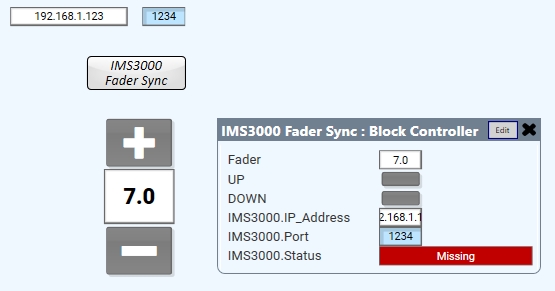
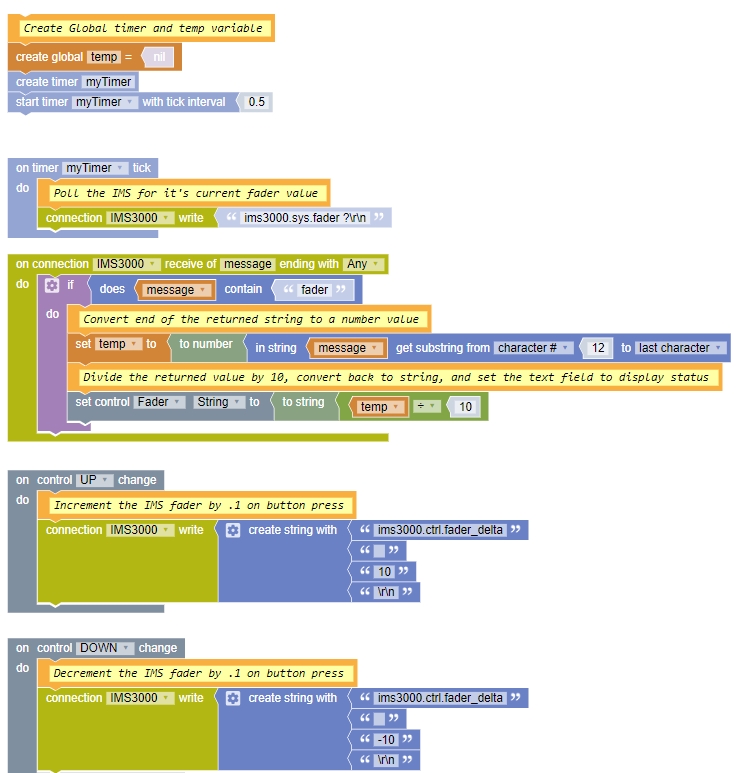
In theory (again, I haven't tested this) this would poll the IMS every half second and display it's current 0-10 fader value. It would also let you bring it up or down from a touch panel or iPad interface.
Posted by Steve Guttag (Member # 268) on 04-28-2019, 11:52 AM:
Thanks Jay. I pretty much follow what you did. I'd probably have to add to that since there will be a slide fader (and the knob on the DCIO-H) that has to integrate with it too.
I'm sure it will take the form of on change with that fader, write the resulting level, in string form, to the IMS3000.
This is definitely some good shoulders to stand on, thanks!
Posted by Bruce Cloutier (Member # 9615) on 04-29-2019, 09:28 AM:
Do the mechanical sliders track the virtual volume setting if changed externally? I am just curious if the faders are motorized on the IMS or CP? It's just something that we felt would be important in applications for the JNIOR in the stage lighting world (DMX). Most high-end lighting consoles move the physical sliders for instance when pre-programmed scenes are selected.
We've got projects underway wherein volume can be controlled via the browser working with the JNIOR Web Server. That would need to work if volume is then adjusted on the audio gear.
Posted by Steve Guttag (Member # 268) on 04-29-2019, 10:55 AM:
The IMS3000 is all virtual (only has a WEB-UI) so there are no actual knobs moving. But if it was a more conventional CP like the CP750, CP850, CP950, then while no mechanical knob movement would happen, I would want the levels to track...if you move the level on the unit, we would reflect it on the display, or if you moved it within a touchscreen, the CP would react accordingly.
Posted by Harold Hallikainen (Member # 5405) on 04-29-2019, 11:58 AM:
The actual level control is happening in the external sound processor, right? The IMS is only sending commands to that external processor and polling it to see what the current level is in case someone changed it there. On "moving pots," most, if not all, sound processors use a quadrature encoder for the fader knob, so there is no need to move it if a level is changed somewhere else. Instead, a display next to the knob is updated to show the current level.
By the way, the JSD-100 and JSD-60 have commands that return a bit mapped value of changes so you don't have to poll a bunch of stuff. Instead, you just poll Delta Bits. For example,
jsd100.sys.delta
Returns an unsigned decimal representation of a 32 bit bitmap of what has changed since the last read of delta, then clears delta. A separate delta is maintained for each connection to the JSD-100. The bit indicated in the list below is set if that parameter has changed.
0 - Bass
1 - Back Surround Source
2 - Equalization
3 - Channel Configuration (LC/RC versus BSL/BSR)
4 - EQ Set
5 - Fader Level
6 - Fader Preset (one of the fader presets was changed
7 - Generator (on/off, frequency, etc.)
8 - Headroom Setting
9 - Input Mode (format select)
10 - Input Mode Name (displayed string for a format)
11 - Input Trim
12 - Mute
13 - Output Trim
14 - Parametric EQ (something was changed)
15 - Surround Delay
16 - Sync Delay
17 - Treble
18 - AES error code
19 - A new message has been saved using jsd100.sys.message
20 - The sleep state changed. Either the system went to sleep or it woke up.
jsd60.sys.delta
Returns an unsigned decimal representation of a 32 bit bitmap of what has changed since the last read of delta, then clears delta. A separate delta is maintained for each connection to the JSD-60. The bit indicated in the list below is set if that parameter has changed.
Bit Meaning
0 Equalization
1 Fader Level
2 Fader Preset (one of the fader presets was changed
3 Generator (on/off, frequency, etc.)
4 Headroom Setting
5 Input Mode (format select)
6 Input Mode Mix (input source mix for a format)
7 Input Mode Name (displayed string for a format)
8 Input Trim
9 Mute
10 Output Trim
11 Channel Delay (normally used as surround delay)
12 Sync Delay
13 XO - A change was made in the crossover, including enabling or disabling (jsd60.sys.biamp)
14 AES error state changed. This is set if digital data appeared or disappeared on the current format. AES/EBU checks L/R (SRC 1). Everything else checks SRC 4.
15 Channel phase or band phase changed.
16 Channel mute or band mute changed.
17 Channel name changed.
18 Input source changed (jsd60.sys.input_source FormatIndex source)
19 Active Matrix changed (jsd60.sys.active_matrix FormatIndex 0|1 )
20 Channel Filter changed.
21 Fade Up or Fade Down rate changed.
22 A BLU link setting has changed.
Harold
Posted by Steve Guttag (Member # 268) on 04-29-2019, 12:23 PM:
Harold,
The IMS3000 is a combination server and sound processor all rolled into one.
In a more complex system, like the one I'm currently working on, more than DCP audio has to be considered (e.g. Dante). I don't want multiple volume controls, necessarily, based on the input path of the audio so I'd rather have the volumes track so there is the one master volume (one can always put in trims to balance things out the way they want them).
Dolby has done "delta" commands too so one can increment "0.1" if desired.
The goal, for me, on this project, is that there be ONE volume control even though there really are going to be, at least, 2, but to the user it should "feel" like there is just the one.
Posted by Harold Hallikainen (Member # 5405) on 04-29-2019, 01:22 PM:
thanks for the clarification! Note that the JSD delta command is a method of identifying what has changed instead of changing anything itself.
Harold
Posted by Carsten Kurz (Member # 5396) on 04-30-2019, 06:07 AM:
That delta read is nifty feature...
- Carsten
Posted by Steve Guttag (Member # 268) on 04-30-2019, 06:40 AM:
Note, Jay's post above will not apply to the IMS3000 afterall. The IMS3000, presently, does not support conventional ASCII commands. It instead uses only a WEB based API from likes of WSDL (SOAP). This is something I'm completely unfamiliar with. Note, what Jay posted should work for a CP850 though.
Posted by Leo Enticknap (Member # 534) on 04-30-2019, 02:38 PM:
Which is great, because I have a customer who wants a CP8850 fader on his Q-Sys UCI.
Incidentally, I just hit an interesting bug with version 8.0. After installing it, if I edit the shortcut that the installer puts on the desktop to add the /cinema suffix, that shortcut won't start Designer in cinema mode (the cinema-specific peripherals don't appear in the list of inventory items, and 110c and 510c don't appear in the core model pulldown).
However, if I create a new shortcut from scratch with the suffix in the command line, it will - all is good. Both shortcuts are identical (apart from their names), down to their size in bytes, but one will not start Designer in cinema mode, while the other will.
I have now replicated the same behavior on two Windows 10 PCs, so it isn't just a fluke with one computer.
Posted by Steve Guttag (Member # 268) on 04-30-2019, 07:15 PM:
I just got word from Dolby, the IMS3000 DOES have an unpublished ASCII (or Hex if you go that way) command set and it does follow the CP850 command structure. Use port 61408.
The IMS3000 will be a subset of the CP850 commands. The presets are not included. Now one could create a set of triggers/macros to allow external command to change presents. Once I have unit, I'll experiment a bit.
Posted by Steve Guttag (Member # 268) on 06-22-2019, 12:12 PM:
I've been working with an IMS3000 and Q-SYS and can confirm that volume and mute can be monitored and adjusted via Q-SYS.
The Block Editor that Jay posted above is close but not quite correct but it is VERY close. The CP850 and IMS3000 commands do not put the model of the processor in their commands so a fader query is "sys.fader ?\r\n" and note the space before the question mark. Likewise setting the volume to 7.0 would be "sys.fader 70\r\n"
There are no "delta" commands that I've found or have been told about however it is a simple matter of keeping track of the current fader level:
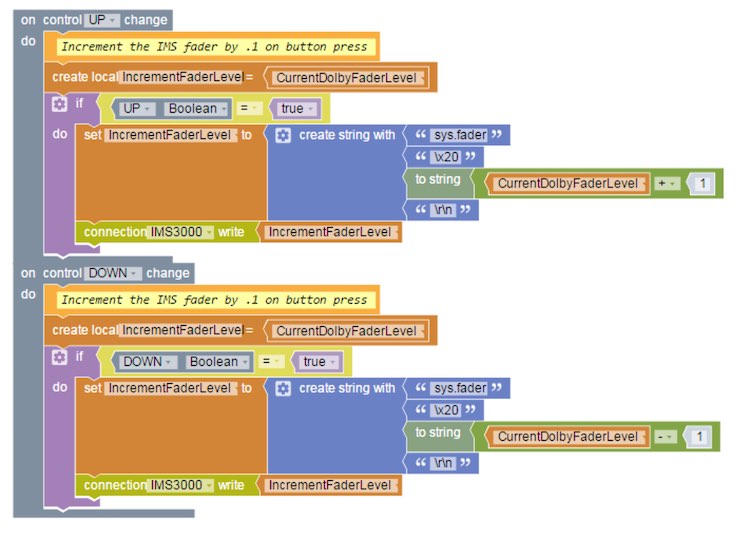
I'm still working on the full Block Editor for this but will make it available once I'm done. It currently will track volume/mute allow a direct entry (if you are using a UCI Viewer or Web-UCI) as well as allowing a normal QSYS fader/gain control to ramp it up/down. I'm adding in a press/hold on the +/- buttons to allow for more rapid changes rather than having to just repeatedly press them as well as a jump to 7.0. Both 0-10 as well as dB scales will be available at all times and the dB vs 0-10 follows the Dolby fader characteristic precisely throughout its range.
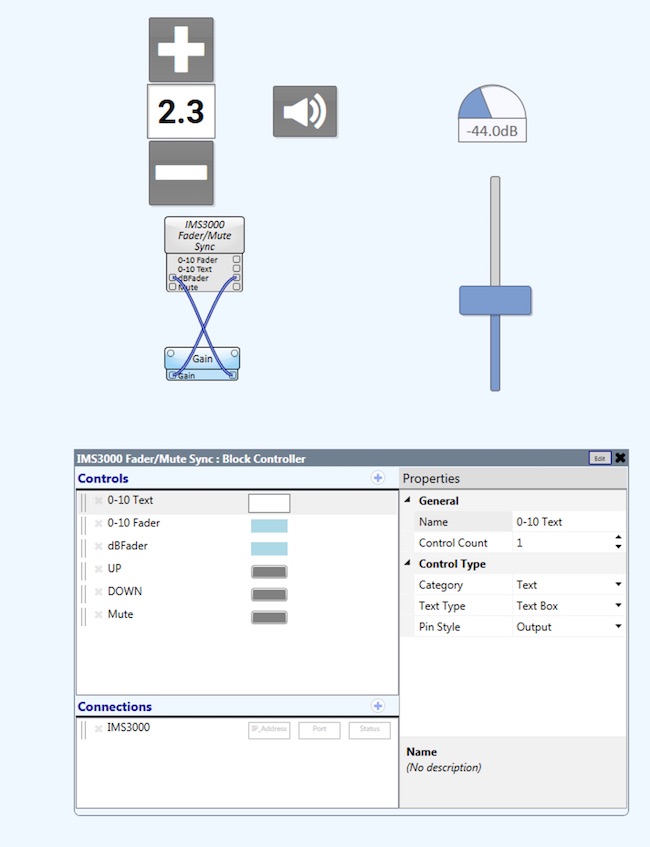
Also, I've been working withe Crestron HD MD6x2-4K-E matrix HDMI switcher and have a working user component of that.
There is the literal translation of the device done by "others":

And there are my versions which are more suited to my uses.
The first version uses separate "LEDs" for output 1 and 2 so visually, you know what input is going to what output. Additionally, at the outputs, it tells you textually what is currently active.
It should be noted that the text boxes self-populate from the switcher itself and it is bi-directional. If you type in what the device is (as I did for Blu-ray and Laptop) it will update the switcher.
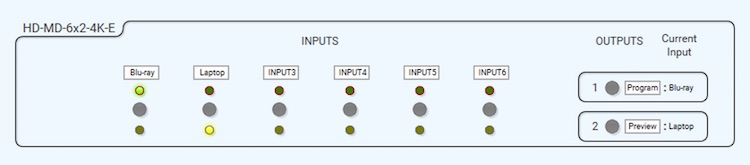
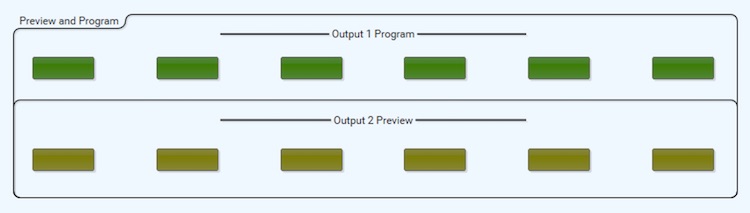
The other way I've configured it is letting each button automatically select the particular input to a particular output in one press. These buttons also self-populate with their labels. The idea here is you can set up a "Preview" monitor selector and a program selector. And, depending on how one set up their UCI, it will be a "preview" and "Take" button for easy and logical switching.
Posted by Marco Giustini (Member # 4544) on 06-23-2019, 05:10 AM:
Steve,
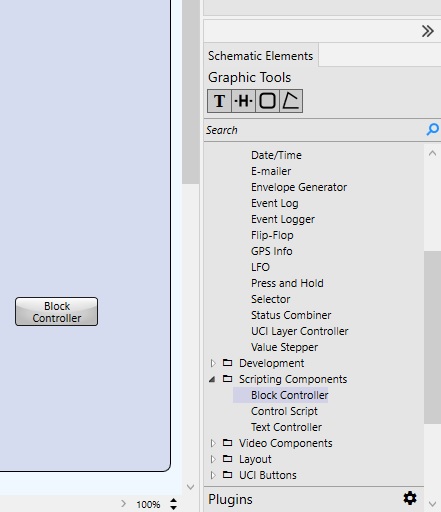
Sorry for the silly question: where in Q-Sys designer do you find that facility to program the automation as in your screenshots?
Posted by Mattias Mattsson (Member # 4308) on 06-23-2019, 06:09 AM:
quote: Steve Guttag
There are no "delta" commands that I've found or have been told about
It's been a while, but I believe that at least for the CP850 the delta command is ctrl.fader_delta
Posted by Leo Enticknap (Member # 534) on 06-23-2019, 12:31 PM:
quote: Marco Giustini
...where in Q-Sys designer do you find that facility to program the automation as in your screenshots?
Posted by Steve Guttag (Member # 268) on 06-23-2019, 12:55 PM:
The silly questions are the ones not asked.
Starting with Designer 7.0.0, QSC has added their Block Controller to the "Scripting" components:
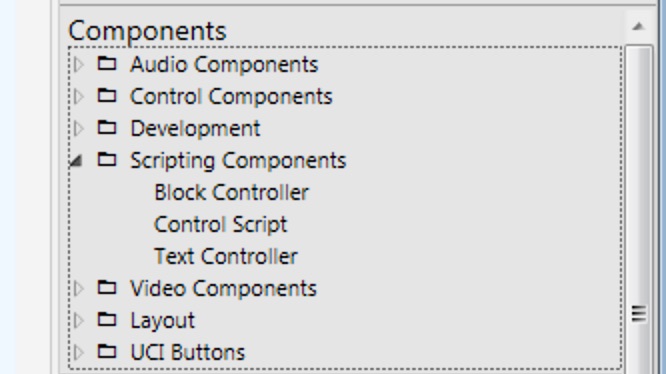
Note, for any system shipped before April of 2018 (pre "c" series of cores like the 110c and the 510c), that shipped with version 6.x or lower, this is a completely free upgrade (like all other scripting and UCI tools). However, any system shipped after 4/2018 (includes all "c" series cores and any core that came with version 7.0 or later) then the Block Editor and all other scripting tools need a scripting license (per core but it is a lifetime of the core type license).
The Block Controller is a handy tool for making scripts because you never make a typo and if you, like me, are not nearly fluent in LUA scripting, getting syntax right can be half the battle. The down side is that if they haven't put the block you need for a particular function/command into the Block Editor, you will be back to using LUA scripts (including from within the Block Editor).
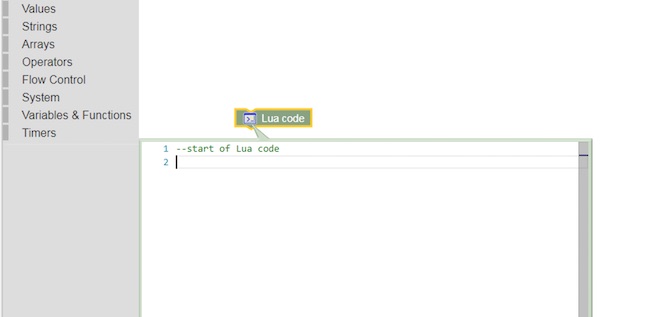
So using the Block Controller doesn't constrain you from using LUA or some command not created as a Block by QSC. Furthermore, the Block Controller creates a Lua script with perfect syntax that can be cut/pasted or edited though once converted to Lua and edited, there is no going back to the Block Controller with that edited Lua script.
I supsect that if you are talented with Lua scripting, the Block Controller is like being forced to always use a mouse/menu system when a command line interface would be faster. But, if you want to "bang out" an interface, it is going to be the faser/easier means to do so. They have some nifty tools to parse out reply strings to get at the information that is important in the response.
So, in Lua Scripting, my "UP" function block above would look like this:
Controls['UP'].EventHandler = function()
-- Increment the IMS fader by .1 on button press
--[[
Increment the IMS fader by .1 on button press
--]]
--
local IncrementFaderLevel = CurrentDolbyFaderLevel
if Controls['UP'].Boolean == true then
IncrementFaderLevel = table.concat({tostring('sys.fader'),
tostring('\x20'),
tostring(tostring((CurrentDolbyFaderLevel + 1))), tostring('\r\n')})
IMS3000:Write(IncrementFaderLevel)
end
end
And that Lua script was created by the Block Controller, I didn't have to type it.
For more information on the Block Editor, I suggest checking out QSC's "quick start" videos:
https://training.qsc.com/mod/book/view.php?id=1055
Also, they have a Control 101 training online (Q-SYS Level 1 training, also on line, should be the FIRST level of Q-SYS training. After Control 101, there is a Control 201 held in Boulder, CO (and likely other places around the world) geared towards people making scripts.
https://training.qsc.com/course/view.php?id=58
Mattis, I can't say for sure on the CP850, but that command does not work on the IMS3000. The CP850 documentation also does not list that command. It isn't really a big deal since it is easy enough to read the current level and then increment/decrement from there.
Posted by Marco Giustini (Member # 4544) on 06-25-2019, 04:28 PM:
Thanks Steve!
Posted by Jay Wyatt (Member # 8768) on 08-06-2019, 12:20 PM:
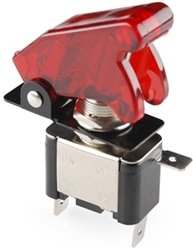
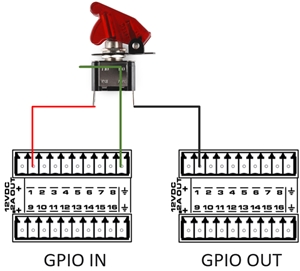
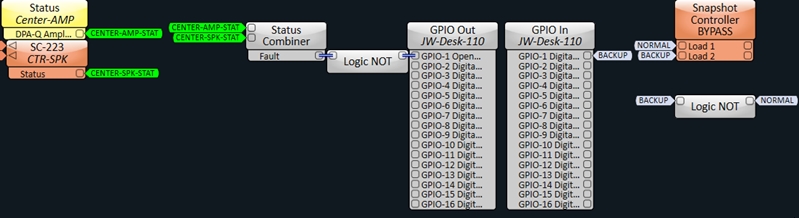
Here's a little logic and GPIO exercise to setup a Bypass Mixer w/ feedback controlled by a $3 LED illuminated missile switch.
1) If either the Center Amp or Center speaker health goes to fault mode(open, short, or low impedance) light up the RED LED on the missile switch. This shines pretty bright so you could see it glowing in a dark booth.
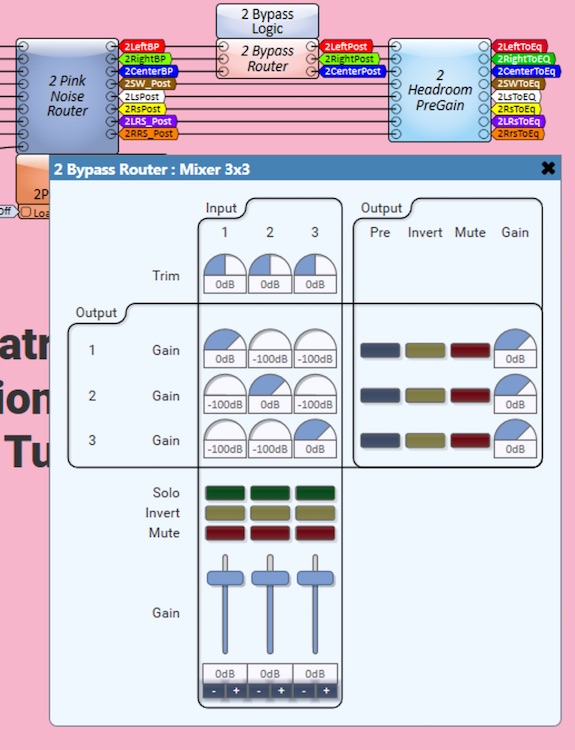
2) If the switch is flipped to the ON state, trigger a snapshot for "BYPASS mode". When enabled, Bypass mode mixes Center channel into Left and Right speakers. This is handled with a 3x3 mixer and snapshot controller. OFF state of switch returns mixer to normal 1:1 operation.
Posted by Steve Guttag (Member # 268) on 08-26-2019, 07:46 AM:
Note, Jay's post above represents a solution that does not require a "UCI." One can provide the bypass switch without a touchpanel or other form of UCI (UCI viewer, Web-UCI, now available in 8.1).
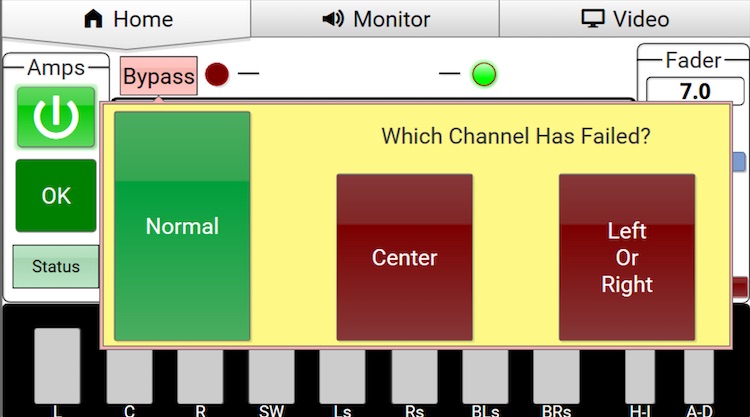
If you have a UCI, a bypass is easy to implement. :
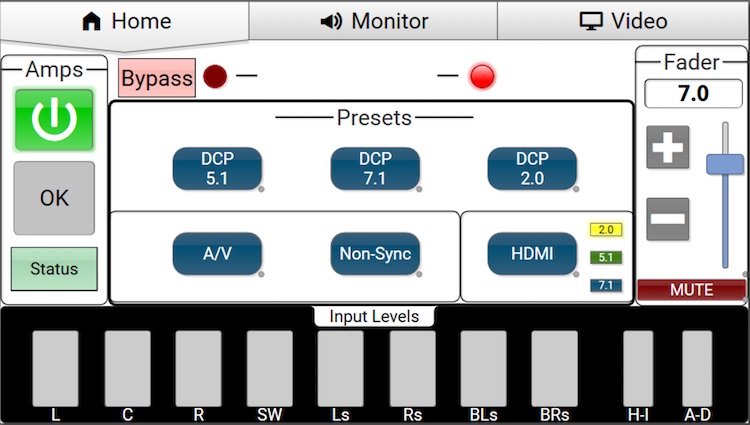
Pressing the Bypass "button" opens up a window:
This is controlling a matrix mixer at the appropriate point in the signal path:
As some my know, one of my "things" is that the dB fader, while handy/appropriate within the signal path, has no place in a user interface where it merely represents "Volume." People do not think in a logarithmic fashion. They think linearly. Ask even a technician what a "little quieter" is when the fader is at 0dB and the answer you get will vary greatly from tech to tech. Regardless of which answer they give, give them the same question from say -6dB. If they give you the same amount, they don't understand how audio works. The log scale doesn't have a fixed slope, by definition.
Conversely, most anyone can relate to a 0-10 scale (or 0-100, if you prefer). If 7.0 is too loud, then 6.5 is going to be a good try. A linear control has the logarithmic part "cooked" in already.
With Q-SYS, you can have it your way. If you really like the dB scale, that is native to the product. However, if you want a linear scale, you can create that fader as well.
A more sophisticated and capable version (be able to interact with several components at once, have bi-directional communication...etc.) is going to be of the form of a script or "block controller" This is one I created that can work with a linear in/out, dB in/out and has a dedicated set of control pins to work with QSC's DCIO front panel fader (so you can have multiple faders active, like the front panel AND a fader on the UCI) as well as text control (one could key in the desired level if on a suitable UCI). I ran into a complication because I have each format in my system have its own fader that is recalled via format selection. Stringing multiple faders could get jitter in the line. Giving the DCIO its own "fader" to talk to cured the jitter problem.
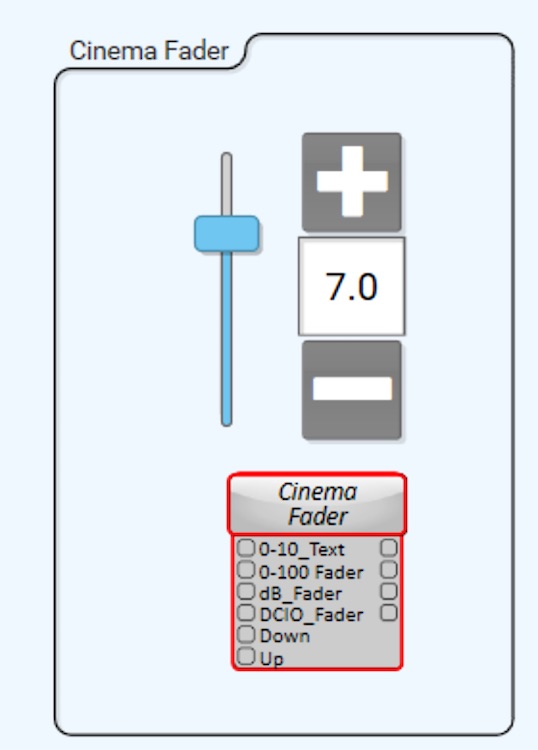
However, if you just want a simple linear fader that follows the "Dolby" fader characteristic, you can do it in Q-SYS without scripting (which requires licensing). Just use the appropriate control components.
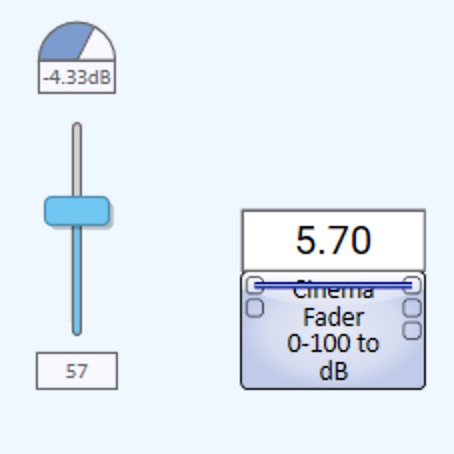
There is a link "wire" in the one above to tie the dB out to the dB in so that it does the full translation linear to dB and dB to linear to generate the display. Depending on the need, the link can be omitted and the fader inserted at the appropriate point in the design or it can merely be "The" fader and the output connected as needed. dB, 0-100 and text input/output are available.
Doing it without scripting is a bit ugly but hiding it in a container cleans it up :
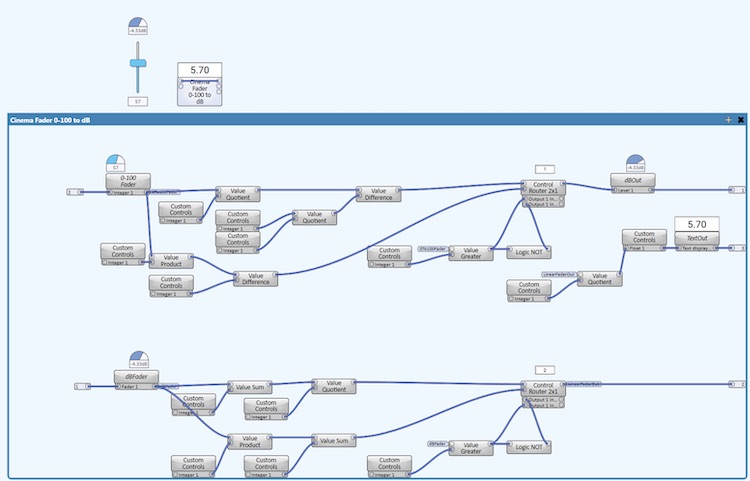
Posted by Steve Guttag (Member # 268) on 08-29-2019, 10:54 PM:
Heads up on Q-SYS 8.1.0 and Custom Voicing modules. If your design is using them, and you are using the high-pass filter on your LF cabinet or subwoofer, it probably doesn't resemble whatever you entered in.
If you must use 8.1.0, a work around is to put a HPF upstream and bypass the one in the voicing module.
I didn't notice any ramifications on the other bands of a multi-way speaker but decided to roll back to 7.1.2 rather than experiment (I didn't have the time).
Posted by Steve Guttag (Member # 268) on 08-30-2019, 03:21 PM:
Update...the problem mentioned above with the HPF in Custom Voicing only seems to affect components using DPA amps. However if used as an "in-line" the problem is not there. QSC tells me that they are on it and have verified the problem (they are the ones that informed me that in-line components nor intrinsic corrected components are affected; just custom voiced the "regular" way are).
Posted by Steve Guttag (Member # 268) on 09-17-2019, 07:47 AM:
Hey, check out the latest addition to Q-SYS and Cinema. In "Asset Manager" one can now download a sample 7.1 cinema design. I believe you have to be using Designer 8.0 or later to load it.
It may not be exactly what you want or need but it is a great starting point and really shows off how neat and clean a design can be:
The UCI Home Page:
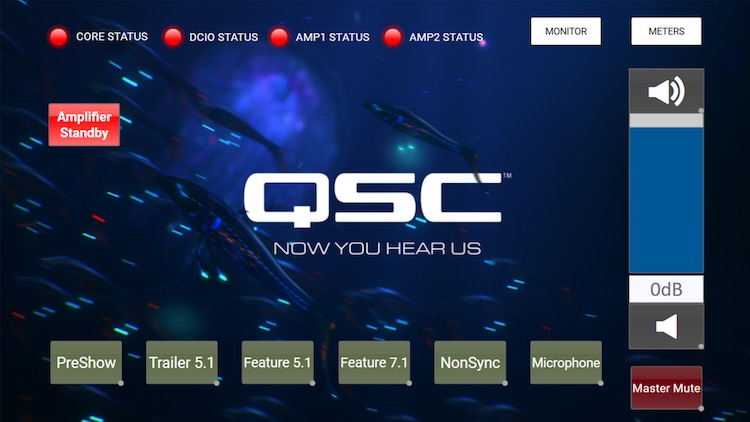
The Schematic:
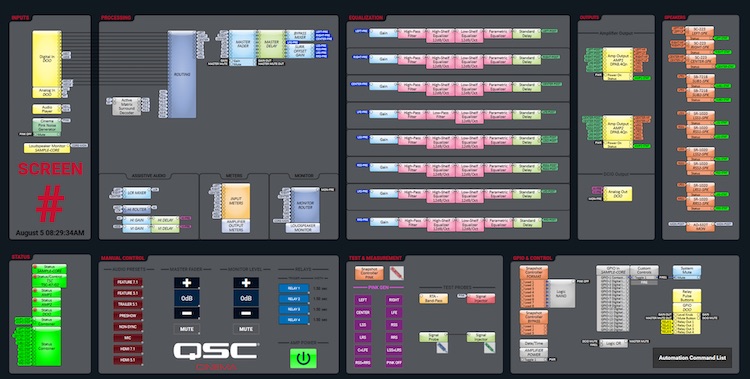
And the best part is, if you think you have a better idea of what the UCI should look like or want to recreate your favorite sound processor, you're just some drag-n-drop type actions away.
The design only uses 11% of the CORE 110c resources so you could conceivably use this design on several screens using a single CORE (though I'd recommend CORE redundancy if going beyond a single screen as well as network redundancy...both are easily accomplished).
Posted by Brad Miller (Member # 2) on 09-17-2019, 09:45 AM:
That's nice to see a "starting point". First thing that has to go is that silly fader in db though.
Posted by Marcel Birgelen (Member # 6801) on 09-18-2019, 02:20 AM:
Because Dolby's non-linear scale is so much more descriptive? ![[evil]](graemlins/evil.gif)
Sorry, being pedantic for sake's sake... ![[Razz]](tongue.gif)
But I don't mind to have them both, a Dolby-type fader and something that gives me dBs.
Posted by Steve Guttag (Member # 268) on 09-18-2019, 06:15 AM:
There; all fixed:
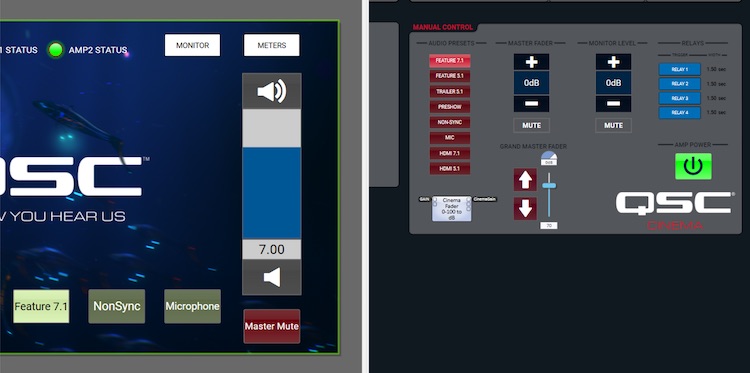
This is using my "logic" version of the Cinema Fader that does NOT require any scripting.
In all seriousness. This example is part of the point of the template. So you don't like some aspect of it...CHANGE IT...make it your own and let that be the template for your next project but you didn't have to start from scratch. Sometimes, it is a lot easier to stand on someone's shoulders to get a start.
As for dB versus linear, it all depends on where you are in the audio chain and who is operating it as to what makes the most sense. There is no 100% correct answer there. I maintain that for interaction with the END-USER, linear is almost always the better choice. For internal controls, precise level adjustments, dB is almost always the better choice. Using a dB type fader externally tends to force one into the small area at the top end of the scale because audio works logarithmically. The linear fader has the log part cooked into it.
Graphically, let's use this interface as an example.
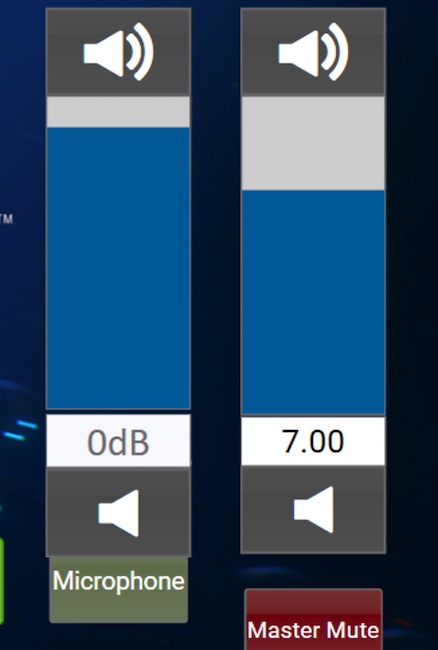
At reference:
And at 4.0 (a rather low volume level but one, unfortunately, one I see a bit too often):
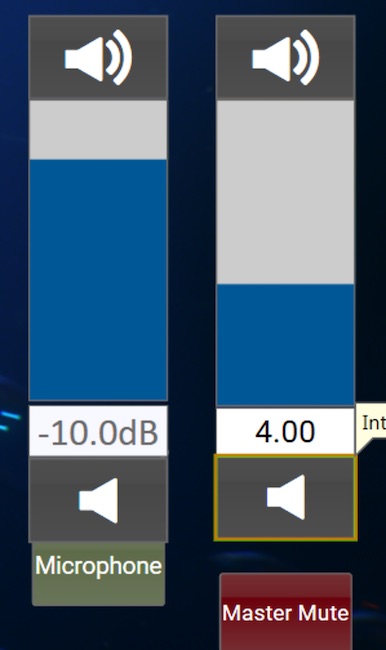
On the dB scale, you've compressed the area of interest into that tiny sliver at the top end of the scale. You might as well never show the bottom 2/3rds of the range. There is a reason why in the analog days they made "audio taper" pots and one didn't use linear...because you compress your useful adjustment range into a small portion of the range.
Both of these faders go from -90dB to +10dB but the linear one puts the area of interest over most of the range. From a user standpoint, it is MUCH easier to figure out. Moving from say 7.0 to 6.5 is simple. How many managers would intuitively do the mental conversion (because that is what it is) to adjust the dB fader to -1.67 dB? Still too loud? Move to 6.0 or -3.33dB (which is an approximation using a straight line approximation of the logarithmic slope; it should be increasing it's rate of decline as you go). You are wanting non-technical people (and even technical ones) to work constantly in negative numbers and throwing in fractions on top of that. That isn't part of their normal world. In this country, we tip at most sit-down restaurants. Ever see the scramble of how much to tip because they are figuring out the 10-30% range (people have their own philosophies about tipping, in general and what is a fair amount is a subset of that). Fractions are not easy for people that don't work with them or think "that way." I see people using cards, calculators (in their phone now).
In any event, with Q-SYS, you can have it YOUR way...whatever way that might be!
Posted by Steve Guttag (Member # 268) on 10-01-2019, 10:24 PM:
Update:
QSC has released 8.1.1, which should address the Custom Voicing issue I mentioned earlier in this thread. In other news QSC has acquired Attero Tech, which has been a source of I/O modules that have "plugins" for Q-SYS. This should also expand the ecosystem that Q-SYS can provide if you need some form of audio I/O in your design.
Posted by Steve Guttag (Member # 268) on 11-26-2019, 08:51 PM:
QSC has released version 8.2.0 of Designer. This marks the first version that has a CMS5000 inventory item. I suspect that this is a beta version or one not fully fleshed out.
There isn't a help file for it yet and while the properties implies it can have up to 70 channels (Atmos/DTS-X), for now, that parameter isn't editable but you can see where they are going with it.
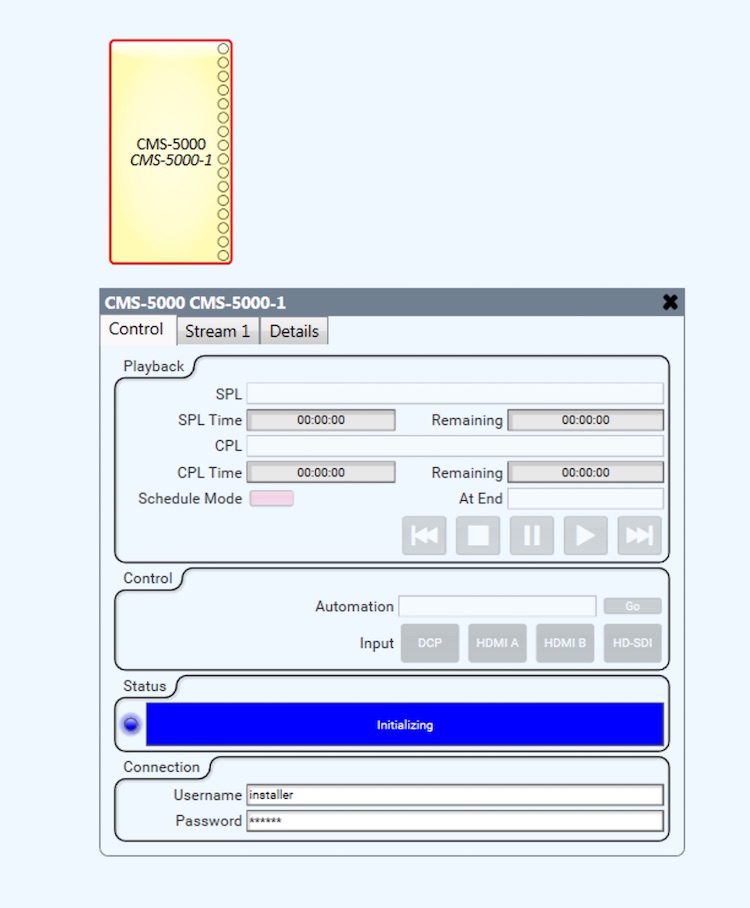
Note the 7.1 sample design doesn't install into 8.2 sample design folder on its own, it would appear...if you remove it and install it from Asset Manager, it shows up in the sample design folder.
Posted by Steve Guttag (Member # 268) on 11-29-2019, 12:33 AM:
My suspicions were confirmed...the CMS5000 component wasn't supposed to be in this release so I would treat it as a pre-beta and probably not include it any current deployments. But with it, it is easy to see where they are going with it and with the information that one can see, it would appear that quite a bit will be able to be accomplished within a Q-SYS UCI.
It looks like one will be able to not only control transport but also see/control what is going on SPL wise and inherently trigger something via the SPL ending. Clearly, they are moving Q-SYS closer and closer to being a DCinema automation system too.
Note, the second time I played with it, I didn't have a problem increasing the channel count so perhaps that was a bug or it opened up funny for me the first time.
It looks pretty interesting to me.
Posted by Steve Guttag (Member # 268) on 12-10-2019, 07:29 AM:
Moving from Random Pictures in Yak:
quote:
I hadn't noticed the 4732 / 4372 typo myself - was working under deadline pressure on Friday.
Before anyone asks, I also don't know why JBLs were chosen for the stage channels and QSCs everywhere else. This is an upgrade of an existing, operating screen from 5.1 to Atmos, so maybe the JBLs are already there for the stage channels, and are being recycled into the new system. I was simply given the DARDT and told to come up with a Q-Sys design in which a Core 110c effectively takes the place of the DAC3202. In other words, all the real processing work is taking place in the CP850 upstream of the Q-Sys core.
I included the amp settings snapshot bank, so that when it comes to tuning, the power amp channel gains can be adjusted in order to get the levels roughly right, and in the case of the bi-amped channels, the LF and HF roughly equal with each other, before letting the Dolby Atmos Designer autotune procedure have at it; and then those gain settings can be saved, independently of any other settings changes made to other components in the design. I also included a parametric EQ for each channel, so that I can iron out any serious rough edges in the X-curve before the autotune, to reduce the amount of judgement that the algorithm, rather than human ears, will have to apply. The crossover snapshots are so that if any tech wants to play with the crossover points in future, (s)he can use the 2 and 3 slots for temporary experimentation purposes, without losing the setting that was in use before starting.
I hadn't thought of going as far as custom voicing with the stage channels, but might resort to that if I can't get them to behave themselves when it comes to the tune.
Interesting. So you are using snapshots as a formal multiple save settings save. That is, once the system is calibrated...if one wants to experiment, they can play with it and then with a press of a button get back to the previous settings.
Whereas I start each tuning session by saving the design with a new unique name, I consider that file my way "back" to where it was. This comes from doing numerous studio screenings and ensuring that I can always return a system to how I found it. I often give the client the option of keeping what I've done versus the way it was. Unless they have a strong preference, I always put it back to how I found it.
I question the person that does the diligence to save their snapshot and the next person to not accidentally overwrite it. If I were to do something like that, I would definitely rename the buttons to what they are and "hide" (not bring out) the save button for the one snapshot I want as the reference to avoid accidents.
As for using JBL stage speakers and QSC everywhere else. I suspect your guess is correct...they existed, the customer probably was happy or happy-enough with them and could save thousands of $$$ to not replace them for brand uniformity.
That said, I have not found that any manufacturer has a lock on all speaker types, QSC and JBL included. They both have excellent speakers of various types. I have strong preferences for particular make/models in various roles. So it is not uncommon, in systems I've designed to have multiple brands.
As for Custom Voicing...that is definitely the way to go. It doesn't replace having PEQ and the like on each channel as a custom voicing will affect all speakers equally without regard to boundary conditions (Left/Right are going to be more bass heavy being near side walls than Center, for instance).
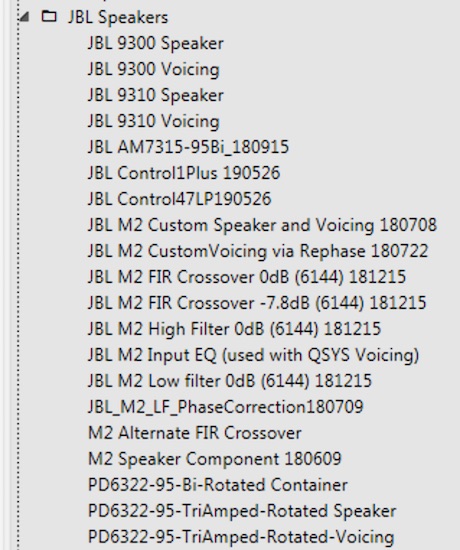
Using custom voicing can REALLY cut down on time and once you have it, you can save it as a User Component that can be dropped into ANY design (and they move from different Designer versions better than other components. Note, using JBL's parameters in Q-SYS will not necessarily be a 1:1 translation. If JBL used any shelving filters, those will need some hand tweaking but the PEQs go between the two environments pretty well.
I have a growing list of JBL speakers:
Powered by Infopop Corporation
UBB.classicTM
6.3.1.2