This is topic Gemini Man - HFR Test in forum Digital Cinema Forum at Film-Tech Forum ARCHIVE.
To visit this topic, use this URL:
https://ft-forum.com/ft/cgi-bin/ubb/ultimatebb.cgi?ubb=get_topic;f=16;t=003616
Posted by Frank Cox (Member # 6258) on 03-07-2019, 04:39 PM:
After all the hooraw about Alita Battle Angel, it looks like Paramount is getting onto the "test your theatre" bandwagon too.
I just got an email saying that they want everyone to test if they can run 60fps in 2D and 3D, and the instructions require setting up a new channel on your projector and several other steps that might be easy for a tech to do but are non-trivial for someone like me to attempt.
Their list of compatible equipment is this:
60 fps 3D-capable equipment
Sony: 200-300 series models require a HFR license.
60 fps 3D- and 120 fps 2D-capable equipment
Barco: All DLP series 2 projectors with an integrated media block.
NEC: All DLP series 2 projectors with an integrated media block.
Christie: All DLP series 2 projectors with an integrated media block and a HFR license
I have a Christie 2210 and as far as I know I don't have a HFR license (or do I?)
I'm thinking that it's not worth jumping through all of these hoops if my equipment can't do it anyway so my question for you folks is, can my equipment do it? If it can't then there's no point in attempting the rest of this stuff.
My server is currently a GDC SA2001A but I'm planning to change that out for a new model within the next few months.
Posted by Carsten Kurz (Member # 5396) on 03-07-2019, 04:56 PM:
This GDC server is pretty old and won't do HFR, by the connection method alone (twin HD-SDI). The paramount letter says: 'DLP series 1 projectors and series 2 projectors without an IMB are not HFR capable.' You don't have an IMB.
Prior to the first Hobbit release, Christie announced their Previsto HFR capability, I think that upgrade is free, it is part of regular projector software upgrades.
The last attempt with HFR was 'Billy Lynns long halftime walk' (also by Ang Lee), and Sony pulled the plug on the HFR versions just a few days prior to release. At the time, they also sent out test clips and procedures to exhibitors.
Let's see what happens with 'Gemini Man'. I yet have to see an HFR movie that makes me say 'Wow!".
For the time being, there will always be 24/48fps versions of these DCPs as well, as the letter says: 'Note: There will be a 24 fps version available for those unable to present HFR'. So...
- Carsten
Posted by Leo Enticknap (Member # 534) on 03-07-2019, 05:01 PM:
Billy Lynn is now out on 4K 60fps BD, so if you want something to test with, you could always buy that, rip it (if you have a 4K capable BD drive in your PC), and make, say, a 5-minute, seriously high bitrate DCP clip to test with.
Posted by Carsten Kurz (Member # 5396) on 03-07-2019, 05:08 PM:
There are quite a few HFR test clips floating around.
However, they don't answer the issues of aesthetic reception. As all HFR releases so far, Billy Lynn centered on 3D, and that UHD-BD is not 3D, as UHD doesn't cover 3D-HFR.
- Carsten
Posted by Frank Cox (Member # 6258) on 03-07-2019, 05:43 PM:
quote: Carsten Kurz
'DLP series 1 projectors and series 2 projectors without an IMB are not HFR capable.' You don't have an IMB.
Okey dokey, that answers my question and I don't have to bother with doing this test regime that they sent out. I'll just check off NO on their form and email it back in.
Thanks! That saves me a fair bit of time and figuring out. ![[Smile]](smile.gif)
Posted by Justin Hamaker (Member # 2165) on 03-07-2019, 06:40 PM:
We could play it at our drive-in, but all 5 screen at our cinema are non-IMB servers.
Posted by Brad Miller (Member # 2) on 03-07-2019, 06:57 PM:
Yay for HD-SDI!!! None of that awful HFR awfulness. ![[thumbsup]](graemlins/thumbsup.gif)
Posted by Nguyen Jack (Member # 7530) on 03-07-2019, 09:04 PM:
About HFR
With server Barco ICMP, Doremi IMB, and Christie IMB S3 can playing HFR.
With Christie IMB-S2, GDC need purchase license HFR and it's not fee
Posted by Leo Enticknap (Member # 534) on 03-07-2019, 09:29 PM:
quote: Brad Miller
Yay for HD-SDI!!! None of that awful HFR awfulness.
Yup ... Tom Cruise would be happy.
Although what would make him really happy would be if you took an in-front-of-the-lens shutter from a circa 1920s Motiograph, mounted it on an anamorph or 3-D mover in front of a digital projector, and synced it via GPIO to give DCPs that authentic, film motion look.
Posted by Brad Miller (Member # 2) on 03-07-2019, 11:35 PM:
Wouldn't it just be easier to project on real film?
Posted by Steve Guttag (Member # 268) on 03-08-2019, 05:59 AM:
Not all DCPs are the same and HFR is still in the wild-west.
For instance, for Billy Lynn, Dolby's DSS servers could:
DSS200/CAT862 could, if carefully configured, run 2D/60fps
DSS2x0/CAT745 run 2D/2K/60 or 3D/2K/60 (could not run 2D/2K/120)
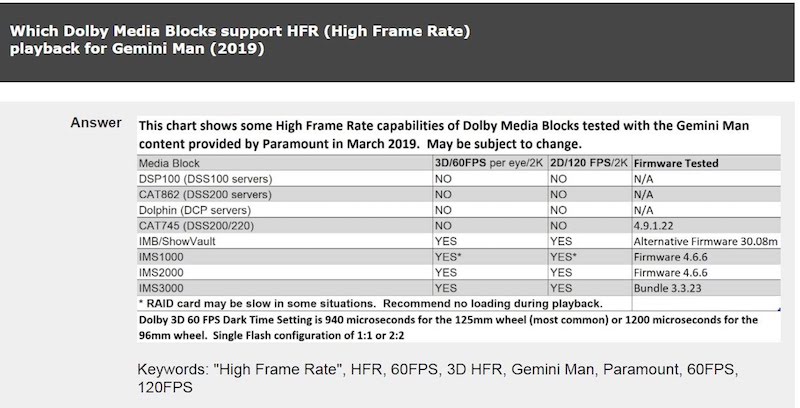
For Gemini Man, no DSS line server can, at present, handle any of the HFR in 2D or 3D. If there can be a software fix for a CAT745 system to handle this variant of 2K/60 3D, then it might be able to work.
Mind you, I've set up CAT745 systems to run 2K/60/3D on CAT745s. It isn't that it can't handle that format but there is something about the bandwidth on this one (Gemini Man) that makes it choke after 3-seconds.
So just when was HFR 3D embraced so much in the past that people still give this guy money to make more? Why must the industry play to his experiments? It's the movie first, not the tech.
My guess is, the more modern your IMB/IMS is, the greater the likelihood that it will handle this latest "experiment." (i.e. IMS3000, ICMP, SX4000, IMB-S3 and possibly the SR1000 but who knows how much effort was put into the HFR 3D crap on the SR1000, at this stage...I'd think they were worked hard to just get it out and move towards stability for the other 99.9999999% of the movies).
Posted by Leo Enticknap (Member # 534) on 03-08-2019, 08:02 AM:
quote: Steve Guttag
It isn't that it can't handle that format but there is something about the bandwidth on this one (Gemini Man) that makes it choke after 3-seconds.
So the issue is the bitrate required by HFR combined with 3-D and/or HDR.
I believe that either the DCI spec or some other applicable standard (SMPTE or ISDCF?) specifies a maximum bitrate of 250 MBPS; but presumably this assumes that the most bandwidth greedy format that will ever be used is 4K, 2-D, DCI XYZ at 24fps. If you're going to use something that would benefit from going over that, e.g. 4K at above 24fps, and/or with 3-D or HDR (say, Rec. 2020), then you're going above the bitrate that a DCP server has to support.
The manuals for both the Alchemy and the IMS2000 claim that they can handle up to 500 MBPS. When I get a moment, I'm going to make a DCP clip of a few minutes in 4K/60 at 500, and the next time I have access to one of the IMSes to experiment with, ingest it and play it and see what happens. But an old school server would struggle to cope with that bandwidth, probably. And HD-SDI media blocks are generally unsafe above around 200.
quote: Brad Miller
Wouldn't it just be easier to project on real film?
Probably not, given the difficulty of getting rid of prints and the fact that most theaters have ripped out their film projectors. My post was meant as a joke, but I've sometimes thought that it would be an interesting experiment to do: put a rotary, two-blade shutter, of the sort that was mounted in front of the lens on many film projectors until around the mid 1920s (when larger lamps started causing nitrate fires in serious numbers, so designers moved the shutter to a housing between the film path and the lamphouse, to reduce heat both by airflow - the shutter doubled as a cooling fan - and not having the film exposed to the lamp continuously) in front of a d-cinema projector, and synchronize its rotation via GPIO pulses as a 3-D filter wheel would be, to simulate a film projector flicker.
It would then be fun to do a back-and-forth comparison between that projector and a 35mm one playing the same content, and ask the audience which they believe is film and which is digital. In order to stand any chance of the result being meaningful, the film would have to be an absolutely spotless print, and possibly the odd spec of digital dirt added to the DCP; and the color calibration of the digital projector carefully set up to match that of the 35mm. But with all that done and then doing two sets of tests, one with the shutter operating in front of the digital projector and one not, I'd be interested to see if the audience responses were substantially above statistical error territory one way or the other.
Posted by Martin McCaffery (Member # 37) on 03-08-2019, 08:11 AM:
Wouldn't it be easier to just program the flicker into the DCP?
Maybe as an added bonus, minor changes in the light quality every 20 or so minutes to simulate change overs. ![[Wink]](wink.gif)
Posted by Frank Cox (Member # 6258) on 03-08-2019, 11:07 AM:
Shades of Grindhouse...
Posted by Carsten Kurz (Member # 5396) on 03-08-2019, 11:49 AM:
The current inofficial spec for HFR is max 450MBit/s. Some mediablocks can go substantially higher, but the Doremi IMB, as the IMB with the most installs, is limited to 450MBit/s.
The tech bulletins issued for Billy Lynns Long Halftime Walk claimed that all HFR DCP versions were done at 250MBit/s only - even those at 120fps.
I don't know if the Gemini Man test footage also prototypes the intended datarate.
I guess the 250MBit/s limit was targeted at systems that are limited to 250MBit/s per eye, but can still show 60fps in 2D (as CAT 862 or Doremi Dolphin boards).
Note, choking will not only occur due to high bitrates. Some test releases of DCP-o-matic used an OPENJPEG optimization that changed only 2 'irrelevant' bytes in a J2K frame to zero, and that made CAT 862 and 745 choke...
- Carsten
Posted by Steve Guttag (Member # 268) on 03-08-2019, 12:45 PM:
Yeah, I was going to say that the CAT745 systems were/are good up to 500 Mbits/sec so it isn't just the bandwidth.
I suppose that the IMS2000 can probably handle this movie but I didn't ask though I'd think that the IMS3000 has substantially more horsepower and Dolby would have an incentive to keep it on top of technology.
Posted by Marcel Birgelen (Member # 6801) on 03-08-2019, 04:40 PM:
I also don't think it's the data-rate itself, but a combination between data-rate and specific JPEG2000 decompression complexities.
With higher frame rates, there is also less time per frame to decompress the frames themselves. That might also choke the hardware.
I guess this clip is unfortunately encrypted? I would love to try it on an Alchemy.
Posted by Carsten Kurz (Member # 5396) on 03-08-2019, 06:34 PM:
It works on an Alchemy. If you still want to download it, there's instructions on how to get KDMs.
https://ql.mediasilo.com/#ql/5c630928e4b05d699980d7ad
But it's boring tech stuff, nothing from the actual movie, so, everyone else, calm down...
- Carsten
Posted by Marcel Birgelen (Member # 6801) on 03-09-2019, 02:36 AM:
Thanks Carsten!
I'll see if it's worth the trouble of getting a KDM for it.
Posted by Greg Routenburg (Member # 1742) on 03-11-2019, 03:09 PM:
It's also worth mentioning...
GDC informed me that if anyone is running an early SX-3000, there may be an issue with the hard drives that were provided. Some of the early drives have trouble keeping up with the data rates. They can provide updated drives if necessary. They will also issue a one or two day "test license" to allow for adequate testing of the content before requiring you to purchase the license for HFR.
Posted by Kirk Futrell (Member # 5006) on 03-15-2019, 04:12 PM:
We just tested the Gemini HFR test last night on a ShowVault with IMB in a Barco 4K 23B. The test seemed to work fine, but we did have a weird, barely noticeable thing happened to the image. When playing at 120 fps, there was a strange color halo effect during the action scenes. The way another projectionist described it is color smearing. Or maybe like a delay or sync issue with the DLP chips. Specifically in the Gemini test there is a guy riding a motorcycle. He is wearing a black helmet. Right before the helmet moves in a certain direction there is a thin red halo in the direction to where the helmet will move. Also there is a roofline in the distance and there is a red halo above the roofline occaisonally as the roof moves upwards on screen. We had previously done tests at 96 fps and noticed the same thing. It does not seem to happen to 48 or 60 fps DCPs.
Another thing we noticed is the Doremi has to load the alternate firmware to play it. The normal firmware we are using is 30.11B and the alternate is 30.08H-2
The color issue does not happen while paused, but there is a strange flickering that happens while paused that is unrelated to the bulb. This too is barely perceptible and only through certain sections of the image.
Any ideas on what is causing these issues so I know whether to contact Barco or Doremi?
Posted by Marcel Birgelen (Member # 6801) on 03-15-2019, 04:54 PM:
That halo effect is pretty strange. You often see the same when color convergence is way off, but I guess that's fine in your setup.
It feels like one of the primary colors gets out of sync, but the only location where I can imagine it to get out of sync is in the server or IMB, because there is a lot of potential buffering there. But, on the other hand, the colors aren't separated yet there.
The next thing that could have some buffering for a few frames is the ICP, which should also output RGB data.
Then it comes down to the formatter board, which shouldn't have a lot of buffer either...
Posted by Tacky Ting (Member # 8686) on 03-16-2019, 01:42 AM:
Dolby just released a test report
https://photos.app.goo.gl/y8W2J3pWYaLzY6kF7
Posted by Dave Macaulay (Member # 813) on 03-16-2019, 12:31 PM:
"The normal firmware we are using is 30.11B and the alternate is 30.08H-2"
Current firmware versions:
Normal: 30.11c
Alternate (HFR): 30.08m
Maybe check with these?
Posted by Greg Routenburg (Member # 1742) on 03-19-2019, 11:42 AM:
Here's the photo that Tacky linked to in his post...
Posted by Jonathan Jensen (Member # 5870) on 03-19-2019, 07:51 PM:
@Brad: quote: Steve Guttag
So just when was HFR 3D embraced so much in the past that people still give this guy money to make more? Why must the industry play to his experiments? It's the movie first, not the tech.
I respectfully diagree. I personally embrace HFR and highly respect Ang Lee's pursuit of perfecting this tech.
HFR wasn't a hit from the get-go, true, but what happended to "If at first you don't succeed, Try, try, try again"?
At least Trumbull, Ang Lee and Jim Cameron has the gut to use their position, money and influence to actually push the technological boundries and take their time doing it - instead of rushing it.
Any new tech takes time to master, even though it's not new, it's just more accessible for both the artists and the exhibitor
2D/3D HFR (4K) is super complex.
All parameters around HFR changes because of the way our brains percieve moving images over time.
Everyone involved in planning and shooting the movie needs to rethink and relearn camera movements and everything else when shooting in HFR. Add 3D to the equation, and it gets really complicated to pull off. Adding Higher resolutions introduces even more complexity!
Trumbull, Ang Lee, Jim Cameron and whoever else who has the stones to pursue new technological frontiers should be welcome to put our industry through as many hoops as necessary to have it tested on a large scale. It's not enough to just test in the lab and show industry people some demo behind closed doors.
However, should HFR become a hit at some point, we're likely to see The Dark Side of Hollywoo milk the new cash cow and churn out 'Clash Of The HFR Titans' and so forth - which will give good tech a bad rep... again.
Here's to hoping that people are less greedy and short sighted when HFR breaks! ;-)
I too often remimiss about the beauty of virgin 35mm prints at steady 24fps on a matt white screen, but we're in 2019 and that is mostly in the past.
-Jonathan
Posted by Jim Cassedy (Member # 4115) on 03-19-2019, 08:12 PM:
quote: Brad Miller
Wouldn't it just be easier to project on real film?
Actually, I'm kinda hoping it gets released on 70mm/60fps, and on 2K reels.
Lets see- - that would be a change-over about every 7 minutes, which would
sure make my evening interesting! Earplugs would probably be necessary,
as I'd imagine a 70mm intermittent would make quite a racket at that speed,
and would probably need to be water or oil cooled to keep from seizing.
- - but it would sure be a fun shift to work ! ![[Big Grin]](biggrin.gif)
Posted by Tacky Ting (Member # 8686) on 03-20-2019, 12:45 AM:
In 2016, Billy Lynn’s Long Halftime Walk can play 2K 3D 60fps (DSS220+CAT745). Why can't Gemini Man play? Do you want to use 4.8.9.12 Version?
Posted by Steve Guttag (Member # 268) on 03-20-2019, 07:27 AM:
Because they keep "experimenting" with this stuff. They are beta testing in real theatres. There is something different in how they mastered this one. Hopefully, they'll figure it out but I stand by what I said previously...HFR hasn't shown itself to have much, if any customer appeal.
I'm not against HFR but I'm against how this HFR is being handled. I also think it would be best to divorce HFR form 3D (which I definitely dislike in its present form).
There is coming a point where the Dolby DSS stuff will be stuck in time like most anything that started before 2010 and I don't think new technology should be held back just due to that.
That said, it would better serve their purpose to ensure the maximum compatibility with the installed base of servers, including the DSS stuff. They should have allowed 2D/60fps (like Billy Lyn). If they think that HFR will grow on the public, get a bigger swath of people to see it.
All of our Dolby DSS/CAT745 systems that are set up for 3D are set up to run 24, 25, 30, 48, 60 fps and we've never had problems with other content (1-offs, seemingly). It should be noted, if you have a DFC100 with Dolby 3D then you have to choose 30fps or 60fps due to how it works (there are only so many frequencies it locks onto...it understands 60Hz but not 90Hz so you either get 60fps single flash or 30fps double flash. With a Barco and Dolby 3D, you can set up separate 3D files and filter wheel frequencies to have them all).
So I fault this new content for being different and experimental.
The facts still remain, the moving going public has not shown any real interest in HFR.
Posted by Kirk Futrell (Member # 5006) on 03-20-2019, 02:25 PM:
Thanks,Dave. Firmware fixed the issue. By the way, before we updated the firmware we dug a little deeper and figured out the Red channel was ahead exactly 1/24th of a second or 5 frames at 120fps.
Posted by Kirk Futrell (Member # 5006) on 03-20-2019, 04:39 PM:
Also of important note, while alternative firmware 30.08m fixed our HFR color issue, going from 30.11b to 30.11c on our projector breaks HDMI for us. We cannot get an image over our HDMI input with 30.11c, so we reverted to 30.11b.
Posted by Stephan Shelley (Member # 8587) on 03-20-2019, 05:16 PM:
I have a theatre I take care of with DSS 200 and cat 745 in a NEC 1000 with real d xl system and the 60 fps 3d seems to work. The 120 fps 2D is a no go.
Posted by Daniel Morez (Member # 5787) on 03-21-2019, 09:18 PM:
Non exhibition but thread title related question for the Chistie savvy folk. Could a CP2210 with a 3G PIB be capable of Stereo 60fps (120 in total) via unencrypted 3G SDI? My first couple calls to Christie support hasn't yet yielded a definite answer. I am waiting on a follow up call as the question gets escalated internally. It could take a few days so I thought I'de try here.
Ive already successfully proven this wild west format out on Barco 2/4K-B and 2K-C units running the Quad 3G, aka "4K", input module.
Posted by Antti Nayha (Member # 4980) on 03-22-2019, 04:14 AM:
I was recently teching a documentary film festival with a total of 85 features. We received not one, but two HFR 2D DCP's – one 48 fps and one 50 fps.
I'm still not convinced of the benefits of HFR for fictional films, but based on these two, I could easily see this becoming a thing for documentaries. Both were "true" HFR, shot in at least 2K progressive instead of interlaced HD.
One of the films (Walden) was an avant-gardish, meditative piece that consisted of an endless slow pan across a forest, showing people chopping wood and going about their daily chores. The 50 fps framerate allowed the audience to see all the detail and action clearly, even though the camera never once stopped panning.
The other (Aquarela) had been shot at 96 fps, and according to what I'd read, the director was severely disappointed when Sony refused to distribute it as a 96 fps DCP. I didn't watch the whole film, but at least the drone-shot landscapes had a very nice smooth but high-budget look even in 48 fps. Had I seen the same rather impressive opening shot in a fiction film, I would probably have lost all suspension of disbelief right away… but that doesn't seem to be an issue for documentaries, at least not in the same way.
As for the general audience, no one seemed to be distracted by the HFR in any way, unlike the Hobbit 3D HFR screenings.
Of course, we screened Aquarela in a venue that could just as easily have run 96 fps. Thank you, Sony
quote: Carsten Kurz
The tech bulletins issued for Billy Lynns Long Halftime Walk claimed that all HFR DCP versions were done at 250MBit/s only - even those at 120fps.
I don't know if the Gemini Man test footage also prototypes the intended datarate.
I was also curious about this and checked them:
2D 120 fps test clip: avg 186.95 Mb/s, max 240.34 Mb/s
3D 60 fps test clip: avg 223.88 Mb/s, max 240.00 Mb/s
quote: Carsten Kurz
Note, choking will not only occur due to high bitrates. Some test releases of DCP-o-matic used an OPENJPEG optimization that changed only 2 'irrelevant' bytes in a J2K frame to zero, and that made CAT 862 and 745 choke...
Sorry for the off-topic, but does anybody here have any idea why Cat 862 chokes on some regular 24/25 fps DCP's with bitrates well under 250 Mbps? Most of these problem DCP's exhibit irregular stuttering, as if the film was paused for a fraction of a second every now and then. Others will simply freeze permanently (just like someone clicked the pause button, except that audio may still be playing on) – but I've found out that you can continue playback by manually skipping to eg. one second later, until it happens again after a while.
I've tried to pinpoint the problem several times by unwrapping the video MXF's and inspecting the individual j2k files with various tools, but I've always been unable to find anything out of the ordinary. No single-frame bitrate peaks, no suspicious metadata, nothing. Couldn't find anything useful in the Dolby logs either. ![[Confused]](confused.gif)
Many (but not all!) of these DCP's/MXF's were created in DaVinci Resolve.
Cat 745 seems to play these just fine, just like all other servers/mediablocks that I've tried. It's just the Cat 862.
Posted by Marcel Birgelen (Member # 6801) on 03-22-2019, 04:55 AM:
In general, if you selectively add motion blur in post, the soap opera effect will be mostly gone, yet the ultra-smooth panning will remain.
Even if you add some motion blur to the panning scenes, the smoothness will remain and the amount of detail that's being perceived will usually still be higher than playing it at 24 or 25 fps.
Maybe this is because of how our visual cortex works. If you look at a continuous moving hand without moving your head, for example, you'll see that it's almost impossible to get a sharp picture of it. It very much looks like our brain blurs those pictures together.
If I flash like 48 high-intensity stills without motion blur within a second at you of that same moving hand, our visual cortex is missing the blurry effect. I guess that this is introducing the unnatural, somewhat "sped up" look.
Now, those 48 fps are still well below the flicker fusion threshold of the average human being about 80 Hz.
But what happens when I flash 120 frames per second of that same moving hand without any motion blur at you? The 120 fps should be well above the flicker fusion threshold. So will the brain now "blur" it for us?
Posted by Antti Nayha (Member # 4980) on 03-22-2019, 05:09 AM:
I understood that Billy Lynn was shot at 120 fps with a 360° shutter, which amounts to a shutter speed of 1/120 seconds. So there is still some natural motion blur in individual frames, but unlike in traditional 24 fps cinematography, no spatiotemporal information is missing between the frames.
I think professional sports photographers use a shutter speed of around 1/1000 fps to get completely rid of motion blur.
I agree that low/nonexistent motion blur in 48–60 fps content is what causes the sped-up look, but at least personally, I still get the soap opera feel even with added motion blur. It just doesn't seem to distract me in the context of documentary form, at least when the production values are high enough.
Posted by Carsten Kurz (Member # 5396) on 03-22-2019, 05:58 AM:
We have seen many of these complaints about Resolve JPEG2000 in DCPs. Many Resolve users seem to think that Cinema servers can eat any JPEG2000, or, that the only use for the JPEG2000 output option in Resolve is playout on cinema servers. But that is not the case. It's a generic JPEG2000 option that does not follow the Dcinema constraints of OpenJPEG. JPEG2000 has very many different coding options.
I guess one would have to be a real JPEG2000 buff to find out the technical reason why these code streams fail.
However, they changed that code in Resolve 14, and in 15.x they now support an internal DCP encoder based on Kakadu, that will certainly keep the codestream within DCI/SMPTE constraints.
Before, people were actually blaming DCP-o-matic for creating bad DCPs, but for JPEG2000 image series or J2K MXF containers, DCP-o-matic is only passing them through, and the original creator is responsible for codestream compliance.
- Carsten
Posted by Antti Nayha (Member # 4980) on 03-22-2019, 06:13 AM:
Cool, thanks for the Resolve version info! And nice to hear it's been fixed.
Posted by Steve Guttag (Member # 268) on 03-22-2019, 12:08 PM:
Stephen,
Did you test your DSS200/CAT745 system with the Gemini Man 60fps/3D material. I know it will work with other 60fps/3D but it chokes after 3-4 seconds on Gemini Man test.
Posted by Stephan Shelley (Member # 8587) on 03-22-2019, 07:55 PM:
I believe it was the test material that came on the Wonderpark distribution disk. I was not at the site personally but will be there a couple weeks after Cinemacon. I will double check at that time. They said it ran all the way through.
Posted by Steve Guttag (Member # 268) on 03-23-2019, 08:43 AM:
The DSS200/CAT745 can run OTHER 3D/60fps stuff but fails on Gemini Man's test material after about 3-4 seconds.
Posted by Stephan Shelley (Member # 8587) on 03-23-2019, 01:00 PM:
Like I said I will check next month myself but I was on the phone with them when they ran it and they said it finished. It was the Gemini Man test with the squares.
Maybe it has to do with the fact the NEC 1000 does not use a TI ICP. I had them check the window on the real d xl unit and it said 120 fps which is correct for 60 fps 3D.
Posted by Carsten Kurz (Member # 5396) on 03-23-2019, 02:51 PM:
There is a non-TI ICP in the NC1000, and that is compatible with a CAT745?
I thought the NC1000 had a standard series2 card-set like the NC900?!
- Carsten
Posted by Stephan Shelley (Member # 8587) on 03-23-2019, 02:59 PM:
The NEC 1000 has the combined ICP/CPU board. They call it a formatter board. Very confusing with the satellite formatters on the light engine. While a bit of a testy relationship it will work. Occasionally get DLP com-e error on bootup but it does work and marriage does work.
Posted by Steve Guttag (Member # 268) on 03-23-2019, 04:46 PM:
I wonder how they deal with subtitles. As I understand it, NEC ditched Cinecanvas on their CPU board and rely on the server's ability to put up captions...something the CAT745 does not do.
Posted by Stephan Shelley (Member # 8587) on 03-23-2019, 04:57 PM:
Something else to check while I am up there.
Posted by Carsten Kurz (Member # 5396) on 03-24-2019, 09:17 AM:
NEC always preferred the Doremi OEM IMB/IMS systems, and they offer serverside subtitling. Also, at the time they launched the NC1000, they probably did not consider the CAT745 for it anymore, as it was EOL.
- Carsten
Posted by Steve Guttag (Member # 268) on 03-24-2019, 11:11 AM:
Still it is risky since one may upgrade say an NC900 to an NC1000 that had a CAT745 and not be aware that there will be a subtitle issue.
Yes, they definitely prefer the Doremi server. I believe the NEC projectors are the only ones that will put the Dolby/Doremi IMS systems into a standby state when the projector is put into a standby state without having to hit "shutdown" on the IMS.
I believe that the Dolby IMS3000 only achieves some of its highest playback rates while in specific NEC projectors. Probably those with the newer CPU board like the NC3541L
Posted by Stephan Shelley (Member # 8587) on 04-18-2019, 01:42 AM:
Well the test stalled 3-4 seconds in for me on the Dolby cat 745. Also Steve is correct no subtitles unless they are burned in with the Dolby cat 745 in a NEC 1000.
Posted by Paul Looker (Member # 5420) on 09-11-2019, 04:51 PM:
I have an NEC NC900C. It has a GDC SX-3000 IMB. Will I be able to run these test packages?
Posted by Carsten Kurz (Member # 5396) on 09-11-2019, 05:07 PM:
Well, the idea is that you run these test packages to find out. While the equipment type is the major factor, the software version and setup may play the final role. So, download the test package and instructions, get the KDMs, and try.
- Carsten
Posted by Paul Looker (Member # 5420) on 09-11-2019, 05:56 PM:
I’ve read the letter. It says the projector has to be set for single flash before you can even try it. I don’t know how to configure the projector to single flash. NEC hasn’t called me back and it costs hundreds of dollars just to get a tech in the door. If someone could talk me through the single flash setup that would be helpful. Or if someone already knows it won’t do it that would be helpful too.
Posted by Carsten Kurz (Member # 5396) on 09-11-2019, 07:10 PM:
Do you have a current version of NEC DCC S2 for projector setup? There is also a manual which explains 3D file setup. It's certainly doable over a phone line.
The NEC can do the necessary frame rates. The GDC as well, although I don't know if you need to purchase an HFR license. You could simply try playing a 60fps or 120fps Test-DCP to find out.
- Carsten
Posted by Geoff Halls (Member # 7501) on 09-16-2019, 12:54 AM:
One of our players is displaying Black and White only with HFR 2D, 3D test of Gemini Man.
24fps content placed directly before and after in playlist of Gemini 2d HFR test play in colour OK whist IMB is in Alternate version mode.
Other screens with identical equipment, software and firmware are OK.
I updated to the latest SW, SM, FW and Alt FW. HFR still plays in Black and White.
The Christie 2220 Projector is on SW 4.5, other screens still on this version play OK
Anyone else had this problem?
Posted by Marlon Martins (Member # 8823) on 09-16-2019, 01:35 AM:
Not trying to hijack the thread, but anyone know where i can download a 60fps or 120fps DCP? whe got a mail telling us to update the ShowVault to play Gemini Man, but we have no HFR content to test. They send the key almost on time to play the movie, so we do not get much time prior to screening. ![[Roll Eyes]](rolleyes.gif)
Posted by Geoff Halls (Member # 7501) on 09-16-2019, 01:50 AM:
Hi Marlon,
Get in touch with your distributor. Paramount have a download page for the HFR test content. I would sent the link but its for Australia sales Dept.
Posted by Phil Ranucci (Member # 3820) on 09-21-2019, 04:59 PM:
Trying to get information on the 3D setup for Gemini Man.
Barco, GDC, and Master Image systems.
I can get the 2D to play correctly, but the 3D clip doesn't activate the MI wheel. Tried all frame multiplication rates and none will start the disk.
What am I missing?
Posted by Dave Macaulay (Member # 813) on 09-21-2019, 06:11 PM:
Same here. Nowhere to go for info.
Posted by Adrian Avram (Member # 7931) on 09-22-2019, 12:49 AM:
What version of the Master Image 3D filter you have ?
MI2100 / MI2100R / MI Clarity ?
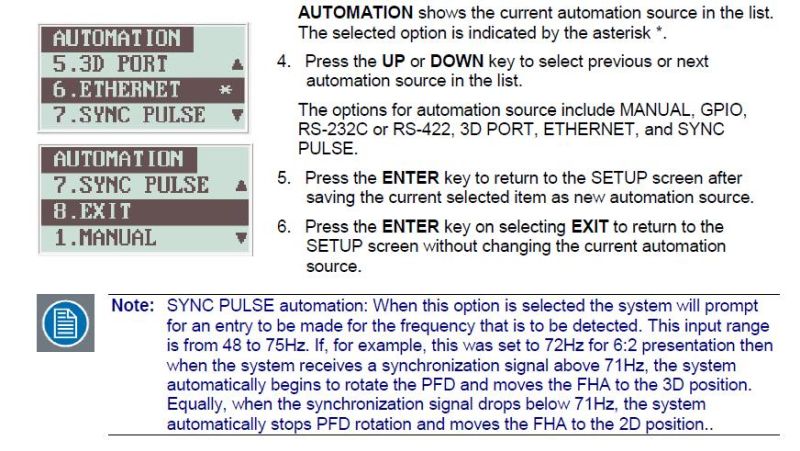
For the first two I don't think it is working, but for the third, after software version 1.2.0 there is an option to select what frequency you want to sync with, 48, 60 or 72 fps.
Posted by Michal Matys (Member # 8614) on 09-22-2019, 03:26 PM:
It works with 2100R as well
As Adrian mentioned, you need to upgrade clarity to 1.2.0 or higher to get the option to set up the automation to 48 or 60hz. You can run it manually without the upgrade.
The multiplication should be set to 2:2.
Posted by Phil Ranucci (Member # 3820) on 09-22-2019, 04:02 PM:
Thanks for that.
60hz seems to activate the wheel.
Now to get the dark time right!
Posted by Carsten Kurz (Member # 5396) on 09-23-2019, 10:59 AM:
Wasn't it planned that only sites would receive HFR content if they'd successfully ran the Gemini Man HFR Tests back a few months? Why do these issues come up now immediately prior to release?
- Carsten
Posted by Leo Enticknap (Member # 534) on 09-24-2019, 04:09 PM:
Because people stick their head in the sand until they're up against an imminent deadline.
The calls about this are starting to come thick and fast here, too.
Posted by Peter Castle (Member # 1997) on 09-24-2019, 08:30 PM:
We were informed that GDC wanted to charge about $1000 to activate the capability on our processor, so we passed on it. Is that the case in the states?
Posted by Steve Guttag (Member # 268) on 09-25-2019, 01:50 AM:
GDC licenses HFR capability on a per-server basis. It is not that much (not even close but still more than a token charge) in the USA.
Posted by Peter Castle (Member # 1997) on 09-25-2019, 04:17 AM:
We already have the HFR as for "The Hobbit". What's extra for "Gemini Man"?
Posted by Marlon Martins (Member # 8823) on 09-25-2019, 08:39 AM:
We finally got the HFR test files/keys
but i didn't find where is the 3D adjustments should be made on showvault.
anyone can help?
Posted by Steve Guttag (Member # 268) on 09-25-2019, 08:52 AM:
HFR on a Doremi server are in the properties of the show. you have 2D, 3D, 4K and HFR.
The projector is where the flash rate is set (2:2 or 6:2...etc) and it is in the 3D file.
Posted by Carsten Kurz (Member # 5396) on 09-25-2019, 02:31 PM:
I have been told that in germany there is NO standard 24/48 fps 3D version of Gemini Man. That is, sites not qualifying for 60/120fps 3D will not be able to play 3D at all. The only 24fps version is 2D. Is that the same elsewhere?
- Carsten
Posted by Tom Bert (Member # 5719) on 09-26-2019, 07:44 AM:
I hear rumours that no 120fps version will be released after all. This all starts next week: https://www.imdb.com/title/tt1025100/releaseinfo ... do people around the world already know which version they will get?
Posted by Carsten Kurz (Member # 5396) on 09-26-2019, 07:56 AM:
I think the idea was to only release 3D versions in HFR - as 120fps 3D did not work on many/most systems, they scrapped that idea altogether and stayed with 60fps per eye. Has anyone heard of 2D releases other than 24fps?
- Carsten
Posted by Steve Guttag (Member # 268) on 09-26-2019, 08:23 AM:
I had customers asking me about 60fps 2D.
Posted by Michal Matys (Member # 8614) on 09-27-2019, 06:00 AM:
Phil, you should not need to adjust the dark time, it should be the same as for your standart 3D, you just change the multiplication.
Michal
Posted by Lyle Romer (Member # 1266) on 09-27-2019, 06:53 AM:
quote: Martin McCaffery
Wouldn't it be easier to just program the flicker into the DCP?
I don't think you'd get the exact same look because the shutter doesn't cover the entire frame instantly where a simulated flicker does.
Posted by Carsten Kurz (Member # 5396) on 09-29-2019, 02:53 PM:
So - which versions/frame rates have you seen? Please post CPL names!
- Carsten
Posted by Mike Moreno (Member # 4887) on 09-29-2019, 04:03 PM:
Sadly we recieved 2 hard drives, one on 3Dhfr and one 2D 24fps ![[Frown]](frown.gif)
i have only one auditorium 3D hfr capable and i was ready to project in all 60 auditoriums 2D version in 120 fps:thumbsdown: ![[thumbsdown]](graemlins/thumbsdown.gif)
Mike Moreno
Mx
Posted by Andrew Leist (Member # 8354) on 10-01-2019, 11:42 AM:
We got the GEMINI MAN test clips (2D 120fps, and 3D 60fps) a couple weeks ago, and it took some effort to make the 3D work. We have Christie IMB and CP4230 projector, and Dolby DFC100 wheel. After updating projector & IMB versions, we had to adjust the filter sync slider in the Dolby app to reduce text ghosting and make the test patterns look right. But we're finally ready and will screen the 3D version next week.
Posted by Carsten Kurz (Member # 5396) on 10-03-2019, 07:22 AM:
Does anyone know wether Dolby Cinemas receive a 120fps (per eye) 3D version? Because, they should be able to play a HFR-120fps version.
Posted by Jack Ondracek (Member # 1466) on 10-03-2019, 10:29 AM:
We're not running it (closed for the season now), but I did try the test file.
My Doremi server loaded some alternate firmware... took between 45 seconds to a minute to do that. The video was good, but the audio sounded like Alvin, running a chainsaw.
Went back to normal content and the server loaded its original firmware. Took another 45 seconds + to do that. If we got the audio worked out and did try to run it in HFR, that switching between fw versions would be a deal-breaker for me.
Posted by Carsten Kurz (Member # 5396) on 10-03-2019, 03:37 PM:
A german colleague tells me he is playing the 3D HFR (60fps per eye) on his (single) CAT745 IMB. He is on DSS 4.8.x though. Maybe 4.9x is the problem with the 60fps 3D version/test files?
Posted by Stephan Shelley (Member # 8587) on 10-03-2019, 04:49 PM:
I tried it on a DSS 200 with Cat 745 running 7.8.10 and it stopped a few seconds into playing. My friends at Dolby say some have reported success with the test but Dolby's testing is negative and can not say how reliable it will be with those that test positive with a cat 745. Dolby's official position is that it is not a supported format.
Posted by Marcel Birgelen (Member # 6801) on 10-03-2019, 06:43 PM:
quote: Carsten Kurz
Does anyone know wether Dolby Cinemas receive a 120fps (per eye) 3D version? Because, they should be able to play a HFR-120fps version.
Yes, they do.
The Dolby Cinema locations in the Netherlands will play it in 120 FPS 3D as a first feature that uses the full bandwidth of the system.
Posted by Stephan Shelley (Member # 8587) on 10-03-2019, 07:02 PM:
Typo in my above post meant 4.8.10.
Posted by Carsten Kurz (Member # 5396) on 10-04-2019, 06:52 AM:
I guess Dolby did not want to suggest a downgrade from 4.9.x to 4.8.x to make it 'compatible'. They'd probably prefer seeing exhibitors to upgrade to a ShowVault or IMS to play Gemini Man 3D.
- Carsten
Posted by Steve Guttag (Member # 268) on 10-04-2019, 07:21 AM:
No...I think it is a liability. For Dolby to say they have a version that works, they would have to know that it works for all servers using a particular version (sort of like with the Showvault/IMB a special version has to be loaded). That version would need to be tested on all DSS200 and DSS220 combinations with the various OEMs or they would find themselves having to "fix" in short order a "feature" they claimed to have on a server that is now 4-years out of production. It is MUCH easier to say that the DSS line does not support this release. All of that to support one title.
Posted by Carsten Kurz (Member # 5396) on 10-04-2019, 07:35 AM:
Well, the trouble here is, for ALL DSS systems, DSS/DSP100, CAT862 AND CAT745, it means, no 3D playout of Gemini Man at all, as there seems to be no standard 24/48fps 3D version. If it was only for the HFR version, who'd care...
- Carsten
Posted by Dave Macaulay (Member # 813) on 10-04-2019, 09:58 AM:
"Doremi" (not DSS) Dolby servers...
"switching between fw versions would be a deal-breaker for me"
If you run manually, just open the playlist and hit "pause" in playback a few minutes before showtime and it will load the appropriate firmware.
Scheduled shows have no problems, the server will automatically load a required firmware change two minutes before scheduled showtime. If the projector lamp is on with dowser open in a server channel, there will be some odd flashing junk on screen during the change.
I believe current software will prompt you to change a playlist's properties to "contains HFR content" if you try to save it without doing it (if you include an HFR clip, that is).
Posted by Steve Guttag (Member # 268) on 10-04-2019, 10:45 AM:
The DSS/DSP100 systems were already excluded from HFR as that version of server topped out at 48fps 2D and 24fps 3D...furthermore, it wasn't an "upto" criteria...they listed specific formats it would support (same as other server companies on the HDSDI systems). Since 48fps 2D didn't really materialize in the DSS/DSP100 lifetime, I suspect a "modern" movie may choke the 100 series systems, depending on the bandwidth (which is probably the DSS server problems with Gemini Man.
Posted by Marco Giustini (Member # 4544) on 10-05-2019, 05:42 AM:
I've always wondered why the dual firmware. The HFR firmware is dealing with both HFR and non-HFR, as a playlist would normally contain mixed content. So why not running HFR firmware all the time?
Posted by Carsten Kurz (Member # 5396) on 10-05-2019, 05:57 AM:
Something tells me we do not want to know the answer to that question...
- Carsten
Posted by Carsten Kurz (Member # 5396) on 10-06-2019, 10:26 AM:
BTW - there are two different 3D-HFR DCPs (three including the Dolby Cinema 'true 120fps' version). One version is for dual/simultaneous 3D projection systems (dual projector, Sony split-lens), the second is for sequential/'flashing' systems (typical DLP 3D setups). The 60fps image/flashing sequence derived from the 120fps master is different between the two.
- Carsten
Posted by Frank Angel (Member # 248) on 10-07-2019, 09:36 AM:
For all this agita, are exhibitors actually selling HFR to customers? How's the marketing for this title? Are they actually making a big deal about the HFR? And is the difference a substantial hook to pull more butts into seats and does Joe Moviegoer see it as a plus that he's willing to seek out a theatre running it in HFR?
I know I would seek out a 3D theatre with dual projectors over one with double flash single projector LONG before I would hunt for a theatre running it in HFR.
Posted by Carsten Kurz (Member # 5396) on 10-07-2019, 04:40 PM:
The special HFR marketing on Gemini Man is practically non-existent. I guess Paramount gives a shit about it. The german Gemini Man website mentions 'IMAX', but nothing like HFR or anything else targeted at that aspect. I think, since the Hobbit, HFR has a smell to it for the general audience. 'Oh, that comicy Hobbit thing'.
- Carsten
Posted by Kristoffer Sjoberg (Member # 9194) on 10-08-2019, 05:25 AM:
So the first test material didn't work for me either on a CAT745. But a few days ago I got a clip from the movie itself "GEMINI-MAN-HFR-DLP_TST-3D-60_F_EN_SV_SE_51-DBOX_2K_PC_20191002_DTU_SMTPE-3D_VF" 11min and it works just fine. DSS200 version 4.9.1
Posted by Steve Guttag (Member # 268) on 10-08-2019, 06:57 AM:
I'd probably still recommend running the entire thing before boasting that it works. If it hangs anywhere in the movie it could be a very bad evening. It is good to know that the feature seems to be working though. Who knows if they altered their formatting after generating the test material.
Posted by Kristoffer Sjoberg (Member # 9194) on 10-08-2019, 07:08 AM:
Absolutely, we have installed a showvault in the screen where we will be showing it. Just wanted to point out that the new testmaterial worked. I have unfortunately not a KDM for the movie to other screens than the showvault one
Posted by Carsten Kurz (Member # 5396) on 10-08-2019, 09:24 AM:
Interesting that they issued new test material from the actual movie with a different encoding. Now what if that new encoding would fail on other systems successfully tested earlier this year with the original test footage...
- Carsten
Posted by Jonathan Jensen (Member # 5870) on 10-08-2019, 10:42 AM:
Carsten: quote: Carsten Kurz
The special HFR marketing on Gemini Man is practically non-existent. I guess Paramount gives a shit about it. The german Gemini Man website mentions 'IMAX', but nothing like HFR or anything else targeted at that aspect. I think, since the Hobbit, HFR has a smell to it for the general audience. 'Oh, that comicy Hobbit thing'.
Carsten, I believe you're right about the smell of 'HFR' is bad after 'The Hobbit', and yet it seems Paramount or maybe it's only IMAX, actually does market it as HFR in new wrapping by calling it "3D+ in HFR":
https://www.imax.com/news/experience-gemini-man-in-imax-3dplus-in-hfr
Another confusing and annoying new term that doesn't make sense :-(
J
Posted by Scott Jentsch (Member # 1681) on 10-08-2019, 09:28 PM:
I wrote an article about 3D+ in HFR in the hopes of explaining it to our readers:
What is 3D+ in HFR?
If anyone has anything that should be corrected or added, please let me know and I'll update it.
Posted by Bobby Henderson (Member # 840) on 10-09-2019, 12:09 PM:
It doesn't look like our local Lie-MAX theater will be playing Gemini Man in "3D+ HFR." My guess is such shows are confined to IMAX' laser-based theaters. It doesn't look like any other 3D-capable screens in town are going to be playing it that way either. Not that it matters, Gemini Man is currently at 33% on the TomatoMeter™, so it's likely I may not waste my time on it.
Posted by Carsten Kurz (Member # 5396) on 10-09-2019, 04:09 PM:
So what is the 120fps Dolby Cinema version? '3D-HFR-DoublePlusGood' ?
- Carsten
Posted by Carsten Kurz (Member # 5396) on 10-09-2019, 09:04 PM:
https://www.dcinematoday.com/dc/pr?newsID=5575
--------------------------------
Los Angeles—Oct 3, 2019
Pioneering 120fps HFR Cinema with Paramount Pictures’ Gemini Man, from Legendary Filmmaker Ang Lee
Three-time Academy Award-winning filmmaker Ang Lee’s much anticipated new film, Paramount Pictures Gemini Man premieres on October 6th at the TCL Chinese Theatre in Los Angeles – a movie palace situated on the Hollywood Walk of Fame. This historic location serves as the perfect showcase for a film that stretches technological boundaries by being produced in 4K resolution, 3D, and shot at a high frame rate (HFR) of 120 fps (frames per second).
Ang Lee is well-known as a pioneer of HFR filmmaking. Gemini Man is an action-thriller starring Will Smith as Henry Brogan, an elite assassin who is suddenly targeted and pursued by a mysterious young operative who can seemingly predict his every move. The film demonstrates the advantages of the format and the progress of HFR technologies to moviegoers. The screening at the star-studded event will use CINITY, the new HFR cinema projection system developed by Christie for Huaxia Film Distribution, which offers the latest advances in HFR screening and Christie® RealLaser™ illumination technology.
Christie’s strategic partnership with Huaxia Film Distribution and GDC Technology Limited resulted in the development of the CINITY Cinema System based on two Christie CP4450-RGB HFR projectors.
Shot on location in the USA, Colombia and Hungary, Gemini Man is distributed by Paramount Pictures, a company which has set the standard in cinema for over a century. This makes the company well-placed to showcase the hyper-clarity and realism synonymous with HFR presentation to audiences in the USA and across the globe.
For the premiere at the TCL Chinese Theatre, the CINITY cinema system will be configured to produce a brightness of up to 28-foot lamberts using Christie’s laser optical system technology, delivering the finest 3D-viewing experience in 4K resolution at 120fps for each eye.
Paramount is distributing Gemini Man in a range of versions including 2D 4K 24fps through 3D 2K 60fps for use with current cinema projectors, 3D 2K 120fps for Dolby Cinema, and has mastered a 3D 4K 120fps version in partnership with Christie which will be shown at the premiere and at select locations in Asia.
“We’re proud to be presenting Ang Lee’s incredible film to the premiere audience in 4K resolution, 3D, and at 120 frames a second (fps) using the CINITY system with Christie RealLaser technology – a bold specification that exceeds all DCI-compliant presentation systems,” says Kyle Davies, President of Domestic Distribution for Paramount Pictures. “We are excited by this new technology and look forward to its roll out in theatres worldwide.”
Lee, who is known for both his dramatic storytelling and adoption of new technologies, won one Oscarâ for the best foreign language film Crouching Tiger, Hidden Dragon and two directing Oscarsâ for Brokeback Mountain and Life of Pi. His 2016 film Billy Lynn’s Long Halftime Walk, was the first ever feature film to be shot in 120 fps high frame rate – over twice Peter Jackson’s The Hobbit: An Unexpected Journey, shot at 48 fps, and five times the standard speed of 24 fps.
“Since working with Ang Lee and having created an HFR preview shown at NAB and IBC in 2016, we have demonstrated to the world that Christie is the only projector manufacturer capable of showing 4K, 3D and 120 fps per eye on a giant cinema screen,” says Brian Claypool, vice president, Product Management at Christie. “Our partnership with Huaxia Film to develop and promote premium format movies, has led us to helping to bring Ang Lee’s vision to life with his latest film, and the results are simply spectacular. It is exciting to be leading the way in this field and helping to deliver exciting new experiences to audiences.”
Christie’s RealLaser projectors comply with DCI standards and deliver more than 95 percent of Rec. 2020 without filtering or color correction. The rich, deep, and intense colors along with high contrast create astounding visuals, while delivering significant operational efficiencies.
-----------------------------------
Posted by Bobby Henderson (Member # 840) on 10-10-2019, 12:47 AM:
From what I've been able to gather from a few different articles on the topic, no commercial movie theaters in the United States will be showing Gemini Man in the way it was originally shot: 4K @ 120fps.
A few Dolby Cinema theaters around the country will be showing Gemini Man in "3D+" @ 120fps, but only in 2K rather than 4K.
The IMAX with Laser locations that are showing the movie will apparently be showing it in 4K but at 60fps.
And everyone else will be sucking hind tit.
Judging by the Rotten Tomatoes score (still at 33%), anyone buying tickets at all might be sucking hind tit on this one.
Posted by Marcel Birgelen (Member # 6801) on 10-10-2019, 02:14 AM:
It's more a tech-demo than a proper movie as it seems now.
Yes, the Dolby Cinema locations will show it at 2K3D. Apparently, their current generation IMSes are the bottleneck in doing 120fps 4K. Apparently, the only Dolby Vision graded version will be the 2K3D@120FPS version.
Also keep in mind that the movie was only shot at 3.2K, so the 4K version is essentially a blowup.
I've seen 120FPS 4K 3D at IBC. It's a stunning thing to look at, but not something that inherently improves storytelling. The "hyper-realism" this introduces only makes it more difficult to put forward a believable environment with believable acting.
Posted by Frank Angel (Member # 248) on 10-10-2019, 07:44 AM:
I don't understand -- Lie-MAX site says that the 3D+HFR Experience is 60fps yet elsewhere all the talk is that the HFR is 120fps. Which is it?
Posted by Steve Guttag (Member # 268) on 10-10-2019, 08:31 AM:
Part of the bottleneck is going to be the ICP in such systems. Only Series 3 projectors and beyond will have a crack 120fps/4K in either 2D or 3D.
What I don't get is why a 120fps 2D offering isn't made. 60fps/3D/2K should be viable on many (and I'm hearing now/most...if the latest Dolby DSS 60fps/3D tests are true) servers.
That said, with each less than stellar movie roll out of HFR, it takes potential luster away as some have termed a "bad smell."
Posted by Dave Macaulay (Member # 813) on 10-10-2019, 08:34 AM:
There are many versions of it. I think there is a general release 120fps 2D version and a 24fps 2D version for systems incapable of HFR. Maybe a 60fps 2D version? Also 24fps 3D. And 60fps 3D. And is there really a 120fps 4K 3D version, or is this 60fps 3D and they call it 120fps because there are two images for each 3D frame? All are 4K DCPs, I think, but 4K is playable in 2K as usual.
How huge is the 120fps 4K DCP, it seems like it would be 20x a 2K 24fps version???
They had a lot of trouble with HFR 3D in the testing. Real-D seems OK with it, Master Image will do it apparently: you need to modify the setup on a Clarity for 60fps but then it won't do 24fps until it's changed back... not good if you have a mixed 3D program... and many cinemas don't have anyone I would trust to fiddle in the Clarity menu. Maybe the older MI units will do it too but I don't know what's required.
I had many calls from sites with SDI servers, not so happy when they heard that they could not play anything higher than 24/30fps.
So the general 3D release is 24fps, apparently. Dolby cinemas with capable hardware should get 60fps 3D, newer Imax systems with IMS2000 servers should be able to do 60 as well I think. The laser IMAX with ICMPs may be able to do 120fps 4K but I don't know for sure. maybe some "normal" cinemas will get 60fps 3D, but the whole thing has been so fricked up that I can't make sense of the release.
Since what you see depends on what equipment a site has I think they've decided to leave out the HFR "feature" in marketing. I've heard a couple of interviews with Ang Lee and he really pushes the 100% CGI "young Will Smith" lead character as an astounding breakthrough in cinema ... and kinda offhand mentions HFR.
Good luck getting through to Dolby or Barco support this week, they are getting MANY calls about Gemini Man.
I have not seen anything except the first test clip with the flashing grid then weird groaning sounds as a plywood sheet gets shot up then an MOS scene with a motorcycle.
Posted by Carsten Kurz (Member # 5396) on 10-10-2019, 10:46 AM:
As far as I know, there is a very special 4k/2*120fps 3D version that will (were) only be played in a handful select special venues using brandnew Christie RGB laser projectors with their series3 electronics, installed for the occasion (same as it happened with Billy Lynn where they used non-DCI Christie Mirage projectors). They need to master dual stream/slaved CPLs in order to accomplish this, as even these latest systems can not play 4k/240fps from a single stream/mxf.
All other 3D versions are 2k. Current installed DCI systems can not play 4k in 3D, even if projector or server is 4k capable.
I don't know for the rest of the world, but we here only get 2D in 24fps, and 3D ONLY in HFR (2*60). That means - ALL HD-SDI systems are left out the 3D version. Only IMB/IMS systems can play the only supplied 3D version.
It seems IMAX Laser are only able to play 2*60fps, while Dolby Cinema can do actual 2*120 fps (the limit for ICP based dual projection systems) The current ICMP in IMAX laser systems can not do 4k/120fps.
I think, same as with the Hobbit and Billy Lynn, they don't trust higher frame rates for the 2D version, they assume the 'soapy look' will not be appreciated by the wider audiences, whereas they think that in 3D, HFR adds something.
I also guess that too many sites failed on the 120fps 2D test. An ICP has a limit of 120fps in 2k, but that doesn't mean all ICP equipped systems can actually play 2k/120fps.
Has anyone REALLY seen a non-24fps 2D version? Or a standard 2*24fps 3D version? I don't think so.
- Carsten
Posted by Steve Guttag (Member # 268) on 10-10-2019, 11:13 AM:
GDC issued me a 120fps 2D license for a recent server software update...this was for an SX2000AR so I would presume it can handle it.
I believe the ICMP and its later incarnations are 4K/3D capable (no ICP bottleneck).
Posted by Carsten Kurz (Member # 5396) on 10-10-2019, 11:45 AM:
The ICMP-X should be 4k/120fps capable, but only after the series 4 projector electronics have been updated somewhere in the future, if I understood Tom Bert right.
Dual-projection systems can 'easily' do 4k/3D by simply master/slaving two 2D/4k CPLs for L and R. At least up to 30fps per eye within current standards.I don't know who's actually doing it, maybe IMAX Laser and Dolby cinema when they play their own mastering breed. Then they could even do higher frame rates after their IMS OEM (Christie/Barco) have done their homework.
Sony can do real 4k/3D with their DS systems. They have a config switch to allow to play 3D in 4k. I don't know the prerequisites of DCPs to have the proper specs to allow this, as currently, DCI/SMPTE/DCP specs max out at 4k/30. The Sony DS systems use a single server and media block.
- Carsten
Posted by Marcel Birgelen (Member # 6801) on 10-10-2019, 01:29 PM:
The 120 FPS 3D 4K presentations I've seen at IBC were non-DCI presentations.
Dolby Cinema also can do 4K 3D up to 60fps, as it's a slaved dual projector system and each setup can do up to 4K 2D at 60fps. But there isn't a whole lot of 4K 3D content out there to begin with. The limit, from what I've heard is the IMS and possibly also the NAS solution they're apparently using.
I guess the 120 FPS 3D release in Dolby Vision/Dolby Cinema has been chosen to give the release an extra edge in novelty compared to IMAX, as they could also do 4K 3D at 60fps.
Posted by Steve Guttag (Member # 268) on 10-10-2019, 01:50 PM:
If I were them (and I'm not, thankfully), I would have issued it:
2D: 2K or 4K/24, 2K/60, 2K/120
3D: 2K/24, 2K/60 (and maybe 4K/30)
I've said it before an I'll say it again, they are convolving 3D and HFR when the acceptance or rejection of each are not necessarily tied to each other. This is a real dual camera 3D shoot, as I understand it, so I can see having a good 3D rollout.
As for release, you have to have the 24fps stuff or you exclude too large an audience and theatre capability.
For 3D, most systems can/should be able to handle 60fps, if they would issue it at the proper bandwidth (I've set up most of my Dolby 3D systems to handle up to 60fps since I'd rather not go back for any wacky title...I set up for 24, 25, 30, 48 and 60). So for those that like 3D and HFR, the 3D/60 should be a sufficient same of those to see if there is acceptance.
For 2D, most systems can handle 24 and 60fps (if formatted right) so again, removing the 3D negativity from the title will let people see if they like HFR. And since this is a test-title of sorts, there will be a few that can handle 120fps 2D to see if it makes a difference but having matched 2D/60 and 3D/60 versions under one roof means that one is evaluating the process and deciding if the issue is 3D or HFR (or both).
Posted by Andrew Leist (Member # 8354) on 10-10-2019, 10:35 PM:
I saw the demo of the new Cinity system (dual Christie RGB lasers set to 28fL, HDR, WCG) last Friday at the TLC Chinese Theatre and they showed Gemini Man clips in 3D (I think it was 120fps). It was set-up just for the demo and the premiere on Sunday, scheduled to be removed after. The projection was beautiful… terrific black, and almost shielded my eyes when a flashlight was pointed at the camera.
Posted by Tom Bert (Member # 5719) on 10-11-2019, 07:07 AM:
quote: Carsten Kurz
The ICMP-X should be 4k/120fps capable, but only after the series 4 projector electronics have been updated somewhere in the future, if I understood Tom Bert right.
Other way around: the S4 projectors are 4K120-ready and will yield a 4K120-capable system after the ICMP electronics have been updated "somewhere in the future"
(current bottleneck that brings system spec to 4K60 is the ICMP-X)
Posted by Carsten Kurz (Member # 5396) on 10-14-2019, 05:58 PM:
I have heard a few reports that the Dolby Cinema 120fps presentations showed visible pixelation. Is it possible that these systems can not do proper 2k->4k interpolation/scaling at higher frame rates? The 3D-DCP is 2k, while the projectors are 4k. Do the Dolby Cinema systems still use a classic ICP?
- Carsten
Posted by Bobby Henderson (Member # 840) on 10-14-2019, 09:35 PM:
I was under the impression the few Dolby Cinema locations showing Gemini Man in 120fps 3D were doing so in 2K. I think the image is not being up-scaled to 4K. If the pixel grid is clearly visible then the theater's projection focus must be pretty good.
Posted by Marcel Birgelen (Member # 6801) on 10-15-2019, 05:24 AM:
quote: Carsten Kurz
I have heard a few reports that the Dolby Cinema 120fps presentations showed visible pixelation. Is it possible that these systems can not do proper 2k->4k interpolation/scaling at higher frame rates? The 3D-DCP is 2k, while the projectors are 4k. Do the Dolby Cinema systems still use a classic ICP?
Dolby is pretty secretive about their Dolby Cinema setup, but I doubt they're using a classic ICP, because of the HDR setup. They need to control both the DLP based light engine and the segment-dimmable integrator rod thing that they likely use to increase contrast.
I've seen 2K features in Dolby Cinema before, they didn't look pixelated, just a bit blurry. It's clear they're not just quadrupling pixels, but they apply some form of scaling algorithm. Maybe that breaks down at 120FPS and reverts to simple quadrupling, which might result in pretty blocky artifacts if you're sitting close.
Posted by Tom Bert (Member # 5719) on 10-15-2019, 02:08 PM:
Could it be they're warping?
Posted by Carsten Kurz (Member # 5396) on 10-15-2019, 02:18 PM:
I know early systems used the Christie Duo mirror system to align, and that includes a warping/geometry transformation option. Wether that pixelation was caused by this, I don't know. I do know though that the person who reported it is knowledgeable and has never noticed pixelation in Dolby Cinemas before. I trust his word and it must have been pretty obvious at least from closer seats.
- Carsten
Posted by Marcel Birgelen (Member # 6801) on 10-15-2019, 08:01 PM:
I believe the Christie DUO mirror setup was only used for the period in which Dolby Vision was not yet implemented. They were running on unmodified 2 x 3P Christie projectors during that period. Once the modified projectors got in, I believe they removed the mirror setup entirely.
Yet, you can still use warping to compensate for overlap in a setup without mirrors, even the Christie DUO setup allows for this. It's not clear if Dolby is using this for their Dolby Vision setup. Digitally warping the image would incur another processing step and doing this at 120 FPS with a 4K image, will require quite some processing. So, it may be a factor, but it's pretty much just guesswork.
Posted by Carsten Kurz (Member # 5396) on 10-17-2019, 05:47 AM:
If they do no longer use a mirror setup, they need even more warping to align the images from those two huge projectors.
HFR+, by the way:
https://www.youtube.com/watch?v=OaZnxAfcvY4
- Carsten
Posted by Sean McKinnon (Member # 612) on 10-17-2019, 03:36 PM:
I thought warping violated DCI spec?
Posted by Steve Guttag (Member # 268) on 10-17-2019, 04:26 PM:
DCI? And just what authority do they have without VPFs? And where was their enforcement mechanism?
On the projection side, there is MUCH more latitude. On that taking side, all pixels are to be square. On the projection side the requirement is to not have visible artifacts. If the warping compensated for keystone and pincushion, would that not reduce artifacts? The key would be to start with a high resolution imager so when you warp you don't lose native resolution of the content.
Posted by Sean McKinnon (Member # 612) on 10-21-2019, 08:16 AM:
Well I would think if the manufacturers want to advertise their product as DCI compliant then it would have to be DCI compliant. I always thought the square pixel thing applied to the playback side too and that this was the reason for not going full chip with an anamorphic for scope D-Cinema projection?
Posted by Carsten Kurz (Member # 5396) on 10-21-2019, 08:30 AM:
No, initially, they only allowed integer scaling ratios (necessary within strict DCI environments for 2k->4k imager scaling anyway), also for anamorphics. Then there is the 'no visible image artifacts' constraint.
The 'strictly square pixel for content' policy is still there.
They added some scaling options with the advent of direct view and HDR displays as well, currently in the addenda and errata.
DCI spec 1.3:
'8.2.2.7. Spatial Resolution Conversion
The projector is required to display either a native resolution of 4096x2160 or 2048x1080. If the projector's native resolution is 4096x2160, and the incoming spatial resolution of the content is 2048x1080, then the projection system is required to perform the up-conversion of 2048x1080 content to 4096x2160. All spatial conversions are required to be done at an exact ratio of 2:1 in each axis, i.e., a projector with a horizontal pixel count of slightly higher than the image container is required to not convert the projected image beyond the image container to fill the array, nor is an image to be converted to something less than the 4096x2160 or 2048x1080 image container size.
Should electronic image resizing or scaling be used to support a constant height projection or constant width projection theater environment, then it is required that the image resizing or scaling does not introduce visible image artifacts. It is intended that the projector project the full horizontal pixel count or the full vertical pixel count of the image container.
'
Then again - Dolby Cinema, as well as IMAX, is a closed environment. What they do is only limited by the contracts Dolby and IMAX have with the content creators. That is, neither Dolby Cinema nor IMAX need to sell anything as 'DCI compliant'.
Posted by Sean McKinnon (Member # 612) on 10-21-2019, 01:27 PM:
so then what is the justification for not using anamorphic's for scope?
Posted by Marcel Birgelen (Member # 6801) on 10-21-2019, 02:24 PM:
The primary reason is cost. High quality anamorphic attachments aren't cheap. You also probably want something that can move the attachment in and out of place via a macro, which also will cost you extra.
In the end, you can probably save lamp life, so over the entire run, the anamorphic setup will probably pay back partly due to longer lamp life, but it's still a sizable one-time investment.
Personally, I'm also not the biggest fan of "non-integer scaling", especially on 2K imagers as it can introduce some noticeable artifacts.
The DCI requirement to only allow "square pixels" as the delivery format is pretty stupid, as "anamorphic pixels" could've allowed for maximizing the resolution for scope presentations for those who do have a working anamorphic setup for scope. I think this requirement was introduced to keep the "single inventory" spirit alive... we know what happened to that...
On the other side, the only part that studios really tend to care about is the security part of the DCI specs... Dolby Cinema and IMAX, like Carsten indicated are under no contractual obligation to keep within the DCI specs for their "specially graded" presentations.
Posted by Steve Guttag (Member # 268) on 10-22-2019, 06:10 AM:
Sean...there is zero reason to not use anamorphic lenses on "Scope screens" other than cost. It is easier on the lamp (or laser)to pick up the 23% light savings by using the anamorphic lens.
Every DCI compliant projector supports anamorphic lenses should be a clue that they were never disallowed. Even projector software that doesn't directly support anamorphic lenses one can use the DLP program to change the anamorphic factor to use them (and save the resulting screen file).
The only exception I know to the rule, at the moment is the ICMP, despite responding to the DLP program does not understand the anamorphic factor. But any ICP based projector does.
Posted by Carsten Kurz (Member # 5396) on 10-22-2019, 07:46 AM:
They even advocated the use of anamorphics in the early days because the light efficiency of the early digital projectors was so bad.
I think it was the right decision to disallow non-square pixels. That would have been an inventory nightmare right from the start. Imagine multiple screens, some with, some without anamorphics, a TMS, etc. Consider the typical size of hard discs at the time with additional OVs to be shipped. No...
- Carsten
Posted by Steve Guttag (Member # 268) on 10-22-2019, 08:59 AM:
No Carsten, I think we would have been better served to keep "Scope" to be a full container anamorphic.
Just like every could handle anamorphics, so can they also apply a scaling factor to compensate for the anamorphic stretch.
I would agree that the "F" and "S" formats should be uniform and not have some square pixel "S" and some non-square.
Every projector can/could handle Scope retaining an anamorphic process...just the screen files would utilize or not an anamorphic lens based on having a scope or flat native ratio screens.
It was a missed opportunity to be better (higher resolution, better light efficiency).
I have anamorphics in some high-end cinemas and NOBODY has negatively commented on them...they just pick up 23% more light (smaller lamp = less cost/hour to achieve the same light output).
Posted by Sean McKinnon (Member # 612) on 10-22-2019, 09:16 AM:
That's great! I had series 1 projectors that had anamorphic lenses on them but when series 2 came out I stopped seeing it. I am glad to know that it is still an option.
Posted by Carsten Kurz (Member # 5396) on 10-22-2019, 09:37 AM:
I play scope features in non-anamorphic setups (as the majority uses them,), and no one complains about 'inferior scope resolution'. If you dare to spend the money on an anamorphic, you can just as well go 4k. At least on constant-width screens, there is no difference in resolution between flat and scope (as a matter of fact, on those screens scope typically has a slightly higher resolution than flat).
Moot point. I'm equally glad they skipped non-square pixels in DCI as they did for Bluray (as opposed to 16:9 on DVD), just as it's good they are done with interlaced video. Projection anamorphics are part of the film age and legacy, and rightfully so. On the camera side, they are a creative tool.
It would have hindered the digital rollout very early on, and we would still be swearing about it today.
Posted by Marcel Birgelen (Member # 6801) on 10-23-2019, 03:11 AM:
quote: Sean McKinnon
That's great! I had series 1 projectors that had anamorphic lenses on them but when series 2 came out I stopped seeing it. I am glad to know that it is still an option.
Those are pre-DCI projectors, strictly speaking not Series 1. They had a pretty abysmal resolution, but they used anamorphic lenses and non-square pixels for scope features.
quote: Carsten Kurz
Moot point. I'm equally glad they skipped non-square pixels in DCI as they did for Bluray (as opposed to 16:9 on DVD), just as it's good they are done with interlaced video. Projection anamorphics are part of the film age and legacy, and rightfully so. On the camera side, they are a creative tool.
Interlaced video was a result of bandwidth shortage and it's far from gone. Most broadcasters still broadcast in 1080i. I'm not a particular fan of interlacing, but it serves a purpose. Sports is far better to watch in 1080i@50/60 than 1080p@25/30.
Anamorphic lenses have long time been used to get the most light and resolution out of a common carrier for wide-screen presentations, in this case, 35mm film.
Now, the "common carrier" is the imager in the projector and as long as that's pretty much fixed in resolution, why would anamorphics not be an adequate solution?
Posted by Steve Guttag (Member # 268) on 10-23-2019, 04:19 AM:
Many/most/if not all series 1 projectors had the Anamorphic (and wide screen converter...a simple magnifier) option. Think CP2000S/SB and DP100 type projectors. For Christie, this continued through all series 1 projectors. Barco kept the Anamorphic option only on the DP3000 but on the smaller they never made a mount (DP1200-DP2000). NEC had the anamorphic option through the NC2000/NC3200. Christie kept it until they ran out well into series 2 as well.
Posted by Marcel Birgelen (Member # 6801) on 10-23-2019, 02:45 PM:
The CP2000S and SB indeed had an anamorphic option, I forgot about those. I didn't know that Barco sold their own anamorphic addons for the DP90/100 and 3000, I think I've never seen any of those.
Posted by Steve Guttag (Member # 268) on 10-24-2019, 04:38 AM:
The Barco one was quite elaborate since the DP90/100/3000 had a recessed lens receiver. Not only would it swing in/out it had to move fore/aft as well!
Powered by Infopop Corporation
UBB.classicTM
6.3.1.2