This is topic Barco Series 4 in forum Digital Cinema Forum at Film-Tech Forum ARCHIVE.
To visit this topic, use this URL:
https://ft-forum.com/ft/cgi-bin/ubb/ultimatebb.cgi?ubb=get_topic;f=16;t=003660
Posted by Tom Bert (Member # 5719) on 04-23-2019, 01:48 PM:
I don't know if this is in line with the forum rules (if not: apologies); but I would like to use this format to collect feedback and spur some interaction on the new Barco Series 4 range of projectors.
I know many of you saw the product as it was launched at CCON: any burning questions? Any first feedback you want to share?
Posted by Steve Guttag (Member # 268) on 04-23-2019, 03:36 PM:
I think it is the future of projection in cinemas. .98" format 4K that runs on an RGB laser with what looks to be easily serviceable and lower cost parts.
We'll see how it prices out but overall, it seemed impressive.
Posted by Marcel Birgelen (Member # 6801) on 04-23-2019, 08:17 PM:
At first sight, it looks pretty impressive. A new range of "mid sized" 4K RGB laser machines could be a nice upgrade for anybody now running their Series 1 machines on the edge, or for those who are looking for an upgrade path for an early series 2 install.
There are some obvious questions though, that come to my mind:
- We've had this discussion here before, but what about speckle? Do I need screen shakers or will there be a list of "known-to-be-good" screen solutions?
- Longevity of the laser light source. The specs may claim "brightness stability" up to 40k hours for normal use, but what is "brightness stability" and what is considered to be normal use?
- Will Barco honor some kind of special warranty for light sources that fail long before their expected lifetime, but aren't covered by the standard warranty anymore?
- What are the expected replacement costs of a failed laser light source, compared to the purchase costs of a new machine?
- If it's an RGB laser solution, why are color separation 3D solutions not supported?
Posted by Tom Bert (Member # 5719) on 04-24-2019, 03:24 AM:
All good questions!
quote:
- We've had this discussion here before, but what about speckle? Do I need screen shakers or will there be a list of "known-to-be-good" screen solutions?
We did the demo at CCON on a 1.7 gain silver screen; we have done customer VIP demos on 2.4 gain. Once you go higher than gain 2.0 on silver screen, the same "caution" is required as on Flagship Laser: be careful. Some people see speckle on those gains, some people don't see anything at all. Things like viewing angle and viewing distance also play.
But in general: we have never used screen vibration; we also don't use/need it on S4.
quote:
- Longevity of the laser light source. The specs may claim "brightness stability" up to 40k hours for normal use, but what is "brightness stability" and what is considered to be normal use?
Normal use in this definition: a mix of 3D (80% power) and 2D (50% power); and an ambient of 25°C. In these conditions you can maintain your max brightness (3D in this mix) constant for 40khrs.
We have calculators to model light performance over time for other use cases. We had to define a reference use case to put a reference number against.
quote:
- Will Barco honor some kind of special warranty for light sources that fail long before their expected lifetime, but aren't covered by the standard warranty anymore?
Yes, this is already part of our SmartCare program. That continues to exist on S4
quote:
- What are the expected replacement costs of a failed laser light source, compared to the purchase costs of a new machine?
We now work with modular laser plates in S4. On the biggest model for example, there are 9 of these plates. You should never have to swap out the full lightsource; but handle 1 plate at a time. https://youtu.be/zkbTg9Edf3w
quote:
- If it's an RGB laser solution, why are color separation 3D solutions not supported?
Because it's 3P RGB; where Flagship Laser was 6P. 6P allows you to use RGB to left eye and R'G'B' to right eye. In 3P RGB, you cannot apply such color separation.
Posted by Marco Giustini (Member # 4544) on 04-24-2019, 05:04 AM:
"video has been removed by the user"
Posted by Marcel Birgelen (Member # 6801) on 04-24-2019, 06:14 AM:
Thanks, Tom, for the quick and clear answers.
The video indeed has been removed, I guess it was for internal purposes only? ![[Smile]](smile.gif)
quote: Tom Bert
Because it's 3P RGB; where Flagship Laser was 6P. 6P allows you to use RGB to left eye and R'G'B' to right eye. In 3P RGB, you cannot apply such color separation.
I expected something like this. I know that 3D is a somewhat dying feature, although I expect some resurgence once the first of the Avatar sequels hits the theaters (whenever that may be ![[Wink]](wink.gif) ). There are no immediate plans for a dual projector "6P" (color separation compatible) setup using those S4 projectors?
). There are no immediate plans for a dual projector "6P" (color separation compatible) setup using those S4 projectors?
Posted by Carsten Kurz (Member # 5396) on 04-24-2019, 06:54 AM:
There has been a long and stable history of xenon lamp manufacturing, whereas laser light sources (LEDs) supply can hardly benefit from a similar development.
How can we be sure that replacement parts for these very special light sources will be available in 5,8,10 years? What are Barcos thoughts on that? Will it be possible to design a matching laser light source from different parts in the future?
- Carsten
Posted by Steve Guttag (Member # 268) on 04-24-2019, 07:37 AM:
The laser light sources on these are pretty cool. They fit in the palm of your hand or somewhere in the 3.5"x3.5" range (give or take). It isn't like the laser engines of current machines.
Seriously, this system, as compared to the LP systems is like the difference between CFLs and LED lamps. Everything about it seemed to be lower cost/higher performance.
It can take EITHER "C" or "B" series lenses (standard is C series but it can be ordered with a "B" mount). As such, anyone replacing a series 2 projector can save even more money by not replacing the lens as well. It also opens the doors to achieving longer throw ratios using the "B" lenses with a .98" chipset.
It is also quiet and most things are removable from the sides rather than having to "pop the top."
Posted by Marcel Birgelen (Member # 6801) on 04-24-2019, 09:25 AM:
I don't know if it is the same or a similar video Tom wanted to publish, but I found this video on-line that shows the major differences between the "Series 2" and "Series 4" projectors from Barco, including a glimpse of a "Laser plate" at the end of the video.
Edit: Including another promotional rendered video right here.
Posted by Ioannis Syrogiannis (Member # 3235) on 04-24-2019, 11:45 AM:
quote: Steve Guttag
It can take EITHER "C" or "B" series lenses (standard is C series but it can be ordered with a "B" mount). As such, anyone replacing a series 2 projector can save even more money by not replacing the lens as well. It also opens the doors to achieving longer throw ratios using the "B" lenses with a .98" chipset.
I guess that, since the “B” lenses are made for/used on a different size of DMD (while the “C” ones are for the same) the same lens may or may not be appropriate for the same screen (auditorium). Meaning, the lens interchange is a granted benefit for replacing C series mostly, not for anyone.
Nonetheless, a great advantage to put into consideration.
(Point made, regarding the recalculated throw ratios with the “B” lenses.)
From what is already known, meaning that the older (S2) ICPs are not to be used with the S4 equipment, we may deduct that the ICMPs won’t be interchangeables too. Please correct me if I miss something here Tom.
From the glimpses I had to the front, it seems like there are three, instead of four, points for correcting scheimpflug. That is not bad, from what we otherwise have seen, but has to be confirmed.
I’ve seen a video on LinkedIn that showcases the modularity of the new series, and I have to admit it was admirable.
There is one or two points that got me thinking after all.
Between them, I wonder if the touch screen instead of the keys would make the handling easier or the use (and therefore the maintenance) more complicated. I wonder if that will make the (input) device more prone to failures.
I have also some unanswered questions about the Web User Interface Communicator software of the new series’ projectors:
I surely welcome it, since such an implementation makes its use even more platform independent and could make its integration in other systems much easier (the same way it was integrated in the Solo G3 servers interface for instance, or the Cinemeccanica ones, but without the need to update on the user’s/server’s side).
Dare I guess that the Alchemy (Commander) Web User Interface, or the program all the same will come to integrate the new communicator, while working on an S4 projector?
At the same time, we don’t know if the Communicator we already know and use for the rest of the Barco equipment (or the attached Communicator Touch Panels) is to keep up with the S4.
We also don’t know if and under what conditions the new communicator’s web interface will be available in sleep(/stand by/low power eco) mode. Nor if the web interface will be available for other uses, like upgrading the software or examining the log files.
Posted by Steve Guttag (Member # 268) on 04-24-2019, 01:49 PM:
I'm hoping it was a typo on the first video you linked to where they called it a laser-phosphor. It is my understanding (and it is called) RGB. But you do see one of the modules in that first video.
As for the "B" lenses...I think that will appeal to chains that have a bunch of Barco B projectors and are looking towards replacement in the early mid 2020s where they can "pool" their lenses to come up with viable focal lengths to save quite a bit of money on reusing the lenses. I agree, for most, being able to reuse the "C" lenses will be key if one is retiring a series 1 (DP1200-DP2000) or an aging series 2.
Posted by Carsten Kurz (Member # 5396) on 04-24-2019, 03:57 PM:
@Ioannis - the datasheet says that there will be an ICP based S4 projector version as well. Otherwise, buyers would be tied to ICMP-X only. That would probably be too ambitious, even though I like the ICMP very much myself...
Wondering what the 'X' in ICMP-X stands for - the video quotes 120fps 4k capability...
- Carsten
Posted by Marcel Birgelen (Member # 6801) on 04-24-2019, 04:15 PM:
quote: Steve Guttag
I'm hoping it was a typo on the first video you linked to where they called it a laser-phosphor. It is my understanding (and it is called) RGB. But you do see one of the modules in that first video.
The video may be a bit confusing, but they're comparing:
integrated phosphor lightsource on Series 2 to
modular RGB laser plates on Series 4
This is according to the captions. They simply want to compare the bulkiness and "non-modular-ness" Series 2 LP laser light source to their new and modular pure-RGB laser diode system.
They might as well have compared it to a bulky, traditional Xenon lamphouse, which still most of the projectors in the field operate on.
quote: Carsten Kurz
Wondering what the 'X' in ICMP-X stands for - the video quotes 120fps 4k capability...
eXtreme?
eXperience?
eXplosion?
neXt?
Secret Formula X?
But yes, I guess it will be the 120fps 4K support, together with some other new or upcoming features we might find out over the coming weeks.
Posted by Ioannis Syrogiannis (Member # 3235) on 04-24-2019, 04:16 PM:
@Carsten
Right, the ICP that is going to be used, «D», is not the same one used at S2 projectors, hence my guess that the ICMPs won’t be interchangeables between the different series. (Due to different integrated ICPs.)
Yet, that, like other suspicions remains to be seen, or maybe clarified by Tom, who suggested using this thread for burning questions. :-)
Posted by Marcel Birgelen (Member # 6801) on 04-24-2019, 04:26 PM:
According to the specs:
quote:
Media server: Barco Alchemy ICMP-X and other media server brands** supported
**projector configuration with ICP-D; contact Barco service for the list of supported brands
So, according to the specs, third party IMB systems are or will be supported, using the "ICP-D".
Posted by Steve Guttag (Member # 268) on 04-24-2019, 04:34 PM:
It is my understanding that the ICP will be Barco developed to be used with the S4 so anyone's IMB can be used. At the time of CinemaCon, GDC and QSC IMBs were being tested with it, I believe Dolby (Doremi) was the one notable that wasn't in the mix yet but I think I heard something was moving on that front by the end of the show. One would presume that there is the usual, but annoying, in-fighting amongst the various companies.
As for the ICMP...it has been a mixed bag for me. It is my most troublesome per/unit of the systems we've sold (IMS2000 remains the most trouble-free). The ICMP definitely has its good points (and I recently verified it will definitely play right from the CRU drive via USB 3 (and it even worked in USB 2 but I didn't try for long). I can't stand that it won't allow DCP playback while the projector is not on a DCP format (e.g. HDMI input). It is a feature that, thus far, NONE of my customers want or like. It also doesn't handle anamorphic lenses and scales in a different manner than the ICP. But mostly, I want better reliability from it. I also prefer non-projector specific servers since I may not have a choice on the projector brand.
Posted by Carsten Kurz (Member # 5396) on 04-24-2019, 04:47 PM:
On a side note, but quite obviously - T.I. now has a 0.98" 4k chipset.
Will we only see that in Barcos S4 machines?
- Carsten
Posted by Stephan Shelley (Member # 8587) on 04-24-2019, 04:56 PM:
At Cinemacon Christie said they were working on some models that will the .98 4K chips to be released in the near future.
Posted by Leo Enticknap (Member # 534) on 04-24-2019, 05:26 PM:
I would welcome some clarification on what is meant by the terms "Series 3" and "Series 4."
My understanding is as follows:
Series 1 - light engine plus formatter interface board and TI board; 2K only. Secure input is only through dual HD-SDI.
Series 2 - light engine plus ICP; 2K or 4K. Only secure input options are an Enigma board, IMB, IMS or ICMP.
Series 3 - Only the DLP chips are made by TI; the rest of the formatting and secure signal processing hardware is produced by the projector manufacturer, with potentially more flexibility as to input options, resolutions and frame rates supported.
Series 4 - ???
Posted by Carsten Kurz (Member # 5396) on 04-24-2019, 05:32 PM:
Series 1 and 2 were clear distinctions. I guess S3 and S4 now can mean anything. Some manufacturers call their system series 3 if it omits TIs original cinema electronics (no T.I. ICP). I guess you could still call these new Barco systems series 3 - although Barco never called their ICMP systems series 3. Probably because they were designed for series 2 projectors.
Calling it series 4 is partly justified because the ICMP-X is a step further from the previous ICMP. But it certainly is also a bit of a marketing move, also targeting the 4k resolution.
- Carsten
Posted by Marcel Birgelen (Member # 6801) on 04-24-2019, 05:46 PM:
The all new shiny series 4K... or 4X?
But yes, Series 1 and Series 2 had some clear distinctions between the multiple TI platform integrators.
Ever since, you can see that manufacturers like Barco started to develop more around the limitations of the TI platform. The first so product that bypassed the traditional ICP was probably the start of the "Series 3", since it also bypassed some of the former Series 2 limitations.
Now, whatever the baseline is for a "Series 4" projector from Barco isn't clearly defined, up until now it looks like:
- It's based on their new RGB laser light source engine
- A 4K light engine featuring TI's 0.98" DLP DMDs
- An ICMP that can do 120fps @ 4K (which is a horrendous amount of bytes per second...) and most likely a custom ICP that can do similar specs.
Will their flagship lasers also get a "Series 4" overhaul? And what about their entry level products? Probably still closely guarded secrets.
Posted by Steve Guttag (Member # 268) on 04-25-2019, 12:43 AM:
So if you have access to the My Barco site, they list the spares for the S4 with the list prices.
The laser modules were not as cheap as I was lead to believe at CinemaCon though not horrendously expensive (except RED, which is a bit pricey). The S4 light-engine is as expensive as the full size 4K light engine too.
The new ICP module (ICP-D), which will work in S2 projector is less than half of the TI version (Series 2 only).
Still no word on how they are going to price out compared to existing models.
Posted by Tom Bert (Member # 5719) on 04-25-2019, 01:43 AM:
The video was a preview. This is the final public version: https://www.youtube.com/watch?v=qPSmZmQzhvU&feature=youtu.be
Posted by Tom Bert (Member # 5719) on 04-25-2019, 03:06 AM:
quote: Carsten Kurz
How can we be sure that replacement parts for these very special light sources will be available in 5,8,10 years? What are Barcos thoughts on that? Will it be possible to design a matching laser light source from different parts in the future?
There is the "hard evidence": we offer extended warranty which makes it legally binding for us to support these products for many years
There is the "soft evidence": Barco has a track record of keeping systems supported and compatible. The modular design of the lightsource also mitigates the risk: in case of changes on laser technology we don't have to redesign the complete light source, but just a plates
Posted by Marcel Birgelen (Member # 6801) on 04-25-2019, 03:55 AM:
quote: Steve Guttag
The new ICP module (ICP-D), which will work in S2 projector is less than half of the TI version (Series 2 only).
I guess it will be subject to the same compatibility restrictions on an S2 as on an S4 machine, so we need to wait for IMS2000/3000 compatibility. Otherwise, the reduced price is really hard to ignore.
Tom, if you're still available, some other questions that came to my mind:
1. There seems to be a bit of confusion regarding the ICMP-X specs.
The advertorial video I linked, claimed 120 fps @4K "ready", wile the specs on the Barco site list:
- DCI 4K 2D up to 60fps
- DCI 4K 3D (24 or 30 fps per eye)
- DCI High Frame Rates 2K 3D up to 120fps (60fps per eye)
- JPEG 2000 bit-rates up to 625Mb
Those specs look more like those of the "Series 3" ICMP specs. Not that I expect that many of us will be playing a whole lot of 120 fps 4K content, it would be interesting to know whether this is old information or whether this 4K/120p is a possible future upgrade.
2. The specs list two "alternative input licenses":
- ICMP License for HDMI 2.0 HDR
- ICMP License for Live IP
So, does this mean that you support 4K Rec.2020 via HDMI, but you require a separate license? If so, is this feature available right away or an expected future upgrade?
Regarding the "Live IP" license, would it be possible to get an overview of what protocols are supported with this license and at what bandwidths it can reliably operate?
Posted by Tom Bert (Member # 5719) on 04-25-2019, 05:17 AM:
quote: Ioannis Syrogiannis
I guess that, since the “B” lenses are made for/used on a different size of DMD (while the “C” ones are for the same) the same lens may or may not be appropriate for the same screen (auditorium). Meaning, the lens interchange is a granted benefit for replacing C series mostly, not for anyone.
The lens throw spec becomes longer. We have a knowledge base article on this (requires access to mybarco): https://www.barco.com/nl/support/sp4k-25/knowledge-base/KB4958
quote: Ioannis Syrogiannis
From what is already known, meaning that the older (S2) ICPs are not to be used with the S4 equipment, we may deduct that the ICMPs won’t be interchangeables too. Please correct me if I miss something here Tom.
That is correct: ICMP-X is backwards compatible, ICMP is not forward compatible. ICP is also not forward compatible.
quote: Ioannis Syrogiannis
At the same time, we don’t know if the Communicator we already know and use for the rest of the Barco equipment (or the attached Communicator Touch Panels) is to keep up with the S4.
We also don’t know if and under what conditions the new communicator’s web interface will be available in sleep(/stand by/low power eco) mode. Nor if the web interface will be available for other uses, like upgrading the software or examining the log files.
Communicator will continue to exist for S2, but will not work on S4. Web Communicator will also only work on S4.
In Eco mode, you'll see a basic "I'm sleeping" page. From that page you'll be able to power the unit up and get to the Web Communicator login page.
The web interface will be fully functional: including (automated) software updates, log file exctraction, ...
quote: Carsten Kurz
Wondering what the 'X' in ICMP-X stands for
Nothing exotic I'm afraid: just "extra". As in extra suppport for SSD and extra ingest speed.
The projector is 4K120 ready, but the ICMP-X as launched is based off the "old" ICMP and limited to 4K60. Once we upgrade the ICMP-X, we'll have a fully functional 4K120 system.
Posted by Tom Bert (Member # 5719) on 04-25-2019, 01:17 PM:
quote: Leo Enticknap
I would welcome some clarification on what is meant by the terms "Series 3" and "Series 4."
Series 1: everything "pre DCI spec"
Series 2: product architecture with DCI compliance, CineLink, ...
[As Leo described. both were official/common TI definition; applicable across Barco, Christie and NEC]
Series 3: (Barco definition) "a Series 2 projector with ICMP"
Series 4: (Barco definition) new projector design as presented a CCON2019 (new engine, new lightsource, new electronics,...); the defining common parameter will -very likely- be the CCB and how that interfaces the projector to the outside world.
[no more common TI-definition of Series 3 or Series 4]
quote: Marcel Birgelen
Now, whatever the baseline is for a "Series 4" projector from Barco isn't clearly defined, up until now it looks like:
- It's based on their new RGB laser light source engine
- A 4K light engine featuring TI's 0.98" DLP DMDs
- An ICMP that can do 120fps @ 4K (which is a horrendous amount of bytes per second...) and most likely a custom ICP that can do similar specs.
As mentioned above, the best common denominator for what makes "Series 4" is -probably- the whole interface to the system (defined by the CCB); as well as the "service interface" (system architecture)
quote: Steve Guttag
The new ICP module (ICP-D), which will work in S2 projector
Note that ICP-D is not validated or approved to work on S2 projectors. Don't try to plug one in ![[Eek!]](eek.gif)
quote: Marcel Birgelen
So, does this mean that you support 4K Rec.2020 via HDMI, but you require a separate license? If so, is this feature available right away or an expected future upgrade?
Regarding the "Live IP" license, would it be possible to get an overview of what protocols are supported with this license and at what bandwidths it can reliably operate?
The HDMI HDR license is not new, it has existed for over a year on ICMP. The license enables the HDR capabilities that are different in the HDMI2.0 vs HDMI2.0a spec
The LiveIP feature is close to being released: the supported formats will be in the manual. MPEG2, H.264; audio up to 5.1; ...
Posted by Marcel Birgelen (Member # 6801) on 04-25-2019, 04:39 PM:
No chance for something like NDI support?
Posted by Steve Guttag (Member # 268) on 04-25-2019, 05:30 PM:
quote:
Note that ICP-D is not validated or approved to work on S2 projectors. Don't try to plug one i
You should check Barco's spare parts for the S4...the ICP-D is listed to work in series 2 or 4!
Posted by Tom Bert (Member # 5719) on 04-26-2019, 03:19 AM:
quote:
You should check Barco's spare parts for the S4...the ICP-D is listed to work in series 2 or 4!
So I did... and slapped some people internally accordingly ![[Razz]](tongue.gif)
quote: Marcel Birgelen
No chance for something like NDI support?
What is NDI?
Posted by Marcel Birgelen (Member # 6801) on 04-26-2019, 04:13 AM:
quote: Tom Bert
What is NDI?
Real Live IP video (and audio)... and it's royalty free.
It's used a lot in live (broadcast) productions nowadays, both as input (from cameras), but also increasingly as an output format. Would be great across the whole Barco line to be able to do NDI directly to any projector.
The Wikipedia page with some more specs
Posted by Steve Guttag (Member # 268) on 05-01-2019, 06:08 AM:
Another video on the Series 4 showing off its modularity:
https://www.cinionic.com/news/discover-Barco-Series-4-modular-design
https://youtu.be/Vq2btUTxaDI
Posted by Carsten Kurz (Member # 5396) on 05-01-2019, 07:14 AM:
More modularity - less chances of these modules to have a 'repair' option from Barco - expensive module swaps instead of actual repairs?
- Carsten
Posted by Steve Guttag (Member # 268) on 05-01-2019, 09:39 AM:
If you go to my.barco you can see the granularity of the parts already. Barco has always been about expensive assemblies instead of cheaper but more parts. Witness what parts on a light-engine are considered "service parts." You can even get cable for it as a service part if it becomes damaged!
That said, they did make the laser modules service parts as opposed to big laser assemblies. So the parts that are likely to be changed over time seem to be available as parts.
Posted by Marcel Birgelen (Member # 6801) on 05-02-2019, 06:40 PM:
I think that you need to factor in the cost of the SmartCare option into the base price of the product, which should at least give you a 10-year commitment from Barco. This would at least give you similar guarantees for light output compared to Xenon based operations.
Posted by Steve Guttag (Member # 268) on 05-03-2019, 12:26 AM:
Barco/Cinionic has also, recently, dramatically reduced the price of their extended warranties too.
Posted by Ioannis Syrogiannis (Member # 3235) on 05-04-2019, 05:21 AM:
Today, after finding out that documentation is now available, I was looking for any differences in the bit rates between ICMP and ICMP-X.
Strangely enough, I found out that both specs sheets read:
JPEG 2000 bit-rates up to 625Mbps
I was wondering, in case the statements are correct, what causes the difference in frame rate capacity between the two systems.
Apart from that, I would like to point one thing. While I love the platform-agnostic new web-interface communicator, I would have felt more worry-free if there were a program that would allow non-browser-dependent use. Just like the two versions of commander (web and application).
Why?
Because from one version of a browser to another, one might stumble upon certificate/authentication issues, protocol issues, memory issues, rendering issues and so on.
Especially when usage from afar or/and from different systems is encouraged, and not all systems in question work under strict update and upgrade policies, such an adoption on the side of browser developers may cause a great number of users calling for such simple a thing as connecting to the projector.
I do agree that, for instance, the web commander is more convenient to use than the commander application. Yet, once or twice, the application saved the day.
I tend to believe that a similar usage of an application (or even the good-old communicator, I don't know) would be beneficial.
Posted by Tom Bert (Member # 5719) on 05-08-2019, 06:52 AM:
quote: Ioannis Syrogiannis
I was wondering, in case the statements are correct, what causes the difference in frame rate capacity between the two systems.
The ICMP-X framerate capacity/spec is today exactly the same as the "old" ICMP: up to 2K120/4K60.
The new framerate (up to 4K120) applies to the projector backplane interface to the engine. Once we upgrade the ICMP-X to also be capable of 4K120, the whole setup will be 4K120-capable. Now the system is "4K120-ready" with the S4 projector 4K120-capable, but the ICMP-X not (yet)
Posted by Tom Bert (Member # 5719) on 05-10-2019, 01:36 AM:
On May 22nd, we'll be hosting two webinars to demonstrate the new software in Series 4: Web Communicator (install, configure, callibrate,...) and Web Analyzer (log file reading, root cause finding,...). The 2 webinars will cover the same topic(s), just aimed at different timezones.
session 1: May 22 – 9 a.m. CET / 3 p.m. HKT: https://go.cinionic.com/e/639321/registration-webinar-session1/3vbscl/1044062887?h=R1qDobS46JR_7D-eqH937HkuPuYBn5R7lWH UlcPW1E0
session 2: May 22 – 6 p.m. CET / 9 a.m. PDT: https://go.cinionic.com/e/639321/registration-webinar-session2/3vbscn/1044062887?h=R1qDobS46JR_7D-eqH937HkuPuYBn5R7lWH UlcPW1E0
(I copied the link for the invite email I got: if you click, don't forget to replace my name by yours )
Posted by Marcel Birgelen (Member # 6801) on 05-10-2019, 05:53 AM:
quote: Tom Bert
4K120-ready
You really need a better term and logo for that.
UHFRD-Ready
maybe?
Posted by Tom Bert (Member # 5719) on 06-27-2019, 07:30 AM:
I am glad to inform you that the validation of the 4TB SSD drives on ICMP-X has been finalized.
Practical:
- This means that you can use these drives, without voiding warranty. The use of any non-validated drives (like before) is not allowed and damages will not be covered under warranty when we see use of such non-approved drives in the logs.
- The drive model is 4TB: Seagate SSD (order code: XA3840ME10063). You configure them like the existing drives: in RAID5 to achieve 8TB net available
- This model be will added to the installation manual as an approved disk (the 1TB and 2TB models are already in there)
- We will NOT resell these drives from Barco; you can go and buy these directly in your local or online “storage shop”.
- Support on ICMP-X is immediate. Support on ICMP can be enabled by installing the new RAID kit (R9801854) and upgrading to SW version 1.4.2 (or higher); both will be possible by end-of-year
Posted by Steve Guttag (Member # 268) on 06-27-2019, 11:21 AM:
Very good!
Posted by Marco Giustini (Member # 4544) on 06-27-2019, 04:50 PM:
what is the RAID kit made of?
Posted by Leo Enticknap (Member # 534) on 06-27-2019, 05:20 PM:
That is welcome news. The previous capacity limitation imposed by 3 x 2TB drives effectively made the Alchemy unusable for arthouse venues, festivals, and other situations in which no TMS is available (or it is, but the time taken to transfer content over the wire is problematic), but more than 3.7TB or so of content needed to be readily available. With the trend toward higher bitrate DCP pushing the size of a typical feature north of 150GB, this problem was only going to get worse.
Posted by Steve Guttag (Member # 268) on 06-27-2019, 09:16 PM:
I would say that the 4TB storage was sufficient for a typical "Art House" but not for a festival where there can never be enough storage!
Now if they could only work on reliability of the ICMP. It has some really cool features, some questionable ones and probably the fastest to learn of the UIs out there of "current" servers but I need equipment I can depend on and I'm a bit spooked on the ICMP having had several issues with them including multiple replacements at a single venue and the odd errors that can show up with them. I really hoped it would be more reliable because I like that you don't have to shut it down (just like the good old servers) and that things like "HDMI" are so well integrated into the architecture of the projector that you just press a preset and everything just works.
Posted by Tom Bert (Member # 5719) on 06-28-2019, 03:08 AM:
quote: Marco Giustini
what is the RAID kit made of?
It was an add-on board (HW RAID controller) and is now a new add-on board (running a new RAID controller that adds SSD support to ICMP): https://www.barco.com/nl/support/spare-parts/r9801854
Posted by Carsten Kurz (Member # 5396) on 06-28-2019, 03:39 AM:
I think the storage limitations of the existing models are now easy to overcome with the direct play feature. As far as I see, recent versions even allow to use direct play in SPLs.
Admittedly, playing from local RAID storage after a full ingest incl. file check should still be the preferred method. But these checks can and should be done ahead of time on the external storage media as well.
- Carsten
Posted by Marco Giustini (Member # 4544) on 06-28-2019, 05:06 AM:
Thanks Tom - interesting that SSD drives require new RAID controller board. Not being sarcastic here, I just didn't know that.
Posted by Steve Guttag (Member # 268) on 06-28-2019, 07:20 AM:
It might be that they are not only going to SSD but also to larger 4TB drives that caused the requirement.
Carsten, the Direct Play feature is pretty cool. I was shocked when it worked, without incident off of USB2.0 in one of my tests. Since I was using extension cables on a particular installation, I wanted to put it through its paces with USB3.0 (25-foot cables, active). Perfect. So, for yucks, I plugged the USB 2.0 cable into the CRU drive and still perfect!
As I said before, there is a lot I like about the ICMP. I just need its reliability to get better and that includes things like "ingest" where I've seen it not recognize anything plugged into the USB ports until it was power cycled.
Posted by Leo Enticknap (Member # 534) on 07-05-2019, 12:04 PM:
quote: Tom Bert
The use of any non-validated drives (like before) is not allowed and damages will not be covered under warranty when we see use of such non-approved drives in the logs.
I can't speak for any other jurisdiction, but my understanding (disclaimer - IANAL) is that under California law (BPC § 22907), warranty claims involving non-manufacturer approved parts can only be refused if the non-approved part(s) caused the problem that the warranty claim is being made in respect of.
So, for example, if a non-approved model of hard drive draws more amps than the IMS's power supply is designed to provide and that fries the power supply, that would be legitimate grounds for refusing a warranty claim. But if a media block battery dies while a server in warranty has non-approved drives in use, that would not be permissible grounds for refusing the claim (unless the manufacturer could prove, on a balance of probabilities, that the non-approved drives caused the battery failure).
On a more general level, I would hope that all manufacturers would apply common sense in this sort of situation: using anything less than a very solid and irrefutable reason for refusing a warranty claim - especially given the price of warranty extensions on major capital cinema equipment - will start to have an effect on sales figures pretty quickly, I'd have thought.
Posted by Alan Gouger (Member # 543) on 07-05-2019, 01:20 PM:
A few things that are not working if using the ICMP that work otherwise.
Using the ICP Enigma Control Program the Convergence feature not working.
If you have a need to create a custom pcf file, maybe your art house, if bumping any of the following by one digit, contrast, brightness, color, any transition between trailers or feature you get a bright orange flash between transitions.
If creating a custom pcf file and placing it in a macro the ICMP will not recall it you must manually select it during playback. It is then lost again if there are any content transitions.
HDMI input, I realize this input is not a priority but worth mentioning. If creating a custom pcf file most features are not working, contrast, brightness, color saturation. Storing the custom pcf is allowed but it will not recall it.
Posted by Steve Guttag (Member # 268) on 07-05-2019, 05:12 PM:
Yeah...the ICMP is definitely a mixed bag.
As to warranty, I would think that they could claim that if say you had skipping/freezing during playback without using a an approved drive, they could (and likely would) deny any warranty claim of a defective server since you chose to use non-approved parts. They never claimed it worked with EVERY drive, just specific drives.
Posted by Carsten Kurz (Member # 5396) on 07-05-2019, 05:52 PM:
Well, as long as they allow you to buy their recommended drives through general IT supply, I have no problem with that. That said, it seems as if the original 1TB drive, the 2.5" Cinemastar C5K1000, have gone out of production, they are nearly impossible to find. The 2TB Seagate ST2000NX0253 is no trouble to source, though.
Alan - I guess the ICMP was never built to fully support the original TI tool set.
- Carsten
Posted by Leo Enticknap (Member # 534) on 07-05-2019, 06:19 PM:
In California, the law came about because of string of scandals involving auto dealerships trying to wriggle out of warranty claims because aftermarket parts were used, even if they were totally irrelevant to the warranty claim. There was even one case in which the timing belt of a nearly new car broke, and the dealership refused to cover the repair under warranty, because they found a non-approved model of bulb in one of the headlights.
So that law was created to ensure a healthy, competitive market in aftermarket parts. But my understanding (and again, IANAL) is that it doesn't just apply to automobiles, but to all equipment warranties: the use of an aftermarket part that is not approved by the equipment manufacturer is only valid grounds for refusing a warranty claim if that part directly caused the problem that is the subject of the claim.
Posted by Marcel Birgelen (Member # 6801) on 07-06-2019, 08:26 AM:
Similar laws are also applicable in the EU, but you need to be careful if they apply to you as a business. Consumers are generally well protected, but a lot of those laws don't count for business deals.
Then, it's also most often the little guy v.s. the giant. If the giant doesn't honor your warranty, what are you going to do as a single screen? Close up shop while you await the outcome of a trial that could last years?
Please note that I'm not implying Barco is such a party. Up until now they've been relatively fair regarding warranty cases. I know that some have had other experiences, but at least for us, they've never made a great deal out of broken parts that were clearly still under warranty.
Posted by Leo Enticknap (Member # 534) on 07-06-2019, 09:42 PM:
The provision about non-approved parts and warranties is both in the California Business Code and consumer legislation. Businesses use automobiles as well as consumers, so the scandals of the 1980s resulted in the protection being applied to both.
quote: Marcel Birgelen
Then, it's also most often the little guy v.s. the giant. If the giant doesn't honor your warranty, what are you going to do as a single screen? Close up shop while you await the outcome of a trial that could last years?
It's more likely that you would make a mental note to avoid buying products and/or warranty extensions from that manufacturer in the future, and advise that course of action to anyone who will listen to you.
Likewise, I am not targeting Barco specifically here: in fact, their response to warranty claims has been consistently better than that of most of the manufacturers whose products I service. I have never known them to refuse a claim for a projector that is in warranty for any reason. In fact, they will sometimes offer to ship more parts than are needed, just in case, in order to expedite a repair (an example being a DP4K-19B that I currently have out of action with a suspected bad CCB: they are sending a backplane as well, even though I didn't ask for one). My only issue with Barco/Cinionic is that sometimes they don't respond to emailed help requests until you follow them up with a phone call.
Posted by Steve Guttag (Member # 268) on 07-07-2019, 11:16 AM:
I also think the 90-day parts warranty is a bit pathetic. Is that all they think that the part should operate? 90-days? How about at least a year on parts, like the others.
Posted by Jarod Reddig (Member # 6363) on 07-09-2019, 09:11 PM:
90 days is indeed pathetic.
Posted by Marcel Birgelen (Member # 6801) on 07-09-2019, 09:45 PM:
quote: Steve Guttag
I also think the 90-day parts warranty is a bit pathetic. Is that all they think that the part should operate? 90-days? How about at least a year on parts, like the others.
To be fair, I've gotten some leeway from them on this in the past. But indeed, the 90 day part warranty on non-consumables is pretty idiotic.
I think they're legally on thin ice there as well, at least within the E.U. and they know it and henceforth usually don't make a big deal out of it, when something fails after day 101 for example.
Although b2b contracts allow you to reduce the 2 year minimum warranty to something lower, the law states that despite that, terms should still be reasonable. You could state that a 90-day warranty on a 10K Euro/USD item isn't entirely reasonable.
But it's their way of pushing you to buying into extended warranties, which, since their recent price adjustments, start to make more sense too.
Posted by Steve Guttag (Member # 268) on 07-10-2019, 06:28 AM:
How about the 90-day warranty on a light-engine? Those are much more than $10K...even for the 6E!
Posted by Marcel Birgelen (Member # 6801) on 07-10-2019, 08:02 AM:
quote:
How about the 90-day warranty on a light-engine? Those are much more than $10K...even for the 6E!
I agree, not realistic. Parts should come with the same warranty as they would come with as part of the machine, especially because:
- The fact that the part broke in the first place, may be an indication of a lingering production flaw.
- You're already paying a premium for the part.
- The part they're sending you as "new" might actually be a refurbished part with some service history you don't know of.
In the end, it shouldn't matter how expensive the part is, whether it's a rubber ring for a few cents or a light engine for the price of a decent car, any new part should come with the same warranty as the original warranty IMHO.
Posted by Steve Guttag (Member # 268) on 07-10-2019, 10:14 AM:
I would agree. That said, dealer can be penalized for stocking parts as warranties can expire on the shelf! Exhibitors can be penalized for stocking parts as well for the same reason. They might have a DOA that they are not aware of until they try to put it in!
Posted by Marcel Birgelen (Member # 6801) on 07-12-2019, 04:25 AM:
It depends on the kind of contracts you have with your supplier, but if you're an authorized dealer that keeps a certain amount of stock, you often can agree with the supplier that the warranty starts on the moment of the sale to the end customer.
This implies some level of trust from the supplier towards the dealer, but the dealer already carries quite some risk by keeping stuff in-stock.
Posted by Tom Bert (Member # 5719) on 07-15-2019, 03:00 AM:
quote: Carsten Kurz
That said, it seems as if the original 1TB drive, the 2.5" Cinemastar C5K1000, have gone out of production, they are nearly impossible to find.
We have updated the list in the next release of the ICMP installation manual to reflect this.
HDD models validated by Barco
1TB: HGST – Western Digital (order code: HCC541010A9E630 or HCC541010B9E660)
1TB: Western Digital black drives (order code: WD10JQLX-22JFGT0)
2TB: Seagate (order code: ST2000NX0253)
4TB: Seagate SSD (order code: XA3840ME10063)
Posted by Ian Freer (Member # 1940) on 07-18-2019, 09:55 PM:
Slightly off-topic, but does anyone know if there is a size limitation for external HDD's to be connected to an ICMP for content ingest?
I have always stuck to HDD's of 2TB or less as many servers can not recognise larger HDD's (older CRU Movedock chipset limitations and MBR vs GPT partitioning etc...), but I have a new (remote) site with an ICMP, and I'm wondering if I can send them a 'larger' HDD. Do I need to stick to 2TB(MBR) or less or will ICMP recongise GUID partitioned HDD's?
Posted by Tom Bert (Member # 5719) on 08-20-2019, 01:18 AM:
We have +200 units in the field already, but this forum is quiet on Series4. "No news is good news", "Silence before the storm",... ?
Posted by Muhamad Taufiq (Member # 8868) on 08-20-2019, 06:51 AM:
Well I would love to review this projector, but still haven't heard any place around here where this kind of projector are installed. A cinema where testing is usually done is still using CP4325. There are some possible locations, but last I heard all of it still use xenon projector. Don't know whether this cinema chain is slow to deploy the projector or they haven't received it yet.
Posted by Leo Enticknap (Member # 534) on 08-20-2019, 08:11 AM:
Arrived in Rancho Cordova yesterday evening and am about to start the training for it, in about two hours' time. We have one installation coming up within the next month, the timing and logistics of which are currently being figured out with the customer, and I know of at least one other in the pipeline.
I wouldn't worry about the no news thus far. New projector sales and installations have quite a long lead time as a general rule, and so it's going to take a few months between the official launch and most of the techs in the field having gotten their hands on one, and having something to say about it. For most of the time between Cinemacon and now, I was working on a new 12-plex with DP4K-17BLPs throughout, the order for which was placed long before the SP4K was formally launched.
Posted by Steve Guttag (Member # 268) on 08-20-2019, 12:17 PM:
What Mediablocks are approved/usable on the SP4Ks, at this time?
Posted by Pete Naples (Member # 761) on 08-20-2019, 01:45 PM:
I commissioned the first SP4K in the UK a month ago.
The web GUI needs work, I mentioned this to Barco and they told me it was in progress, so no doubt there will be updates in the near future.
Other than that, too early to tell. I like that there are B and C series versions so lenses are more flexible/can be 'upcycled'. Also adaptors for B series to take other manufacturers lenses.
We installed with the ICMP X Alchemy.
Posted by Leo Enticknap (Member # 534) on 08-20-2019, 02:33 PM:
At present, only the ICMP-X (i.e. the latest version of the ICMP) can be used in the SP4K models. The ICMP-X is backwards compatible, i.e. it can be used in regular Barco Series 2 and 3 projectors, but the reverse is not true - you can't put an Alchemy mk. I or II in an SP4K.
There will be an ICP available later this year that will enable the use of third party IMBs and IMSes in the SP4K. The trainer isn't sure which models will and won't be supported as yet, but he anticipates that all of them in widespread use will.
Posted by Mark Gulbrandsen (Member # 72) on 08-20-2019, 02:40 PM:
quote: Pete Naples
The web GUI needs work, I mentioned this to Barco and they told me it was in progress, so no doubt there will be updates in the near future.
This is one case where "If Its Not Broken Don't Fix It" can not be ignored... LOL!
Posted by Tom Bert (Member # 5719) on 08-20-2019, 08:45 PM:
quote: Pete Naples
The web GUI needs work, I mentioned this to Barco and they told me it was in progress, so no doubt there will be updates in the near future.
Can you share some specific examples (via email is OK if you prefer)? I'm not sure if this feedback reached me
Posted by Leo Enticknap (Member # 534) on 08-21-2019, 09:23 AM:
One example is that to make certain configuration changes to the ICMP, you need a separate, cut down version of Communicator (on the SP4K, communication with the ICMP is via the projector's IP address but using a different port from regular Series 2, not 43744, so the regular Communicator won't work), that only has the media server tab. These settings aren't yet accessible in the projector's web UI. Our trainer told us that adding them was in progress, and that they'd appear in post 1.06 firmware versions.
Also, the white point setting and color calibration process is very clunky, with vital steps requiring you to press tiny, unlabeled icons. We were given an overview of it yesterday, and at first glance, it's way more difficult and with more gotchas than doing it using Communicator. Today or tomorrow, I intend to grab copious screenshots and make detailed notes, and I'm sure that after doing it a few times, I'll be OK. But a more tech-friendly wizard-type procedure would certainly help to reduce the risks of errors in the field (e.g. measuring using native colors selected instead of DCI), especially while these projectors are new and unfamiliar to the techs installing them.
Posted by Tom Bert (Member # 5719) on 08-22-2019, 12:07 PM:
quote: Leo Enticknap
One example is that to make certain configuration changes to the ICMP, you need a separate, cut down version of Communicator
I assume you're referring to the fact that we have 2 different applications:
- Web Commander: to control the media server; content mgmt; schedule;... operational tasks
- Web Communicator: to install, configure and calibrate the projector + ICMP. The S4 successor/version of Communicator, but now web based.
These are 2 separate applications, because we re-used the ICMP design from S2 to make the ICMP-X from S4.
As long as you distinct "service tech tasks" from "show manager tasks", it should be manageable. You'll also be using a separate application when a 3rd party IMB/IMS is used. If you're using a TMS, you might never need to use Web Commander.
quote:
Also, the white point setting and color calibration process is very clunky, with vital steps requiring you to press tiny, unlabeled icons. We were given an overview of it yesterday, and at first glance, it's way more difficult and with more gotchas than doing it using Communicator. Today or tomorrow, I intend to grab copious screenshots and make detailed notes,
Yes, please share those notes and screenshots.
It is important to understand that some of the increased complexity comes from the increased flexibility. On an RGB projector, you can now choose the white point of your light source. On Xenon it was fixed D65 and you derived DCI white pure electronically via MCGD/TCGD. On the S4 RGB laser projector, you can tune the laser light source to emit DCI white; allowing you to run the MCGD calibration that comes after it in the optical path much more efficient.
Posted by Tom Bert (Member # 5719) on 11-05-2019, 11:08 AM:
The first major update to Web Analyzer was released today. Our online diagnostics tool for Barco Series4 projectors now also visualises data on board swap history, firmware update history and the so-called projector Bio Log.
https://webanalyser.proj.barco.com/
Posted by Ioannis Syrogiannis (Member # 3235) on 11-08-2019, 07:37 AM:
I am all in for advancements on tools for analysis.
Yet, I am a bit disappointed that one now needs an account to have access to the tool.
With earlier generations of systems, where you could have tools offline (essential when you are somewhere where the so called booth still resembles to bricks and mortar put together and cell signal is scarce, meaning no internet granted), you could share info with users. Meaning, supply them with troubleshooting options and ask of them to come back to you with specific data from the logs.
With this tool, even though I love its system-blind capacity, all data need to be handled by the support provider.
Or, all users need to create and account on Barco and log-in.
I do know that it is a rather simple procedure, but it makes things more complicated and time consuming on a time (where you need the log-analytics) that promptness is of the essence.
Posted by Mark Gulbrandsen (Member # 72) on 11-08-2019, 08:51 AM:
I know at least one major chain here in the USA that is converting to all laser projection as I type this. They are installing all Barco Series 4 where they have compatible Barco pedestals or Christie laser where they have Christie pedestals. That is well over 5000 new projectors being installed over the next two years! Something like this ought to start bringing laser prices down a bit.
Mark
Posted by Tom Bert (Member # 5719) on 11-08-2019, 09:21 AM:
quote: Ioannis Syrogiannis
I am all in for advancements on tools for analysis.
Yet, I am a bit disappointed that one now needs an account to have access to the tool.
With earlier generations of systems, where you could have tools offline (essential when you are somewhere where the so called booth still resembles to bricks and mortar put together and cell signal is scarce, meaning no internet granted), you could share info with users. Meaning, supply them with troubleshooting options and ask of them to come back to you with specific data from the logs.
All the information you had in Series2, should be available in the Series4 package and "processable" offline. The added value of the Web Analyzer online tool is on:
- its graphical visualisation and advances filtering, sorting, searching, ... root cause analysis
- accessing the new "lifetime data" that is in the S4 package
Posted by Ioannis Syrogiannis (Member # 3235) on 11-10-2019, 05:54 AM:
quote: Tom Bert
The added value of the Web Analyzer online tool is on:
- its graphical visualisation and advances filtering, sorting, searching, ... root cause analysis
That exactly is what I am trying to say.
The added value is added for me online and not for the user (on-line or off-line).
Thus, the added (value) data needs to pass through me in all cases, where before I could get support from a projectionist or manager that was able to do some basic search, sorting etc.
The more precise a user/customer is in their report, the faster and better one can help them.
So, on one hand, we have added value to help that and on the other, user restrictions to oppose it.
I would really like it if anyone could use the tool and also share the link to the analysis with another, so to not need to forward the same file, upload etc.
Posted by Alan Gouger (Member # 543) on 11-27-2019, 01:45 AM:
The typical back focal length adjustments are lacking on the new series 4 lens mount. Is there a workaround?
Posted by Frederick Lanoy (Member # 5416) on 11-27-2019, 06:44 AM:
quote: Alan Gouger
The typical back focal length adjustments are lacking on the new series 4 lens mount. Is there a workaround?
You can use the three Scheimpflug adjustment points using a 5 mm allen key. If you move the 3 adjustements points equally, you have your back focal alignment.
Posted by Leo Enticknap (Member # 534) on 11-27-2019, 11:14 AM:
The procedure I was taught at the Barco school for the SP4K is as follows:
- Unlock the outer set screws with the 8mm Allen
- Using the 5mm Allen, screw all three adjusters down until they're just snug
- Back them off 1.5 turns
- Try to focus using the touch screen buttons for both flat and scope; if you can, then back focus adjustment is done. If you can’t, do a "home and return to mid," then turn the adjusters further, but EQUALLY, as necessary.
- Once you have sharp focus at least somewhere, Scheimpflug is then done by differentially adjusting the three adjusters as necessary.
- When focus uniformity is good, lock the outer set screws.
I found it a helluva lot easier to set back focus and Scheimpflug than on a B or C series, and an order of magnitude easier than on a Series 1.
Posted by Alan Gouger (Member # 543) on 11-28-2019, 02:30 AM:
Thank you Frederick and Leo, that did the trick.
Posted by Tom Bert (Member # 5719) on 11-29-2019, 01:51 AM:
Happy to announce that 4 months after the official release of our Series 4 cinema projectors, we have published the first major new software release on my.barco.com.
Version 1.1.4 contains:
- support for 4 new languages: Spanish, Chinese, Russian & Korean
- a new theater dashboard functionality to give the show manager an at-a-glance view of all his projectors
- small UI improvements around 3D configuration and lens file management
- a bug fix for the signal pin on the 3D connector
- support for the system configuration with ICP-D
Posted by Leo Enticknap (Member # 534) on 11-29-2019, 10:20 AM:
What about projector self-tests? We were told at the training that these would be added to a software update shortly. This is an extremely useful troubleshooting tool (and planned maintenance tool, to confirm that there isn't a fault with a rarely-used feature that might have been missed) in Series 2 Communicator, and I'd like to see it in the SP4K UI.
Posted by Tom Bert (Member # 5719) on 12-01-2019, 02:27 AM:
quote: Leo Enticknap
What about projector self-tests? We were told at the training that these would be added to a software update shortly. This is an extremely useful troubleshooting tool (and planned maintenance tool, to confirm that there isn't a fault with a rarely-used feature that might have been missed) in Series 2 Communicator, and I'd like to see it in the SP4K UI.
That is planned for our next release (Q1 2020). We had to leave some room for dessert after the 1.1.4 release ![[Big Grin]](biggrin.gif) #HappyThanksgiving
#HappyThanksgiving
Posted by Leo Enticknap (Member # 534) on 12-01-2019, 09:57 AM:
Thanks Tom. That feature proved its usefulness again only yesterday. Had to replace a pump on a DP2K-20C; after reassembling everything, refilling and confirming that the liquid cooling system was fixed, I ran the self-tests to check that there were no other faults. The lens zoom motor failed - turned out that the multi-pin connector on the lens hadn't quite seated properly. That is why I do the tests immediately after finishing any maintenance or repair to a Series 2 Barco - they are a big help in catching that sort of thing.
Another item on the Christmas list would be either to add an full scale SP4K-style web UI to the Series 2 projectors, or to add at functionality for the SP4K to Barco Communicator. I have heard from a number of potential customers that the SP4K having a completely different, and incompatible, GUI from anything before it, is a dissuasion to this upgrade path.
Posted by Steve Guttag (Member # 268) on 12-01-2019, 12:20 PM:
I'll second Leo's comments about the value of the system self-tests. That said, on a C series projector, particularly with some Fujinon lens sizes, it is almost a guarantee that there will be a failure on horizontal lens shift (I believe it is when the lens bonks (a technical term) into the prism safety pressure switch). It would be nice if the self-tests would know which lenses are installed and test the limits accordingly.
-Steve
Posted by Rick Cohen (Member # 6140) on 12-07-2019, 06:41 PM:
We are considering upgrading one of our screens from Barco 2K-32B to Barco 4K-60L. This is a 100 foot wide drive-in screen, which is challenging to achieve 14 f/L with a 32B. The server being used is a Doremi ShowVault 4 with IMB.
The Barco 2K-32B has been through eight seasons, and has never really put out satisfactory light for the size of screen (100 feet wide) that it is assigned to. Our other four screens are only 60 feet wide, so the 32B is providing plenty of light on those.
My questions are:
1. Will the pre-existing Doremi ShowVault with IMB need to be replaced, or is it compatible with the Barco 4K-60L?
2. Is the Barco 4K-60L the brightest alternative available?
3. Is the Barco 4K-60L going to provide a 30 year lifespan in order to justify the cost of the upgrade?
4. Is there any technological reason to hold off for another year or two to upgrade to laser, other than the possibility of a price drop?
The screen is painted flat white, which I understand is ideal for laser applications to reduce speckle.
We believe that we will have little-to-no trouble with receiving the necessary FDA waiver, since the projector port is on the second floor, about 15 feet above the parking area, with a throw of around 400 feet to the screen which is about 17 feet above grade at the bottom.
Any feedback is appreciated.
Posted by Stephan Shelley (Member # 8587) on 12-07-2019, 07:18 PM:
Curious what you were getting. I was on the install team of a 4K 32B in a drive-in with 100 x 40 foot screen. With a 6500 watt bulb they were getting 6 ftl on scope 9 ftl on flat. The 4Ks do put out a little more light than the 2Ks. It was more than they had with 35mm.
I was involved on an install of a 22L on an indoor with a 21 foot screen. Can get 14 ftl on scope laser 3D at about 60% power. 2D flat is at min power around 15%, 20% for scope 2D.
Not sure how this translates to your drive-in. Maybe Tom from Barco has some idea. As far as lasting 30 years none are old enough to speculate. The clam is 20% light loss over 10 years but time will tell.
These projectors are big and very heavy 600+ pounds for the 60L plus the two coolers you will have to have. Projector and each of the coolers will need there own 3 phase 220 circuit. Projector needs a 60 amp one. Maybe 70 for the 60L. While normally the projector dose not pull that much, if you loose a laser power supply the remaining supplies pick up the slack and create an unbalanced high current load on two of the phases.
I am sure I do not have to say but they are very expensive projectors. But you might be able to do 3D at a drive-in with a respectable image. Now you have to figure out how to get the glasses back that cost $70.00 each.
Posted by Steve Guttag (Member # 268) on 12-07-2019, 08:51 PM:
ANYONE that tells you that any of this projection or server equipment will be operating 30-years from now is lying to you. For projectors, anything over 15-years is going to be on the high side with 10-15 more reasonable. What makes you think even parts will be available 30-years from now? Most projector companies cap their warranty at 10-years (Cinionic is extending that to 13-years for those that convert xenon projectors to their new RGB+ stuff to make it financially viable...IF you are converting in year 6 or 7).
30-years ago, Digital Cinema was science fiction...that is an absurdly long projection to plan for with a generation 1 RGB laser system. How many generation 1 of anythings do you know that go the distance?
Posted by Stephan Shelley (Member # 8587) on 12-07-2019, 09:15 PM:
Forgot to say your showvault/IMB should work fine as long as you get it with the ICP in it instead of the ICMP.
Posted by Jay Glaus (Member # 6011) on 12-07-2019, 09:32 PM:
Hi Rick, It's been a while.
I'm curious what kind and size bulb you are using in your 32b? My screen is 80 feet wide and I use an 7kw Ushio and its a flame thrower. Arguably too bright if you get the right animated film. I'm curious how much 20 feet difference makes, I guess it must be a good bit in the grand scheme of things.
Also I think the actual concern with the FDA comes from whats reflected off the screen, at least thats what I was understanding.
I've thought about going laser at my place, and someday may have to. I have a feeling in the future, maybe not near future, but nonetheless I feel there will be a big push to drop xenon and go laser. I'd love to convert. I just wrestle with the thought of spending all that money. Ouch.
If anything I might go with one of the conversion kits. I got an email not too long ago about them, but I didn't really read it too close. Figure I'll get a little longer on xenon before I make the leap of faith.
I know no matter what, once film left projectors quit the whole concept on return on investment. Film projectors would easily pay themselves off many times over. But I know even the machines we have now most likely won't last long enough to justify the expense let alone laser. Not saying digital doesn't have it's advantages in some aspects, but it comes at a much heftier price than a Simplex XL.
Posted by Stephan Shelley (Member # 8587) on 12-07-2019, 09:55 PM:
The safety thing is a bit complex but there is a hazard a certain distance in front of the lens. The distance is based on the intensity of the projector and the lens used. Then there is a safety distance below and to the sides of the light cone to the end of the hazard distance for ones installation. In the USA the light cone needs to be 8 feet above the floor for the specific hazard distance for the installation. If your below 8 ft then you have to block off that area plus the side safety distance which I do not remember off the top of my head. There is a concern of reflected light within the hazard distance such as reflection from the port glass. The screen would be well beyond the hazard range and the light spread out so it does not pose a hazard.
Posted by Dave Macaulay (Member # 813) on 12-08-2019, 10:08 AM:
The screen reflected light is not a concern.
Retrofit lasers will be a problem in many sites because they often have low ports so the image beam is barely above the rear seats, I know several where anyone in the rear row will obstruct the image just standing up. A zone in front of the port will have to have seats removed and be barricaded off to use a laser projector.
New builds we've done for laser have been designed with the port quite high above the back seating row.
A 3P or 6P laser shines out coherent laser light which is pretty dangerous to eyes... but not as bad as a tight laser beam in the eye. Phosphor laser projectors have normal non coherent light for green and red, but blue is still coherent laser light.
I don't know how much more dangerous the laser light is over a xenon projector's. I would not advise looking into a xenon projector lens with a bright image showing.
The laser regulations were enacted for laser equipment with focused beams either in industry or for scanned beam entertainment systems like Laserium (is that still around?). There have been rule changes to allow laser light source projectors but, in my opinion, they are still too restrictive relative to the danger.
Posted by Rick Cohen (Member # 6140) on 12-08-2019, 09:32 PM:
Jay,
Yes, the 20 extra feet of screen width does diminish the overall brightness of the image significantly. Also, with a longer throw (400 feet) comes a longer focal length lens, which reduces the light efficiency output of the lens. With a new 7K lamp, we are only hitting 5-6 f/L with flat, less with scope. By the time we reach warranty life on the lamp, figure about half that, which is not where I'd like to be. Waiting for the laser market to mature with corresponding price drop is very frustrating.
To get more light out of my Barco 2K-32B, I could build a booth closer to the screen with a more optimal focal length lens, or I could stack two 32Bs, or I could cut my screen width back to 80 feet from 100 feet. None of those options are especially appealing.
Posted by Tom Bert (Member # 5719) on 12-09-2019, 07:50 AM:
For calculation/evaluation of any projector/lens/screens combinations, we have our online tool: https://www.barco.com/HtmlApplications/DigitalCinemaCalculator/index.html
Posted by Leo Enticknap (Member # 534) on 12-11-2019, 06:46 PM:
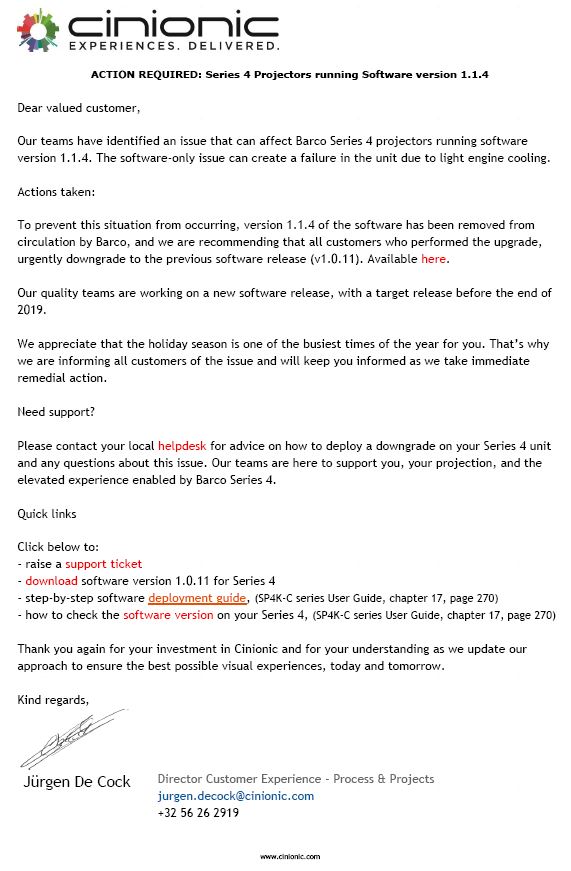
Just received an emergency service bulletin from Barco, advising that any SP4K projectors running software version 1.1.4 should be downgraded to 1.0.11 urgently and ASAP. This is because they have found a bug in 1.1.4 that can "create a failure in the unit due to light engine cooling." 1.1.4 has been pulled from the website, and 1.0.11 is available to download there, for those who need it.
Posted by Tom Bert (Member # 5719) on 12-13-2019, 12:58 AM:
quote: Leo Enticknap
Just received an emergency service bulletin from Barco, advising that any SP4K projectors running software version 1.1.4 should be downgraded to 1.0.11 urgently and ASAP. This is because they have found a bug in 1.1.4 that can "create a failure in the unit due to light engine cooling." 1.1.4 has been pulled from the website, and 1.0.11 is available to download there, for those who need it.
Did you get that from Barco, or from Cinionic?
Barco will send out an InfoT advising to upgrade to 1.1.5 (or downgrade for those who feel more comfortable with 1.0.11), which came online today.
Posted by Leo Enticknap (Member # 534) on 12-17-2019, 07:22 AM:
Posted by Peter Montoulieu (Member # 10468) on 12-17-2019, 09:13 AM:
Hello Tom,
I am commissioning the first sp4k15 that has gone into a home.
https://wallscreen-skylounges.com/carl-fisher-estate-gets-rgb-laser-upgrade
The projector is excellent, one of the best-designed projectors out there.
The red convergence could be improved.
I am having issues with the 3d via HDMI.
AG in Sacramento mentioned that I had to to do the updates in order to fix some 3D bugs.
I believe the recall of 1.14 may have preempted the fixes AG referenced to.
Using pinouts 7 conn synch + and 14 conn synch - we are unable to properly display the 3D L test pattern using expand48 settings. This is using a volfoni rf50 emitter that worked on the previous dp-1500.
In addition, an edid issue on HDMI b is preventing 3D authentication on the oppo 3d player. Please look into this.
Posted by Rick Cohen (Member # 6140) on 12-18-2019, 12:14 PM:
This is big.
https://www.boxofficepro.com/cinemark-signs-10-year-exclusive-agreement-with-cinionic-for-barco-laser/
Posted by Marco Giustini (Member # 4544) on 12-18-2019, 01:22 PM:
I’m still confused of what Cinionic is and what is its relationship with Barco.
Posted by Tom Bert (Member # 5719) on 12-19-2019, 05:16 AM:
quote:
believe the recall of 1.14 may have preempted the fixes AG referenced to.
In addition, an edid issue on HDMI b is preventing 3D authentication on the oppo 3d player. Please look into this.
Did you try upgrading to 1.1.5?
Posted by Peter Montoulieu (Member # 10468) on 12-23-2019, 10:33 AM:
Hi Tom, I will go looking for 1.15.
Cheers!
Posted by Leo Enticknap (Member # 534) on 12-24-2019, 01:09 PM:
I've had a report of an SP4K-12C on 1.1.5 refusing to change inputs from HDMI to DCP, saying "player - IMB error - format configuration failed" in the ICMP UI's transport page. Problem can only be fixed by putting the projector into eco mode and then starting it up again: rebooting the ICMP by itself doesn't fix it. Happens sometimes but not always when switching from a macro that calls for HDMI input to one with media player input.
Posted by Steve Guttag (Member # 268) on 12-24-2019, 09:26 PM:
Seems like the 1st year is a beta year rule continues.
Posted by Peter Montoulieu (Member # 10468) on 12-26-2019, 09:52 PM:
Because my hdmi signal is UHD and I am projecting on a scope screen with the lumagen doing the automatic aspect ratio correction I require a PICTURE Masking file masked to 1,692 pixels by 3840. I save the file to a unique name. Everything is masked perfect, but when I call the macro with the Picture file I just saved, all the masking disappears.
The 3d hdmi edid 3d incompatibility player error continues, have not had a chance to try the 3d yet.
Posted by Tom Bert (Member # 5719) on 12-30-2019, 11:33 AM:
quote: Peter Montoulieu
Because my hdmi signal is UHD and I am projecting on a scope screen with the lumagen doing the automatic aspect ratio correction I require a PICTURE Masking file masked to 1,692 pixels by 3840. I save the file to a unique name. Everything is masked perfect, but when I call the macro with the Picture file I just saved, all the masking disappears.
It is best you share log files for us to check, Peter.
Posted by Ken Lackner (Member # 1002) on 12-30-2019, 11:40 AM:
Hi Tom,
Any plans to make the web interface for both the projector and the ICMP-X a responsive design, meaning the web page automatically adapts to the resolution of the device you are using? Both web interfaces are pretty much useless on a mobile phone, and that can be a big setback for those of us who provide remote support after hours.
Thanks!
Posted by Leo Enticknap (Member # 534) on 12-30-2019, 10:29 PM:
I've had to open a ticket with Cinionic over the error C10999 / IMB format configuration failed, when switching from HDMI to server playback mentioned above. Couldn't see any apparent cause using the online log analyzer. Hopefully they'll be able to figure it out from the diagnostics zip.
Powered by Infopop Corporation
UBB.classicTM
6.3.1.2