This is topic Blue and Red light leak after swapping Light Engine in forum Digital Cinema Forum at Film-Tech Forum ARCHIVE.
To visit this topic, use this URL:
https://ft-forum.com/ft/cgi-bin/ubb/ultimatebb.cgi?ubb=get_topic;f=16;t=003670
Posted by Nat Jencks (Member # 10863) on 05-01-2019, 11:30 PM:
We just swapped a light engine on a new DP4K-19B and after the swap we are seeing much more light leakage coming from the front of the lens including some blue and red leaks that look like they are from the prism. In our setup there is a foam core divider in our porthole. Prior to light engine swap there was *NO* light hitting this divider and now you can see a big circle of light with clear red and blue spillage.
Does anyone have any thoughts or clues about this? The tech that did the swap noticed that the design of the light engines was slightly different with the newer one having two holes in the front of the light engine. Waiting for more info from Barco.
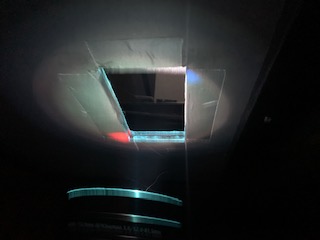
Anyone seen this issue?
Thanks!
-Nat
Posted by Marco Giustini (Member # 4544) on 05-02-2019, 03:17 AM:
I struggle to believe that a 4K projector won't have any residual light coming out from the engine - what you see looks pretty normal to me (besides those funny coloured spots!).
Get your colour meter and measure the contrast ratio ON/OFF (make sure the auditorium is pitch black when measuring black). If it reads something around 1600/1800:1, then your engine is working well (I'm assuming you don't have a High Contrast lens).
Not all engines are the same. Some are better some are worse. Take measurements to make sure they meet the specs.
Posted by Marcel Birgelen (Member # 6801) on 05-02-2019, 04:28 AM:
The residual light is hard to judge from this picture, since you don't know about the exposure time.
The blue and red spots are definitely not something I see in our unit and might point to a somewhat misaligned prism. The unit might still calibrate fine though.
Posted by Nat Jencks (Member # 10863) on 05-02-2019, 08:54 PM:
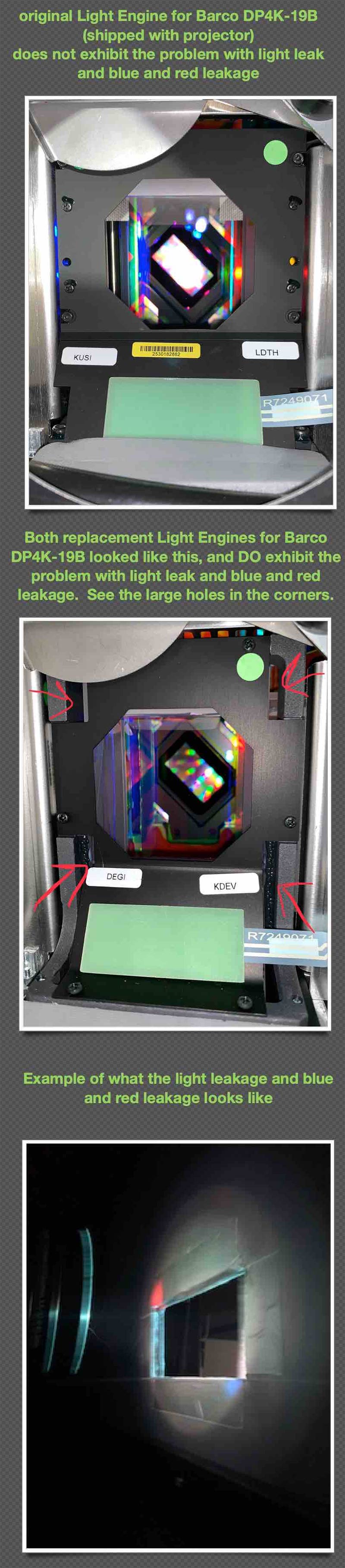
@ Marcel, it looks about the same in person as it does in the picture. This is actually the third light engine for this brand new projector (don't ask). The first Light Engine which came with the projector didn't have this bright circle of light or the red and blue leaks.
However BOTH of the replacement light engines which seem to be slightly differently designed DO have the issue.
The attached image shows the difference between the light engines and the issue we are seeing.
Posted by Alan Gouger (Member # 543) on 05-02-2019, 10:45 PM:
It's possible it looks like the folding mirror or light pipe was not properly aligned. Is there any shading issues around the corners or the edges of the screen if displaying a 100% full white raster.
Posted by Nat Jencks (Member # 10863) on 05-02-2019, 11:03 PM:
Thanks for the reply Alan! Bear with me because my knowledge of the inside of the light engine is limited! Are the folding mirror and light pipe part of the light engine? The reason I ask is that we have seen this on two totally different light engines at this point.
We are not seeing shading in the corners if we put up white. Uniformity is not perfect but its not bad.
Thanks
Posted by Alan Gouger (Member # 543) on 05-03-2019, 10:35 AM:
If there are no colors appearing at the edge or corners of the screen then disregard my previous comment, your folding mirror, and light pipe is not an issue.
Posted by Marco Giustini (Member # 4544) on 05-03-2019, 10:55 AM:
I doubt that those openings are the culprit of the issue. Indeed when a new engine is replaced sometimes you may need to re-adjust the cold mirror but if you don't do that you'd lose light - I wouldn't expect the issue you are mentioning.
I still recommend you check the contrast ratio on screen - that amount of light doesn't seem so weird for a 4K chip.
Posted by Dave Macaulay (Member # 813) on 05-03-2019, 03:33 PM:
Put some duct tape over the holes?
Posted by Marcel Birgelen (Member # 6801) on 05-04-2019, 04:27 AM:
The amount of light leakage itself doesn't look entirely off, but those colored corners are simply weird and I've not seen this before. To me, it looks like a problem with the prism.
But if it doesn't end up on-screen and the contrast ratios are OK, then it's probably fine to live with it.
Posted by Marco Giustini (Member # 4544) on 05-04-2019, 04:49 AM:
It is normal to have "a" coloured patch on a corner of the light output - Barco has an info-T about that and the same applies for Christie. But it's usually a low level coloured patch, not what you are showing in the picture.
I still feel that you should check the contrast on screen and if that checks out, you're ok. Again, remember that an emergency light in the auditorium will completely void your black level reading.
Posted by Mark Gulbrandsen (Member # 72) on 05-04-2019, 12:03 PM:
I've put in quite a few NEC 3240's and never had any light leaks like that. I even replaced two engines that were bad from the initial batch of projectors and never saw any leakage like that during convergence and set up.
Mark
Posted by Paul Finn (Member # 10726) on 05-04-2019, 01:12 PM:
Sir: Please explain, if possible, the reason(s) that this is the third new light engine in a "brand new projector"?
Thank you, Paul Finn
Posted by Nat Jencks (Member # 10863) on 05-07-2019, 11:15 AM:
@ Paul Light engine was swapped because of issues hitting P3 targets satisfactorily.
Powered by Infopop Corporation
UBB.classicTM
6.3.1.2