This is topic sony problem in forum Digital Cinema Forum at Film-Tech Forum ARCHIVE.
To visit this topic, use this URL:
https://ft-forum.com/ft/cgi-bin/ubb/ultimatebb.cgi?ubb=get_topic;f=16;t=003693
Posted by Fernando Caldeira (Member # 5680) on 05-19-2019, 02:18 PM:
Projector - Sony SRX-R815P
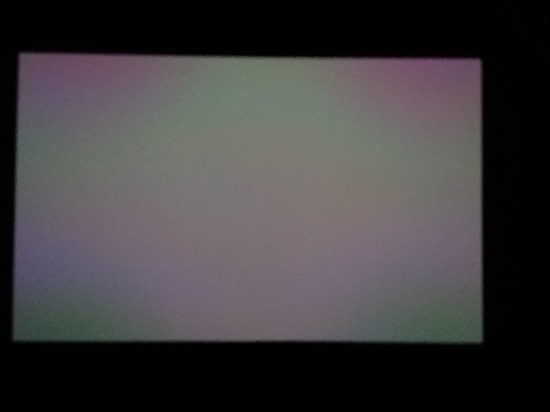
Image - grey test patt of the projector.
The pictur is poor but what you see on it is the problem. pink corners and green in the middle, on what was supossed to be a grey test.
Any ideas on what the problem can be?
Sony is just telling us to upgrade software and recalibrate colours.
Can this really be just uncalibrated colours?
Tomorrow after recalibration will post the results, if any.
Cheers
Fernando
Posted by Sascha F. Roll (Member # 9043) on 05-19-2019, 02:53 PM:
Though I am a bit fed up of giving my knowledge out for free and companies who clearly don't have a clue what they are doing get the money... here are my 2 Cents:
- Your projector suffers from severe Shading. First of all, get the following DCP from Sony: "PRDTESTB1V1_TST-1_C_30_4K_20170814_IOP_OV" and take pictures of the results, then send it to your qualified Sony technician.
- What you probably need: Complete cleaning of the "Optical Block" and surrounding filters, glass surfaces ect.
- Followed by Adjustment of the "Optical Compensator" (e.g. "Black Level uniformity")
- Perform PCAB-G (Gamma)
- Perform PCAB-U (Uniformity)
- Perfom CSC (Color Space Converter)
After all those steps were done properly you should have a very, very good and uniform picture again. Those steps above usually take between 6 hours or up to 8 hours, depending on the state of your projector.
Note:
There have been quite some updates in the last year or so. (Patches for lower target temperatures for the Blue Panel for example - there is also a "replacement kit" consisting of a new, more powerful fan for the blue panel and a small board that needs to be replaced.)
Also you should find out WHY your picture looks that aweful - how lang has the machine been installed? Operating Hours? Ambient temperature? Dirt? Your picture really looks aweful, I've seen a LOT of Sonys (and performed Maintenance on them) and yours seems to be quite unique.
PS: The above Maintenance steps should be perfomed AT LEAST anually, if you're putting lots of hours on your unit (>2800 p.a. or so) better twice a year. Sonys are great machines, very reliable, put out great picture BUT they need more love than DLPs. It's really not that bad. If you have a good tech performing the maintenance anually it also takes less than 6 hours because the projector should be in a better state in the first place.
Also: DO NOT USE the air filters that come with the machine per default, I have not yet found one location where they were suitable. At least german distributors are aware of that problem and provide "better" filters for "normal booth environments".
Posted by Marco Giustini (Member # 4544) on 05-20-2019, 04:28 AM:
What Sascha said.
Better filters: are those approved by Sony? I know there is a kit for that but I would not 'upgrade' filters on any projector without manufacturer permission as you never know what happens to the airflow.
Indeed, finding a good technician is not easy. The information you gave for free are readily available (for free AFAIK) to a qualified Sony trained technician.
Posted by Carsten Kurz (Member # 5396) on 05-20-2019, 05:06 PM:
Fernando - this machine is only a few weeks old I reckon. Hard to believe it went to this state in such a short time? Maybe somehow the calibration data was lost, or you operate it in an exceptional dusty environment. From my experience, that coloration pattern was not caused by accumulated dust, but something else, it shows an obvious cross pattern. Whatever, the machine is brand new, and should be under warranty. So, call Sony and/or your integrator and make them solve that issue quickly.
- Carsten
Posted by Marco Giustini (Member # 4544) on 05-21-2019, 03:30 AM:
That pattern reminds me the pattern I have when I over-use my variable polariser on my DSLR. Maybe just the quarter wave panels to be adjusted or, as Carsten says, just uniformity to be re-done.
Posted by Marcel Birgelen (Member # 6801) on 05-21-2019, 06:47 AM:
It will be interesting to see if uniformity adjustments can fix this.
I've seen similar patterned uniformity issues from image burn in on a Sony machine. In this case, they forgot to shutdown the machine and let it run with the same slide on-screen for multiple days.
Powered by Infopop Corporation
UBB.classicTM
6.3.1.2