This is topic FTP DCP to DSS 200 TMS Help in forum Digital Cinema Forum at Film-Tech Forum ARCHIVE.
To visit this topic, use this URL:
https://ft-forum.com/ft/cgi-bin/ubb/ultimatebb.cgi?ubb=get_topic;f=16;t=003699
Posted by Karl Belter (Member # 10813) on 05-27-2019, 11:14 AM:
Have a indie movie playing tonight. Of course they did not get content to me early like I asked. They have DVD and it looks horrible.
Have converted it to DCP with DCP-O-Matic.
Server would not recognize my USP drive. So I am not trying to FTP the movie onto the DSS 200 TMS. I can FTP to the server, but I don't know where to put the files.
Have a folder from DCP-o-matic with assetmap.xml and several others. Which files and where to I put them on the Dolby server?
Posted by Brad Miller (Member # 2) on 05-27-2019, 11:46 AM:
Drop the entire DCP folder (not the DCP-O-Matic folder) into the root directory and it will find it.
Note - using NTFS is the easiest these days with DCPs. I'm not aware of any server that can't read them.
Posted by Karl Belter (Member # 10813) on 05-27-2019, 11:48 AM:
THANKS FOR REPLYING!!!!!!! This little bit of info I could not find anywhere.
So when DCP-O-MATIC finishes, there is a folder with the special name based upon the settings, that contains the produced files. Drop that folder, as a folder, into root? Or drop the files themselves into root?
Posted by Leo Enticknap (Member # 534) on 05-27-2019, 12:27 PM:
If you open the DCP-o-Matic project folder, you will see something like this:
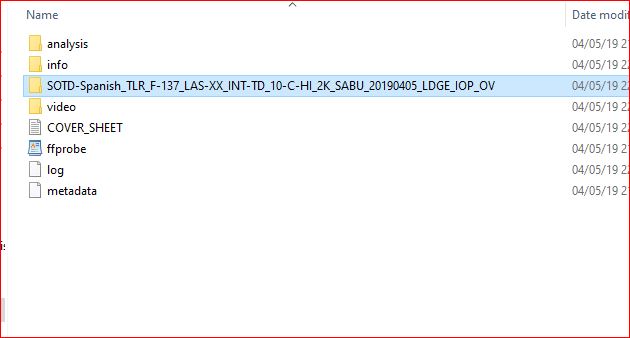
You need to copy the highlighted folder (i.e. its equivalent in your project) into the DSS200. It doesn't matter if you copy the actual folder (i.e. create a folder in the directory you land in after logging on to the DSS200's FTP server), or just the files within, as long as you copy all of the files.
For the FTP transfer, you need to make sure that the following settings are in place:
Transfer mode = active, not passive
Transfer type = binary, not ASCII
Connection type = regular FTP, no TLS
Authentication type = normal password authentication
If you're using physical media, then as Brad points out, NTFS will work. The only gotcha is that if your flash stick or drive has an EFI partition on it, or the partition table is GPT (which it will be if the capacity of the drive is over 2TB), I think that the DSS200 might not be able to read it. I've certainly had problems with this in the past.
The solution is to use GPartEd on a non-UEFI computer running a Linux-based OS to nuke the partition table, then to create a new DOS one, followed by one partition occupying the entire capacity of the drive. If you want to both write to it using a Windows PC and make it readable in most DCP servers, it needs to be NTFS.
Again, on the physical media, it doesn't matter if you put the actual DCP files in the root of the volume, or copy the folder. I'm not sure how many folder levels down the DSS200 will look, but it's definitely at least two.
Posted by Karl Belter (Member # 10813) on 05-27-2019, 12:35 PM:
You guys are all awesome. That was exactly what I was looking for. I was VERY hesitant to just put files on the servers. I rebuilt them a couple months back. I was crazy careful and scanned for virus/malware constantly.
Posted by Carsten Kurz (Member # 5396) on 05-27-2019, 01:12 PM:
https://dcpomatic.com/manual/html/ch14.html
- Carsten
Powered by Infopop Corporation
UBB.classicTM
6.3.1.2