This is topic HDMI from Stage to Booth Advice in forum Digital Cinema Forum at Film-Tech Forum ARCHIVE.
To visit this topic, use this URL:
https://ft-forum.com/ft/cgi-bin/ubb/ultimatebb.cgi?ubb=get_topic;f=16;t=003725
Posted by Martin McCaffery (Member # 37) on 06-25-2019, 02:44 PM:
We've been doing more speakers with Powerpoint presentations and need to up our game.
I'd like to be able for the speakers to operate their presentations from the front of the stage with their own laptops. Currently, we put their presentation on a laptop in the booth and go the "next slide please" route. It works, but not gracefully.
Ideally, I would like to do this wirelessly.
It is about 100ft from the stage to the booth at the back of the balcony. I bought a remote clicker that can make it to the front of the balcony, but not into the concrete bunker 1941 projection booth even with the door open. Are there signal boosters for this purpose? Is there a wireless transmitter/receiver that can be plugged in at the stage and trasmitted to the HDMI input in the booth?
Wiring up for HDMI from the stage may be doable, but more expensive and a pain. We are going for a grant, so the expense may be taken care of. A brief scanning of HDMI extenders using Cat5e/6 indicates the maximum run is 150 feet. All of the snaking to get from the stage to the booth may be close to the limit. Is HDMI actually reliable to 150ft or will I need boosters?
Anything I'm overlooking? Advice and recommendations appreciated.
Posted by Scott Norwood (Member # 30) on 06-25-2019, 03:10 PM:
You have a few options:
The cheap way is to use wi-fi networking and install VNC on the presenter's computer and on one in the projection booth. This requires installing stuff, which the presenter may not want to do (or be able to do). This also does not really work if the presenter wants to do anything with sound. A related method would be to use an Apple TV in the booth and configure the laptop to display to it, although this (as far as I know) only works with Macs.
Another option is HDBaseT, which is good for 100 metres (300-odd feet), and which works well. It runs on cat. 5e or cat. 6.
The next option is to convert the HDMI signal to HD-SDI, then run coax cable to send the HD-SDI signal to the booth. Alternatively, Teradek makes a wireless HD-SDI transmitter and receiver, which is good for a few hundred feet. These are rent-able if you do not want to buy one. Supposedly, it works fine. I don't know if these will carry sound, though.
Some things that will bite you with all of these options: older laptops that only have VGA outputs (there are VGA-over-cat5 devices, or you can convert it to HDMI or HDSDI), Mac laptops (and others) which require any one of a dozen or so adapters that no one ever remembers to bring, and that stupid non-locking HDMI connector.
Personally, I don't trust wireless, so I would suggest just running cat. 6 cable from the booth to your stage (do several runs--at least four). You can use one of the other runs for network, which would be good for the next time that someone wants to do a Skype call in front of an audience (which never works right...I hate using Skype for public events).
Edit: there are also USB-to-IP devices that will let you plug in, say, a keyboard and mouse at the lectern, and use them to remotely control a computer in the projection booth. Look at the Digi "Anywhere USB" product line (which is Windows-only, but works well) for an example.
Posted by Carsten Kurz (Member # 5396) on 06-25-2019, 05:22 PM:
We bought a couple of different gadgets to cater for different needs.
At 150feet, you may need to buy HDBaseT - the cheaper CAT5-HDMI extensions are sometimes advertised to work over these runs, but they are probably unreliable.
HD-SDI/fibre converters cost even more.
It's not such a bad idea to use a wireless presenter to control a notebook in the booth. On our site, we have the USB receiver located close to the port glass. However, we could also have it hanging out on the back wall through a small cable conduit on a standard USB extension cable.
That's probably a low cost solution compared to HDMI extensions. However, some presenters want/need to look at their local display to make it though the presentation.
I would strongly suggest to run two CAT6 cables from stage to booth. With todays breed of adaptors and converters, you can have any signal type running back and forth, and putting two cables in doesn't cost much more than a single one. Make sure that proper cabling is used. I still don't believe how many still put in unshielded cable because it's a few cents less. You also see many patch cables without screen. Typically, you recognize them easily because there is no metal screen around the connectors.
- Carsten
Posted by Marcel Birgelen (Member # 6801) on 06-25-2019, 06:09 PM:
HDMI will not be reliable over 150 ft without some serious boosting or regeneration, at least not at FullHD-like bitrates.
There are plenty of HDMI extension solutions out there, but we recently implemented the HD Fury Maestro. It's essentially a scaler, 4 ports HDMI switch/router and general HDMI Swiss army knife with 4K HDR HDBase-T support. At $1000 for both the scaler/receiver and one transmitter, it's not cheap, but also not the most expensive option out there. The fact that we can automate most of the functions via RS232 is pretty important for us.
Posted by Bajsic Bojan (Member # 4928) on 06-26-2019, 04:22 AM:
Probably mentioned in other threads regarding this, but still.
After testing about a dozen CAT5/6 extenders, wifi transmitters and hdmi singal boosters, the only range of products i have found to be reliable enough is the Extron DTP HDMI line here .
One should ideally run a shielded CAT6 or better cable direct from booth to stage (you can maybe use speaker cable conduit if an old building). Anything in between the two points can cause trouble, routers and switches especially, but even patch panels.
The extrons have been reliable for many sources (bluray, desktop, laptop, through random displayport-hdmi or microHDMI converters... at FHD resolutions up to 60Hz). They do 4k also, but havent tested yet as no suitable projector. They have done a 250 feet run on unshielded CAT5 even on an occasion, but reccomended CAT6.
Couple of things to always take care of tho:
- yes, extrons are expensive!
- if possible, test the setup first. borrow it from the dealer and plug into 300feet of whichever cable you have.
- wiring for CAT6 should usually not be an issue and major expense.
Hope it helps.
Posted by Steve Guttag (Member # 268) on 06-26-2019, 07:05 AM:
I second that Extron is my most reliable extender. On the cable, the shielding is more important than the higher CAT number Shielded CAT5e will outperform CAT6 UTP. If you look at Extron's cable, it is really just shielded CAT5e (braided shield). It is on the higher end of CAT5e with a bandwidth of 425MHz rather than 350MHz.
That said, most HDBase-T devices should "work."
Also beware that as HDMI changes, so does the requirements on the infrastructure. "4K" is nebulous specification. Getting 4K at the HDMI 1.4 standard has quite a few options as it is, at best 10.2GBps. However, at the HDMI 2.0 standard, it is 18GBps and the dirty little secret there is that MOST of the equipment on the market can't handle it, you can't have it all, 4K, 60fps, 4:4:4 color and 12 Bits per color. That exceeds 18GBps bandwidth. You can have most of that...say 4K, 4:4:4, 24fps at 12-bit or you could go up to 60fps and drop down to 4:2:0 but something has to give.
One nice thing about HDMI 1.4 is that the restrictions are sort of already cooked in. You are going to top out at 8-bits, for instance.
HDMI is a least common denominator system so the worst thing in the entire chain sort of sets the limits for everything it touches.
But back to the OT. If you can afford it, I'd get Extron's DTP or preferably XTP system (the XTP is VERY pricey but darn near bulletproof and can have a scaler built into the receiver so everything works). They make wall plate systems for the stage that have VGA and HDMI inputs (auto switching) so the client can just plug in what they have and it comes out HDMI in the booth. The need for VGA is diminishing rapidly though.
If Extron is out of the budget range, then look for an HDBase-T solution. You still need to run shielded CAT5e or better between the booth and stage but that cable is pretty cheap and with plenum cable, you can run it most anywhere you need to. Do yourself a favor and run a spare or two so you don't need to revisit it so soon.
Posted by Sean McKinnon (Member # 612) on 06-26-2019, 10:17 AM:
I second Extron but I personally prefer Crestron DM. I have posted the DM distance specs below for cat 5e and their own 8G cable.
Supports cable lengths up to 230 ft (70 m) for UHD and 4K using DM 8G cable, or 165 ft (50 m) using CAT5e
Supports cable lengths up to 330 ft (100 m) for all resolutions up to UHD and 4K using DM Ultra cable [1]
Here are some of the things Crestron DM supports;
HDBaseT® Certified — Enables direct connection to other HDBaseT certified equipment
Provides one HDMI® or DVI display output [2]
Handles video resolutions up to 4K and Ultra HD
Handles 3D video and Deep Color
Handles Dolby® TrueHD, Dolby Atmos®, DTS-HD®, and uncompressed 7.1 linear PCM audio
HDCP 2.2 compliant
Provides a 10/100 Ethernet LAN connection
Enables device control via CEC, IR, RS-232, and Ethernet
Compatible with Crestron® USB over Ethernet Extenders
Crestron DM extenders can operate via "PODM" or Power Over DM
I imagine that Extron's version has similar specs and features
Posted by Jim Cassedy (Member # 4115) on 06-26-2019, 11:04 AM:
In working a lot 'union jobs' at convention centers & hotels, as well as in many
of the mulit-purpose screening rooms I work at, I've encountered a number of
HDMI extender devices. In general, you get what you pay for.
As someone else pointed out- - a wireless system may or may not work for you.
The wireless HDMI systems I've worked with have all been rather expensive
models (over $500), but even so, we would NEVER use wireless for 'mission
critical' HDMI signals, such as the main source to a projector. The HDMI wireless
links were reserved for lobby or backstage cue monitors, etc. Another thing we
needed to take into consideration, especially at the hotels, was the amount of RF
'noise' in the area. Many of the wireless HDMI extenders share frequencies in the
2.4 & 5Ghz bands with WiFi and other radio technologies which can affect the signal.
(And which is why we only used it for remote monitors)
One of the screening rooms I work at had a nice wall-panel & rack mounted VGA
(wired) video link between the stage & the booth, which was probably state of the
art when it was installed in the 1990's, but was woefully inadequate now. We really
needed to upgrade to an HDMI link so clients could do their presentations from the
front-of-house, but because of the building construction, pulling new cable
at that venue would have been extremely difficult & expensive.
Fortunately, there were also a number of spare 75Ω coax video tie lines between
the stage & booth, so I wound up using HDMI-to-SDI transcoders to send the SDI
signal over the coax. They weren't all that expensive, and they worked very well.
For extremely long runs at convention centers & stadiums, I've worked with some
HDMI-to-Fiber systems, but they are uber-expensive, although most of them were
capable of carrying multiple signals in addition to HDMI, and so were economically
feasible on big jobs when the cost of union labor for running & rigging lengthy
multiple cable runs, and breaking them down later, would easily exceed the
equipment expense.
No matter what, MAKE SURE YOU KNOW HOW YOUR SYSTEM HANDLES HDCP!
This can sometimes be a 'gotcha'! Some systems I've worked with seem to handle it
better than others, and I've got a system at one location that doesn't pass it at all.
I'm not an expert in HDCP or DRM as implemented in PC & MAC HDMI interfaces, but
I'm guessing there are differences in the way it's implemented in various vintages or
versions of video cards and/or software & operating systems.
Just last week, I had a client who came in to rehearse her presentation and see how
it looked on screen, and everything worked well. But the following day, she came in
and & tried to run the presentation off of a different computer (one of the newer
MacBook Pro's) and I couldn't get an image out of it and onto the screen.
Experience, and a quick test with an HDMI video pattern generator I have, confirmed
it was an HDCP issue. I got around it by using one of those small HDMI
splitter boxes on the computer end, which I keep in my 'bag of tricks' for just
such an emergency.
Posted by Paul Finn (Member # 10726) on 06-26-2019, 12:54 PM:
To follow up on Jim: I also have a facility with 75 ohm coax runs - longest are +/- 250 feet stage to booth. There are also Cat.5e runs which work well for VGA sources with Tripp-Lite extenders. However, even some laptop VGA sources will not output 1080P resolution because of HDCP issues. The simple fix is to change the source resolution to 1280x720 (720P). Some projectors will upscale this to 1080P, but if not, 720P looks fine on most video screens in less than twenty two feet horizontal sizes.
For HDMI, I use the coax with SD/HD SDI converters. Again, some laptops will not output 1080P because of HDCP. Checking the output on a monitor will show 1080i HDMI video. AJA mini-converters are reasonably priced and will up convert 1080i, or 720P for that matter, to 1080P at the projector if the projector does not. It is good to get away from the HDMI connectors ASAP and use DVI-D connectors/cable with an adaptor cable from the laptop.
The SDI links are completely reliable and trouble free even in a multiple AC ground difference-of-potential environment.
I have also used a Kensington remote clicker with the receiver hanging on a USB extension cable from the laptop outside the booth about 175 feet from the stage. The presenter could be given a small monitor, but most of the time just looks at the screen from an angle view on the stage.
Paul Finn
Posted by Steve Guttag (Member # 268) on 06-26-2019, 03:06 PM:
1080p won't cause HDCP issues...it will either be the bandwidth or the computer was outputting 1920x1080 computer rather than 1080p video (there is a difference as far as EDID is concerned, believe it or not).
Now moving to 720p will lower your bandwidth down and allow things to fit easier.
As for Crestron, they make some really cool stuff (and I think their prices are on the low-side for what they are), for sure. However, for a company that got their start by controlling other people's stuff, they sure don't play nice with others controlling THEIR stuff! Often, there is a means to do it but Crestron doesn't like to talk about it or publish it.
So, before I go and use a Crestron piece, I have to check to see...do I need a Crestron controller for it? Because that could add to the cost significantly (not only the controller but someone to configure that because I don't program Crestron).
Conversely, Extron is VERY controller friendly. They even have their SIS (Simple instruction Set) to make commands all that much more easy.
The only thing on Extron is that they only deal with THEIR dealers (which is nice, speaking as a dealer). So you will need to have your dealer provide you with any software that might be needed to configure their equipment...and we are only talking configuration, not coding (telling the DTP system, in this case, what your desired EDID is for picture and sound, perhaps a gain control...that sort of thing).
Extron, in their DTP range will handle either 230-feet or 330-feet, depending on the model.
Posted by Marcel Birgelen (Member # 6801) on 06-27-2019, 09:22 AM:
I only like Crestron for self-contained environments like offices, meeting rooms or small auditoria with primarily business functionality, like hotels and convention centers. Doing external automation on Crestron equipment is close to impossible.
Posted by Sean McKinnon (Member # 612) on 06-27-2019, 11:07 AM:
The only things I really still use from Crestron is the DM stuff and only because that is what I am familiar with and can control with Q-Sys. If I was more familiar with Extron I would use them. I get the impression they are pretty evenly matched.
Posted by Steve Guttag (Member # 268) on 06-27-2019, 11:36 AM:
No. Extron is very K-12 and University oriented. The closest that Extron has to a "DM" sort of switcher is their XTP line. The XTP stuff is pretty bulletproof but at a cost.
So for HDMI. From Extron's normal switchers (matrix) you have variants of 4. 4x4, 8x4, 8x8 (and even a 4x8) and up to 16x16. Which could quite possibly suffice for most cinemas. They are pricey though.
They do combine HDMI switching with DTP in their DTP Crosspoints. They go up to a 10x6 but again, it isn't cheap.
Compare that to a Crestron DM where you buy the frame you could possibly ever need and merely load it with what you need. It's always the right size and you only buy what you need (maybe a little extra on the frame size).
Extron can do that too in their XTP line...BUT it will cost you. Extron also puts restrictions on their XTP stuff (who buys it, what training/certification do they have...that sort of thing). It's good stuff, for sure and I have had zero XTP issues and have never heard of any XTP issues. But, for the most part, it is more that what typical cinema people will be expecting.
Since you can, apparently code for Crestron, I can see the desire to use that equipment. Often the simple action of sending an input to an output in Crestron is a relatively simple Telnet type command so that is viable but I suspect the command structure to do much else is limited.
Fortunately, the HD-MD6x2-4K-E is "cracked" enough that most anything of value is doable using conventional commands and I now have a couple of "user components" for that one for QSYS.
Posted by Gordon McLeod (Member # 33) on 06-28-2019, 10:16 AM:
We have had good luck with these
https://www.monoprice.com/product?p_id=21669
Posted by Steve Guttag (Member # 268) on 06-28-2019, 12:04 PM:
Monoprice can be a crapshoot. Some of their stuff is great, some is garbage. They generally price out on the low side. We certainly use their Ethernet patch cables and some of their HDMI cables. They have a several different DAs (splitters) that some work much better than others.
On the product that Gordon linked to...it sends up red flags for me. Were does it state its bandwidth. It uses AV double-speak in its specs (It does 4K/60 but at what color space? and at what distance? and at what bit depth?). Oh they'll tell you a distance but then they drop the frame rate spec off.
Key things to look for is the bandwidth the product will support. A proper HDMI2.0/HDCP2.2 device handles 18Gbps now and a good HDMI 1.4 is at 10.2Gbps. If you don't see the bandwidth spec, I wouldn't look further. And even then, your work isn't done. You need to see if they will publish a grid of what is supported when other things are also true.
You want to see something like this:
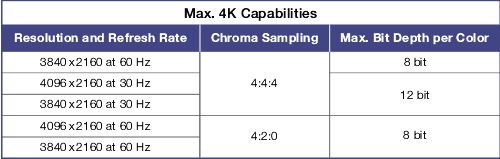
Something that tells you what it can do.
Posted by Sam D. Chavez (Member # 1841) on 06-28-2019, 04:48 PM:
Altona HD Base T hardware has worked quite well for me in the past. It is wired Cat. 6 system. It's used every day at a couple of very demanding venues and has not missed a beat. I don't recall the maximum distance but have used it as far as 150 Ft. Not cheap at about $1,200 but seems foolproof.
Posted by Steve Guttag (Member # 268) on 06-28-2019, 07:27 PM:
Atlona isn't riding high with me right now.
I had a site that insisted on 4K HDMI 2.0/HDCP 2.2 and they wanted everything. So much so, the only choice of servers at the time was the ICMP because they had an input that could handle it.
One of the sources, an Oppo UDP205. Plug it straight into the server...no problems...pretty awesome picture too.
Plug it into an Atlona JUNO 451 so they can switch between four sources, an Atlona extender...BAM...doesn't work. Or i should say it normally doesn't work. Change sources, doesn't work or takes over 15 seconds to make a switch. Unplug the extender and plug in direct, it does much better. Unplug the Atlona switcher it does better but still very sluggish and unreliable.
The cable run was about 100-feet.
Atlona traded me out to a "better and more powerful extender" It was better...but still unreliable. Swapped out the Atlona JUNO for an Extron 4x1 switcher that had since become available...it has status LEDs to let you know when you have good signal and HDCP sync...that greatly increased reliability but the extender still will cause a delay or no picture/sound. A straight connection to the projector from the switcher was very good quality switches.
So, in the end, I had to lower the bandwidth by restricting the color depth and chroma subsampling to ensure the Atlona wouldn't choke. So no, Atlona is not a bulletproof company, in my book. Their stuff says it should do what it doesn't do. Now for HDMI 1.4 stuff, I have not had Atlona issues. They pretty much do as advertised.
In August, Extron is coming out with their DTP2 system and that is stated to handle 18Gbps content. When that is out (for a couple of months, I don't want to be the first), I'll recommend to the client to change it out...that the "State of the art" got better.
Posted by Sean McKinnon (Member # 612) on 06-29-2019, 09:01 AM:
I wish I was a crestron programmer Steve! No, I can do like you and use Q-Sys to switch inputs and parse some feedback that's about it.
My opinion is that for the time and money it takes to program crestron that its place is in the large corporate complex environment as a control system. In cinema projects I am only using it for its video products.
Does the Exteon XTP line support different input and output types like SDI, composite video, etc any support for video over fiber?
Does the Extron
Posted by Steve Guttag (Member # 268) on 06-29-2019, 09:56 AM:
Oh yeah. Extron's XTP absolutely has choices for input and output and also absolutely does the fiber thing.
https://www.extron.com/product/listbytype.aspx?subtype=486
However, where Crestron lets you choose your input/output types on an input/output basis, Extron has you move in 4 input/output hunks.
Crestron gives you an HDMI output on each input (whatever input) and a stereo audio, Extron does not.
So I absolutely get the desire to use Crestron in an HDMI intensive environment or even mixed use. Their model structure fits better. It just sucks that they don't allow their switchers/end points to be controlled "by others" officially and embrace that. Rather than let things like Q-SYS be the control system, they would rather you use one of their audio "things" and buy their control system. Extron would like you do that too but realistically, for us, unless something dramatically changes, QSC's Q-SYS is likely going to be the bulk of our control systems going forward if we need to put in any sort of DSP audio. And if it is just a simple control system in an existing environment, probably Extron's Touchlink Pro (cheaper, easier, faster...oh...and I'm certified on that one!). Unfortunately, due to the Crestron, "we don't support others controlling our stuff" attitude, Extron won't make drivers for Crestron equipment.
Posted by Sean McKinnon (Member # 612) on 06-29-2019, 08:45 PM:
My colleague who went to infocomm attended a lecture about how open source is the direction of the industry and how they have shown that everyone makes more money (somehow?) over proprietary protocols. It is too bad that Crestron doesn't see it that way. It seems they have built their business on a large barrier to entry (cost to become a certified programmer, time, and complexity). I know people who make an easy six figures plus as freelance crestron programmers people like that are going to want to protect their investment and crestron is able to profit from and maintain some type of control (quality or otherwise) through this system. I prefer the QSC model. Sure they manufacture amplifiers and loudspeakers and I think there is an advantage to using their products on a q-says system but they have made their protocols public and adopted open source type control and programming platforms (Lua, Json)
Posted by Steve Guttag (Member # 268) on 06-30-2019, 07:20 AM:
Hey, if one is a "Master" programmer for Crestron, odds are, they are a talented individual that probably deserves 6-figures. I HATE making GUIs and some of these guys can really hit the nail on the head. I still hold up the AFI/Silver's Crestron GUI as the standard by which I judge all others. It was done by a talented individual (Don Getz). It is just so intuitive that most anyone walking up to use it, doesn't need a manual to figure it out. As it has evolved and others have taken over the Crestron part, it has lost some of that, in my opinion. There was an elegance in its user simplicity despite a complex control system. If you haven't seen it, check out the pictures in the Warehouse here.
Posted by Sean McKinnon (Member # 612) on 07-02-2019, 07:49 AM:
I will check that out. I don't. Begrudge anyone the ability to make six figures as a freelance master Crestron programmer at all its just not my cup of tea right now from a control standpoint.
Posted by Ben Schulz (Member # 9832) on 07-04-2019, 06:55 PM:
Hey OP
We use Kramer Cinema Scalers and they are really good. They are a little pricey but worth the money.
They have the scaler at the front of the cinema (or wherever you put it), then runs the signal up to bio via a cat6e cable using HDBT. Then into the Kramer break out boxes.
Powered by Infopop Corporation
UBB.classicTM
6.3.1.2