This is topic Off Centre for Digital Projectors in forum Digital Cinema Forum at Film-Tech Forum ARCHIVE.
To visit this topic, use this URL:
https://ft-forum.com/ft/cgi-bin/ubb/ultimatebb.cgi?ubb=get_topic;f=16;t=003733
Posted by Adam Towill (Member # 7683) on 07-03-2019, 08:08 AM:
Hey all,
Is centre line absolutely essential? Or.. is there a certain amount of compromise either way without noticeably or substantially affecting the on screen image?
Interested in all your thoughts on this? Trying to decide the best way to approach something.
Thank you.
Posted by Marcel Birgelen (Member # 6801) on 07-03-2019, 08:34 AM:
Almost no movie projector is exactly in the center of the screen, not vertically and many also not horizontally. Perfect vertical alignment is almost impossible, because the beam would probably impact the audience before it reaches the screen. And horizontally, it's quite common to have multiple projectors aimed at the screen, which makes perfect horizontal alignment impossible.
All DCI compliant projector/lens combinations allow for a certain amount of lens shift. The larger your lens shift will be, the more side effects you'll get though, like non-uniform focus and optical aberration.
Then there are the digital tools, that allow for trapezoid corrections called keystone corrections. I consider those options last-resort options, because they digitally alter the image, thus lowering the potential resolution and often leave some nasty artifacts.
Also, in order to correct focus issues due to extremely high projector placement, like in rooms with very steep stadium seating or balconies, a common trick is to tilt the screen a bit.
I know about one auditorium that is located in the basement, which has the booth located on the left side (when facing the screen), this sub-optimal placement is due to height restrictions. This leaves some noticeable issues with focus on screen.
Posted by Marco Giustini (Member # 4544) on 07-03-2019, 09:00 AM:
quote: Marcel Birgelen
Then there are the digital tools, that allow for trapezoid corrections called keystone corrections. I consider those options last-resort options, because they digitally alter the image, thus lowering the potential resolution and often leave some nasty artifacts.
Those are not available on DCI projectors thought so if you run out of lens shift you'll see vertical/horizontal keystone.
quote: Marcel Birgelen
Also, in order to correct focus issues due to extremely high projector placement, like in rooms with very steep stadium seating or balconies, a common trick is to tilt the screen a bit.
Most projectors have focus adjustment for those situations. Barco calls it Scheimpflug, Christie Boresight. I don't think NEC has it even though you can play with the mount a bit to achieve some results. Sony 500 series features spring-mounted mounts which can be used (officially? unofficially?) to correct focus.
I never had a situation where I could not make the focus even throughout the screen using those tools. Clearly if you end up with the projector at the side of the room as Marcel mentioned, then you'll have to live with severe compromises.
PS: I find that not many techs like to adjust the focus uniformity by playing with the aforementioned tools!
Posted by Steve Guttag (Member # 268) on 07-03-2019, 10:27 AM:
NEC has the adjustments, though awkward on many of their projectors.
As for absolute center...the closer the better but as others have pointed out, there is some amount of adjustment. Realize that 1.38" 4K projectors will have the least amount of adjustment due to how big the imager is relative to the inlet pupil of the lens.
Posted by Jim Cassedy (Member # 4115) on 07-03-2019, 11:01 AM:
I worked in a screening room where the NEC projector was located way off
center using an old spotlight port because we wanted to keep our two 35mm's.
But the picture always bothered me. I didn't have a trouble with image focus,
but trying to get an even light across the screen took a lot of work, and even
though it "looked ok", it wasn't ideal, and it bugged me.
I also had to play with the internal projector masking quite a bit to hide the
fact that the image was trapezoidal. Corporate customers who put power-point
graphs or charts on screen often commented that our projector "wasn't level" ,
and I'd have to explain what was going on & why it looked that way. Enough
of the image was masked that we were just barely "DCI legal".
I finally had enough, and early this year I got them to spend the money to
move the NEC to position between the two 35mm's. This involved buying a
spacer to bolt onto the existing projector pedestal to raise it about another
foot or so, and to re-do some of the power & and signal wiring.
The whole thing cost just under $1000, but IMO it was worth every penny.
My tapazoidal image is gone and screen illumination uniformity is now no
longer a challenge to achieve.
The NEC is now located between the two 35mm's, and shoots out of one
of the projectionist viewing ports. I can still do 35mm change-over shows.
I can easily squeeze between the NEC and the left 35mm projector, with
no problem, and I can still see enough of the screen to focus & catch catch
the cue-marks. It's a bit of a tight fit, but I'm a skinny guy & have no
trouble. If "the other guy", who is a lot larger than I am needs to do a
35mm show, the NEC is on wheels, so we just roll it back a bit so he
can fit in there. I made sure there was enough slack on all the cable
connections to do this when we moved the NEC to the center position.
Long story short- - IMO it was well worth the effort to get the projector
to its' new position which is now almost dead-on center screen, and I
sleep a lot better at night knowing that I'm no longer forced to work
with what I always considered a 'compromised' image at that location.
Posted by Marcel Birgelen (Member # 6801) on 07-03-2019, 01:26 PM:
quote: Marco Giustini
Those are not available on DCI projectors thought so if you run out of lens shift you'll see vertical/horizontal keystone.
It's not certain we're talking bout DCI projectors here. But, DCI projectors indeed don't allow keystone corrections, but almost all other digital projectors do. Not all digital projectors do have lens shift though. (Interestingly though, DCI still allows for scaling, but that's another discussion.)
I had a special case of a laser scanning projector once, that did have a pretty interesting trapezoid correction configuration, by adjusting the laser scanning pattern itself.
quote:
PS: I find that not many techs like to adjust the focus uniformity by playing with the aforementioned tools!
It's a pretty time consuming process and you need the proper tools to do it right, like at least some good binoculars.
The problem with scheimpflug/boresight adjustments is that when you over-use it, it seems to cause some additional optical aberration, especially in the edges of the screen. (You can try to compensate that by adjusting the convergence a bit... ![[Smile]](smile.gif) )
)
Posted by Mark Gulbrandsen (Member # 72) on 07-03-2019, 04:29 PM:
I had a couple during conversions that were about 5 degrees off center. The projectors can certainly handle it, but keep in mind that DCI allows zero geometry adjustent. Being off center will also affect light distribution and might make for a longer lens change, waiting for the shift. Not reccomended for any 3-D systems.
Mark
Posted by Justin Hamaker (Member # 2165) on 07-03-2019, 05:28 PM:
I have only worked with NEC and Barco projectors. I really like the scheimpflug adjustment on the Barcos. When I took my level 1 certification I remember the instructor was extremely impressed with my screen adjustment, especially the scheimpflug. Several of my NEC projectors could really benefit from a similar adjustment. I know it's possible to get a small amount of this, but since it's not a native function I don't even want to mess with it.
Posted by Adam Towill (Member # 7683) on 07-03-2019, 08:18 PM:
Thanks for this all so far.
It’s an NEC, DCI projector. I’m going to work out the angle shortly, but I can’t see it exceeding five degrees.
The question is whether to leave it dead centre and make fairly significant structural changes to accommodate a 35mm to the left, or to tuck it in the corner of the box, make less structural changes and put the 35mm in the centre.
The left porthole was originally for an advertising projector. There is the possibility that this cinema may only have a few years of life left, so until that’s certain, I don’t want to go too nuts on modifications if there are less invasive ways to achieve similar results.
Posted by Steve Guttag (Member # 268) on 07-03-2019, 08:53 PM:
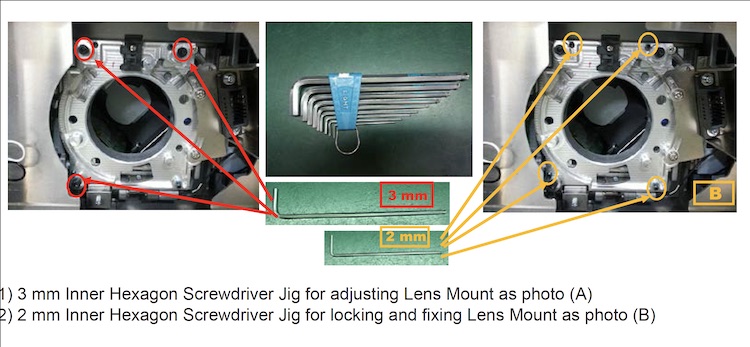
For the NC1200/2000C, the left/right boresite/scheimpflug adjustment is a matter of loosening the four allen cap screws on the lens mount (from inside the projector. You don't want them sloppy loose just enough so you can move it so a little friction is good. If you get it loose and you have any down angle, the weight of the lens will cause it to skew. There is a slot on the "left" or the "non-op" side of the mount that is for an offset too but a slotted screwdriver with a largeish blade works fine and you can tweak it for left/right adjustment. Snug them up and it should be good for that.
Up/Down...that is another interesting activity. They are done from the front. There is a set of four ball bearings that sit on a shelf (well...two above and two below). Presuming positive gravity, you back the two below off and adjust the two upper ones (the bearing centers are on eccentrics) to pivot the lens mount up/down. Be sure to get them matched (so each are bearing the same amount of weight). once done, bring the lower bearings back up to just pinch the shelf (without binding).
I recommend Barco's Focus green pattern (or similar) as it has targets in all of the important areas. You won't be fooled by convergence (only one color and it is in the middle of the range). If nothing else, NEC's adjustments are not interactive with each other. you or only moving vertical or horizontal...aside from if you loosen the mount too much and the lens is tipping on you.
Posted by Adam Towill (Member # 7683) on 07-04-2019, 06:49 AM:
Is that the 900 as well? These are getting kinda long in the tooth, but are still doing their job.
Sounds adventurous, but I’ll have a look when I sort out doing it. It’ll only be left/right. They’re a reasonably flat rake, so no huge issues there.
Thank you.
Posted by Mark Gulbrandsen (Member # 72) on 07-04-2019, 07:34 AM:
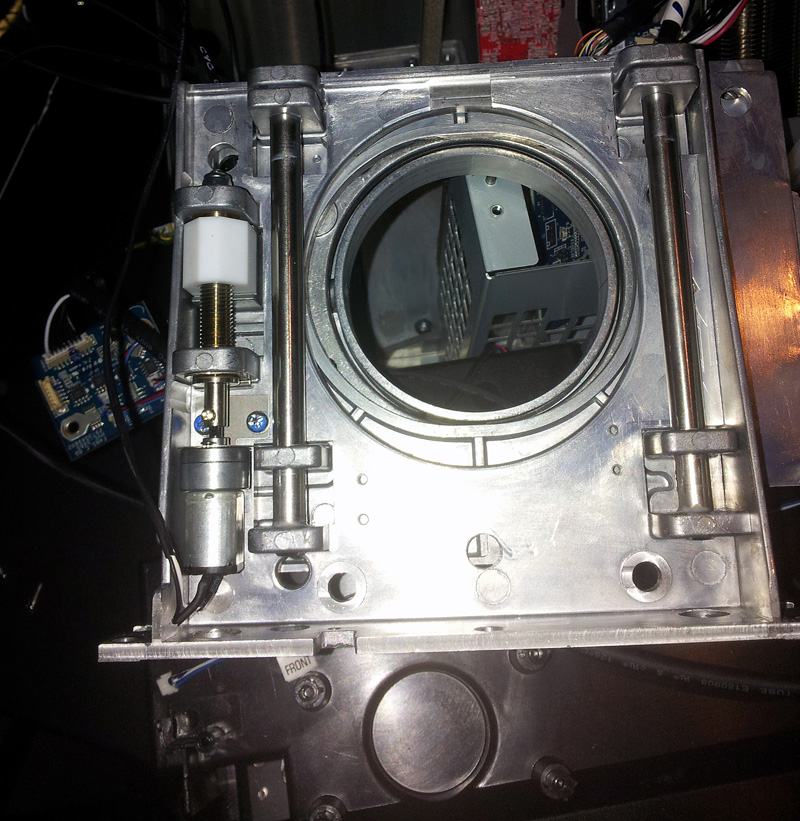
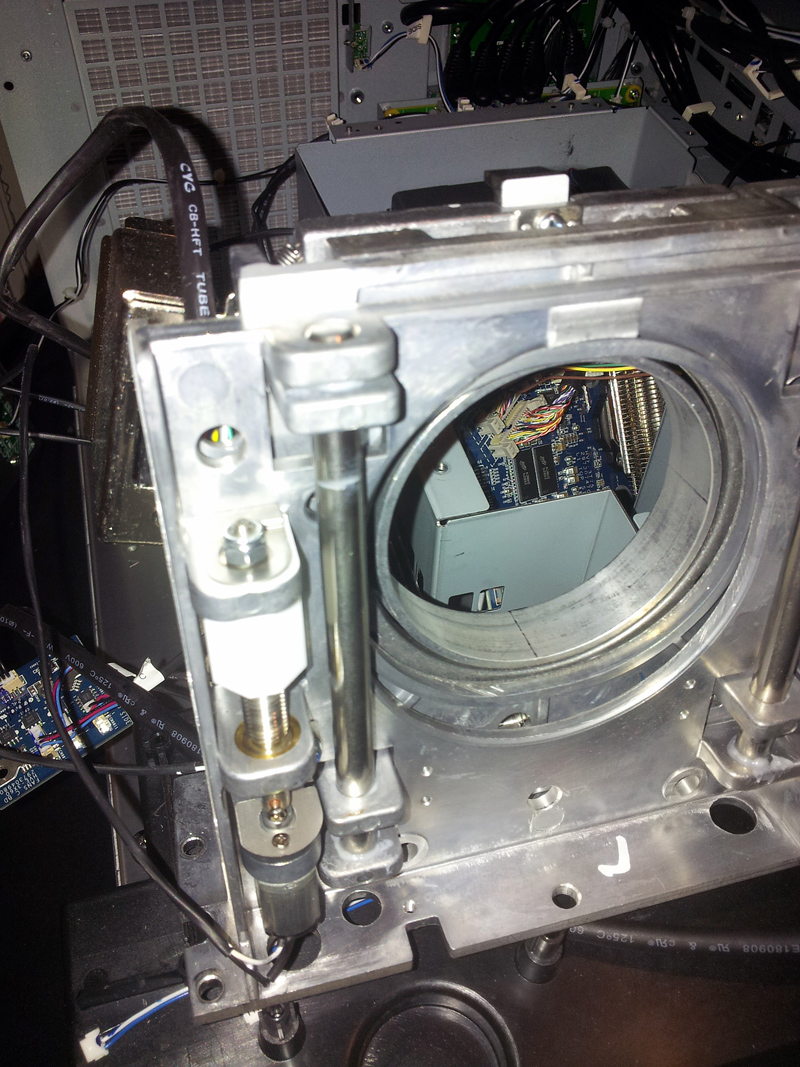
Not sure you can scheimpflug an NC-900. The mount is all too simple. But if you do go in there... its a lot of work to get to it! Here are a couple of pictures so you can see what the mount looks like. While you are in there check the lead from the motor seen in the first image, lower left. NEC had a bunch of those assembled improperly and there is a serice bulliten regarding it. That lead will eventually short out if your lens does any vertical repositioning between formats.The short will also blow the chip on the lens driver board. The chip is very inexpensive, the lens driver board is about $250.
Mark
Posted by Carsten Kurz (Member # 5396) on 07-04-2019, 08:42 AM:
Adam - can you give us approx figures about throw and the off-center distance of the projector?
- Carsten
Posted by Marcel Birgelen (Member # 6801) on 07-04-2019, 08:44 AM:
I don't see any reliable way to "schleimpflug" an NC900 or I'm missing something. I also don't see anything in the pictures Mark provided, that indicates it is possible. In order to do so, you need to be able to reliably change the plane of the lens versus the imager, in ever so small increments.
Posted by Justin Hamaker (Member # 2165) on 07-04-2019, 02:56 PM:
On my NEC NC2000C projectors the focus across the screen is close enough that I don't think it's worth all the work it would take to try and improve it. With the focus adjustment set to fine, I think there is no more than 4-5 clicks difference between the extremes. I have it set to the center of that range, so the difference is really only noticeable when you have a framing pattern on the screen.
Posted by Steve Guttag (Member # 268) on 07-04-2019, 02:58 PM:
Actually, the 900 (and 1100) adjusts pretty much like a Barco.
Posted by Marcel Birgelen (Member # 6801) on 07-04-2019, 05:41 PM:
Yes, that looks pretty similar to Barco's Scheimpflug adjustments, but are they even mentioned in the manual?
quote: Justin Hamaker
On my NEC NC2000C projectors the focus across the screen is close enough that I don't think it's worth all the work it would take to try and improve it. With the focus adjustment set to fine, I think there is no more than 4-5 clicks difference between the extremes. I have it set to the center of that range, so the difference is really only noticeable when you have a framing pattern on the screen.
It's a matter of personal opinion, but especially for 2K projectors, there is something as "too much focus" in my opinion. I rather have the pixels blur a bit into each other than have the pixel grid on full display.
Posted by Marco Giustini (Member # 4544) on 07-05-2019, 01:42 AM:
quote: Marcel Birgelen
It's a pretty time consuming process and you need the proper tools to do it right, like at least some good binoculars
It is - but not particularly IMO - but aren’t we installers and supposed to carry the right tools? Sound is also time consuming and requires special tools! 🙂
Posted by Dave Macaulay (Member # 813) on 07-05-2019, 02:30 AM:
"are they even mentioned in the manual"
NEC manuals are the worst from all digital projectors I have worked on.
Try figuring out how to R&R an NC900 prism from the service manual... there are images from the factory assembly, and the prism is shown on an otherwise bare chassis - obviously one does not need to remove EVERYTHING else to access the prism.
You really need to take the NEC service course to learn how to properly take care of them... and the NEC policy of allowing anyone who passed that course to teach it (and then get their students access to the closed service website) is a bit odd.
I pity the fool (©1982 Mr. T) who tries to do in depth service on an NC1100L without having taken the service course.
Posted by Adam Towill (Member # 7683) on 07-05-2019, 02:33 AM:
Hey guys,
Keeping all this in mind. I'm going to look at temporarily moving it on a closed day and see how it performs.
Approximate numbers are a throw of 14.3m, currently at 90 degrees to the screen, relocated will be about 85.2 degrees to the screen. Scope ratio is about 5.5m on screen.
Realistically, is this something I should touch, or leave to a service agent?
Thanks again.
Posted by Carsten Kurz (Member # 5396) on 07-05-2019, 05:46 AM:
While the horizontal shift is very limited on the NC900, you should be okay under these conditions. If you're able to do the necessary adjustment in NEC DCC S2, go on. The NC900 has a software limit for shift, depending on lens type.
Naturally, don't modify the existing lens files, but copy, and modify the copy, so you can always return to the previous version.
- Carsten
Posted by Mark Gulbrandsen (Member # 72) on 07-06-2019, 11:31 AM:
My kudos to Mr Pflug! I was told that it didn't adjust by the people at NEC. (Not Strong or MIT)
Mark
Posted by Cameron Glendinning (Member # 3516) on 07-08-2019, 06:57 PM:
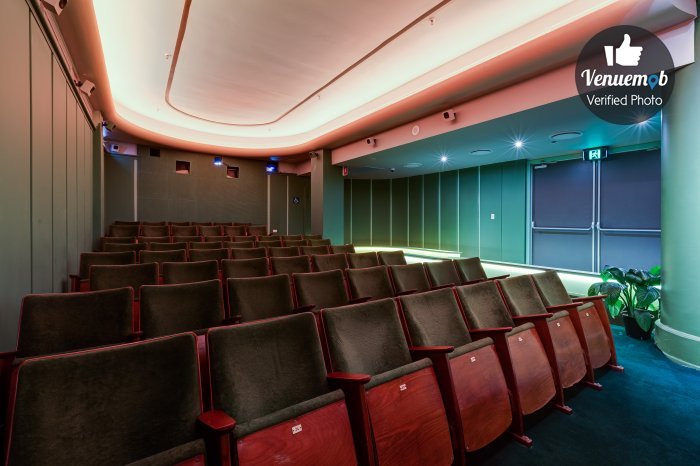
When I was involved with the reopening of the old paramount screening room in Sydney Australia as the Golden Age Cinema, due to national trust issues we left the 35mm projectors in place and installed the NEC 900 through an observation port on the extreme left of the projection room ( right hand side in auditorium photo), which matched the very edge of the seating area. The Lens Shift setting almost removed any keystone issues.
Posted by Mark Gulbrandsen (Member # 72) on 07-12-2019, 09:04 AM:
Nice looking room Cameron!
Powered by Infopop Corporation
UBB.classicTM
6.3.1.2