This is topic Macros Cues create for 4k enable in dcp2k4 in forum Digital Cinema Forum at Film-Tech Forum ARCHIVE.
To visit this topic, use this URL:
https://ft-forum.com/ft/cgi-bin/ubb/ultimatebb.cgi?ubb=get_topic;f=16;t=003743
Posted by Annli Com (Member # 8266) on 07-19-2019, 02:48 AM:
Dear Freinds
Any option to create a macro cues for 4K Enable at DCP2K4 Show playlist properties ?
Please check the images.
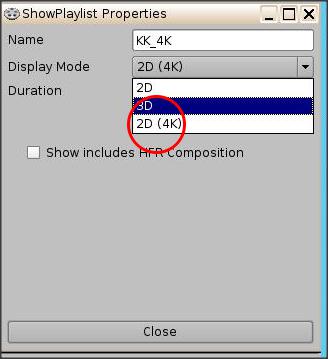
Thanks In advance
ShibuPaul
Posted by Marco Giustini (Member # 4544) on 07-19-2019, 05:18 AM:
If memory serves, I used to put a default cue with a "force 4K" command in it so every playlist would be 4K - 2K content would be automatically rescaled. I do not think the average cinema would change that option based on content properties so 4K content would end up being played in 2K.
My "Force 4K" macro was the following
quote:
<AutomationCueMacro>
<Name>Force_4K</Name>
<Id>urn:uuid:5de9d06f-1b65-4947-a31a-821849d52882</Id>
<CommandList>
<Command>
<Type>DeviceRawSendMessage</Type>
<AnnotationText>SET_4K_MODE_ON</AnnotationText>
<DeviceName>Certainty</DeviceName>
<MessageType>text</MessageType>
<Message>29,CTRL,1,S4KMODE 0 1,N,??,\r\n</Message>
</Command>
</CommandList>
</AutomationCueMacro>
Obviously the ID should be unique for you. You'll find the Set_4K_Mode_On command in the Certainty library anyway. Nothing special.
I then added this macro in the "Default_cues.xml" file.
Bear with me, this was a few years ago, I do not know if the software has changed today and this may work differently.
To check 4K playback, I believe the projector will tell you the input somewhere or you could use a 4K framing chart with fine details and check on screen.
Posted by Annli Com (Member # 8266) on 07-19-2019, 06:01 AM:
Dear Marco Giustini
Thank you for replay , i found at library section of Doremi new version include the cue facility at Library > certainty.4K Enable/Off.
only for IMB.
Regards
ShibuPaul.
Posted by Dave Macaulay (Member # 813) on 07-19-2019, 06:32 AM:
The DCP2K4 server is a larger chassis version of the DCP2000 server, and uses a dual SDI cable link for image data to the projector. This link can not carry the data bandwidth needed for 4K playback.
You server will not playback 4K resolution. It will play 4K DCPs but only at 2K resolution.
An internal server or an external server with IMB internal media block is required to play 4K resolution (only on a 4K projector of course).
Posted by Marco Giustini (Member # 4544) on 07-19-2019, 08:13 AM:
I gave for granted that we were talking about an IMB. I didn't know the software would even allow the 4K option on a Dolphin system.
Posted by Annli Com (Member # 8266) on 07-19-2019, 08:41 AM:
My Systom is DOREMI DCP2K4 With Doremi Imb Connect via PCI Express card to CP4230.
ShibuPaul
Posted by Steve Guttag (Member # 268) on 07-19-2019, 09:27 AM:
Officially, that is known as a "Showvault/IMB" system. Even if it started life as a DCP2K4...once the Dolphin board was removed and the IMB added, it changed to being a Showvault.
Posted by Dave Macaulay (Member # 813) on 07-20-2019, 08:58 AM:
I've not seen that playlist property choice. I believe we just load a 4K DCP, and it plays in 4K.
Not sure why you would force 4K for a 2K DCP.
Posted by Annli Com (Member # 8266) on 07-20-2019, 09:21 AM:
Dear Dave Macaulay
Christie projector IMB 4K Mode On option only work after push/cues via enable.
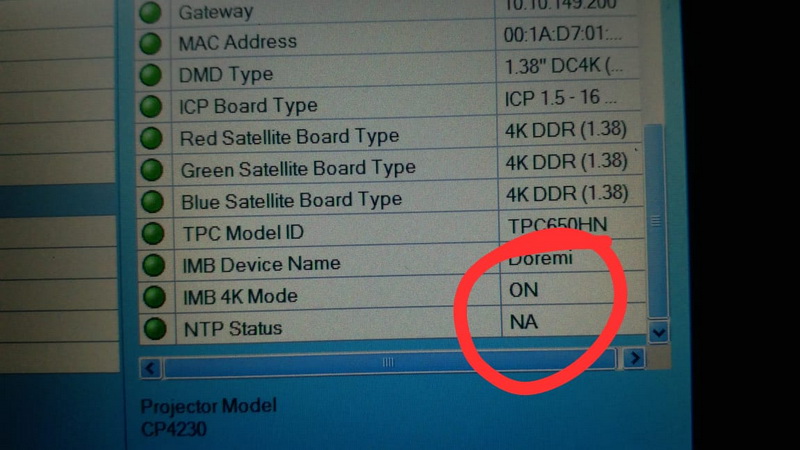
Regards
ShibuPaul
Posted by Dave Macaulay (Member # 813) on 07-20-2019, 10:56 AM:
Ok. I'm not a Christie guy. Doremi used to have a 4K license for the IMB, may still exist? But with Barcos it originally forced 2K playback in 4K and gave a very weird image (can't recall exactly but it was 1/4 of the 2K image projected)so it would need to be deleted for a 2K projector.
Posted by Marco Giustini (Member # 4544) on 07-20-2019, 02:58 PM:
4K licence is indeed required or it won't play 4K - again, you'll need a detailed 4K framing chart to assess. Alternatively you can look into the Barco signal path.
Dave, That happens when you play 2K using a 4K macro on the projector (4K source file if not mistaken).
I hope nowadays you can set the source file to auto and that would sort it out BUT if you force 4K on the SERVER and play 4K macro on the Barco, it'll always be good. That's why I ended up forcing 4K on the media block.
Powered by Infopop Corporation
UBB.classicTM
6.3.1.2