This is topic NEC NC900 IMS in forum Digital Cinema Forum at Film-Tech Forum ARCHIVE.
To visit this topic, use this URL:
https://ft-forum.com/ft/cgi-bin/ubb/ultimatebb.cgi?ubb=get_topic;f=16;t=003769
Posted by Richard May (Member # 2627) on 08-14-2019, 01:55 PM:
I have 4 NEC NC900 projectors with IMS 1000's. The software and firmware have never been updated since install in 2014. No real problem in the 5 years. It looks like we finally lost an IMS. I'll be putting in an IMS 2000 in it's place. Does the projector SW or FW need to be upgraded for this IMS?
Posted by Leo Enticknap (Member # 534) on 08-14-2019, 04:20 PM:
I don't know of any formal recommendation on that score, but my gut feeling is that a five-year gap in software/firmware versions between a projector/ICP and IMS carries the risk of causing some unpredictable behavior. I'd suggest asking the tech who installs your 2000s to update the projectors and ICPs to the current version while (s)he's at it. It'll only take about 15 minutes per projector.
The current ICP version (4.54) contains a modification that substantially reduces the risk of dead pixels, and a bug fix for subtitle rendering that can be quite a significant bug if you play subtitled foreign language movies, so it's worth doing.
Posted by Richard May (Member # 2627) on 08-14-2019, 04:37 PM:
Thanks Leo. I just worry about updating when we have had ZERO issues for 5 years on this version.
Posted by Leo Enticknap (Member # 534) on 08-14-2019, 06:40 PM:
I hear you about not fixing what ain't broke. You could always try installing the IMS2000 into the untouched projector and seeing what happens. I suspect that if you do run into any issues that NEC don't immediately recognize and ask for their help over them, though, the first thing they will ask you to do is to send them a log, and the second will be to update the software and firmware bundle to the current version.
Posted by Richard May (Member # 2627) on 08-14-2019, 06:50 PM:
Yep. That's what we'll do and see what happens. Thanks Leo.
Posted by Carsten Kurz (Member # 5396) on 08-14-2019, 07:17 PM:
What about your lamp running times? NEC introduced software upgrades for their powersupplies that improve lamp life. I don't know of any major issues with NC900 updates, admittedly I stopped at 4.219 or so, which is also not the most current. But I don't think much happened after 4.218 or so anyway...
Since you're on IMS, Enigma 1.8 should be no concern for you. Otherwise, you would have known already...
- Carsten
Posted by Mark Gulbrandsen (Member # 72) on 08-15-2019, 06:43 AM:
Actually there was a T.I. upgrade at 4.310 when ICP went to 4.5. The current projector firmware is 4.312. No you won't need to upgrade for it to work, but it may help your lamp life considerably, a lot was done for lamps in both the ballast firmware and fan controler over the last five years. Especially when they went to version 2 lamps.
Those running 4.219 are at T.I. 4.2, obviously...
Updates should be done at a minimum once a year and twice a year preferably. Auto update has been 100% fool proof and you can even do it remotely if your locations have remote access. I literally have not done any updates on site in going on a four years. Also, it's not that something isn't broke, it's about increasing reliability and every once in a blue moon making your equipment do cool new things it couldn't do before the update, like actually getting 3000 lamp hours!! It take less then ten minutes to update a projector people!
If you DO update, be sure to only do it with the latest version of DCC because you may actully break things updating to a newer version of firmware with an older version of DCC. Just ask me about that some time!
Mark
Posted by Leo Enticknap (Member # 534) on 08-15-2019, 07:50 AM:
The decision as to whether or not (and if so, when) to install software/firmware updates into projectors and servers can be a difficult one, and should always involve reading the release notes to establish what the update is supposed to do, followed by a risk/benefit analysis. In rough terms, this goes as follows:
Benefits
- Manufacturers will often require the machine to be running the current release version before being willing to assist with troubleshooting. Therefore, keeping machines current avoids the need to have to do the updating under pressure and while trying to fix a bigger problem.
- The update can fix bugs that are affecting your operation.
- The update can improve efficiency and reliability (e.g. NEC 900 updates improving lamp life, or ICP 4.5 putting the DMD mirrors at rest in a position that exposes them to less heat).
- The update can add support for new technical standards, e.g. SMPTE DCPs.
- The update can add new features that can benefit your operation (e.g. the ability to import and export automation cues in DSS 4.9).
Disadvantages- The updating process itself can go wrong, resulting in an unstable or even, in the worst case scenario, a bricked system. This is especially a risk if it is not on a UPS.
- The update can change the behavior of the system (e.g. rearrange buttons on a web UI) that imposes a learning curve on the end user, or even the tech.
- The update can introduce new bugs (e.g. Barco B series, 2.54 breaking the Smart Maintenance function).
- The update can break the reliable interaction between the machine being updated and others it has to interact with. I experienced this with an IMS3000 and a Lumagen scaler a few months back, and in the end the only way we could make the system reliable again was to downgrade the IMS to its previous version.
I would always want to establish which of these potential pros and cons applies to an individual update scenario, and then discuss with the end user if and when to do it.
Posted by Marco Giustini (Member # 4544) on 08-15-2019, 11:28 AM:
To be honest one of the biggest disadvantages here is what Leo mentioned: the manufacturer won't support you if you are not on the latest firmware.
I see the 'if ain't broke, don't fix it' but that is not a 100% safe situation either.
What I don't like is just updating for the sake of doing it: integrators should 'beta test' the new firmware/software themselves a bit or at least give it some months before going out on the field and update. Unless there is a major fix implemented, see Enigma 1.8 as Carsten mentioned.
Posted by Mark Gulbrandsen (Member # 72) on 08-15-2019, 02:00 PM:
quote: Leo Enticknap
The decision as to whether or not (and if so, when) to install software/firmware updates into projectors and servers can be a difficult one, and should always involve reading the release notes to establish what the update is supposed to do, followed by a risk/benefit analysis.
I could not disagree more with that perspective. Until recently, you could be assured that there was suffucuent viable updating on a yearly basis and in checking on a twice yearly basis. Especially with the NC900C. I had one site in Ogden, UT that ran their GDC severs on Ver 7.8 Final until hell froze over when one day they had to be able to play SMPTE content. So we updated all their servers in a rather large one time jump to the latest 8.XX, what ever it was at the time. Before this and like the 330 others I tend to, they never had one GDC problem over a 6 year span. Since the jump to 8.XX this site has since then seen multiple IMB failures, more than one on some screens, and one motherboard failure. While all the other sites I tend to... all 330 of them... recieved at least twice yearly incremental updates. None of those sites have had any issues with GDC except normal drive replacement.
And yes, the manufacturers generally won't support you until you have run the latest upgrade to see if that fix the issue you are having.
No it ain't necessarily broke, but keeping up with the Smith's may keep yours from breaking too.
Go figure....
Mark
Posted by Marco Giustini (Member # 4544) on 08-15-2019, 05:24 PM:
Leo is not suggesting they shouldn't update. He's suggesting caution in doing it. I agree with that.
You can quote your magic NEC software fixing motherboard and HDD failures but we all know how many buggy software packages have been released over the years by all manufacturers.
Clearly staying on a non-SMPTE compliant version for a long time without considering the consequences is not wise and it's not what Leo suggested.
The 'solution' lives in the middle as it's often the case.
Posted by Mark Gulbrandsen (Member # 72) on 08-15-2019, 08:01 PM:
Certain GDC 8.XX packages had some bugs in them, but overall very little and none that cause loss of shows in 2D or 3-D. None in NEC that I can remember once they got into the Auto-Update versions. I have never had one update stall, not load or function improperly on reboot. Never had any enigma issues either, even befoe the update to that. The only mishap I have had working on NEC's is one ICP died changing the clock battery change out, and they are famous for flipping the eyes on Real-D systems after update... sometimes. I also did one with a too old version of DCC and ended up with an IP of 0.0.0.0.
Mark
Posted by Stephan Shelley (Member # 8587) on 08-15-2019, 08:45 PM:
That is not true Mark. There was a build of 8 for the G2 IMB that sometimes would trash the audio decoder in the IMB on upgrade. The first five I upgrade without issue the next 4 did. Had a whole site down till GDC shipped replacement IMB. That build was removed from the FTP site. A bit of work to install the replacement IMBs. Having to roll the server back to an non DCI version so you can change the serial to match the new IMB and then do the incremental upgrades to mach the IMB. Takes some time.
Posted by Leo Enticknap (Member # 534) on 08-16-2019, 08:09 AM:
quote: Mark Gulbrandsen
I had one site in Ogden, UT that ran their GDC severs on Ver 7.8 Final until hell froze over when one day they had to be able to play SMPTE content. So we updated all their servers in a rather large one time jump to the latest 8.XX, what ever it was at the time. Before this and like the 330 others I tend to, they never had one GDC problem over a 6 year span. Since the jump to 8.XX this site has since then seen multiple IMB failures, more than one on some screens, and one motherboard failure.
Stories like this are precisely why Richard and many others prefer to take the "if it ain't broke, don't fix it" approach to software and firmware updating.
My position is that neither "if it ain't broke, don't fix it" (because, as you point out, eventually something will break from lack of maintenance), nor keeping up with the Smiths is the most effective approach.
Software and firmware updating for projectors and servers is a bit like spinal surgery: you're doing it for the benefits, but there are also significant risks involved. Therefore, unless the update is to fix a mission critical bug (Enigma 18.4 would be the classic example) and the OEM is advising its immediate installation, regardless of any other circumstances, I would always wait at least 2-4 weeks from publication, to see if any reports of new bugs surface. Barco B series 2.54 and IMS2000 2.8.22 are examples of this - bug reports did surface within a couple of weeks, and these versions were withdrawn.
Otherwise, I agree that leaving it 4-5 years between updates is likely asking for trouble, hence my reply to the initial posting, that I suspect that having an IMS in a projector with a five-year gap in the software/firmware versions between the two carries the high risk of some unusual and erratic s*** going on. However, if I see an update for a machine that I last updated a month ago, and the release notes indicate that there is nothing in the update that is relevant to the operation of the site in question, then why eat the risk, for no reward?
Posted by Steve Guttag (Member # 268) on 08-16-2019, 09:56 AM:
I trust some companies more than others on software releases. Some clearly push them out too early without a proper Beta. Christie is a bit notorious for pushing out an update and within 2-weeks pulling it back.
It's no secret that I beta test some software (for various companies) and some definitely do a more thorough approach of vetting the software before sending it out to the world.
So, if it isn't a software I've beta tested...I tend to hold off at least a month before pushing it out. The only exception is on new-builds. I run the latest-greatest as my own personal beta. If something doesn't work on a new installation, the finger pointing goes right back to the manufacturer. Furthermore, on new equipment, there may be a piece of hardware that ONLY runs on a later version of software.
For the record, I think I've had ALL updates hang at some point. As for NEC, Mark...just had it happen on an NC900. I think it was a bad software file because I went to the next lower version (that had the same file for the ICP) and it went without incident.
Posted by Mark Gulbrandsen (Member # 72) on 08-17-2019, 02:07 PM:
quote: Leo Enticknap
Stories like this are precisely why Richard and many others prefer to take the "if it ain't broke, don't fix it" approach to software and firmware updating.
And not ever doing updates incrementally and then jumping to the front of the line is exactly why all the media blocks failed there after. Again, GDC even agreed with that. This "if it ain't broke don't fix it" idea is a fallacy that was well proven in this theater. Had this theater had the once or twice twice yearly updates done, they likely would not have lost any media blocks. And technically all six of their systems were all of a sudden broken because they were faced with having to play back SMPTE content and could not. And yes, they were warned about it several times over the years. Anyway, all my customers that had the once or twice yearly updates have some dam relaible systems that have never given them trouble. ![[Big Grin]](biggrin.gif)
Mark
Posted by Steve Guttag (Member # 268) on 08-17-2019, 07:28 PM:
That speaks more to GDC's failed design than to someone holding off on updating. If a system requires stepping through versions to be able to get to the desired version, then it would have been a simple matter for the updating software to check the current version and then decline to update.
Dolby did require that one step through the first DCI compliant version (4.4) before going to any later versions BUT they include that update and the system can perform that update and then immediately go to the desired one.
Christie projectors have specific limitations on their updates and state what version you have to be on in order to perform the update so one may indeed have to perform multiple updates to get to a desired/needed version.
NEC is a bit more flaky but one can normally move anywhere within a full version number safely It SHOULD be able to go from all but the earliest versions to current but it is safer to step through each full version before moving to current. I think one reason is that the ICP has specific requirements on getting to version 4.x so you have to have the ICP on the right version first. It has been so long since I moved an ICP from version 3, my memory is less clear but I recall that one really did want to be on the last version of ICP 3 before moving to 4 and it is always a good idea on the ICP when moving full versions to run the pre-installation first. The NEC updater will do this automatically.
Barco can go from any version to any version as it does its updates in "steps" anyway so it will go through as many steps as needed to incrementally put the projector on the new version. The ICP is kept separate, unlike the other two projectors, so one has to do the ICP updating separately and again, I recommend never moving more than one full version and always using the pre-installation version on each full version jump. Moving to version 4 can be rough. Furthermore, any of the lower versions of the ICP program will corrupt an ICP so moving to version 4 is a very good idea. 4.5.454 has been current for a LONG time and is quite stable.
Posted by Mark Gulbrandsen (Member # 72) on 08-18-2019, 09:50 AM:
No, not at all Steve. If you recall I had no other failed media blocks out of the other 337 GDC based systems I installed. In fact they are all still running to this day except for three very early servers that were traded in recetly and replaced with SR-1000's. The failures all being on one place and occuring after the 8.XX upgrade says a whole lot about not doing progressive updating. FWIW The insides of GDC's media block is almost the same as the inside of Dolby's media block, right down to the chips ustilized. I have pictures of both of them. There are only so many ways this can be done after all. The main difference is in the firmware thats doing it via the exact same FPGA chips.
I have had approximately five GDC failures associated with certificate batteries because no one knew about the three year life of them, one NIC failure on an SX-3000, and one GDC motherboard failure. In fact out of all those systems only one OS drive has ever failed to this day. Thats pretty dam good.
Mark
Mark
Posted by Steve Guttag (Member # 268) on 08-18-2019, 11:02 AM:
Blah, blah, blah BS Mark. The failure rate of a CAT862 to a GDC mediablock is somewhere on a 20:1 against the GDC. I've had to retire exactly one CAT862, thus far (only shows White screen now...the server was converted to a DSL200 and lives on to this day). Conversely, I had yet another GDC mediablock die only 2-weeks ago.
Your equating mediblocks is like equating cars because they both have four rubber wheels and there is only but so many ways you can build a car to achieve similar results.
Oh and Dolby fully supported their mediablock 3.5 years after discontinuation, GDC only supported theirs for about 6-months and a full-year on the HFR IMB (SX-2000AR system). That is to say, GDC will honor its 3-year warranty on new servers but as far as repairing or offering an extended warranty on existing systems, nope 6 months on some, a year on others and then buy new with a discount. And now they they just "nag" the user about being out of warranty unless they pay the shake-down money for possible, but not guaranteed, software updates.
In any event, if a software update needs to step through versions (Regardless of who is writing it for what product), then I think it should be incumbent on the software to check to see if a prerequisite is met.
Posted by Mark Gulbrandsen (Member # 72) on 08-18-2019, 01:28 PM:
I have not needed any support, nor do I anticipate needing any except probably at the one site. What this has essentially shown me is that GDC media blocks are indeed as reliable as Dolby.
BTW: I know of three CAT 862's that have failed.
Mark
Posted by Steve Guttag (Member # 268) on 08-18-2019, 04:20 PM:
Only in your small world Mark. I doubt you get anyone that doesn't work at GDC to back up your statements. I've had at least half (if not more) of the GDC mediablocks (including original, SX2000AR and SX3000) fail to the point of replacement. I've had three CAT862s out of nearly 200 fail of which two have been repaired and still run to this day and one, as mentioned, has been retired. It really is a 20:1 ratio on the GDC failure rate. Oh...and no batteries on the CAT862 to contend with.
CAT745s have not fared as well. I've had something like 3 or 4 fail and need repairs and while we are talking about similar numbers as the CAT862, the quantity of those I have in are MUCH lower than the CAT862. We have been proactive in getting them converted over to the 10-year battery too...which Dolby will still do and for a rather low cost.
Posted by Mark Gulbrandsen (Member # 72) on 08-18-2019, 06:50 PM:
Well, you are welcome to poll my customers. At least several of them are on this forum from time to time.
Mark
Posted by Steve Guttag (Member # 268) on 08-19-2019, 12:52 AM:
By all means...let them speak. I know Mike had to junk his original GDC server.
Posted by Mike Blakesley (Member # 26) on 08-19-2019, 12:48 PM:
FWIW, the consensus was that our server failure was probably caused by a power spike after an electrical storm - we upgraded to a media block via an insurance settlement.
(Yes, we have the system on a UPS, but this was a pretty potent storm -- it also took out the entire phone system at my day job, and it is on a UPS too.)
Posted by Mark Gulbrandsen (Member # 72) on 08-19-2019, 04:39 PM:
Thats pretty mmuch how I remember it too... It sorta died at the hand of God ![[Eek!]](eek.gif) . But I honestly don't know how many insurance companies would cover that sort of thing. Does this company also sell car insurance?
. But I honestly don't know how many insurance companies would cover that sort of thing. Does this company also sell car insurance?
Mark
Posted by Mike Blakesley (Member # 26) on 08-19-2019, 05:22 PM:
It's a business interruption policy, it's part of our overall policy. It's pretty limited but it does cover projection equipment since that's "mission critical."
Posted by Mark Gulbrandsen (Member # 72) on 08-19-2019, 08:13 PM:
Thats awesome!
Posted by Mark Gulbrandsen (Member # 72) on 08-20-2019, 02:45 PM:
Mike,
I was at a theater in St George, Utah working in the booth at the time that was struck by lightening. It took the ballast out in the then nearly brand new NC-2000 that was closest to the area of the sidewalk outside the theater that was hit. I'd estimate it was about 20 feet from the strike point. It didn't die right away, but it did about three or four days later.
Mark
Posted by Kenneth Wuepper (Member # 1174) on 08-20-2019, 07:58 PM:
Equipment exposed to lightning and still operating is called "Walking Dead!"
It WILL fail at some recent time and very unpredictably. All of the equipment manufacturers that I have worked with will not repair nor guarantee the operation of equipment exposed to lightning or other very high voltage discharge conditions.
Posted by Mike Blakesley (Member # 26) on 08-20-2019, 10:57 PM:
Yep that's why we have our pretty-expensive UPS device protecting all our stuff. Between my house and two jobs, I think we own about a dozen of the things, but the one at the theatre is the most elaborate...go figure.
Posted by Marcel Birgelen (Member # 6801) on 08-21-2019, 05:53 AM:
I'm not sure about the U.S. insurance market, but I do have an insurance that covers damage by lightning strikes up to a certain degree.
An active UPS will not help you with any serious lightning strikes. It will get rid of normal power peaks, but since there is no real galvanic isolation in them, they won't help you if it really hits.
There are UPS systems that run everything through their batteries and hence a separate transformers, but those are usually only employed in datacenters and hospitals.
Some of our stuff in our screening room is now double protected. Via a large active UPS and a surge protector. Since I don't trust UPSes (I've seen one go up in flames and I've seen the results of a fire caused by them), the UPS is now in a shed outside.
I also don't trust those surge protectors, but they come with a big warranty from the supplier (which has yet to be tested).
Most power surges aren't direct hits though, they're caused by induction, that's why you always need some kind of protection near the devices you want to protect. Those surges caused by induction will usually be handled without big fanfare by most UPSes and surge protectors.
Also keep in mind that any copper connection coming into your premises is prone to lightning strike, cable, telephone, etc. Even the dish you put on your roof is a potential target, make sure there is a good, separately grounded metallic conductor near it to avoid it being a target for juicy direct hits, because that could potentially fry anything connected to it...
Posted by Bruce Cloutier (Member # 9615) on 08-22-2019, 09:30 AM:
You probably cannot totally eliminate the risk of damage from a lightning strike unless you enclose the whole facility inside of a hefty Faraday Cage (metal box). Most of the devices afford some protection from one kind of damaging current or another. Nothing guarantees complete protection.
I had my home struck years back and at least 80% of the electronics were taken out. Yet there was absolutely no evidence of a direct hit. Not a toothpick of seared wood or missing shingle. An anemometer up on a small grounded mast on the roof was completely disintegrated. Parts were found in the front and in the back yards but no melted metal or plastic.
My guess is that some (not an awful amount) of energy entered there and came down through the weather station into the wall power. Not far away was my Klipsch subwoofer which was a fatality. From there it followed the LFE cable to the surround system... gone. That let it onto the network. Every device on that network segment (wired) was history. Some of that was on a UPS. I had surge protectors.
This you might not believe but none of the remote controls worked after that. They all had dead batteries (0V). That includes the wall thermostat whose batteries were measured at 0 volts as well. I don't know if an EMP somehow can kill an alkaline battery. I couldn't believe that they all just died at that moment by coincidence. Normally there is some voltage left on the battery. Those things weren't connected to anything.
My insurance was great and replaced everything covering the replacement cost. I am emotionally attached to the SW and an engineer at Klipsch was great in providing schematics and an accurate Bill of Materials. There was no PCB damage. I replaced probably 50% of the components and that sub is still in use today. Without asking, the insurance company selected an hourly rate and paid me for the time to repair the subwoofer. Yeah, also unbelievable.
When I left for work that the morning there was a very active storm off to the West. There was a lot of strange cloud to cloud bolts of lightning that reached down from the clouds and seemed to return. I didn't pay much attention. My wife was still in the house when it reached us. Scared the crap out of her. I had to turn around and rush back home when she called.
So... S&*t happens.
Posted by Mark Gulbrandsen (Member # 72) on 08-22-2019, 10:23 AM:
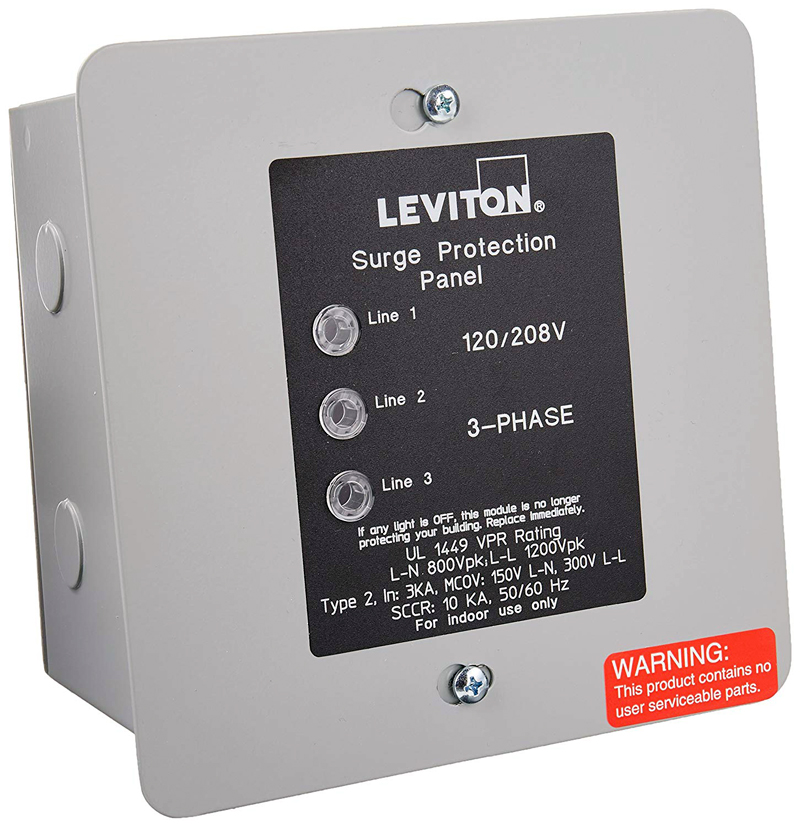
Back in the 1970's when I was a tech at Panasonic I used to see lightening damage electronics come in all the time. Some could be repaired but then others were literally blown apart inside and totaled. There is no predicting what lightening can do or where it will go within a building. There is one fairly reliable way to stop it from traveling and that is to install whole panel surge protectors on all the panels in a building. In the booths that had whole panel surge protectors installed we never lost a single piece of gear. But I did see failed surge protectors at several sites I replaced.
Note that you do need an extra three pole breaker for any of these surge protectors.
Posted by Ioannis Syrogiannis (Member # 3235) on 08-26-2019, 03:21 AM:
If I may turn this thread a bit backwards, to the update subject, does anyone know of key software versions, that would be preferable for one to go through, in an incremental update?
Some companies keep such key step versions in their release notes. Others don't. I can't find anything in the NEC's latest release notes.
I came upon some "forgotten" NEC (NC900 mostly) projectors that are in the same booth but with different software versions. ![[Confused]](confused.gif)
I'd like to update them, but with long-time-no-update equipment my experience taught me to be extra cautious.
Posted by Mark Gulbrandsen (Member # 72) on 08-26-2019, 09:37 AM:
There is only one version of each presently shown on the NEC FTP site.
Software: 2.6.7-0
Firmware: 4.6.6-D
Security: 6.1.133-0
Posted by Mark Gulbrandsen (Member # 72) on 08-26-2019, 11:17 AM:
quote: Marcel Birgelen
There are UPS systems that run everything through their batteries and hence a separate transformers, but those are usually only employed in datacenters and hospitals.
Thats a regenerative type UPS and it's the type I used at all my install sites. I just never ran the xenon supply off them because they become really costly when you get to that size. The type I used is like this one in the link, except I used all 220 volt UPS's and it ran all projector related items except the Xenon LVPS. You can run an entire NC-900 with IMS off one as long as you run the projector on 220 volts. Max draw is only ~8 amps.
Tripplite On Line UPS
Posted by Ioannis Syrogiannis (Member # 3235) on 08-26-2019, 11:22 AM:
Thank you for your response Mark!
From what I gather, you are referring to the Server's update versions.
I am mostly interested on the projector's software versions, that were discussed before in the thread (even though, admittedly, the title of the thread is "NEC NC900 IMS").
More than that, I am afraid that if the NEC FTP site keeps only the latest of the projector's firmware/software/Release Package, or the latest two, as it might seem to do, that don't quite means that an update from, say, a Release Package issued back on Q/4 2013 or mid-2016 to the current 4.314 would work flawlessly.
For that reason, and since I would like to take advantage from whatever advancements were made during the last three or six years, I am trying to establish the safest way, if one of you could share.
Documentation I found on NEC didn't shed any light on the issue and I was wondering if someone here might enlighten me.
Posted by Mark Gulbrandsen (Member # 72) on 08-26-2019, 11:52 AM:
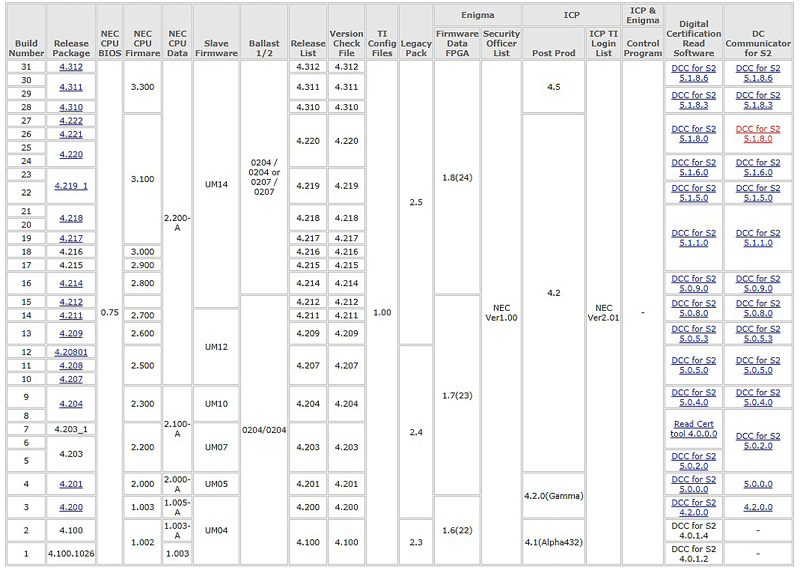
Oh, thats very different. NEC has everything back to version 1. Although the sites I service got all the major NEC updates I never had trouble jumping ahead on NEC firmware. Just make sure you use the matching DCC for each update. You can mess up the projector if using an old DCC to update to a lot newer firmware version. The TI part of it for the ICP is written by TI and not NEC. So depending on what TI versions you are at... if it's really early, you might want to cycle through those releases going foreward to 4.312.
Also: In the projector firmware section there were a lot of updates done to the lamp ballasts and lamp cooling fan controling. Those improvements are important if using version 2 lamps.
Mark
Posted by Ioannis Syrogiannis (Member # 3235) on 08-27-2019, 09:49 AM:
Thank you again Mark for your response.
So, according the version table, you suggest, if I want to play it safe, to go (for instance for the machine with 4.208, that was October 2013, if you can believe it) first to 4.310, where the ICP software changed from 4.2 to 4.5 and then to the latest 4.314. And all that with the latest DCC, being 5.1.8.10 for both upgrades, right?
Or, maybe, since between the 4.208 and 4.314 there is no other ICP version in between, go from one to another in one and only step?
Regarding the DCC software, if I understand it correctly, you don't suggest to use different versions for different Release Packages, when you write "use the matching DCC", but "no earlier issued DCC than the Release Package you are about to install".
Posted by Mark Gulbrandsen (Member # 72) on 08-27-2019, 10:04 AM:
That shold work fine. The rest of the changes will automatically be applied when you run 4.312. Just be sure to use the LATEST version of DCC 5.1.8.6 when you are updating.
I ran an update back about 2011 once with a firmware version that was quite a bit newer than the DCC I had and it reset the projector IP to 0.0.0.0!
Mark
Posted by Carsten Kurz (Member # 5396) on 08-27-2019, 10:16 AM:
I would probably try to go to one of the later 4.2x versions first (most actual NC900 improvements incl. lamps/lamp supplies happened there). I think not much happened after 4.219 projector wise. Then go to 4.3/ICP4.5 from there. Should be safe to go from 4.208 any later 4.2 version. The auto updater is pretty safe, and it goes without fuzz and pretty quickly.
Ioannis - what the hell are you doing on Iceland now?
- Carsten
Posted by Ioannis Syrogiannis (Member # 3235) on 08-27-2019, 10:34 AM:
quote: Carsten Kurz
Ioannis - what the hell are you doing on Iceland now?
To put it in just a few words: Avoiding the high temperatures of Greece (or the European mainland), enjoying crystal clear water and fresh air (in various speeds) and -more interestingly- dealing with long un-updated projectors and servers...
Það er allt í lagi. (It is O.K.)
Posted by Mark Gulbrandsen (Member # 72) on 08-27-2019, 07:53 PM:
Enjoy Iceland before it melts! It's going fast.....
Powered by Infopop Corporation
UBB.classicTM
6.3.1.2