This is topic Connect Wii U to Christie Solaria One+ in forum Digital Cinema Forum at Film-Tech Forum ARCHIVE.
To visit this topic, use this URL:
https://ft-forum.com/ft/cgi-bin/ubb/ultimatebb.cgi?ubb=get_topic;f=16;t=003828
Posted by Jake Sinn (Member # 11045) on 10-20-2019, 06:32 PM:
Hi all,
I need to connect a Wii U to a Christie Solaria One+ and made a diagram for all the connections. Check link below for diagram. Can someone just look it over and see if it looks good? I will link the products accordingly to the key in diagram.
1. https://www.amazon.com/dp/B005LJQOPK
2. https://www.amazon.com/dp/B014I8UQJY
3. https://www.amazon.com/dp/B077DNPXVX
4. https://www.amazon.com/dp/B014I8T0YQ
DIAGRAM: 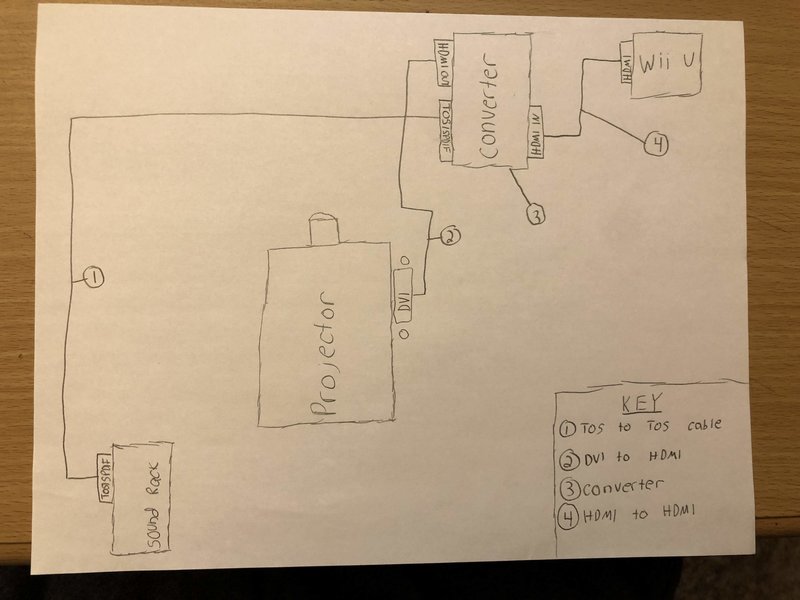
Posted by Dave Macaulay (Member # 813) on 10-21-2019, 11:51 AM:
The wiring looks good. I don't have the time to look at all your components, but it looks like a simple HDMI to DVI and audio adapter.
Most integrated servers have HDMI input though, I'm not sure about the Christie one though. Or have you ditched the Christie integrated server and installed one that works? Anyway, that would process the audio as well and put it on the normal server digital audio output - no adapter required: you just select HDMI input in the server.
How will you handle the Wii position LEDs. Aassuming the U needs them, I have worked with the original Wii a few times and as I recall those needed a pair of IR LEDs near the screen visible to the device(just lit LEDs, no need to have them connected to the Wii light bar jack).
Posted by Marcel Birgelen (Member # 6801) on 10-21-2019, 02:33 PM:
Keep in mind that TOSlink will only support two digital PCM channels, while the Wii U does support surround sound.
Maybe you can tell us what kind of sound processor you're using.
Posted by Jake Sinn (Member # 11045) on 10-21-2019, 02:53 PM:
Hi Dave,
We are using an integrated server (Christie IMB). There is no HDMI input. I will attatch a picture of all the projector connections. We are using that open DVI port next to the one that is in use (when you say HDMI, do you really mean DVI, because on the projector it says HDMI but is really DVI). For the Wii LEDS, i'm assuming that you are referring to how are the controllers going to work. We are just going to try to see if they work first. Wii says it should work up to 24 ft. So we will see...
Projector Connections: 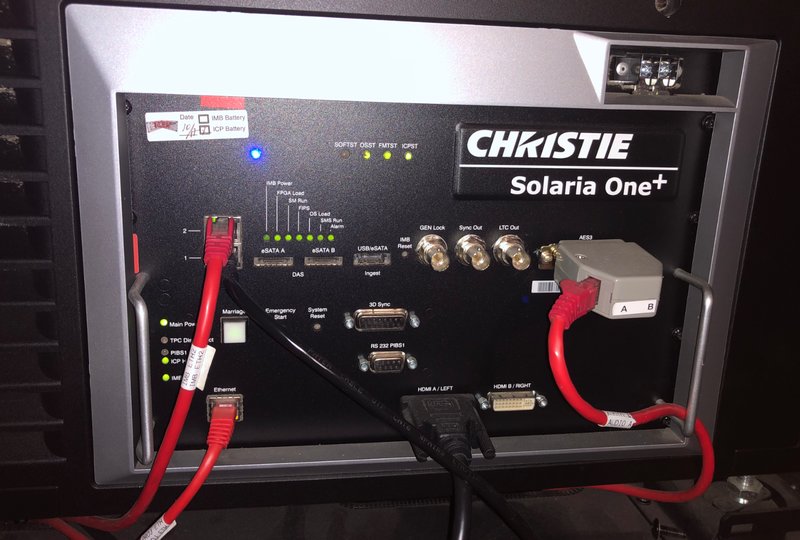
Marcel,
I did not know that! The sound processor we are using is the USL JSD60. Any way to get around that...?
Posted by Carsten Kurz (Member # 5396) on 10-21-2019, 04:17 PM:
TOSLINK supports AC3 and dts, and the HDMI audio extractor in that list allows to set the Audio EEID between stereo and 5.1, so, that should cover all necessary options.
The AC3 and dts decoding on the JSD60, however, is an optional feature, so one needs to check that capability with the specific device. Whatever, initially Jake wanted to use analog stereo only anyway (2*RCA), so, that shouldn't bother him too much. Toslink may still save him some hum issues.
However, it's quite a distance between the Wii U and the booth, so I suggested to add some sort of HDMI extension, and to move the video/audio splitting close to JSD60 and projector.
I think Jake talked about 15+ metres. That MAY work with a good cable, but I don't think that a Wii U spots an exceptionally solid HDMI output. So, either a basic HDMI-CAT5e/6 extension, or a simple HDMI repeating circuit (splitter, cable driver, etc.) should be added if a cable longer than 7-10m is actually needed. That is trial and and error. Buy something, try it. Of cause, there are very solid HDMI-extensions available in the range of multiple hundred dollars. An HDMI splitter used as a buffer can be bought for as little as 10US$ and may do the trick.
One possible option, depending on application, auditorium and booth layout may be to split the HDMI cable length between Wii U and audio deembedder. So, 5m between Wii U and audio deembedder, and another 5m between deembedder and Christie. The deembedder will work as a buffer, too. Again, depends a bit on what goes where and what cable runs and setup are acceptable for the occasion.
- Carsten
Posted by Jake Sinn (Member # 11045) on 10-21-2019, 04:40 PM:
Carsten,
As you may be able to tell, I am not pro into all of this. You suggested on the dcp-o-matic forum that I use TOSlink over 2RCA. So will the TOSlink cable get me 5.1 surround sound? This is how its going to be set up..
Wii U sitting on ledge outside of projection booth. 10 foot HDMI cable going into the booth (along with power cord for Wii U). Inside the booth will be the HDMI converter. HDMI from Wii U and HDMI from Christie will plug into the converter as well as the TOSlink audio cable (15 feet).
And no, we will NOT be doing 15 meters (50 feet). That was only if we were going to run it all the way down into the theater.
Will be testing all of this on Wednesday.
With all that being said (not be doing 15 meters), do you think the current setup will work?
Posted by Carsten Kurz (Member # 5396) on 10-21-2019, 04:49 PM:
With the shorter cables, all should be good. You still have the choice to go from the HDMI-audio extractor to the JSD60 in analog stereo (1*TRS->2*RCA), OR - better-, using the unused TOSLINK port on the JSD60. If that JSD60 has AC3/dts decoding enabled (I think it's an optional license), you will get surround sound. If not, you will only get stereo sound (same as with the 2*RCA).
Did you ever use the DVI input on the Christie before, e.g. for a notebook or DVD/Bluray player?
I'd say, get these parts and start playing. There may be some configuration necessary to get everything working, but there is a chance it'll work right from the start.
Harold from USL/QSC listens on this forum, he may help you to find out wether that JSD60 has surround decoding on TOSLINK/SPDIF(coax) or not. I would think that it works autodetect, so, if the Wii U and audio extractor sends AC3 or dts, I guess there are two things that may happen - no audio at all, or surround. If you hear no audio at all, try to set the audio extractor and Wii U to stereo.
- Carsten
Posted by Jake Sinn (Member # 11045) on 10-21-2019, 05:01 PM:
Carsten,
Yes that is what we are going to do. We ordered that TOSlink cable. Surround sound would obviously be better, but stereo would be fine. Yes, we do use the other DVI input on the projector. It is connected to a DVD player which is also where those 2 RCA cables are plugged in from the audio processor.
We will see how that goes on Wednesday.
I'm going to attach two images for the channel setup. Can you just look those over?
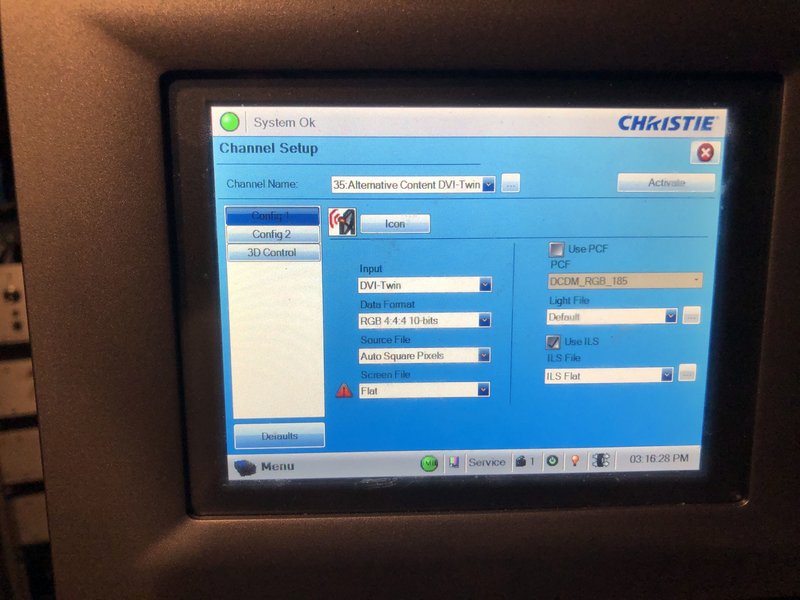
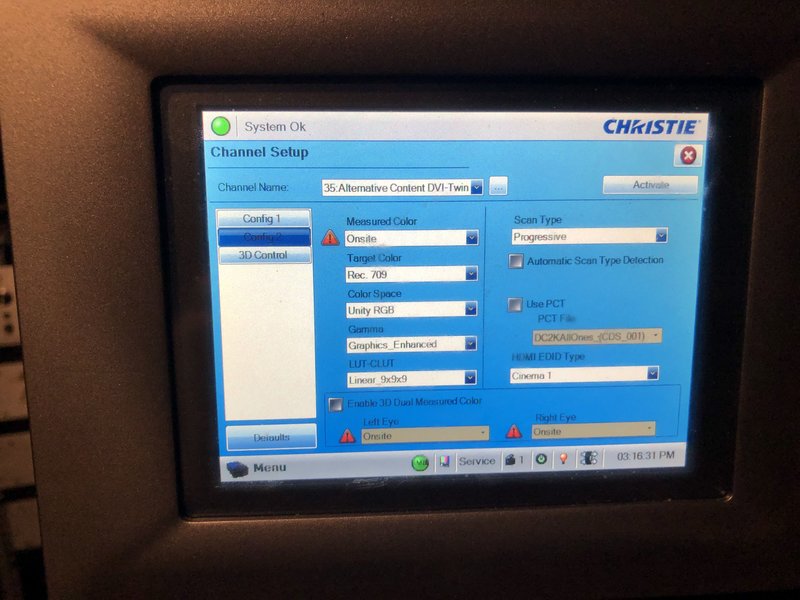
Posted by Carsten Kurz (Member # 5396) on 10-21-2019, 06:03 PM:
That 'DVI-Twin' irritates me, but if it works with a DVD player HDMI, it should work with the game console just as well.
Can you check for other alternative content presets using the DVI input? Anyway, with that level of access, you should find a working channel.
We will have a Wii session next sunday here as well, but our booth setup is completely different from yours.
And: Better start with the JSD60 volume turned down. ![[Eek!]](eek.gif)
- Carsten
Posted by Jake Sinn (Member # 11045) on 10-21-2019, 06:14 PM:
Oh, I think the other options for that besides "DVI-twin" are HDMI A and HDMI B. We will use HDMI B as labeled on the projector connections. It is a different channel for the DVD player. I don't think this channel has ever been used before.
Posted by Carsten Kurz (Member # 5396) on 10-21-2019, 06:20 PM:
Well, someone more familiar with the Solaria One+ may chime in here.
DVI-TWIN should be used if both inputs are used simultaneously (some computer graphics cards need TWIN DVI connections for high resolution and bit depths, or for 3D signals).
You should use either HDMI-A or HDMI-B. As only the first port is currently used, you could try HDMI-B, so you can leave the first cable in place. Using the HDMI-B port for the Wii U with the DVI-TWIN channel config will probably not work. Then use either the A-connection, or use a channel profile using the HDMI-B input.
- Carsten
Posted by Jake Sinn (Member # 11045) on 10-21-2019, 06:29 PM:
Yes, we do not need to use the DVI-twin ports simultaneously. We will use HDMI B since HDMI A is in use. And I know that it will not work when set to DVI-Twin, I know we need to change to HDMI B.
Posted by Marcel Birgelen (Member # 6801) on 10-22-2019, 02:00 AM:
Regarding the surround sound of the Wii U:
This comes from the Nintendo Support site:
- The Wii U uses six-channel linear PCM audio output.
- With a recent system update, support for Dolby Pro Logic II was added. Use of this format is only available in Wii Mode.
Source
The Dolby Pro Logic II mode is only relevant if you're going to use Wii games, so you can probably get that one off the list, allthough the matrix decoding on the JSD-60 would probably get a 5.1 mix out of it.
What remains is the 6 LPCM-channel option, that doesn't work over TOSLink and you would need a more sophisticated audio extractor. The only way to feed it to your JSD-60 would be over the 6 x analog input as the digital input will already be occupied by the Solaria One+ output.
You would need something like this instead.
Also, you need the appropriate cabling to go from 3.5mm jack to the DB25 analog connector on the rear of the JSD-60.
It's great how the DVI ports are labeled as HDMI port... well, it's almost the same as long as only digital signals are involved.
The thing won't be able to do resolutions beyond the capabilities of a single DVI/HDMI 1.x link anyway, so DVI-twin is not needed in any case. (And would not be supported by the device anyway.)
Regarding the data format, I think 8-bit 4:2:2 (YCbCr) @ 1080p is the maximum you can get out of it. You might want to set your Wii U to manual resolution, especially with that audio-splitter box in between.
Posted by Jake Sinn (Member # 11045) on 10-22-2019, 08:03 AM:
I'm not too concerned with the audio being stereo rather than surround...
Stereo should sound fine.
As for the channel, change the input to HDMI B, data format to 4:2:2 (YCbCr), and everything else can stay as is? (In the pictures)
Also, what is LUT_CLUT??
Posted by Dave Macaulay (Member # 813) on 10-22-2019, 08:13 AM:
LUT-CLUT is the color look up table. Just use the one shown. I don't know what they are for but picking a different one screws up the image.
Posted by Jake Sinn (Member # 11045) on 10-22-2019, 08:17 AM:
Sounds good. Why is there a exclamation point next to the screen file in image one and next to measured color in image two?
And what is screen file and measured color?
Posted by Carsten Kurz (Member # 5396) on 10-22-2019, 09:14 AM:
I'd say, call up the channel config you used for the DVD player - that should work. All you need to change is HDMI-A to HDMI-B.
Do you have that Wii U on site already? Because you could already try now with the existing HDMI-DVI cable between DVD-Player and projector (except for audio). That would give you some peace of mind.
- Carsten
Posted by Sean McKinnon (Member # 612) on 10-22-2019, 09:30 AM:
quote: Jake Sinn
Why is there a exclamation point next to the screen file in image one and next to measured color in image two?
usually that icon indicates that the selected file has not been setup. Is it possible the actual measured colors are saved under a different file name? Same thing with the screen file.
Posted by Carsten Kurz (Member # 5396) on 10-22-2019, 09:45 AM:
Jake - give us screen shots of the actual channel config you use for DVD playback (HDMI-A)! It's useless to talk about that Twin-DVI setup you're never going to use.
- Carsten
Posted by Jake Sinn (Member # 11045) on 10-22-2019, 10:03 AM:
No, we don't have anything set up yet. We are going to test everything tomorrow. I am not at the theater right now, but will look tomorrow. I will try the one I showed first, but change DVI Twin to HDMI B and see if that works. I will also change the data format to 8-bit 4:2:2 (YCbCr).
Posted by Carsten Kurz (Member # 5396) on 10-22-2019, 11:53 AM:
But - you did show DVDs before? So, which channel profile did you use for that?
Not saying that we can't talk you through adjusting that Twin-DVI setup - but it would be easier if you started with a channel profile that is closer to your needs or is known to be working with the DVD player.
- Carsten
Posted by Jake Sinn (Member # 11045) on 10-22-2019, 12:30 PM:
Yes, we do show DVDs for birthday parties and private showings. That is what those 2RCA cables are plugged into from the cinema processor. I think the channel is called Denon DVD or something like that. I will take a look at the configuration of that channel tomorrow and just copy all the settings from that into the channel I showed in the previous picture, but of course just change the input to HDMI B. So you're saying that all the same settings that are set for the DVD channel should be set for the Wii U (besides the input)?
That DVD player channel settings should be great. We use it multiple times a month.
Posted by Carsten Kurz (Member # 5396) on 10-22-2019, 12:35 PM:
Yes. a DVD player signal timing may be a bit different compared to a Bluray player (is it ACTUALLY a DVD player, or a Bluray player?), but the config should be very close if not identical to what you need for the Wii U. 4:2:2, YCbCr, rec.709, 1080p. etc.
But let us have a look when you're there again.
- Carsten
Posted by Jake Sinn (Member # 11045) on 10-22-2019, 12:48 PM:
Of course. I will send pictures of the configuration of the DVD player.
I'm not entirely sure if it is just a DVD player or if it is Blue-Ray as well. I think it is Blue-Ray as well. It is built into the projector pedestal and brand is Denon.
Edit: Do you think we should play in flat or scope?
Posted by Carsten Kurz (Member # 5396) on 10-22-2019, 02:58 PM:
I don't know what the Wii U allows, or the specific game, but I am pretty sure that 16:9 is the default for games, so, use flat (or 16:9 if there is an actual 16:9 config).
- Carsten
Posted by Jake Sinn (Member # 11045) on 10-22-2019, 03:45 PM:
We will see. We will be playing Super Smash Bros.
I will get back to you tomorrow with pictures of config for DVD player and let you know how our testing went.
Posted by Jake Sinn (Member # 11045) on 10-23-2019, 06:21 PM:
Hi all,
I will attach images of config for BlueRay channel below
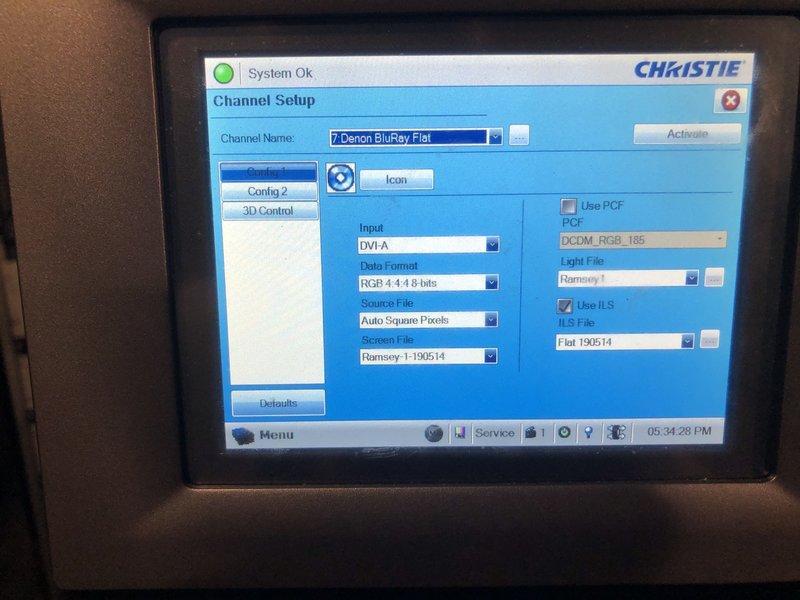
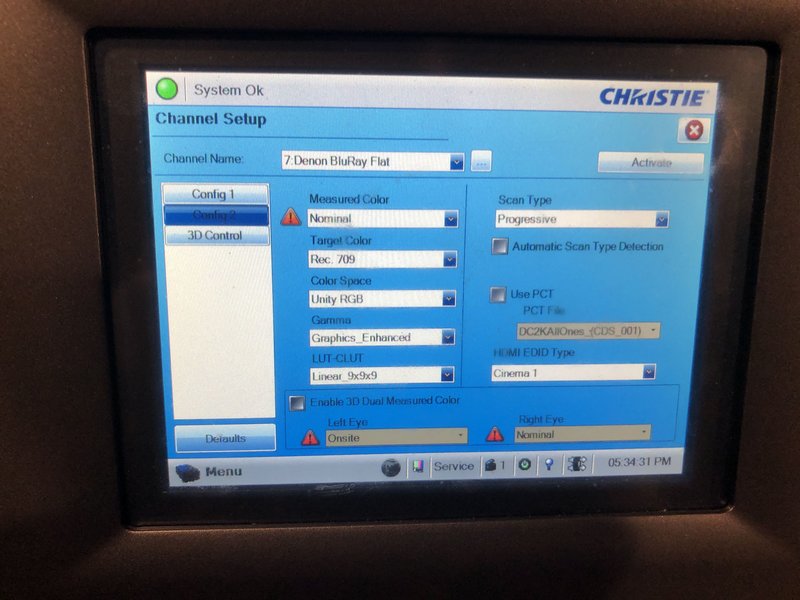
Everything worked! I changed the settings to the HDMI B channel and everything works good. The controllers even worked from in the theater with no problems. The audio sounds great and video looks crisp.
Posted by Marcel Birgelen (Member # 6801) on 10-23-2019, 06:54 PM:
Great to see that everything is working.
One thing to remember: Those controllers will consume more juice if they need to bridge a bigger gap. Having some charged spares could be a good idea.
Also, those things run on Bluetooth, I've seen those things fail on longer distances, with many people in the room using Bluetooth gadgets. For example, we had someone using a Bluetooth airmouse to control his presentation on a notebook that was located in the booth. It worked beautifully in an empty room, but in a room filled with mobile phones, it simply stopped working. We switched to a sign language where I was pushing buttons on command.
Sign language will not be the best way to control Super Smash Bros. (If there is something to control at all, for me that game was always just random button pushing. ![[Wink]](wink.gif) )
)
But I don't want to raise too much concerns, most likely, stuff will just work, but if you run into non-responsive controllers, this might be the cause...
PS: Don't forget to try Mario Kart on the big screen.
Posted by Jake Sinn (Member # 11045) on 10-23-2019, 06:55 PM:
Thank you for letting me know. Maybe we will tell everyone to turn off their Bluetooth before entering the theater.
Powered by Infopop Corporation
UBB.classicTM
6.3.1.2