This is topic Creating Pause Macro On IMS 2000 in forum Digital Cinema Forum at Film-Tech Forum ARCHIVE.
To visit this topic, use this URL:
https://ft-forum.com/ft/cgi-bin/ubb/ultimatebb.cgi?ubb=get_topic;f=16;t=003829
Posted by Jim Cassedy (Member # 4115) on 10-21-2019, 01:05 PM:
I'm working a show tomorrow at a location that has an IMS2K.
I've never used one of these before, but I went down to the Theatre
early today & I see that except for the UI, it's almost operationally
identical to a Doremi DCP2OOO. (Even the default pw's are the same!)
So I had no problem ingesting & creating a playlist for tomorrow.
BUT- - I have one clip that I want to 'pause' 10sec after it starts.
I do not see w 'pause' action anywhere in their cue library.
I know how to create & save a pause macro on the Doremi, but I can't
seem to figure out how it's done on the IMS 2000.
I assume it can be done.
Yes, I've gone through the manual. Did I miss something?
Posted by Sean McKinnon (Member # 612) on 10-21-2019, 01:24 PM:
is it not listed under playback actions?
Posted by Marcel Birgelen (Member # 6801) on 10-21-2019, 02:12 PM:
If you're building an SPL, you should have a list of elements on the left and your playlist on the right.
First you add your clip and then you add the automation elements to it. Under the Automation Elements there should be the "Pause" action, you can add it to the clip and specify an offset in minutes and seconds.
Posted by Jim Cassedy (Member # 4115) on 10-21-2019, 02:42 PM:
Unfortunately, I don't see "Pause" listed under the playback options.
I know how to create the pause macro & add it to the playback option
menu on a Doremi using the Macro Editor, but I can't seem to do that
on this IMS2000. I'll givit another try in the morning, since I"m off
to do a screening at another location now.
Posted by Juan Jose Vazquez (Member # 10496) on 10-21-2019, 04:03 PM:
Hi.
To create the pause macro, first:
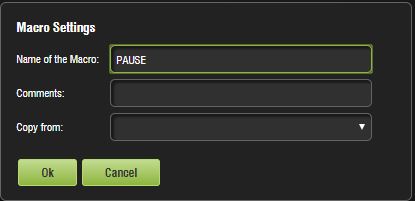
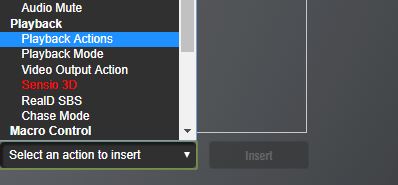
press ok and select playback options and then insert:
In the next option box select pause and then press ok:
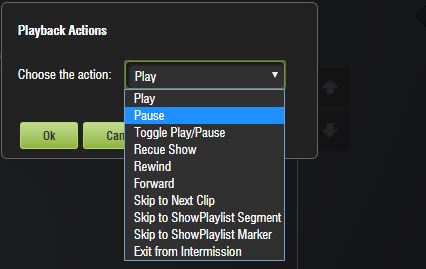
The server is currently in version 2.8.25
it's all
Regards
Juan José
Posted by Leo Enticknap (Member # 534) on 10-21-2019, 05:14 PM:
quote: Jim Cassedy
I see that except for the UI, it's almost operationally identical to a Doremi DCP2OOO.
If the DCP2000 has recent software in it (I have a dim recollection that 2.6.65 was the version in which the web UI was introduced, but am not certain), it also has the exact same web UI as the IMS2000 - just enter its IP address on the management LAN into your browser, and off you go. The 1990s-looking VNC UI is still there as an option, though, if you prefer it. There is no VNC UI on the IMS2000.
Posted by Jim Cassedy (Member # 4115) on 10-22-2019, 07:42 AM:
Thanks, Juan for the detailed instructions & pictures. ![[thumbsup]](graemlins/thumbsup.gif)
Except for the way the UI is set up, that's pretty much same the way I've
done it on the earlier Doremi servers. I'll give it a try when I get to
the theater later today. I didn't note what software version they are on,
so perhaps the 'pause' option might not be there.
I need the pause to freeze a logo on screen several times during Q&A
sessions today. I'm running everything manually, so if I can't build the
pause into the playlist, I'll just do it myself. It's just that it would be nice
to 'automate' it, since it's one less button to remember to push when I'm
also dealing with lights & microphones & pesky event producers.
Powered by Infopop Corporation
UBB.classicTM
6.3.1.2