This is topic Playing HDMI content through a GDC Server. Help Please. in forum Digital Cinema Forum at Film-Tech Forum ARCHIVE.
To visit this topic, use this URL:
https://ft-forum.com/ft/cgi-bin/ubb/ultimatebb.cgi?ubb=get_topic;f=16;t=003872
Posted by Kristian Hillman (Member # 10995) on 12-07-2019, 08:50 PM:
Hello all,
Long time reader of these forums but first time poster today.
I have been a projectionist/Manager at several big boy theatre's for the past 13 years. But recently I took on a projectionist job at an independent. I am trying to automate a few things and make the booth run smoother when I am not there.
We get a lot of alternate content/ student features playing here. This normally means playing via HDMI on a blu ray player. I have had quite a bit of luck making a playlist that will switch over to the correct display setting in the projector and also start the live stream HDMI, this means all the person on shift has to do is turn on the blu ray player and press play. My issue is the ending of the playlist. The CPL for the HDMI live-stream option through the server that I have runs for 13 hours and the only way to stop it is to manually press stop. Another issue is that if I was to program this playlist in the TMS to automatically start. I cannot program any other shows for 13 hours in the scheduler.
I'm not quite sure what type of content this HDMI CPL actually is and if I can create another one that runs for a shorter amount of time? I've had no luck finding the file to extract from the local servers or TMS. Has anyone else had any luck creating something like this?
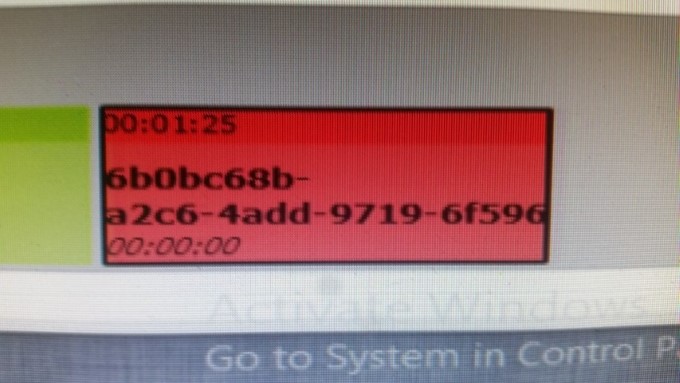
Attached is a picture of the content when its in my playlist on the TMS. If I schedule that to play it allows anything to be shown via the HDMI port.
I am using GDC-TMS 4.1.8030
GDC-sx3000 servers
NEC2000C Projectors.
Any help you might be able to give or suggest would be appreciated.
Cheers.
Posted by Steve Guttag (Member # 268) on 12-07-2019, 08:58 PM:
Have you contacted GDC's tech support? They are pretty good at getting answers for what can be done.
I'd be curious to what answer you find. Thus far, all of our systems use the DVI port of the projector for Blu-ray input so the problem you describe does not exist. I suspect you have an S2K projector or something very new that omits the DVI ports on the projector so are compelled to use the HDMI port on the IMB.
Posted by Sean Falk (Member # 10981) on 12-07-2019, 09:42 PM:
I'm using GDC 1000s, this is how I do it
Through a GDC Server Web UI: Playback> Edit> select your HDMI SPL from the drop down> select the horizontal 3 bar edit button, then adjust the End Frame/Time
I have no experience with GDC's TMS, but I hope this helps
Posted by Kristian Hillman (Member # 10995) on 12-08-2019, 11:55 AM:
Hello, thank you for responding.
I had to make up a primitive cue to stop the server playback but what Sean said works. The only difference I had was my server actually said Edit Cue instead of having the horizontal 3 bar symbol. I still cant schedule the playlist in the TMS though because it still registers as 13 hours. Even if I program it to stop and eject after a minute. Hopefully this is were GDC can help. Waiting to hear back from one of their Techs.
Again thank you both for your assistance.
Powered by Infopop Corporation
UBB.classicTM
6.3.1.2