..if you want to do that in real time.
Here is a pict of a measuring machine:
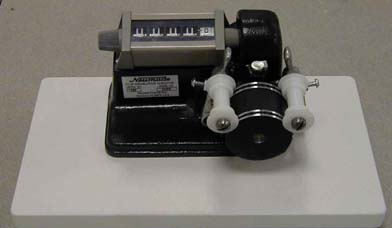
Put that machine between the rewind spindles on your bench and zing away. One can spin off a feature a lot faster to get the running time results.
Much faster than using real time.
-Monte
Posted by Jeffry L. Johnson (Member # 453) on 02-23-2005, 10:15 AM:
The stopwatch methods assumes the projector actually runs at 24 frames per second. If it's fast or slow, the running time will differ from the correct 24fps running time. For accuracy, better to have a footage count.
That said, I've seen footage counters jump numbers if run too fast.
Posted by System Notices (Member # 2357) on 02-06-2012, 12:30 AM:
It has been 2538 days since the last post.
Posted by Manny Knowles (Member # 1171) on 02-06-2012, 12:30 AM:
Having a footage count is also useless if the projector doesn't run at exactly 24fps. So, even with a footage count, you'd still only be able to estimate an actual running time.
Also, I've seen footage counters damage film if run too fast -- especially the kind in Monte's picture.
Besides, it just seems excessive -- "a long walk for a short drink of water."
Posted by Monte L Fullmer (Member # 2797) on 02-06-2012, 01:07 PM:
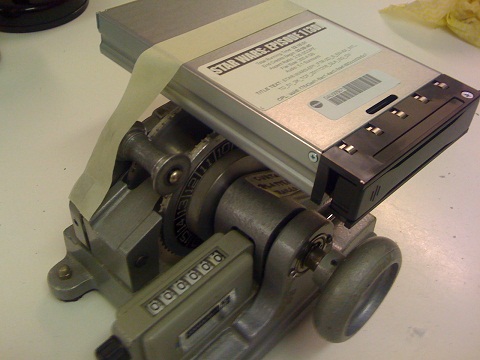
Lately, on deluxe prints, is a sticker that deLuxe puts on to identify the reel and contents.
If one looks close, one can see the actual footage length of the reel itself.
Add all the footage up and divide by 90fpm to get your total minutes of the feature.
Posted by Manny Knowles (Member # 1171) on 02-06-2012, 02:13 PM:
...and then go calibrate your projectors. What speed are they REALLY running at?
My point being that you're still just going to end up with an estimate if you take the footage counting route. There are more efficient ways to get an estimate on a feature's running time.
Posted by John Wilson (Member # 269) on 02-06-2012, 03:01 PM:
No worries!
![[Smile]](smile.gif)