This is topic Trailer Loop in the lobby in forum Ground Level at Film-Tech Forum ARCHIVE.
To visit this topic, use this URL:
https://ft-forum.com/ft/cgi-bin/ubb/ultimatebb.cgi?ubb=get_topic;f=5;t=001680
Posted by Dennis Benjamin (Member # 1137) on 04-28-2006, 11:45 AM:
I have got an interesting scenario:
The theatre I am managing has a lobby monitor. Currently it runs a powerpoint presentation (no sound). I have wanted to figure out a way to run movie trailers on it. There is a Windows XP computer hooked to the TV monitor. What I have done so far was to buy some RCA plugs for sound. I have experimented with Windows Media Player, Quicktime, and DIVX. The big problem I am running into is the looping (or repeating) of the trailers. I cannot figure out a way to keep the trailers going continuously. With DIVX I was able to loop four trailers because they were the same picture size and resolution. With the other programs I have I cannot get a set of trailers to repeat. I would even be willing to hook a DVD player to the TV, but where would I get a bunch of looped trailers on a DVD?
Any suggestions?
Posted by Ken Lackner (Member # 1002) on 04-28-2006, 11:59 AM:
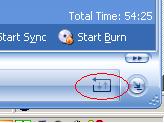
I don't know about where to get content, but Windows Media Player has a repeat function in the lower right corner that could be used to continuously loop a playlist.
Posted by Doug Willming (Member # 728) on 04-28-2006, 03:56 PM:
FYI, our company sells loop trailer DVD's for lobbies - you just go to the website, click the ones you want, and the DVD goes out the same or next day; we also provide them in different file formats for computer based playback systems. Both systems have their advantages & disadvantages involving playback, glitches, interactivity, etc.; most of our customers use DVD (we even still have some that use VHS.....).
http://www.PreShowProductions.com
Posted by Caleb Johnstone-Cowan (Member # 3710) on 04-28-2006, 07:40 PM:
If you get Nero pro or similar you can create a DVD, will convert everything to a playable format as far as i know. Just press 'repeat title' on the DVD player and leave it. That's what we do although we have a DVD for the chain.
Posted by Dennis Benjamin (Member # 1137) on 04-29-2006, 06:32 PM:
Figured it out! I didn't have to shell out any large sums of money either!
I hooked the computer to the Internet, downloaded the new Windows Media Player, went to themovieinsider.com and made a nice playlist of upcoming trailers.
It works great!
Posted by Scott Jentsch (Member # 1681) on 05-01-2006, 12:48 PM:
If you're streaming the trailers from remote sites, you may want to make sure that you're not going to run afoul of any bandwidth limits imposed by your ISP.
Not many ISP's (if any in the U.S.) charge by the byte, so you shouldn't have to worry about incurring extra charges, but many do have stated (or nebulous) bandwidth limits in their contracts and can cut off anyone they deem to be "abusing" their accounts (in their opinion, not mine).
I don't think Windows Media Player does any caching, but you may want to dig into that possibility, so that you have a better chance of not running into connectivity problems and it will also keep you on a friendly basis with your ISP. ![[Smile]](smile.gif)
Posted by Dennis Benjamin (Member # 1137) on 05-02-2006, 09:24 AM:
It does cache. I did an experiment: after trailers ran through one or two loops I then disconnected the Internet connection. Everything ran through fine. So, it does work. Most of the trailers I ran were actually downloaded (fully) from themovieinsider.com. About three of them were streaming versions. The whole thing works out really well. It is only on the first time around that there is buffering on the streams. Once the first loop goes through, everything runs smoothly.
BTW- themovieinsider.com is one of the coolest websites out there. I rank it right underneath IMDB.com for movie info and trailers. IMDB is the number one movie info site out there.
Posted by Mike Williams (Member # 1140) on 05-03-2006, 06:27 AM:
Dennis,
Here is another idea since you mentioned power point was on this machine.
You could create a power point presentation that has the media player object in it. It would function like a mini-media player on the page and should function the same as it is now for you. This way, you can add snipes under each trailer like "Coming Soon" or "Starts this Friday" or other graphics. There should be a property that can be changed to prevent the controls from showing when you run it.
Posted by Brad Allen (Member # 470) on 05-04-2006, 03:13 PM:
The film distributors are missing the boat by not making this easy to do and hosting trailers in a central location for us to use in this method.
Posted by Caleb Johnstone-Cowan (Member # 3710) on 05-04-2006, 05:21 PM:
Couldn't you email and ask for the trailers in a media player format?
Good idea about the powerpoint, you could advertise when the film is showing and so on, and add in promotional stuff like deals at the concession stand. Could probably even sell ad space if the local market is suited to that.
Powered by Infopop Corporation
UBB.classicTM
6.3.1.2