This is topic Designing POS Software - Asking For Input in forum Ground Level at Film-Tech Forum ARCHIVE.
To visit this topic, use this URL:
https://ft-forum.com/ft/cgi-bin/ubb/ultimatebb.cgi?ubb=get_topic;f=5;t=002280
Posted by Cody Martin (Member # 2523) on 10-26-2009, 11:57 AM:
Hello,
I am currently in the process of taking my BS of Computer Science senior project ( A Drive-In POS System) and converting it into a multiple station POS Software. I was wondering what types of features would make you look into a new system for your theatre.
I am very open to ideas and would love to hear your input.
I am starting small with just box office, but will eventually add concessions into the system. I have also started talking to Mercury Pay about credit card integration. The core system will also have giftcard capabilities. Receipt printing is currently limited to one type of printer (EPSON TM88), but will be expanded.
The system will run on any standard touchscreen terminal XP and up.
The goal is to create a low cost, yet highly functional piece of software that meets the needs of our business.
I would love to get your input on this. I am also planning on releasing a test version soon for those who would like to try (please know it will be limited in functionality for some time, but with each release I will try to have one major function completed ready for testing.
Thanks for your time,
Cody
Posted by Martin McCaffery (Member # 37) on 10-26-2009, 01:02 PM:
Without knowing where you're starting, off the top of my head:
Electronically report the evening gross to distrib.
Multi-screen funtionality
Cashier sign in/sign out for security
Tamper resistent for security
Real time attendance (ie it says there are 365 tix sold as opposed to you looking at open/close numbers and adding in your head)
Payroll
Inventory control for concession
easily updateable price/cost change mechanism
Daily weekly reports including percap as a whole and by item
All sorts of other reports
I'm sure there are more;> Good Luck
Posted by Cody Martin (Member # 2523) on 10-26-2009, 01:15 PM:
Thank you for your input. It'll be a time consuming project, but I'm hoping to apply the knowledge I have gained from working at a few differnet theatres to the project also. I current have implemented the following features to some degree.
*Multi-screen capability (18 screens) each movie is assigned to one theatre and can have up to 6 showtimes.
*cashier sign-in/sign-off and lock mechanism
*the application will be designed to be run full screen with no exit for non manager employees.
*cash drawer will only open for manager level
*real time attendance is currently working for auditoriums/showtime
*status screen with last transaction totals for drawer/session totals
I am working on the cashier part currently and will work on the back end as the project goes on.
If all goes as planned, I would like to implement a report generation feature that will allow the manager/owner the ability to design custom reports based off of any capture field in the system. This will be the most time consuming part I believe as due to the nature of this part, it needs to be very user friendly.
Thank you again,
Cody
Posted by Adam Holland (Member # 4539) on 10-26-2009, 08:16 PM:
(1) Do not post your email address.
(2) Do not conduct private business on the board.
[ 10-27-2009, 12:54 AM: Message edited by: Adam Martin ]
Posted by Paul Trimboli (Member # 1509) on 10-27-2009, 05:57 AM:
Firstly I would defiantly not lock it into Windows, it should be cross platform. So maybe look at doing something that uses a webfront end.
Posted by Mark Gulbrandsen (Member # 72) on 10-27-2009, 11:31 AM:
I think Rusty Gordon at Sensible Cinema would tell you differently. It's much more practical to integrate a Windows based scheme and in fact I'd look into XP Embeded for this sort of applications since it boots very quickly.
Mark
Posted by Cody Martin (Member # 2523) on 10-27-2009, 11:50 AM:
Thank you for your ideas.
I will be building this in the .Net so I can convert a lot of code to a website in the long run if I choose to go that way.
I do like the idea of an embedded system, however the price makes most people back away. However, it is something I am considering to make sure it is both compatible and an option for those already using an embedded system.
I'm enjoying your inputs, so please keep adding!
Posted by Mike Blakesley (Member # 26) on 10-27-2009, 12:42 PM:
You might want to consider doing a keyboard interface. Not everyone will want to (or be able to) put touchscreens in. We use RTS currently -- due to limited space, I use a regular cmoputer keyboard in the boxoffice, with touchscreen in the concession. That way I can use the office computer for other things.
The "screens" in RTS (especially on the keyboard mode) are sort of ugly, so improving the looks might be a good competitive thing. Also their manual/"help" system is the worst I've ever seen. But the software is very robust and dependable.
Posted by Cody Martin (Member # 2523) on 10-27-2009, 01:02 PM:
Mike,
That is an excellent point! I have been looking at an integrated keyboard/trackball/magswipe model for those who cannot afford or do not have the space for touch screen. The footprint is similar to that of a standard keyboard. Would using the mouse/trackball be a fair compromise in your situation, or would you rather stick to a keyboard only mode?
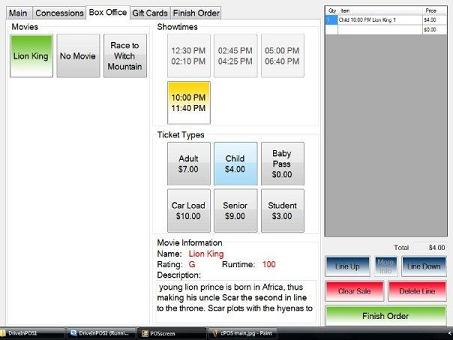
Here is a sample screen prototype of version 2 of the software. You will see that you can have up to 18 movies with 6 ticket types(per movie) and 6 showtimes(per movie).
Posted by Chris Slycord (Member # 4239) on 10-27-2009, 02:01 PM:
Is the 18 movies limit just because you can't put any more blocks on the side panel? If so, why not steal an idea from other softwares and simply have a button that displays more movies?
Posted by Cody Martin (Member # 2523) on 10-27-2009, 02:21 PM:
Chris,
There is technically no limitation on the number of screens the software could support. The backend is very open to expansion. 18 was the number I choose after looking at many of the theatres around the area. However, it will only display the first 18 movies currently.
I've also thought about how to add more in there (the concession screens will use an idea like what you mentioned). The button size could also be modified, but after doing some testing for the original project, this size allowed the easiest keying with fewer mistakes in product selection. I have also thought about having two box office tabs (movies 1-18, movies 19-36) However I am not keen on that idea as it will increase order time.
With the current setup if a screen has two movies, it will list both movies separately and have the showtimes. If the same movie is on 2 screen it will list them both seperately, but the showtimes will be different depending on what you select.
The real-time count will be placed under the show times for the selected movie in the format "SOLD"/"AVAILABLE". Showtimes are locked out 20 minutes after the start of the showing. I plan on adding that as a user configurable option along with a warning level threshold for the seats sold.
Posted by Mark Hajducki (Member # 1732) on 10-27-2009, 03:01 PM:
Look into ways of continuing if there is a failure of some of the hardware.
Having one ticket selling station running when the main server/network goes down will make life a lot easier. Having the concessions tills run in a stand alone mode will also help.
-----
A (possibly more long term) development would be to add a membership/loyalty scheme for customers where they can buy a year of reduced price admission and concessions purchases, staff could have a special category of membership to allow free tickets/ drinks to be recorded.
Will reserved seating be an option (but not compulsory for every show/screen)?
If you have online ticketing or have automatic display board functions have an option to prevent the publishing of certain shows.
Posted by Cody Martin (Member # 2523) on 10-27-2009, 04:59 PM:
Though I have not thought of a "stand-alone" mode, I am implementing a failover server scheme so that the sales can continue to happen.
I will also implement the selective publishing as that seems like a very smart feature to implement.
I have also implemented some of the membership/loyalty card program in the design of the system. The system will be based upon point value when completed. This is a long term goal, but it is on the slate.
Keep your input coming,
Cody
Posted by Chris Slycord (Member # 4239) on 10-27-2009, 10:31 PM:
And if you do an actual stand-alone mode in case the backend is down... it would be nice for it to not allow you to do something stupid like actually use credit cards while the CC backend server is down.
It's pretty annoying to have the thing sit there for over a minute waiting for the transaction to time out while you could easily do cash in between (and simply have those transactions sent to the server once it is up).
Posted by Damien Taylor (Member # 4255) on 10-27-2009, 11:01 PM:
quote: Chris Slycord
it would be nice for it to not allow you to do something stupid like actually use credit cards while the CC backend server is down.
I'm not sure how our system does it, but at my work the server stores all card data until the bank connection is restored. All that is disrupted is there is no cash out, and everyone must sign for their purchase.
Posted by Chris Slycord (Member # 4239) on 10-27-2009, 11:20 PM:
No I'm talking about if the server on-site goes down. I know when I worked downstairs at one location it wasn't uncommon for the CC processor to go down and would require a reboot. But the only way for you to find that out was to swipe the card and have it time out a few times. It would be much preferable to have the server simply tell the clients the status of each service or something similar.
Posted by Cody Martin (Member # 2523) on 10-28-2009, 06:30 AM:
Chris,
I know that feeling. The Cinema I use to work at had a POS that would count down from 60, the cancel button didn't work. The CC Processing will be incorporated on each standalone terminal, however by design it will check to see if the connection is active. I will disable the CC mode if the connection goes down though.
Thanks for the suggestion,
Coody
Posted by Paul J. Neuhaus (Member # 3205) on 10-28-2009, 02:35 PM:
Cody, This is great. I'm so glad somebody with skills is putting the time in to get it right and is actually willing/asking for sugestions.
-warning levels for tickets sold so you can start to know when limited seating is available. People like to know this when they buy a ticket it cuts down on complaints
-work in a showtime scheduling program for the managers computer. You could put in run times and trailer times. This could do many things for you. First it would give a visual representation to the manager when he is making his schedule of how start times and let out times overlap. Then you could also integrate the trailer times into the box office. Then the box would know where exactly the movie is. Is it still in trailers?? How far in the movie is it? The box office attendant would have that info! I've never seen this done before but it might make for a nice feature.
Posted by Chris Slycord (Member # 4239) on 10-28-2009, 03:17 PM:
And I like warnings based on the percentage of seats left rather than the actual number. Like 30 seats left in a 300-seat room is way different than 30 in one w/ 100.
Posted by David E. Nedrow (Member # 4981) on 10-29-2009, 09:55 AM:
Hmmm, the .Net part is unfortunate, since it means you're locked into using a Windows system for the backend, regardless of how the users interact with the system.
My general suggestions...
Relational database backend for all data storage. And, most importantly, do NOT require a specific server. If you stick with standard SQL queries, there is no reason a business with an existing database setup can't host host your data as well.
Allow any merchant services credit card processing company to be used. Most businesses already have a card processor, so they aren't going to want to break a contract to use Mercury Pay. And if you only do MP, why would anyone look at using the software if the already have a CP?
Allow full keyboard and/or touchscreen control at the terminals. Do NOT do anything that requires the operator to use a mouse. When their hands aren't on the screen or on the keyboard, they aren't making money for the business. You can find multiple ergonomic studies that show that mouse usage in a sales scenario can significantly reduce productivity.
-David
Posted by Caleb Johnstone-Cowan (Member # 3710) on 10-29-2009, 07:08 PM:
From your screenshot, make the tabs at the top bigger. It's easy to miss those things on a touch screen if you don't have a spare pen around. Same with everything else, big buttons in easy to read fonts.
For concessions items, I'd like a system where if cashiers press seperate items it automatically goes to the cheapest combo price. If a cashier can say 'i/the till made it cheaper for you' it will encourage repeat food purchases, the positive aspect of the saving pushing the negative that everything is still very expensive to the wayside.
Posted by Paul J. Neuhaus (Member # 3205) on 10-30-2009, 02:54 PM:
Caleb brings up an excellent point. I have never seen a POS system that actually recognizes when a all the items in a combo has been ordered and making it the cheaper price. This could be useful depending on the combo. If all of a sudden the cashier told the customer that they now get a free candy for what they ordered that would go over quite well. It also takes the crap the customer paying for what they ordered and then realizing that they are an idiot at the end of the transaction and wanting you to redo all of it tying up your line.
That would truly be a cool feature!
Posted by Damien Taylor (Member # 4255) on 10-30-2009, 09:08 PM:
The non cinema-centric POS at my other job Fujitsu onePOS has automatic multiple item and combo reductions. It also has real time back-end and EFT line status monitoring. It runs on XP bit ran happily on NT4 until a few months ago. This POS is geared for high volume retail but it shows that these features are possible and worth the effort of coding.
Posted by Paul J. Neuhaus (Member # 3205) on 11-01-2009, 01:23 PM:
What is EFT?
Posted by Damien Taylor (Member # 4255) on 11-01-2009, 06:13 PM:
Electronic Funds Transfer. As always, wikipedia explains it much better than I can. It seems this is an Australian/NZ/GB system.
Wikipedia: Electronic Funds Transfer
Posted by Jack Ondracek (Member # 1466) on 11-02-2009, 11:47 AM:
quote: Chris Slycord
And I like warnings based on the percentage of seats left rather than the actual number. Like 30 seats left in a 300-seat room is way different than 30 in one w/ 100.
Why is that, Chris? Arent 30 seats (or car slots) the same to the boxoffice person, regardless?
Posted by Chad Souder (Member # 343) on 11-02-2009, 01:13 PM:
Every system I've seen allows the administrator to set the warning and sell-out levels based on number of seats left in each individual auditorium. A fixed percentage would be a bad idea since the auditorium design along with the type of movie being played could vary the warning numbers. When running a kid's cartoon, for example, you want to up those warning levels to account for the small children for whom you do not charge (unless you issue a free pass for that age which I have never seen but could be done.)
Also, I prefer being able to continue selling tickets even if a show reaches it's "sell out" point rather than locking out the sales. You would want to lock out the online sales, but allow cashiers to sell more to fill those last individual seats.
Posted by Cody Martin (Member # 2523) on 11-02-2009, 03:46 PM:
Chad,
I am curious on your baby scenario. How does your staff maintain the max occupancy of the theatre without issuing a babypass? The theatres around here all issue passes for young children as we couldn't have strollers in the isles as it can become a tripping/firehazard?
Also, currently I have a Number of Seats and 2 levels of warning in the backend setup. The warning levels will be based on actual numbers rather than percentage. This would only need to be set up once but would allow customization if the management ever wants to change the threshold.
Posted by Chris Slycord (Member # 4239) on 11-02-2009, 04:11 PM:
quote: Jack Ondracek
Why is that, Chris? Arent 30 seats (or car slots) the same to the boxoffice person, regardless?
You're leaving one big thing out of your assessment: Guests/Customers.
If there are 30 seats left in a 600 seat room, they are most likely random, scattered single seats or at the front of the auditorium only. And if I blindly sell a guy 2 or 3 tickets without informing him of that, it won't be that shocking if he comes back for a refund. And he'd probably be a little annoyed that I didn't inform him of that.
Whereas 30 seats out of a 75 seat theater will likely not have the same problem at all.
Posted by Jack Ondracek (Member # 1466) on 11-03-2009, 10:30 AM:
OK, good point. I could see some merit in having both types of warnings, so long as they could easily be discernable.
Lockouts, in my mind, are a bit of a moving target. For a drive-in, it's a deal breaker. The car capacity of radio based fields, especially those without speaker poles, tends to breathe a bit, depending on the overall size of vehicles on a given night, and the skill of the parking staff. In our case, we have areas (staff parking lots, back rows of other fields, etc) where we could put cars, but normally don't. For various reasons, these areas aren't reflected in my capacity settings. Our system screams in big red letters that we're selling past our declared capacity, but (if allowed by administrative settings) will continue to spit out tickets.
Though I don't agree with the practice, some indoor operators will find online ticket "no-shows" and will resell those seats to late arrivers. You can count on them to squawk if they don't have that ability. In order not to become part of the philosophical debate over the practice, just putting option buttons in the system setup will deal with it.
Posted by Chris Slycord (Member # 4239) on 11-03-2009, 10:51 AM:
The way it works (or did when I worked downstairs at an old location) with Radiant was that it would have both the total number of seats available (which could be changed to seats sold through a menu option) and a display of the percentage available/sold.
And the part that showed the seats available/sold would be green normally then turn yellow if it got within a certain percentage and then within 10% it turned red. That didn't lock out the room but it gave you an easy warning that you'd probably have to.
Posted by Cody Martin (Member # 2523) on 12-30-2009, 02:28 PM:
Wanted to update everyone and say the project is still going.
Have been working on the transaction tracking so that theatres will be able to get a large variety of information from the data collected per sale.
Thanks,
Cody
Posted by Eric Robinson (Member # 2966) on 01-11-2010, 12:38 AM:
A move drawer function that will allow an employee who was working on one box office terminal to move to a different box office terminal. This is handy when hardware fails, like the printer or PC.
Posted by Jack Ondracek (Member # 1466) on 01-11-2010, 10:21 AM:
The ability to use barcode scanners at the sales terminal, as well as when doing inventory and counting in new supplies. Guess that would require more than one code for a particular product (case counts)?
Posted by Sean McKinnon (Member # 612) on 01-11-2010, 12:07 PM:
I always thought that the ability to carry a PDA of some sort with a a bar code scanner for inventory purposes would be great! When doing "counts" you could scan an item then enter the amount present, same thing for transfers, and receiving inventory. Each inventory location could have it's own barcode so you could scan the stockroom/cabinet/display case etc... then scan the items in it for counts, or scan the "to" and "from" locations when physically moving stock. imo it would cut down on errors.
Posted by Scott D. Neff (Member # 185) on 01-12-2010, 11:27 AM:
At Century they had designed an entire purchasing system that did inventory via a barcode scanner. What it ended up doing inventory wise was assign a barcode to each item in a particular location. As you counted you scanned that barcode, entered the count for cases/sleeves/each and then it downloaded the info into the count entry screen. It was snazzy I suppose but really what it did was force people to do inventory a certain way. Some places I could inventory faster with pen and paper.
I think where barcodes could be handy is for POS sales. It keeps the brain dead cashier from pushing the wrong button and creating all those +1/-1 on popcorn bags and drink cups.
Posted by Cody Martin (Member # 2523) on 01-12-2010, 01:07 PM:
Hello,
The barcode scanning ability would be a good feature for a future release. I am interested in pursuing that one further and may pm you if that is okay on that subject?
Would anyone be willing to provide a redacted copy of an end of day report? I'm working on a few simple reports currently and will soon start on the management piece.
I am currently trying to put together a demo for download that will point to a centralized server so that you all can test it if you would like.
Thank you for your help,
Cody
Posted by Eric Robinson (Member # 2966) on 01-20-2010, 12:02 AM:
Just curious what language your coding in. VB? C++?
Posted by Cody Martin (Member # 2523) on 01-20-2010, 06:17 AM:
The majority of it is written in vb.net. There are a few parts that are c++ as in terms of processing power it was a better choice.
Posted by Mark Hajducki (Member # 1732) on 01-20-2010, 06:31 AM:
If barcode scanners are part of the system then printing barcodes on each ticket/receipt would make refunds easier.
The system used by the former Warner Village cinemas did this and it was easier than typing in the number on both halves of the ticket (it was possible to offer a refund with half a ticket, but required extra authorization stages). If only the barcode scanners lasted more than a few days.
Posted by Caleb Johnstone-Cowan (Member # 3710) on 01-20-2010, 05:10 PM:
We do fine with barcode scanners, they're used for items such as candy and drinks bottles, and for allowing free tickets and vouchers to be used. We also use them to do ticket refunds, much easier than it would be otherwise. None of our scanners have broken yet and I've been working at my new place for a month or so now.
Posted by Cody Martin (Member # 2523) on 07-01-2010, 06:21 AM:
Hello everyone,
The client/back office portions are almost to the point where testing could start if anyone is interested.
If you are interesting in test, drop me a line and I can help with the process of gettign started. Testing will start with the client hitting a remote "theatre" location, so I can monitor some of the back end parts. Once I am comfortable with the performance, I'll work out a way each person can start using the management studio to run their own location.
For the client, you will need to install the following( it seems like a lot, but most of this would be rolled up into an install and automated).
.Net 4.0 Click Here
POS .Net (Install complete package and you can use some of the simulated hardware)Click Here
MySQL Connector Click Here
Once installed, I will send you the link to the client download, and set you up a user name and password for testing. I will need the MAC address of the network your computer your computer uses to communicate with the internet (terminals are based on MAC addresses rather than IP's to avoid in conflicts).
I am still trying to think of the best way to handle bugs/error tracking, but I will talk to you through pm about that issues.
Please message with any questions!
Looking forward to working with you all,
Cody
Posted by Cody Martin (Member # 2523) on 10-05-2010, 06:11 AM:
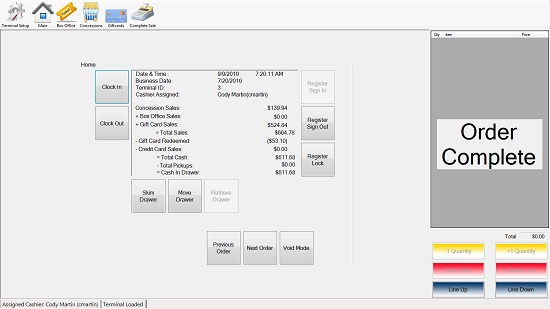
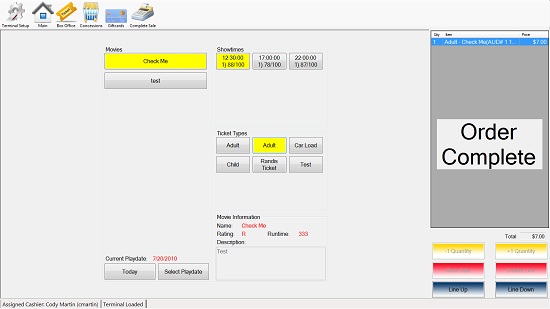
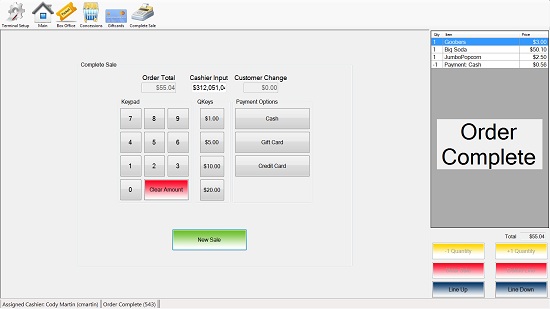
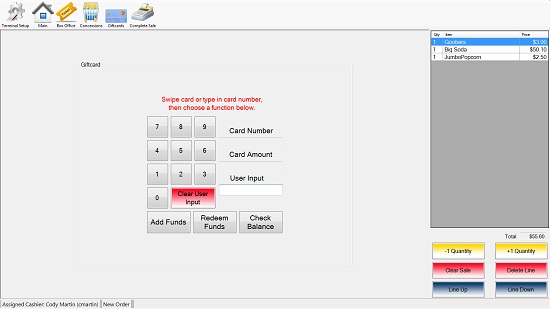
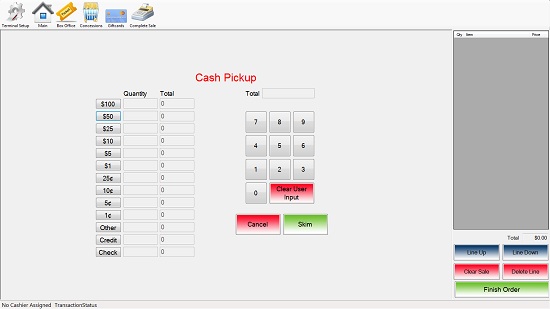
I would like to take a moment to post a few screenshots of the client for those who have not had the opportunity to use/test the software. If you have any questions, or would like to sign up to test the software, please send me a message through here.
Thanks,
Cody
Main:
Box office screen:
Concessions:
[IMG]http://www.film-tech.com/uploads/uploads0503/96Concessions.jpg[/IMG
Finish:
Giftcard:
Skim:
Powered by Infopop Corporation
UBB.classicTM
6.3.1.2