This is topic Source for Hi- Rez Movie Poster artwork. in forum Ground Level at Film-Tech Forum ARCHIVE.
To visit this topic, use this URL:
https://ft-forum.com/ft/cgi-bin/ubb/ultimatebb.cgi?ubb=get_topic;f=5;t=002727
Posted by James Waite (Member # 4536) on 11-05-2013, 04:29 PM:
We make our own poster each week to go up around campus. The artwork easily found on most websites is usually 300 DPI which looks okay but can look fuzzy when printed.
Does anyone know of a reliable place to get artwork in higher resolution?
Posted by Justin Hamaker (Member # 2165) on 11-05-2013, 09:16 PM:
The highest resolution I have ever found online consistently is MoviePosterDB.com. It is a pay site in that you will need to buy credits and each download will cost you credits. You can buy 100 credits for 5.00 euro, and most downloads are 2 credits.
MoviePosterDB.com
Just out of curiosity, what size are you printing? Are you trying to print at the full one-sheet size of 27"x40"? If you're trying to print smaller than 27" x 40", you can scale down to achieve a higher resolution. For example, 27" x 40" at 300 dpi would be the same as 13.5" x 20" at 600 dpi.
Obviously this won't matter if the original image/scan wasn't high enough resolution to capture all of the detail.
I'm guessing that if you're prints are looking fuzzy, you're taking a smaller image and making it larger. For example, I downloaded a one-sheet for Gravity from the above site and it is 3386x5000 pixels - which equals 250 dpi at 13.5" x 20". But if you were to stretch that up to 27" x 40", it would be a 125 dpi image. But at 250 dpi, it's probably going to look pretty good, depending on the printer you're using.
Posted by Carsten Kurz (Member # 5396) on 11-06-2013, 06:10 AM:
In germany, all distributors operate press sites for trailers, set-photos, and other PR related stuff. As a cinema, you can apply for login to use that material for your own advertizing.
- Carsten
Posted by Barry Floyd (Member # 385) on 11-06-2013, 08:09 AM:
I get all of our poster artwork for our website at www.impawards.com
Most of the time they will have both a standard resolution and a higher resolution of each poster available.
Posted by Frank B. McLaughlin (Member # 6683) on 11-06-2013, 08:44 AM:
I would think that with the resolution of these posters one might convert one sheet displays to electronic devices.
Posted by Mike Blakesley (Member # 26) on 11-06-2013, 10:05 AM:
Some places are already using electronic one sheet displays. I'm sure the day is coming when printed one sheets will be a thing of the past and all of exhibition will have to spend thousands of dollars to digitize their display cases… and the studios will pay for the big cinemas to convert.
Posted by Bobby Henderson (Member # 840) on 11-06-2013, 12:02 PM:
If the movie studios actually intend to distribute electronic versions of movie posters and allow theaters to make prints from those files they ought to be sending PDF files rather than dopey JPEG images. Of course, I don't think the studios want any end users making prints in the first place.
Even if you had a 27" X 41" one sheet image with a native 300ppi resolution (which would come out to 8100 X 12300 pixels) the type, logos, etc. in the image would still look soft when printed. In high quality print production elements like type, vector-based logos, etc. are rendered at resolutions beyond 2000ppi.
The PDF format can contain pixel-based and vector-based artwork. PDF/X is used in professional pre-press. A 27" X 41" one sheet in PDF could feature all the credits, 3D format logos, sound format logos, etc. all in vector form. They would print razor sharp no matter low large or small the poster was scaled. One would have more control over how the photographic imagery was embedded. And it wouldn't necessarily need to be 300ppi. I think 300ppi is overkill for photographic content on a movie poster (levels of 233ppi or 200ppi would be enough for continouous tone methods and 150ppi would be sufficient for any halftone process). Essentially the file wouldn't have to be so bloated.
Another issue is how those poster images would be used. A flattened one sheet image in JPEG isn't going to be very flexible. It's not like you can scale or reposition any of the many elements in the image to fit different sizes or shapes of displays -like re-purposing that vertical one sheet image to fit the long horizontal opening of an auditorium label sign.
quote: Mike Blakesley
I'm sure the day is coming when printed one sheets will be a thing of the past and all of exhibition will have to spend thousands of dollars to digitize their display cases… and the studios will pay for the big cinemas to convert.
I'm a little skeptical about that. On one hand, LED-based displays are growing more common at ticket booths and for overhead auditorium label signs. I can certainly see them replacing all the little horizontal "mylar" signs.
HDTV monitors can be rotated into "portrait" orientation. Their 16:9 aspect ratio isn't all that different from the 1.52:1 aspect ratio of a 27" X 41" one sheet. There are numerous multimedia kiosk systems available that can drive images and video to multiple HD displays. Still, there is the matter of cost. Lighted one sheet cases cost less than HD monitors in a kiosk system. Theater customers are very accustomed to seeing the printed one sheets. So I don't know if a theater would actually gain anything by shifting to an electronic display of a poster versus a much sharper, printed version.
Posted by Richard Orsak (Member # 4472) on 11-06-2013, 01:05 PM:
What companies are offering "electronic" displays for posters or multimedia trailer content to be displayed on a monitor? I believe at one chain I saw the poster being displayed on a monitor, and the trailer playing on the bottom?
Posted by Mike Blakesley (Member # 26) on 11-06-2013, 01:40 PM:
quote: Bobby Henderson
Theater customers are very accustomed to seeing the printed one sheets. So I don't know if a theater would actually gain anything by shifting to an electronic display of a poster versus a much sharper, printed version.
Are you kidding? Even just having a single screen, I can think of a lot of great possibilities it would open up for us:
- Ability to change out posters instantly
- Ability to display different posters at different times of day
- Ability to use display "cases" for other than movie information if necessary
- Not having to keep a closet full of posters
- Not having a ton of old posters to throw away
- Posters would always look great, as opposed to the way they look when one flourescent bulb gets burned out, or when they get faded in outside cases
- All posters would be lit
- Ability to program a display to cycle between various different posters
- Not having to bother with ordering posters (assuming they would be delivered via a TrailMix-like service)
- Not having to worry about poster availability
While I love a good-looking printed one-sheet as much as anyone, I really don't think the average movie poster observer gives two hoots if a poster is printed on a sheet of paper or not. Some adjustments might be required to make the credit-block at the bottom readable, but I don't see any other big problems outside of the cost of all those monitors and the related connectivity...two things that are dropping fast.
I think it'll happen eventually. Our booker told me the same thing. Just the amount of printing, paper and shipping cost that would be saved over the long haul is enough to convince the pencil pushers at the studios to go for it.
Posted by Scott Ribbens (Member # 180) on 11-06-2013, 01:52 PM:
quote: Richard Orsak
What companies are offering "electronic" displays for posters or multimedia trailer content to be displayed on a monitor? I believe at one chain I saw the poster being displayed on a monitor, and the trailer playing on the bottom?
That was most likely "TrailerVision" From Cinema Scene: http://www.cinemascenemarketing.com/
Did the display look something like this? (First picture on the left): http://www.cinemascenemarketing.com/media/
More info: http://www.cinemascenemarketing.com/media/media/trailervision-digital.html
(No, I do not work for them. ![[Big Grin]](biggrin.gif) )
)
Posted by Justin Hamaker (Member # 2165) on 11-07-2013, 02:25 AM:
You don't need to use a subscription service for displaying digital content. Many TVs now have USB ports and can be set to play the USB files as a slide show. Otherwise you can use a mediatank device, like a Popcorn Hour box, to play over HDMI to a TV. And it doesn't take a huge amount of programming knowledge to create a system which will run box office and auditorium signs - and the programming and server tools are free (PHP, MySQL, Apache, etc).
You can even download HD trailers from YouTube for use in a lobby display.
When you start adding up what you're paying for things like auditorium and box office signs, these digital systems can pay for themselves within a couple years. You could even use these options for snack bar menus to eliminate the need for menu strips.
Posted by Bobby Henderson (Member # 840) on 11-07-2013, 12:44 PM:
quote: Mike Blakesley
While I love a good-looking printed one-sheet as much as anyone, I really don't think the average movie poster observer gives two hoots if a poster is printed on a sheet of paper or not.
Lots of people still like big photo prints as opposed to merely looking at photos on a computer screen or TV screen. If they were happy looking at only electronic versions of photos we wouldn't need any cameras that recorded more than a couple million pixels.
The trade-offs are pretty noticeable from a printed poster to a reduced resolution version shown on a rotated 1080p monitor. You're right about the credits at the bottom. Those thin, ultra condensed typefaces commonly used on one sheets can get pretty faint or fuzzy when reduced to fit the pixel count of a computer screen or TV screen. Small logos in the credits block can end up looking like illegible clumps of pixels.
I've dealt with similar issues in billboard ads. Billboards in high traffic locations are going electronic simply because the images can be changed every 8 seconds or so and bring in more income. But there's a huge tradeoff in resolution. You can't show anywhere near the level of detail on a LED billboard that you can on a static printed billboard. Color control is even an issue (lots of subtle highlight and shadow details can get blown out or crushed on a LED display if brightness isn't properly adjusted).
quote: Justin Hamaker
You don't need to use a subscription service for displaying digital content. Many TVs now have USB ports and can be set to play the USB files as a slide show.
This is true, but most people don't have the resources needed (time, talent, creative software, technical know how) to create their own content for a HDTV monitor, particularly one rotated into vertical orientation to use as a electronic poster case. A turn-key "kiosk" system of networked monitors, a multimedia playback server and supply legally acquired/licensed content removes all the end user work that would be required in a "DIY" setup.
quote: Justin Hamaker
When you start adding up what you're paying for things like auditorium and box office signs, these digital systems can pay for themselves within a couple years. You could even use these options for snack bar menus to eliminate the need for menu strips.
Electronic signs aren't cost free. Hardware can and does malfunction or break. It takes time/money to create the content for the electronic displays.
I have seen a few fast food restaurants install a wall of flat panel monitors and use them to display the food menu along with other animated/video content. The tricky thing is the system and content playing on the system has to be carefully designed. All of the content on those fast food restaurant menus is being generated by the company's advertising department or the ad agency working for them. That stuff isn't getting created on the individual restaurant level. The local guys don't have access to all the creative "assets" (product photos, graphics objects, logos, unique fonts, brand guidelines, etc.) to be able to do the job right even if one of the employees had a good computer and Adobe Creative Cloud subscription.
And that's really where I see a big problem with trying to use a flat screen TV to replace the printed mylar strip signs that slide into auditorium entry signs or changeable slots in the box office. I only see text-based LED signs replacing those things at a lot of theaters, not TV screens.
In a DIY situation where is the end user going to get the individual assets to create the proper sign for the TV screen? He can't just use a flat JPEG of the movie poster one sheet. I strongly doubt any movie studio or production company would give just anyone full access to the individual assets it has for promoting a movie. Studio marketing departments are pretty anal retentive when it comes to consistency of branding in a movie's promotion. They have all kinds of rules on how things are supposed to look in order to make ads uniformly consistent in every type of advertising medium. Out of would-be amateur graphic designers many don't get that or give a damn about it. Hence, they're not to be trusted in making their own home-brewed ads of the movie.
Every once in awhile I'll look at movie poster art on Google Images. I'm usually looking for some kind of detail, like if any movie posters have a Dolby Atmos logo on them (very few do). Some movies will have a fair amount of fan generated poster art. It's usually pretty easy to tell the difference between the fan generated art versus the stuff that came from the studio.
Posted by Mike Blakesley (Member # 26) on 11-07-2013, 04:34 PM:
quote: Bobby Henderson
I have seen a few fast food restaurants install a wall of flat panel monitors and use them to display the food menu along with other animated/video content.
And that is a huge gripe I have with the fast food industry. These stupid moving, changing, circulating menu boards, combined with the 47 "combos" that they all seem to be pushing now, have made ordering way too complicated. JUST LIST THE FREAKING PRODUCTS, ALL RIGHT? I'LL ORDER WHAT I WANT!
ME: I'd like a 3-piece chicken dinner, original recipe.
Kid: If you order the #8 combo it comes with 2 sides, or the #16 combo comes with a side and a drink, or you could get the #39 combo, that comes with an extra piece of chicken of your choice plus dessert, and a drink is a quarter extra for all of them except #16, which already includes a drink.
OK rant over, back to griping about movie posters. I've quite often had to print a onesheet myself when a "real" one wasn't available. My printer does 13x19 sheets. Nobody has ever come in saying "Man, I sure wish you had a full-sized one-sheet...the resolution on that one sucks!
I think the biggest job of a one-sheet is to inform the passerby what the movie is like, not dazzle them with its quality of print.
Posted by Marcel Birgelen (Member # 6801) on 11-07-2013, 07:55 PM:
quote:
And that is a huge gripe I have with the fast food industry. These stupid moving, changing, circulating menu boards, combined with the 47 "combos" that they all seem to be pushing now, have made ordering way too complicated. JUST LIST THE FREAKING PRODUCTS, ALL RIGHT? I'LL ORDER WHAT I WANT!
I also especially hate those TFT panels with rotating menu items... No matter where, at a movie theater, fast food restaurant. It's totally fine that you put some animated content in there, but keep options and price info steady and do not shuffle them around while I'm reading them...
Regarding movie posters... I would really love to see some improvements in E-ink technology: better colors, bright white background and bigger surfaces. Also, E-ink displays should be cheaper to produce than big LCD/TFT/Plasma screens and do only require a minimal amount of power. I've already seen E-ink based price tags at local supermarkets and retailers. They're programmed using some kind of RFID programmer and do not require any power to retain the information on screen.
Posted by Bobby Henderson (Member # 840) on 11-08-2013, 11:48 AM:
quote:
And that is a huge gripe I have with the fast food industry. These stupid moving, changing, circulating menu boards, combined with the 47 "combos" that they all seem to be pushing now, have made ordering way too complicated. JUST LIST THE FREAKING PRODUCTS, ALL RIGHT? I'LL ORDER WHAT I WANT!
That could be one reason why In N Out Burger has become so popular (aside from the fact its burgers taste great and are priced very competitively). The In N Out menu is very simple and old fashioned in appearance. The burger chain has a "secret menu" for its fan base (basically it's just different ways to customize burgers, fries and shakes sold there).
Animated content is the norm for any flat panel TV set trying to act like a sign. Why spend all that extra money on a video monitor if it's only going to be used to show static imagery? A standard sign cabinet internally lit with fluorescent lamps or white LEDs is going to be a lot cheaper to buy, operate, maintain and replace.
An independent theater operator, especially one who has any staff members that know how to use graphics and video editing software, can use flat panel HDTV monitors however he likes. But if theater chains adopt HDTV monitors as replacements for movie poster cases it's a guarantee they would be showing a lot more than mere, static posters. They would be showing a lot of stuff instead of movie posters.
I can image a theater multiplex box office featuring all its movie titles and show times displayed on a wall of flat panel HDTV monitors. I also foresee much, if not all, of that video wall being consumed by movie trailers, food ads and other stuff. It would turn into a chore for customers to see what time a certain movie is playing and in what projection/sound format. They would have to wait for all the other animated crap to finish so they could get another glipse of the show times. I suppose the box office person could suggest customers download their smart phone app to check show times and even buy tickets. With so much of the ticket purchasing going online I wouldn't be surprised to see box offices disappear from movie theaters. Just show up at the door, insert the credit/debit card that was used to order tickets online into a kiosk machine, the tickets spit out automatically.
There's lots of signs that are meant only to be static. Brand equity is built best by keeping that brand visible 100% of the time, be it a business name or movie title. I don't see retail businesses replacing their signs with color LED boards and only flashing their brand name once in awhile between other ads. The brand stays visible and they install an LED board under the sign.
quote: Marcel Birgelen
Regarding movie posters... I would really love to see some improvements in E-ink technology: better colors, bright white background and bigger surfaces.
E-ink technology still has a ways to go before it can take off in popularity. If costs of OLED production could ever come down from the stratosphere it might have a better shot since OLED displays can be backlit and produce very vibrant colors and contrast while maintaining a very thin form factor.
Posted by Martin McCaffery (Member # 37) on 11-08-2013, 03:05 PM:
Back to the earlier question, I know Landmark is going, or has already gone, completely paperless. A friend who runs their LA Flagship informed me of this last year. When I was out their his theatre was completely electronic advertising. The posters were mostly horizontal, so they either create their own or have enough pull to get them done by the disturbs.
Several of the arthouse distribs to give you access to all of the elements of the ads. I don't think they do it with the intent you mess with their ads, but I do it sometimes anyway.
Posted by Frank Angel (Member # 248) on 11-17-2013, 03:03 PM:
James, how do you make your 1-sheets? Do you have a large format printer (oh how I wish we did), or do you use regular laser or inkjet printers that can "tile" the output? Since we run classics, we are left to our own devices to find 1-sheet images of a title on the web and then convert that to 1-sheet size posters.
When we are lucky and can find decent resolution images, we can get surprisingly decent looking 1-sheets. We may have to enhance as best we can, and then tile the output. Of course tiling requires carefully trimming and gluing nine 8.5x14 inch pages together, but with a little practice and a steady hand, you put that patchwork into a frame and anyone standing two feet or more away will think it's one single piece of paper, and more importantly, it gets the title and art work in front of the public.
Occasionally and especially when you can only find a low rez image, you may have to do some enhancement in Photoshop -- some gently sharpening of certain elements and perhaps just completely drop all the skinny fonts at the bottom which become illegible when blown up. I know this stuff must make Bobby cringe, but when you are desperately in need a poster of an old tile, an exhibitor's gotta do what an exhibitor's gotta do!
Posted by Frank B. McLaughlin (Member # 6683) on 11-18-2013, 09:52 AM:
A number of UPS, FED-EX, Office Max, and Office Depot locations have large format printers. If you want paper, pay the price, if not convert to digital.
Posted by Frank Angel (Member # 248) on 11-18-2013, 12:03 PM:
Frank, the problem is not how to print them -- the tiling method is less expensive than schleping to Office Depot et al -- it's finding a decent enough reproduction online that you can send to a printer that will look half decent. Paper or digital display, you still need to find a decent reproduction of the original 1-sheet. Plus, not for nuthin, but if you want digital, be prepaired to REALLY pay the price -- a lot more than what it would cost to create the 1-sheet in paper. Cost of a 1-sheet size digital display vs. paper? Really?
Posted by James Waite (Member # 4536) on 11-18-2013, 10:08 PM:
The posters we make are on 11*17 paper, we usually play two movies each week. We make some in color that go on sandwich boards and display cases where we can't put 1-sheets. We make the rest in b/w to put up around campus.
Quite often the image is fuzzy or hard to make out for dark images which is why I was looking for better artwork.
The newest Cineplex here uses TVs sideways outside the theatres to show what's playing. Often looks fuzzy but gets the message across.
I had a 1-sheet size poster made up for our midnight series and it was $60 to print the darn thing on a large format printer. Looks damn good though.
Posted by Mike Blakesley (Member # 26) on 11-18-2013, 11:18 PM:
I have an HP printer that was fairly cheap (around $200) and makes 13x19 prints that serve the purpose on those occasions we can't get a proper one-sheet. I use the poster images from the I.M.E. website. They resize well, but of course, you have to be a subscriber to that site to get those images.
Posted by Bobby Henderson (Member # 840) on 11-19-2013, 09:40 AM:
quote: Martin McCaffery
When I was out their his theatre was completely electronic advertising. The posters were mostly horizontal, so they either create their own or have enough pull to get them done by the disturbs.
The latter could be happening to some degree. Movie distributors will put together certain horizontal lock-ups of posters for special purposes like banners, subway poster ads, billboards, murals, etc. An HDTV friendly version would just be another option.
I would be a little disappointed encountering a theater that replaced traditional, vertical oriented one sheet poster cases with horizontal HDTV monitors. It just doesn't have the right visual feel to me. Ultimately it's going to make the movie-going experience even more like, using Quentin Tarantino's term, watching TV in public.
quote:
I know this stuff must make Bobby cringe, but when you are desperately in need a poster of an old tile, an exhibitor's gotta do what an exhibitor's gotta do!
"Up-rezzing" a low or limited resolution image doesn't do a whole lot of good, especially if someone merely uses the "bicubic smoother" setting in Photoshop. Vector-based artwork is the only thing that can be scaled from small to large sizes and still look razor sharp.
Some 3rd party Photoshop plug-ins & stand-alone applications do a little better job at resampling images up to larger sizes. Alien Skin Blowup 3 is a good step up from Photoshop's bicubic smoother. Perfect Resize 7.5 (an app formerly known as Genuine Fractals) appears to be better at enlarging images than Blowup 3. The latest version of Adobe Photoshop ("CC") has new enlarging tools that deliver results similar to Perfect Resize 7.5. However, the results from those tools is not perfect. They do a lot of work to hide the enlarged pixel grid. But in doing so the enlarged image can look a little like an oil paint filter has been applied to it. Some of the noise reduction smoothing that goes on can give the imagery a plastic like feel. Edge detail on elements like type can look a little wiggly and muddy. That's better than fuzzy, but still not so great.
Ultimately there is no substitute for native high resolution imagery. If I'm designing something like a billboard ad and need to buy a stock photo image I always buy the highest resolution version available. If I'm enlarging an image across a 14' X 48' billboard layout a 25 million pixel version of that image will hold up to the enlargement a lot better than a cheaper 5 million pixel version.
quote: Frank Angel
Plus, not for nuthin, but if you want digital, be prepaired to REALLY pay the price -- a lot more than what it would cost to create the 1-sheet in paper.
The "consumables" in large format printing (papers/vinyls, inks, laminates) are expensive. Most large format printing service bureaus include a set up charge for handling the artwork files, switching out printing materials & laminates, etc. They'll usually add on more fees if they have to manipulate the artwork at all.
Posted by Marcel Birgelen (Member # 6801) on 11-25-2013, 04:16 PM:
quote: Bobby Henderson
E-ink technology still has a ways to go before it can take off in popularity. If costs of OLED production could ever come down from the stratosphere it might have a better shot since OLED displays can be backlit and produce very vibrant colors and contrast while maintaining a very thin form factor.
E-ink would work in an outdoor situation, where the only other option currently is either something printed or big ugly LED screens that are sufficiently bright. E-ink is also perfect in situations where you do not have constant power available, but want to easily reprogram stuff on demand anyway. I've seen E-ink based price-tags and small information signs at several retailers quite recently, so the technology is making its way in, but slowly.
OLED would be the perfect replacement for back-lit advertisements, current LCD and plasma screen (with those nasty burn-in habits) installs.
But, unfortunately, the industry as a whole is not focusing on either technology right now, so there is not much progress happening. Instead of replacing LCD and plasma with OLED, they went the easier route of pushing 4K. And e-ink is also going nowhere, because hipster tablets all use "retina" LCDs...
Posted by Bobby Henderson (Member # 840) on 11-25-2013, 06:46 PM:
Cost is an inescapable factor in trying to push things like LCD/LED monitors to replace much cheaper printed "Point of Purchase" displays, be they movie poster one sheet cases or a variety of other displays.
I don't see E-ink ever taking off as an outdoor advertising medium. The cost per square inch is probably way too high for it to be feasible, even for smaller things like banners.
At the scale of a billboard, RGB LED clusters are the only way to go in terms of electronic billboard displays. The LEDs are bright enough to stand up to direct sunlight. Their brightness can be attenuated to look pleasant at night time. I haven't seen very many LED-based billboards that could be called "ugly." But they will look only as good as the ads that are designed to play on them. Not many people know what they're doing when it comes to designing effective and attractive billboard ads.
Posted by Frank Angel (Member # 248) on 11-28-2013, 02:14 AM:
Finally got around to taking some pics of the last home-made 1-sheet I needed and made by the tile-printing method on an ordinary under $200 HP ink jet. For what it does -- lets people know what your playing -- it does a decent job and it's not so shabby that you have to stand next to it and apologize.
This one was made from an image I got right off IMDB, so it's about as awful a source as you can get, yet, as you can see, out comes 9 pages of 8.5x11 paper and with a little snip and paste, you've got yourself that much-needed 1-sheet.
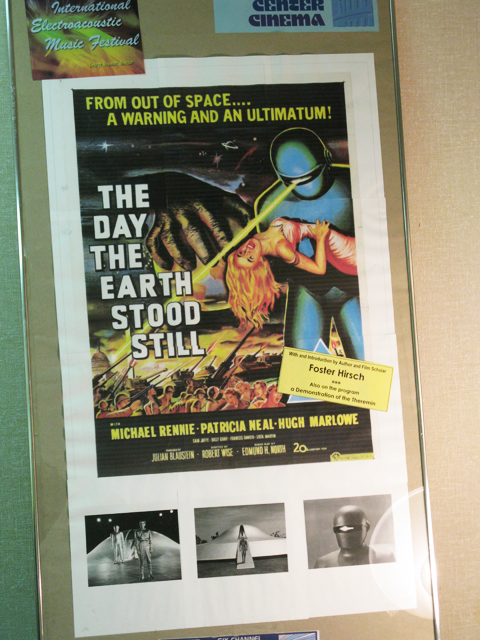
Of course you can't tell much from this picture of a picture, but if you look at the diagonal paste-on notice about Foster Hirsch and the Theremin which was printed on a laser printer, you can see the relative softness of the picture next to the printed text. Here is a closeup of the paste-on so you can see the clarity of it compared to the poster image.
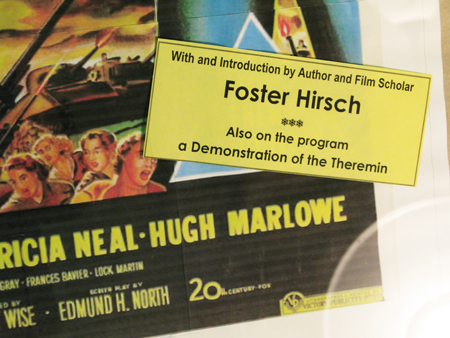
And of course it's not perfect. No matter how careful you are in cutting and lining up the pages, the moisture in the ink causes the pages to swell and warp ever so slightly and at different rates depending on the amount of ink. So you can wind up with slight mismatches. If you wait a day after you print, I found it's not as severe as you see in the detail below; it happens I needed this one immediately and I pasted them together right out of the printer. I also guess that a laser printer would cause less or no warping -- no liquid ink. You can see the mismatch here on the word STILL:

All in all, it's still beats having no 1-sheet at all.
HAVE A GREAT THANKSGIVING EVERYONE.
Posted by Marcel Birgelen (Member # 6801) on 11-28-2013, 05:19 PM:
quote: Bobby Henderson
I don't see E-ink ever taking off as an outdoor advertising medium. The cost per square inch is probably way too high for it to be feasible, even for smaller things like banners.
Well, I still remember the days that this was the promise of E-ink. And I don't want to give up on it yet ![[Wink]](wink.gif)
quote: Bobby Henderson
At the scale of a billboard, RGB LED clusters are the only way to go in terms of electronic billboard displays. The LEDs are bright enough to stand up to direct sunlight. Their brightness can be attenuated to look pleasant at night time. I haven't seen very many LED-based billboards that could be called "ugly." But they will look only as good as the ads that are designed to play on them. Not many people know what they're doing when it comes to designing effective and attractive billboard ads.
There are tons of reasons why I generally don't like them... let me give you a few:
- Although this is usually an operational issue, most of them are far to bright at night. I guess many operators don't want to tune them down, because they think they make more impact this way.
- Most of them have abysmal resolutions. Many of them even have separate "dots" per sub-pixel.
- But my biggest issue is the gaps between the pixels. The resulting dot matrix remains visible from a large distance. This makes images look fake.
Posted by Mitchell Dvoskin (Member # 751) on 12-03-2013, 12:05 PM:
Frank,
For the amount of time and effort it took to tile print that poster and piece it together, you could have bought a 27x40 reproduction online for $15. For example, click here.
Unless you were creating your own poster for the fun of it, you forgot that your time has value.
Posted by Bobby Henderson (Member # 840) on 12-03-2013, 04:11 PM:
quote: Marcel Birgelen
There are tons of reasons why I generally don't like them... let me give you a few:
- Although this is usually an operational issue, most of them are far to bright at night. I guess many operators don't want to tune them down, because they think they make more impact this way.
- Most of them have abysmal resolutions. Many of them even have separate "dots" per sub-pixel.
- But my biggest issue is the gaps between the pixels. The resulting dot matrix remains visible from a large distance. This makes images look fake.
Big question, Marcel? What's the alternative? It sure isn't e-ink.
Most LED-based signs and billboards have brightness settings automatically adusted via solar cell input. Some will have it adjusted by a time settings. The only displays I see running full brightness at night are newly installed units where someone forgot to turn on automatic dimming. That's a rare occurence. Not many people will get away with deliberately running a LED sign at full brightness. City council members and police officers tend to get called about that sort of thing in a short amount of time.
Regarding "separate dots per sub-pixel" -well, yeah, you need at least a minimum of a red, green and blue LED for each cluster to create a proper "pixel" capable of full color display. This isn't any different from how a computer monitor works. It's just taking place on a much larger scale.
Regarding abysmal resolutions, gaps between pixels, etc. it all comes down to money. It costs more $ to pack more RGB pixel clusters into a given space. The smaller, more coarse looking units are more affordable for businesses to install. But they're also far more limited in what kinds of content they can show.
Most billboard sized LED displays (30' X 10' and 48' X 14' are the most common sizes) have a pixel pitch of 23mm, 20mm or 16mm from one pixel center to the next. Overglow from the LEDs fills in the gaps sufficiently unless you're looking at the board at a close distance. Pitches tighter than that (such as 12mm, 9mm, etc.) are overkill for billboards.
As LED-based signs and billboards continue to grow in popularity the costs per pixel will continue to fall and make higher resolution boards more affordable.
quote: Mitchell Dvoskin
For the amount of time and effort it took to tile print that poster and piece it together, you could have bought a 27x40 reproduction online for $15.
Don't forget about the cost of that desktop printer's ink! That stuff ain't cheap!
Posted by David E. Nedrow (Member # 4981) on 12-05-2013, 07:27 PM:
quote: Bobby Henderson
If costs of OLED production could ever come down from the stratosphere it might have a better shot since OLED displays can be backlit and produce very vibrant colors and contrast while maintaining a very thin form factor.
Think about this for a second. LED means light emitting diode. OLED requires no backlight, which is why is can be so vibrant.
Powered by Infopop Corporation
UBB.classicTM
6.3.1.2