This is topic Theatre management software - what do you use? in forum Ground Level at Film-Tech Forum ARCHIVE.


To visit this topic, use this URL:
https://ft-forum.com/ft/cgi-bin/ubb/ultimatebb.cgi?ubb=get_topic;f=5;t=002758

Posted by Martin Thuss (Member # 7976) on 02-09-2014, 12:20 PM:
 
Just curious about what theatre management software (Retriever, RTS, NCR, etc.) everyone uses. Do you like it or would you swap it out for something else if you could? What are the pros and cons?
 
Posted by Michael Putlack (Member # 6523) on 02-09-2014, 12:38 PM:
 
We use RTS and I really loathe it. Sometime in the next few years we're looking to upgrade. I had my eye on Veezi, which looks amazing and it comes from the folks who make Vista, which I've only heard great things about.

http://www.veezi.com/
 
Posted by Dennis Benjamin (Member # 1137) on 02-09-2014, 01:12 PM:
 
If you are a smaller operation, I recommend Sensible Cinema Software.
 
Posted by Andrew Thomas (Member # 7000) on 02-09-2014, 03:20 PM:
 
We use Sensible Cinema. Seems to work fine for us. A few things I would change, but nothing major. Honestly, the biggest issue I have is how ugly it is [Wink]
 
Posted by Jack Ondracek (Member # 1466) on 02-09-2014, 07:40 PM:
 
We've used RTS for years, and it works very well for us.
We used Sensible at one time, with less-positive results.

Just a matter of finding something that matches your needs, I guess.
 
Posted by Justin Hamaker (Member # 2165) on 02-09-2014, 07:50 PM:
 
We use Retriever (aka Venue) at my cinema. We've been using this system for almost 15 years and I like it. It pretty much has all the functionality you could ask for - they even do credit card processing and internet ticketing. The only downside is the selling terminals are still DOS based, so there isn't much flexibility with hardware.

We use RTS at our drive-in, and I'm not a fan. Many things about the software are not intuitive, the reporting is limited, and concessions setup can be very complicated. If you're not careful about your item setup, it can create overages or shortages that don't really exit. The user interface is utilitarian at best. But since it's Windows based, there is a fair amount of flexibility for hardware.
 
Posted by Dennis Benjamin (Member # 1137) on 02-09-2014, 08:07 PM:
 
The upside to Sensible Cinema is that when you call their tech support number, you are speaking to the guy who wrote the software.

The other company that I provide support for uses Retriever and there seems to be more left to be desired...
 
Posted by Frank Cox (Member # 6258) on 02-09-2014, 09:39 PM:
 
A lot of DOS-based software can be run on Linux under dosemu. You can set up a Linux computer to run dosemu full-screen and the user won't know he's not on a native dos machine. Then you get to use goodies like USB printers and whatnot that don't work on DOS. (The trick is to spool the dos printer output to a file and then send it to the appropriate cups driver for your printer.) Works like a damn and dos really rattles right along on a modern computer.
 
Posted by Martin Thuss (Member # 7976) on 02-10-2014, 11:33 AM:
 
I took a brief look at the Veezi web site, including some of the videos. It looks interesting. Does anyone on this thread use this system? My one potential concern is the ongoing monthly cost tied to admissions. How does this compare to other systems? Some of the systems use up front costs, some fixed monthly/annual and some variable monthly/annual.
 
Posted by Rusty Gordon (Member # 2210) on 05-02-2014, 03:25 PM:
 
Rusty from Sensible Cinema Software here. Regarding the drive-in location Justin mentioned: We've added a bunch of new features to Sensible Cinema this summer particularly for drive-in theaters. If you'd be interested in having a look send me a reply to rusty@sensiblecinema.com.

I think one of the most attractive features of Sensible Cinema is that we don't have annual license fees or recurring per-ticket fees like our competitors. You won't have a monthly bill or an "account" you must maintain with us. Additionally, our software is not 'cloud based' so you don't have your entire point-of-sale system at the mercy of the performance your internet provider or run it from a web browser!

Not sure what Andrew thinks is particularly 'ugly' about our software. This is a desktop application, not a web site or video game. We've followed a design convention that closely matches the Windows operating system to a large extent using the user's Windows version's common controls, forms, buttons, etc. with primary focus on usability and intuitiveness. If we take too much creative license with the visual interface it becomes more difficult for the user to figure things out. Screen shots are widely available on our web site and a demo is available.
 
Posted by Justin Hamaker (Member # 2165) on 05-02-2014, 06:22 PM:
 
Martin
I have been testing Veezi for possible use in our drive-in.

From a employee usage standpoint, it's probably as easy as any other system out there, but there are a number of little quirks where you can see it wasn't designed by someone who actually uses the software in a cinema.

For example, by default they have a quick tender function disabled, meaning it takes twice the number of touches to sell a ticket. You can turn the function on, which then makes it as little as 2 touches to sell a ticket.

Another downfall is the system isn't configured to allow for modifiers. For example, if you add a flavor to drinks, then you have to set up a separate size/flavor for each item. Normally you would set up small, med, and large drinks, then Coke, Sprite, Diet - where you would use the same modifier for every size. But with Veezi you would have to set up Small Coke, Med Coke, Large Coke, Small Sprite, Med Sprite, Large Sprite, and so forth.

On the other hand, it's easy to create add-ons to your items - extra cheese for nachos, chili for hot dog, etc.

Probably the biggest downfall with Veezi is it currently does not have an inventory module. While it's easy enough to create an Excel spreadsheet to handle your inventory, it does wind up being more work.

Pricing for Veezi really depends on your volume and what you pay for your existing system. Since the pricing is flexible based on actual monthly volume, it does cost less during slow months. Since Veezi is based on admissions, and not terminals, it makes the system very scalable. And this is what you have to factor into the price. Most systems base their licensing on the number of selling terminals. With Veezi you can add additional terminals with no additional licensing cost - just the cost of the additional hardware.

Overall I would say Veezi is a good work in process. If you're going to a computerized system from a manual system or a cash register, then you'll be happy with the upgrade. However, if you are looking to replace an existing system - RTS, Venue/Retriever, or one of the other systems, you're probably going to be left wanting. That being said, they seem to be very responsive, and I would imagine it will only be a short time before the shortcomings are addressed to make it a more robust system.
 
Posted by Randy Stankey (Member # 64) on 05-02-2014, 09:00 PM:
 
I vote for Sensible Cinema. We use it at the Tom Ridge Theater and it does anything we want.

Discolsure... We are a single screen with one concession stand.
As others say, it works good for smaller operations. No experience with larger operations.
 
Posted by Martin Thuss (Member # 7976) on 05-04-2014, 05:26 PM:
 
Our installer/integrator (Cinematronix) is suggesting Jack Roe; I guess a number of their other clients use this system. Does anyone have any experience with this system or have you heard any feedback (direct or indirect) to pass on? We still have a good amount of time to decide as our site selection is taking longer than expected so we are still quite early in the process.
 
Posted by Dennis Benjamin (Member # 1137) on 05-05-2014, 09:25 AM:
 
Alan Roe (the guy who runs Jack Roe) is one of the nicest guys to do business with. Even though we do not use his P.O.S. software (TaPoS), I am sure it works well. We use their Fone and Go product and it is awesome.

Having worked with every major Movie Theatre P.O.S. system in the last 25 years - none of them are perfect. It's really just a matter of finding one that works well with your operation. It does help that the system was developed by someone with a working knowledge of movie theatres.
 
Posted by Mike Blakesley (Member # 26) on 05-05-2014, 11:22 AM:
 
We got an email a couple of months ago saying that RTS was upgrading to a new version which included a remodel of its (fairly ugly) interface, and some other improvements....anyone got it yet?
 
Posted by Gordon McLeod (Member # 33) on 05-05-2014, 12:30 PM:
 
In Canada the two major installed POS systems are Vista and OmniTerm
We have always had good support from OmniTerm
 
Posted by Justin Hamaker (Member # 2165) on 05-05-2014, 02:33 PM:
 
Mike, we received and RTS update at our drive-in a few weeks ago and it was the 7/29/2013 version. Although the update had some changes to the reports and other areas, the interface was unchanged. I think the primary change with that version was converting to and SQL database.
 
Posted by Mike Blakesley (Member # 26) on 05-05-2014, 02:50 PM:
 
Yes I remember that change -- we put that version in when we updated our license the last time. But, just before CinemaCon this year we got an email with screenshots of the "new" version which looks nice. It did say "coming soon" though, so probably just isn't out yet.

I was going to ask tech support about it when I called in about an issue last week but those guys are always in such a big damn hurry to get off the phone that I forgot to ask.
 
Posted by Chris Daigle (Member # 7347) on 05-05-2014, 05:12 PM:
 
I got the same email a couple months ago informing us of a new sharper looking version as well. I asked one of the techs at RTS a week or two ago about it when I was on the phone with them for another issue. They told me that they had it out in a handful of theaters being tested and getting feedback. The person I spoke to told me that theaters would start getting scheduled to convert later this summer/fall but I suppose that all depends on how its going so far in the few theaters that may be using it.
 
Posted by Martin Thuss (Member # 7976) on 07-02-2014, 02:31 PM:
 
FYI, I asked Veezi about modifiers (as posted in Justin Hamaker's comment on May 2); here is their response:

quote:
In Veezi you can set up ‘Options’ which will do exactly what you are looking for. In my demo account I have set up a “DRINK” button, and then when you click on it it asks you which drink you would like.

You can set up a SMALL DRINK, MEDIUM DRINK, LARGE DRINK button to do the same.


Posted by Justin Hamaker (Member # 2165) on 07-02-2014, 07:17 PM:
 
Martin, hopefully they made some changes based on my suggestions when I was testing. What I found when I tried to set up modifiers was they would not inherit the parent item. For example, you could set up all your drink flavors for each soda size, but once you selected the flavor on selling, the price entered was the price for the flavor, not the price for the size. This meant having to set up each flavor for each size. In you have 6 different flavors, it meant setting up 24 different size/flavor items.

When I was testing, I was in contact with the people at Veezi and explained to them how this issue was a problem. They seemed to understand what I was saying, so hopefully it's been fixed since then.
 
Posted by Michael Putlack (Member # 6523) on 07-02-2014, 08:05 PM:
 
We've been live with Veezi now for two months and it has been working out great for us so far! Implementation was super easy. I was able to do most of it myself without needing their help, and when I did they took the time to walk me through a few things on the phone. We have a very extensive menu which I was worried about getting all into the POS and organizing it right, but it proved not to be an issue at all. I like the system because it has very strong reporting powers and also because I can log-in from anywhere and check in on things or change things in the system. For instance, I just spend a week + in Japan and I was able to log into the back office to make changes, build the show schedule, and just check-in in general. We've had some busy weekends since we've converted and the software has been nothing but a champ.

The only drawback I've really had with them so far is that they don't integrate a timeclock into the program. I've been using timeclockfree.com since we changed over, which is a bit of a hassle but isn't something that would stop me from using Veezi (obviously).

I should also say that whenever I've run into anything I couldn't figure out on my own their customer service has been excellent. If you visit their site during business hours (I think West Coast and Kiwi), they'll IM you to see if you need anything and it is pretty cool.
 
Posted by System Notices (Member # 2357) on 05-25-2019, 10:32 AM:
 

It has been 1787 days since the last post.


Posted by Sarah Treichel (Member # 10857) on 05-25-2019, 10:32 AM:
 
It's been a while and these products have all had updates. What are people using now and what do you think of it? Were there any features or costs that surprised, delighted, or vexed you?
 
Posted by Melanie Loggins (Member # 6454) on 06-30-2019, 03:05 PM:
 
We switched from nothing to Veezi a couple years ago and I've been really happy with it.
 
Posted by Mike Blakesley (Member # 26) on 06-30-2019, 03:29 PM:
 
Still on RTS. I have threatened (inside my head) to switch to something else various times but when I think of the hassle it would be to re-train everybody (and myself), combined with the fact that we'd probably just trade one set of annoyances for another one, we've stayed where we are.

RTS has just announced an app where people will be able to buy tickets on their phone so we'll be looking into that.
 
Posted by Steve Guttag (Member # 268) on 06-30-2019, 03:35 PM:
 
Veezi and RTS are "POS" (Point of Sale) systems, not TMS (Theatre Management Systems). The TMS runs the projection/sound.
 
Posted by Jack Ondracek (Member # 1466) on 06-30-2019, 08:20 PM:
 
It looks like that's what the OP might have meant, Steve. This thread has been about POS since the first post.

As for the question: We're still using RTS. We have 8 sales stations and we manage the database from two office seats and two portable computers.

One of the features we're using more than when this thread started is the ability to log into the system from a remote location. Previously, functionality was limited. Now, you can access all functions as if you were on-site and connected to the local network.

Beyond that, the system (and our needs) have largely settled into a familiar routine. I'd like to see more options as regards available credit card processors, if for no reason but to be able to shop pricing a bit. Otherwise, we've been with RTS a long time and we're happy with how it's developed.
 
Posted by Ben Schulz (Member # 9832) on 07-04-2019, 06:59 PM:
 
We use Screenwriter by Arts Alliance
 
Posted by Justin Hamaker (Member # 2165) on 07-08-2019, 02:08 AM:
 
My drive-in has switched to Veezi since my previous comments in this thread.

Veezi has some real positives, especially if you are a low volume theatre. Their licensing is monthly based on the number of tickets you sell, rather than the number of terminals. This helps keep the expense minimal compared to systems which have a flat licensing per terminal.

Because the licensing is not based on the number of terminals you use, Veezi is very scalable. If you find you need an additional concession or box office terminal you can easily add it for just the cost of the hardware. A bare bones system with a Monoprice touch screen and used Epson T88 printer can have you up and running for under $300.

Veezi is also fairly easy to configure, which makes it relatively easy to set up your tickets and concessions. The concession screen supports image button, but the grid is somewhat limited if you have a lot of concession items.

On the negative, I've found Veezi's support to be less responsive than Retriever and RTS. They are slow to implement changes and/or improvements to the system, and their reports leave a lot to be desired.

Veezi does have an inventory module which you can add on, but I have found their inventory system to be pretty incomplete. Especially when I also use a system with a much more robust inventory system.

There are other issues such as not having a way to do paid outs, and you can not apply security levels to concession items. The void process is more cumbersome than it needs to be, and tendering can be cumbersome as well.

I know this sounds like a lot of negatives, but I have found Veezi to be better than RTS. Especially if you are coming to it without having anything else. My biggest complaint about Veezi is it seems like the system was designed without consulting with people who will actually use the system in a theatre environment.
 
Posted by Sean Falk (Member # 10981) on 08-31-2019, 11:47 PM:
 
I'm at a theater that opened just a few months ago, this is also the first theater I've worked at. We're using Veezi and for the most part I've liked it. Like Justin said it's not the best for inventory (we're currently trying to work that out), and their digital signage is extremely temperamental (I had to rollback updates on all of our minix boxes). Also Justin have you tried grouping certain concession items using by creating a new item and using "options?" It's not the best solution, but I just had to add alcohol to our menu and set it up to have single buttons for like 5 different drink options.
 
Posted by Dennis Benjamin (Member # 1137) on 09-03-2019, 05:54 PM:
 
quote: Justin Hamaker
If you find you need an additional concession or box office terminal you can easily add it for just the cost of the hardware.
I was just curious as to a ballpark figure on this.
 
Posted by Justin Hamaker (Member # 2165) on 09-07-2019, 08:09 PM:
 
Dennis, all of our Veezi terminals are used/refurbished Dell computers purchased off eBay for $75-$100. We purchased a touch screen from Monoprice for about $175; an Epson T88 printer from eBay for about $50, and a card swipe from Amazon for $20. So that's $325-$350 to set up a new terminal. And you can cut that price further if you already have some of the equipment.

If you have and Epson T88 printers with a serial interface, you can purchase a USB card to convert them. The cards cost about $20.
 
Posted by Dennis Benjamin (Member # 1137) on 09-09-2019, 05:52 AM:
 
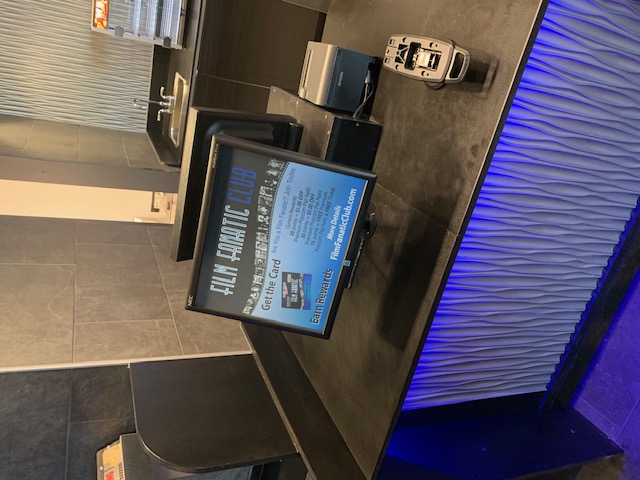
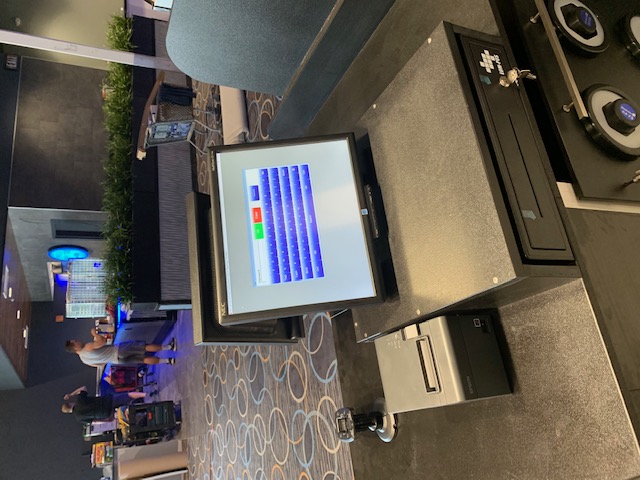
Justin, I was curious as I have a register build that we use at our locations now. We have RTS and use reserved seating. We have to have double sided monitor set ups so people can pick their seats.

I am not a fan of any "all-in-one" register set ups as if there ends up being a problem, you have the entire unit down. I use components: small form factor computer underneath, separate printer, credit card reader, etc.

Here are a couple of pictures (although I think they loaded sideways):

 -

 -


Powered by Infopop Corporation
UBB.classicTM 6.3.1.2