This is topic Calls for open captions at movies after Saskatoon man's experience in forum Ground Level at Film-Tech Forum ARCHIVE.
To visit this topic, use this URL:
https://ft-forum.com/ft/cgi-bin/ubb/ultimatebb.cgi?ubb=get_topic;f=5;t=003171
Posted by Frank Cox (Member # 6258) on 03-24-2019, 05:50 PM:
Calls for open captions at movies after Saskatoon man's experience
quote:
A Saskatoon man is hoping for change after a movie experience was less than thrilling.
Adam Pottle is a deaf playwright in Saskatoon. On Friday, March 24 he went to see the horror movie "Us" at the Saskatoon Cineplex.
"I'm a huge horror fan," Pottle said.
Pottle said the film was advertised as closed captioned so he asked for a CaptiView machine for captioning.
"It's a strange-looking contraption with a base that sits in the drink holder and a small screen with green letters that sits at the end of a bendy arm."
When the previews started, no captions appeared on the screen. Pottle said that can be typical and often the captions don't start until the film does.
"Then "Us" started. No captions. I waited. No captions showed. I pushed the buttons on the machine to try and catch a signal. Still no captions," Pottle said.
Pottle said he thought about leaving to complain but didn't want to miss more, as he had been waiting for months to see the film. After the movie ended, Pottle said he spoke to the manager who told him captions must not have been available.
He was offered a free pass but said if the captioning is not working, then a free pass is useless, and left.
"I left the theatre livid. I'd been robbed of experiencing a film that by all accounts is a modern horror masterpiece," he said. "And I wanted to enjoy their work on equal ground as my hearing peers."
Cineplex Theatres said in an emailed statement they were 'disappointed to hear about' Pottle's experience.
"I was also able to circle back with the local management team and they are currently investigating the situation," Cineplex spokesperson Sarah Van Lange said.
Van Lange said Adam Pottle may have been given a faulty unit. She said Cineplex tests their units nation-wide on Fridays but with technology there can be glitches from time to time.
"Both closed captioning and described video are available for the movie "Us", so the manager who Mr. Pottle spoke with after the film yesterday was incorrect as closed captioning is available for the film," she said.
Cineplex takes these concerns very seriously, she said, and offered her apologies.
"We clearly fell short," she said.
Adam Pottle is calling for open captions at the theatre for both deaf and hard of hearing people, as well as members of the public where English is a second language or they have trouble keeping up with the words. (Cineplex)
This isn't the first time something like this has happened, Pottle said, and it hasn't happened just to him.
"Thousands of deaf people across Canada and millions around the world experience this same thing," Pottle said.
Pottle suggests theatres offer open captions, meaning captions would appear on the projection screen with the film. For Pottle, open captions would mean "everything."
"It'd mean that I'm being taken seriously as a patron and as a human being. It'd mean that the theatre actually wants deaf people there," he said.
"Deaf and disabled people are one of the largest untapped cultural markets on the planet, and the first theatres to truly recognize that will be rolling in the dough," he said.
Pottle said change doesn't really happen until hearing and able people support those who are deaf or hard of hearing. If filmmakers and actors demanded changed and people stopped going to theatres, change would happen fast, he said.
"That hasn't happened yet, and that's because of apathy, of people saying 'It's not my problem,'" he said.
"But that's wrong. Captioning helps everyone, not just deaf people. As I've discovered since sending out that Twitter thread, many hearing people love captions," Pottle said.
It can help people watching fast-paced films, those who are learning English and when actors mumble, Pottle said.
"I'm hopeful about deaf and disabled people's resolve to push for change. I'm skeptical about hearing and able people's ability to support our efforts. But I've been proven wrong before."
Hmmm...
quote:
Pottle said he thought about leaving to complain but didn't want to miss more, as he had been waiting for months to see the film.
If you can't hear the soundtrack and the captions are not working, then what is there to miss? Go out to complain and get a different caption gadget and then either go back in or wait for the next show.
Or just sit through the whole thing and complain to CBC afterward, I suppose... ![[Confused]](confused.gif)
Posted by Carsten Kurz (Member # 5396) on 03-24-2019, 07:24 PM:
Open captions can also fail. If you need/want them, you need to get up to complain. Hardly anyone would sit through a movie without image or sound. He could have gotten a free pass, and watch the movie again with the issue fixed.
With the ADA regulations in place, things will probably become much better for HI/VI-N issues. But it may take some time until staff is educated.
- Carsten
Posted by Mike Blakesley (Member # 26) on 03-24-2019, 08:52 PM:
Sometimes I kind of enjoy watching a movie on TV with captions, especially if I'm watching in bed and my wife is asleep. But it really grinds my gears when the captions offer a "shortened version" of what's said onscreen. People can read really fast....put all the damn words up there!
Posted by Scott Norwood (Member # 30) on 03-24-2019, 09:16 PM:
I am sympathetic to the needs of the deaf. If the theatre were supposed to have a caption device and the movie were captioned, it should have worked. The theatre clearly owes the man some passes and an apology.
That said, the day that theatres start showing captions for every movie is the day that I stop going to movie theatres. That would be truly annoying, and a good reason for many people to stay home.
edit: grammar
[ 03-25-2019, 11:20 AM: Message edited by: Scott Norwood ]
Posted by Jim Cassedy (Member # 4115) on 03-25-2019, 11:00 AM:
On a semi-related topic:
Last week a client who is booking a film at one of the screening rooms
I work at wanted to know if the projector (35mm) "could do subtitles" ![[Roll Eyes]](rolleyes.gif)
Posted by Scott Jentsch (Member # 1681) on 03-25-2019, 04:14 PM:
This could have been solved quickly if the display had shown something during the previews.
Is it possible for text to be sent to the caption devices that would test the proper operation of getting the captions to the devices? Maybe a short clip that would be put in the playlist for captioned shows that would send a message to the devices while a message on the screen says "Open Caption System Test - Please check your devices for a welcome message now"
On the displays, something simple could be shown, like "Thank you for visiting our theater. Open captions will appear here when the movie begins."
When the staff is handing out the devices, they could tell the recipient to look for the welcome text during the previews, and if there is any problem, please come out to the lobby and we will make it right before the movie begins.
Posted by Leo Enticknap (Member # 534) on 03-25-2019, 04:52 PM:
quote: Scott Jentsch
This could have been solved quickly if the display had shown something during the previews.
Whenever I install a Captiview dongle on a Doremi or Dolby IMS, I always populate the two default message fields with "This reader is working correctly, but the movie now playing has no closed captions," (which will appear during the playback of a CPL that has no CCAPs), and "This movie has closed captions, but none are currently being displayed" (after 60 seconds of a blank screen during a CPL that does have CCAPs).
I don't know if it is possible to configure an Accesslink setup (the intermediary box used with Captiview if the server is not a Doremi or Dolby IMS) to do this - it probably is by uploading a configuration file into it, but I've never had the time to figure it out.
In this case, the manager "...who told him captions must not have been available" is deeply unimpressive, if that claim is complete and correct. A quick glance at the TMS should have told him or her whether the DCP being played was CCAP-ed or not, and if it was, that the Captiview system needed to be troubleshot.
However, I can't agree that OCAPs are a good idea, apart from possibly on one or two weekday matinees. For a main evening or weekend shows, OCAPs would attract ten walkouts and/or complaints for every one satisfied customer.
Posted by Scott Jentsch (Member # 1681) on 03-25-2019, 05:14 PM:
That sounds like a good way to do it, Leo.
I realized that I accidentally interchanged the terms "open caption" with "closed caption" when I shouldn't have. My intent was to say "Closed Caption" in my previous message.
The only experience I have with one of these devices was when I was trying to help an elderly lady get hers working when I went to a movie and saw that she was having difficulty.
I wonder how many people know how to insert the messages that you are referring to?
Posted by Leo Enticknap (Member # 534) on 03-25-2019, 05:33 PM:
It's not hard. This is the window that is used to configure a Captiview dongle that is connected directly to a Doremi rack server or a Dolby IMS:
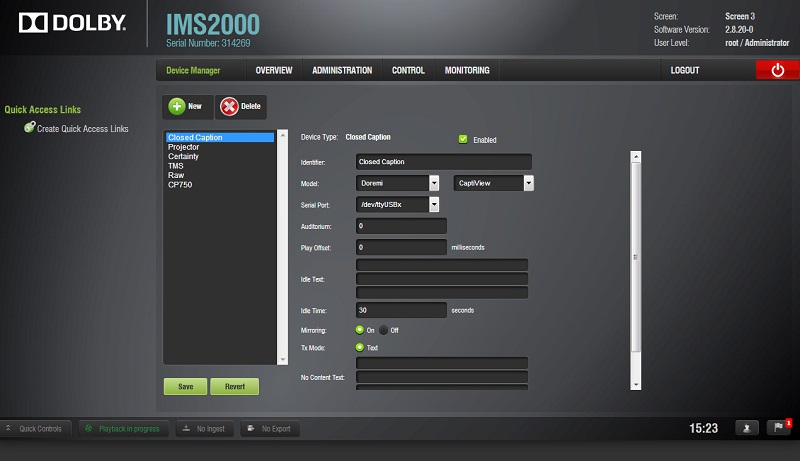
"Idle text" is what appears when a DCP has closed captions but during the time that the screen is intentionally left blank. I set the timeout to 60 seconds before the message appears (unless instructed otherwise by the customer), to reduce the annoyance factor. "No content text" is what appears on the reader if a DCP is playing that does not have any CCAPs at all, period.
Posted by Justin Hamaker (Member # 2165) on 03-25-2019, 11:43 PM:
One of the issues is content providers not providing closed captioning for trailers and policy trailers. Even our pre-show advertising should include captions.
Posted by Harold Hallikainen (Member # 5405) on 03-25-2019, 11:58 PM:
Is your preshow advertising on DCP? Cinema closed captioning systems rely on SMPTE standards for cinema and do not accept captions from other sources (streaming, DVD, Blu Ray, etc.).
Harold
Posted by Carsten Kurz (Member # 5396) on 03-26-2019, 06:16 AM:
It's easy now to create (or pimp your existing) preshow, announcement, policy, etc. slides with ClosedCaptions using DCP-o-matic (2.13.x). Also very easy to create a dedicated piece of test content so staff or patrons can test the displays.
- Carsten
Posted by Leo Enticknap (Member # 534) on 03-26-2019, 10:29 AM:
I don't know about the USL system, or Captiview used via an Accesslink box with a non-Dolremi server, but the whole point of the "No content text" field in the native Captiview setup is to provide the customer with immediate confirmation that the reader is working correctly when an uncaptioned DCP is playing.
Hopefully this can be done with the other systems, because using this feature prevents a situation whereby a customer complains, and the theater staff do not know whether they're dealing with a technical problem or a DCP that doesn't have captions.
Posted by Harold Hallikainen (Member # 5405) on 03-26-2019, 01:49 PM:
The QSC/USL system puts up a "welcome message" when content is not playing. If, however, content is playing but has no captions, the display is blank. I'm working on a firmware update right now and can look at adding a message if there is no caption for some amount of time. SMPTE ST 430-10 allows there to be an RPL (Resource Presentation List) per show or per composition. Different systems do this differently. Further, there is a difference as to when the RPL URL is transmitted. Some do it immediately before the start of the composition. Others do it when the show is loaded. If the RPL URL (or URLs if per composition) is sent when the show is loaded, the captioning system can determine the first caption even if it is not in the first composition. If the RPL URL is sent immediately before the start of a composition, the system cannot determine when the next caption will run if the current composition does not have one. I am currently working on a pretty major firmware update and can look at putting up something if the next caption is more than a minute away or there is no next caption in the system.
Harold
Posted by Leo Enticknap (Member # 534) on 03-26-2019, 02:44 PM:
Does the welcome message display regardless of whether the reader has a good connection to the transmitter or not? Ideally, it should only display if the reader is in error-free communication with the transmitter, so as to give the user confirmation that the equipment is working as it should.
A "content is playing but has no captions" message would be a big help: if a customer enters the auditorium while Screenvision or other uncaptioned content is playing, they might never see the welcome message that appears when nothing is playing (depending on how that model of DCP server handles HDMI input). If they walk in with their reader and its screen stays blank for more than a minute or two, this might lead them to suspect that something is wrong with the reader.
Posted by Harold Hallikainen (Member # 5405) on 03-26-2019, 05:56 PM:
The QSC/USL system is IR linked and uses one way communications. A red LED in the lower right corner of the display lights and dummy captions run if no IR data is received (typically because the receiver is not in the auditorium). When IR data is being received, the welcome message (programmed into the IR transmitter) is displayed unless content is playing (indicated by a SetOutputMode request in the SMPTE 430-10 protocol). If content is playing, either the current caption is displayed or the display is blank (typically between captions). Captions are transmitted repeatedly from the TimeOut of the previous caption to the TimeOut of the current caption. A CRC in each transmission ensures errors are rejected. The repeated transmission allows recovery from received errors. Packets are transmitted with the current timeline information (PlayoutID, current position and rate), and each of four languages. The receiver has its own timeline clock that is synchronized with the received timeline info. The buffered caption is displayed and taken down based on the local timeline clock and the TimeIn and TimeOut of the caption.
Based on the discussion in this thread, I'm thinking of adding code to the receiver that puts up a message telling how many minutes until the next caption when SetOutputMode is enabled.
In general, stuff can go wrong! I suggest theater staff walk all the auditoriums on the first showing of a movie to ensure HI, VI, and closed captions are working. A once a week check should be good, and many times problems are due to new content. When an issue occurs, I work with the theater, server supplier, and content supplier to resolve the issue. It's better for theater to staff to discover a problem before a customer does.
The desire for open captions is nothing new. It was mentioned by several people in the comments to the NPRM that established the current rules. A summary of all the comments with links to the comments is available at http://hallikainen.org/org/DojNprm/ .
A summary of the current US rules on HI/VI/CC is available at http://ftp.uslinc.com/MultiProduct/Accessibility/q_wp_cin_accessibilityrequirement_171129.pdf .
Harold
Posted by Buck Wilson (Member # 5885) on 04-09-2019, 11:58 PM:
To those assigning some fault to the guest: I can understand the frustration that a customer may sit through an issue(any issue, really, not just captions) and complain after the fact, but do know it's not the customer's job to be your equipment tester/guinea pig/quality control. They paid to watch a movie, period. Of course, accidents happen, equipment and technology isn't perfect, but it's up to the employees/management/owner to know what's going on.
Powered by Infopop Corporation
UBB.classicTM
6.3.1.2