This is topic Kodak Stuff in forum Film-Yak at Film-Tech Forum ARCHIVE.
To visit this topic, use this URL:
https://ft-forum.com/ft/cgi-bin/ubb/ultimatebb.cgi?ubb=get_topic;f=8;t=000329
Posted by Joe Redifer (Member # 3) on 06-13-2001, 02:28 AM:
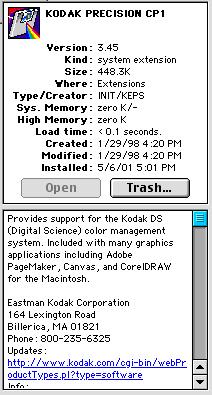
John or Mark-What are these Kodak files doing in the extensions folder that is inside my system folder? The files are:
KODAK PRECISION CP1
KODAK PRECISION ProfileAPI
Since they say Kodak on them, I'd figure you'd be able to answer this with extreme ease. I don't have a scanner, nor did my digital camera require any software to be installed. Are these for PhotoCD access? Or maybe files so Kodak can spy on me?  Somehow I feel as if perhaps I asked this before. If I did, I apologize for my idiocy. Well, I should apologize for that anyway as it is.
Should I also have any FUJIFILM extensions?
Posted by Christopher Duvall (Member # 284) on 06-13-2001, 04:38 AM:
Some art programs such as Paint Shop Pro dump similar files on your drive just in case you hook a Kodak digital camera. I have a ton of Kodak files because of my scanner, camera and various art and photo editing software.------------------
Chris Duvall
General Manager
Regal Cinemas Colonnade14
Las Vegas, NV
Posted by Randy Stankey (Member # 64) on 06-13-2001, 08:26 PM:
They are an adjunct to the color-sync system, aren't they?PhotoShop uses some of those routines as well as some scanner, printer and cameras.
Just use CC and make a link for them so you can turn them on or off at will.
Posted by Joe Redifer (Member # 3) on 06-13-2001, 09:50 PM:
Conflict Catcher sucks. It causes more problems than it's worth. I just use the extension manager to select certain extensions.
Posted by John Pytlak (Member # 331) on 06-21-2001, 01:55 PM:
Joe --- software and digital imaging utilities are totally separate areas of Kodak from where I work, but I would guess that Randy has it right. Even if you do not have any Kodak hardware installed, Kodak has partnered with quite a few digital imaging companies, who may be using our software:
http://www.kodak.com/US/en/nav/digital.shtml
http://www.kodak.com/US/en/developers/index.jhtml ------------------
John P. Pytlak, Senior Technical Specialist
Worldwide Technical Services, Entertainment Imaging
Eastman Kodak Company
Research Labs, Building 69, Room 7419
Rochester, New York, 14650-1922 USA
Tel: 716-477-5325 Cell: 716-781-4036 Fax: 716-722-7243
E-Mail: john.pytlak@kodak.com
Web site: http://www.kodak.com/go/motion
Posted by Randy Stankey (Member # 64) on 06-21-2001, 03:24 PM:
Joe:
You keep saying that about Conflict Catcher. I have no problems with it.
I do agree with you that the conflict debugger is rather lame but I don't use that part. I just start from a known-to-be-good exension set and do a binary sort until I find it. It has never taken me more than 5 or 6 restarts to find the problem that way. If I use some good deductive reasoning, I can usually find the problem in less than that.The main reason I use it is because of the incompatibilities between Toast and Disk Burner. I have an extension set for each of them. Each one has its own command key. If I want to switch Toast on I hit CMD-T at restart. If I want Disk Burner it's CMD-N. I have a sound play whenever I activate the Toast set so I know which one is active. I suppose I could buy Toast 5 Titanium and I wouldn't have to do that but I already have CC and T5T costs $$$.
The other feature I like about CC is that it allows you to link extensions together. Using Toast as an example, DB has three extensions. I can make it so that all of them will turn on (or off) together if I change one of the others. Then I can name the links to make "mini estension sets". Each time I load a new piece of software that needs an extension I make a link for it. I have a link for the printer, the CD-RW, the scanner, etc. If I think my scanner software is interfering with the CD-RW, for instance, I can just click on the links. I don't have to go through and remember which extensions are for what purpose.
But, HEY! This is a free country, right? 
Posted by Joe Redifer (Member # 3) on 06-21-2001, 03:30 PM:
The last time I tried Conflict Catcher it kept wanting to resart and reboot the computer just so it could see what is going on. I don't have time for that! Anyway, I am always easily able to detect extension incompatibilities quickly. Except in the case of Toast 5.0.1. It won't let me copy certain types of CDs that it used to. But I think I should just reinstall the program from scratch, because it does this on my other hard drive as well with a different extension set.
Posted by Randy Stankey (Member # 64) on 06-21-2001, 03:32 PM:
Oh, and while I'm at it, here's one more feature that CC provides:
Posted by Joe Redifer (Member # 3) on 06-21-2001, 05:06 PM:
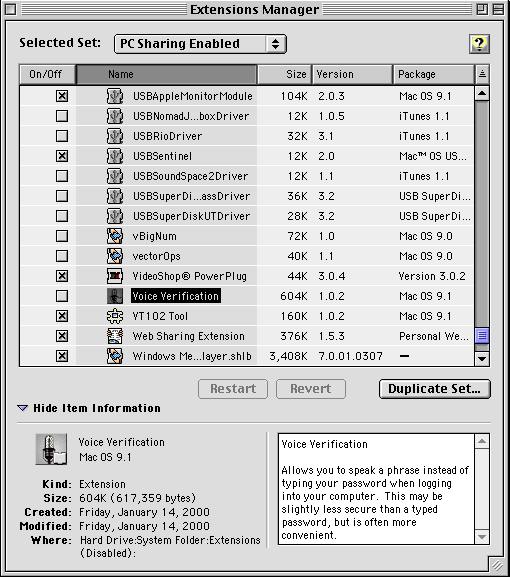
Ew. You have both of the scroll arrows next to eachother The extension manager does the same exact thing.
Posted by Randy Stankey (Member # 64) on 06-21-2001, 06:37 PM:
Yes, but it doesn't tell you how much memory an extension takes up, nor does it tell you how much time it takes to load. You can't tell extensions to load up in a certain order unless you rename them with a ~ or a • or a ƒ. The descriptions that the old EM gives sometimes range from brief and cryptic to non existant.And... You LIKE moving the mouse all over hell just to scroll a window? (Assuming that you still even USE a mouse!)
BTW: Knock out some of those iTunes drivers! You don't use them unless you have a MP3 player and they just take up space!
Posted by Joe Redifer (Member # 3) on 06-21-2001, 06:40 PM:
I have always liked my scroll arrows where they belong. Besides, I use a two button wheel mouse anyway, so I rarely use the arrows as it is
Posted by Randy Stankey (Member # 64) on 06-21-2001, 06:43 PM:
EEEEEeeeeewwww! Two buttons! YUCK!!!!!!I use a ZERO button mouse! (Wacom Tablet)
Posted by Scott Norwood (Member # 30) on 06-21-2001, 07:31 PM:
What about those of us who use 3-button mice?
(Am I the only one who really hates "wheel" mice? I'm fairly certain that I am.)
Posted by Randy Stankey (Member # 64) on 06-21-2001, 09:49 PM:
Just for the sake of discussion, I hope you understand...What can you do with a 2 or 3 button that can't be done with a 1 button? With just my one button I have the equivalent of about 40 of your buttons.
The Wacom Tablet also comes with a cordless mouse. It has two buttons and a scroll wheel. I like the scroll wheel but I have both buttons programmed for the same function... CLICK. There is a button on the pen as well. I have it programmed for CMD-Z (undo) I don't know. I just never liked the idea of a multi-button mouse. It never made any sense to me.
I also have a Logigech Marble Mouse. If you want to have a scroll wheel, that's the way to go! It's all in one motion. Move... click... scroll... unclick. Completely natuarl and transparent, once you get used to it. (And it doesn't take long to get used to it, either.)
Posted by Joe Redifer (Member # 3) on 06-22-2001, 12:35 AM:
A two button mouse calls up the contextual menus, just like in Windows (a PC feature I actually like). On the Mac, you either have to press and hold the CONTROL button as you click the single button mouse to get the menu or press and hold that button down for a second or two before the menu appears (and that doesn't even work in all programs). Those menus have enhanced just about every program I work in, especially PhotoShop. It makes using the computer go much faster and smoother.Scott, you don't need a wheel mouse since you do everything with the keyboard anyway! That'd be like having a mouse in DOS. With your keyboard skills, a mouse would probably be SLOWER!
Posted by Randy Stankey (Member # 64) on 06-22-2001, 01:12 AM:
I have always used my left hand to press the modifier keys. I don't even notice that I'm doing it sometimes. CMD-Z, X, C and V are naturals. I have the button on the pen tablet set to CMD-Z and I forget to use it half of the time.The key commands of PhotoShop are also getting to be naturals for me. W, E, V, K, etc are starting to get so burned in to my memory that I have to stop and think whether I pressed them or not.
The thing I like the most is that I don't even have to use the mouse for a lot of things. If I want to check my e-mail all I have to do is type "M-A-I CMD-O CMD-M". Yes, I know I could make an AppleScript to do that and set one of the F-Keys to execute it but then I would have to take my hands out of position to use it.
I know I'm set in my ways.... Free country... Right?
Posted by Joe Redifer (Member # 3) on 06-22-2001, 02:55 AM:
Why not just turn on speakable items and say "Get my damn mail!" or "Upload that virus to the server!" or "Crash, so I have to reboot!"
Posted by Randy Stankey (Member # 64) on 06-22-2001, 03:41 AM:
Yeah, but then every time I fart or belch Victoria comes back and says, "Knock! Knock!" Otherwise, I have to set the control panel to listen only when the the proper key is pressed. That just makes me move my hands out of postion again.(I'm a lazy bastard, ain't I?)
Posted by Tao Yue (Member # 836) on 06-22-2001, 08:52 AM:
Hey Scott -- glad to know that there's another 3-button person around. But of course, that's because you use UN*X.3-button mice are pretty much essential for UN*X systems because of the way X handles copy-and-paste (middle button is paste). They also make it more convenient to open links in Netscape in a separate window (again, the middle-button). On some of the newer computers at MIT, Microsoft wheel mouse are used, which is a major pain because the wheel has to be used as a middle button. It works, but doesn't feel as natural as a real button.
--
Tao Yue
MIT '04: Course VI-2, Electrical Engineering and Computer Science
Projectionist, MIT Lecture Series Committee
Posted by Scott Norwood (Member # 30) on 06-23-2001, 12:34 PM:
I strongly prefer 3-button mice even on NT. After all, it's pretty much a necessity in order to get decent minesweeper scores...
Posted by Bobby Henderson (Member # 840) on 06-23-2001, 03:11 PM:
I like my Logitech optical mouse. No more digging out the ball and cleaning caked up mouse pad lint on those wheels. This one has a scroll wheel that I hardly ever use (except for occaisional weapons changes in QuakeII or QIIIA). The optical sensor is so much more accurate, which comes in handy when you want to mercilessly slaughter your opponents in a good deathmatch.For artwork the mouse is okay, but it still a brick on a string. My Wacom tablet gets far more use in that regard.
Posted by William Hooper (Member # 71) on 06-25-2001, 05:57 AM:
{Beginning to suspect that Scott's mousepad is covered with a fine network of tiny blue lines)