This is topic Film-Tech web setup in forum Film-Yak at Film-Tech Forum ARCHIVE.
To visit this topic, use this URL:
https://ft-forum.com/ft/cgi-bin/ubb/ultimatebb.cgi?ubb=get_topic;f=8;t=000657
Posted by Peter Berrett (Member # 672) on 01-30-2002, 05:52 AM:
Hi allI have been having problems when I visit Film-Tech lately. The black bar and links (forum, film cleaning etc) show up as a vertical bar on the right hand side of my screen. It makes navigation difficult.
Is it just me or are others having problems also? I am using Internet Exploder version 6.0
Thanks
Peter
Posted by Dave Bird (Member # 490) on 01-30-2002, 08:11 AM:
Well, mine's on the left, but I'm up here top side in Canada. It's obviously, polar-sensitive OR the fact that you folks drive on the wrong side??!! 
Posted by Dick Vaughan (Member # 540) on 01-30-2002, 08:23 AM:
Well DaveHere in the UK (Northern Hemisphere,drive on the correct<left>side of the road,decent beer )my vertical bar is on the left.
Another theory down the drain 
Posted by John Pytlak (Member # 331) on 01-30-2002, 08:33 AM:
Maybe it's due to the Coriolis Force, where things go in the opposite direction in the Southern Hemisphere? ------------------
John P. Pytlak, Senior Technical Specialist
Worldwide Technical Services, Entertainment Imaging
Research Labs, Building 69, Room 7525A
Rochester, New York, 14650-1922 USA
Tel: 716-477-5325 Cell: 716-781-4036 Fax: 716-722-7243
E-Mail: john.pytlak@kodak.com
Web site: http://www.kodak.com/go/motion
Posted by Brad Miller (Member # 2) on 01-30-2002, 09:05 AM:
Do not use version 6.0 of any browser. These are beta and all have known bugs. The trouble is being caused by your browser.
Posted by Brad Haven (Member # 954) on 01-30-2002, 11:11 AM:
i am using i e 6.0 and have had no problem's, yet!
my navigation bar is on the left.
brad, thank's for the tip on 6.0.
Posted by Brian Hogan (Member # 940) on 01-30-2002, 01:29 PM:
i believe the nav bar is vertical because brad intended it to be that way. 6.0 or not... its just the way it is.
Posted by Bernard Tonks (Member # 809) on 01-30-2002, 03:06 PM:
I have never had any problems with Internet Explorer 6.0. Have you downloaded the latest patches from Microsoft? I have installed BIGFIX www.bigfix.com (free) which prompts you of the latest patches available and explaining them. You can then download through Bigfix.
Posted by John Schulien (Member # 215) on 01-30-2002, 03:31 PM:
I'm using Netscape 4.76 on Linux and I'm having the same problem. The menubar is showing up on the left-hand side, with a chatroom window under it.
Posted by John Pytlak (Member # 331) on 01-30-2002, 03:38 PM:
John S. said: "The menubar is showing up on the left-hand side, with a chatroom window under it."AFAIK, that's the way it is supposed to be! Peter Berrett originally reported it was on the right side on his monitor, which was different than most people were getting.
AFAIC, it's just a matter of getting used to the new arrangement. Slide the margin bar between the menu and Film-Tech Screen to the left until you just start to hide the words on the menu bar, giving you the largest area for the Film-Tech screen.
It's nice to immediately see if someone is waiting for an impromptu chat.
------------------
John P. Pytlak, Senior Technical Specialist
Worldwide Technical Services, Entertainment Imaging
Research Labs, Building 69, Room 7525A
Rochester, New York, 14650-1922 USA
Tel: 716-477-5325 Cell: 716-781-4036 Fax: 716-722-7243
E-Mail: john.pytlak@kodak.com
Web site: http://www.kodak.com/go/motion
Posted by Ken Lackner (Member # 1002) on 01-30-2002, 03:54 PM:
Hows about putting the links on the bottom, where they were, with the chatroom status on the side, where it is, whith an option to close the chatroom pane? I don't use the chatroom anyway, so for me it's just a waste of space. For those of you who use it, you don't have to close it. I think it would be great to have that option.------------------
This one time, at Projection Camp, I stuck a xenon bulb....
Posted by Dave Macaulay (Member # 813) on 01-30-2002, 04:06 PM:
The menu frame is on the left for me with IE6, and also with Opera 6.0 which is the best browser in the known universe. I can't understand how or why it could move to the right.
The one thing I really really like about the recent changes to the site is that Opera is now useable here. It used to give me the "no bookmarking!!!!!" window if I wanted to see any page except the front page, and I needed to use IE if I wanted to come here.
Now I don't need to use IE for anything!
Thanks, Brad!
Posted by Phil Hill (Member # 371) on 01-30-2002, 04:47 PM:
Oh NO!!!! Do NOT put the links at the bottom or change anything! The new format rocks and is woking 100% on my IE6 dialup and DSL!
Congrats again to Brad and Joe!Those having problems may want to log on to the base site page and re-bookmark.
>>> Phil
Posted by Rachel Gilardi (Member # 4594) on 01-30-2002, 05:02 PM:
I like the new set-up (mostly the new chat room feature) its just going to have to take some getting used to! ------------------
"I'd like mornings better if they started later." -Garfield the Cat & Jim Davis
Posted by David Stambaugh (Member # 1102) on 01-30-2002, 05:33 PM:
I've been using IE6 for a while now and to the best of my knowledge I haven't had a single problem with it. Film-Tech works fine with IE6. I like the new setup too.
Posted by Aaron Sisemore (Member # 145) on 01-30-2002, 07:00 PM:
I would prefer the original style links on the bottom and maybe a Java pop-up window (that can be minimized) for the chatroom status?-Aaron
Posted by Mike Blakesley (Member # 26) on 01-30-2002, 07:13 PM:
As long as we're all nitpicking here...I wish there was a way to turn off the chatroom feature so it doesn't update every few seconds. It slows my connection down (I live in the boonies) and it's annoying. There's already a link there to update who's "in" so it doesn't need to be automatic, does it?The layout itself is cool, I think. The chatroom is cool too...I got in on "day 1" for a few minutes.
Posted by Gerard S. Cohen (Member # 994) on 01-30-2002, 08:21 PM:
Although Film-tech works fine with my Windows ME and MSN,
while reading the thread "Opera 6 Kicks A$$" one day there was a series of loud thunderclaps. With each boom a MSN icon disappeared from the frame (skin) on my monitor screen. Then Film -tech and MSN
froze. Shutting down I got the message "This program [MSN] has performed an illegal action and will be shut down." Same thing
happened with a newer "Opera 6..." thread. Today my email contained
a message announcing a reply to the Opera 6 thread, but when I went to delete it, The booming, deleting icons and lockup occured again.
This is a pain, since I would like to follow the thread and possibly install Opera 6.0, if the comments of Film-techers are favorable.Has anyone else experienced this? My VShield and Viruscan detect nothing. I've just disabled my PopUpKiller, which is the only program
I have that can generate a "boom", (when it detects and kills a popup),but that hasn't worked in many months, even when activated.
Posted by Gordon McLeod (Member # 33) on 01-30-2002, 08:42 PM:
My only complaint with opera6 and the new layout is the menu is to tightly spaced making selection difficult
It almost needs to be double spaced
especially on a laptop
Posted by Dave Macaulay (Member # 813) on 01-30-2002, 08:55 PM:
I didn't know anyone actually used MSN Explorer!From what I've heard this is a bastardized IE5 that "simplifies" internet use much like the AOL browser.
If you don't need the "simplification" you should just get rid of it and use the unabridged IE, Netscape, or O*era (I don't want to blow up your system again so I won't spell it out).
Unfortunately it may emulate AOL and be near impossible to remove...
O*era has some great features (for example the mouse gesture control is sweet and the tabbed windows layout is addictive) and some annoying peculiarities, but once I got used to it I don't use IE unless unavoidable (Film-Tech.com was unuseable in O*era until recently). I stopped trying Netscape a long time ago, it was slow and unstable - it might be great now but I'm off it in much the same zealous way Brad loves it...
Try O*era for free, you get some ads but can decide if you like it. Registering it and thus removing the ads is pretty cheap ($US39).
And I agree the auto-refresh is annoying. Can the script be modified so it only refreshes if there is a change to the chatroom list rather than on a timer?
At least O*era doesn't "click" when refreshing.
Posted by Brad Miller (Member # 2) on 01-30-2002, 09:33 PM:
Some of the complaints and suggestions here are possible, but many are not for a variety of reasons. I did not start a thread asking for opinions and troubleshooting yet because quite simply I am not finished. Having a way to see if anyone is in the chat room has always been the #1 request of members. Actually pulling that request off is requiring a lot more than I bargained for when I started hacking things. Things like this take time, and that is something I have not had much to spare of in the last couple of days. It was either shut down the site for awhile until I finished upgrading it, or keep it online and have some glitches. I chose to keep it online.Since the change of the design, quite a few problems have turned up that I have seen but have not even been addressed yet. Some of the members have already reported verified problems with the new design. The idea here is obviously to keep the site accessible by as many browsers and platforms as possible, but there does come a point as to what can be done and how much time I have to spend on trying to make every person's system in the world able to navigate the site. I am by no means finished, but I can tell you that Netscape will always work if you come to the site one day and cannot navigate because I am changing things. I design in Netscape and only once finished do I bother to check other browsers for compatibility.
Technical glitch reports are very much welcome, but please do make sure to tell me what operating system you are using, what browser you are using and what kind of internet connection you have. Without that information any such report is useless, so please keep that in mind.
If anyone has further ideas for improving the site, please feel free to pass them along. However please understand that it is impossible to please everyone and make everybody's system compatible. In the end I will settle with what I feel is the best compromise.
As to the "ticking" noise from the chatroom monitor, that is an Internet Explorer issue. This only occurs once every 60 seconds. The ONLY way to remedy that is to make a correction to YOUR computer, or simply stop using that browser and opt for a better one. It is a simple procedure, but will take some time to put together a quick "how to" page. The chat room monitor will not be removed, so please do not ask. Way too many people requested this, I put way too much effort into making it work, and the chat room has seen an amazing increase in it's use since the implementation of the monitor frame. Most of the time all it takes to get a chat going is for one person to go into the chat room and wait. Usually another member will join in within a few minutes and I've seen the chats run for hours from there as people come and go. If you've never participated in the chat room, do step in, as I believe you will find many of the discussions quite interesting. Also, the chat room monitor should not be slowing down an internet connection any more than someone sending an "Instant Message" or an "ICQ message". The data sent is so minimal that unless the computer is really slow or a dialup connection is absurdy slow, it will not slow anything down. I am sending this post from a 26k AOL dialup and have only seen a split second flash of time that it takes to perform the refresh. If anyone is legitimately seeing a slow down, I need specific information about your setup like I listed above in order to troubleshoot.
Posted by Joe Redifer (Member # 3) on 01-30-2002, 10:11 PM:
I think the chatroom monitor is cool, but of course having the links on the side does look a bit weird at first. I could easily make a pop up window (non-java) that would host just the chatroom monitor while the rest of the site stays as it was, but how many people would that annoy? It would always cover something unless it was minimized. And if it were minimized you couldn't see who was in the chat. Kind of a double-edged sword.The only thig I would change is to increase the spacing between the links on the left to make them more distinguishable and make the chatroom window take up only 40% of the vertical screen instead of the 60% it seems to be taking up now.
Posted by Ken Lackner (Member # 1002) on 01-30-2002, 10:35 PM:
Joe,This is of course just my opinion, but I think the popup window would be the best idea. I defintely like the links on the bottom.
------------------
This one time, at Projection Camp, I stuck a xenon bulb....
Posted by David Stambaugh (Member # 1102) on 01-30-2002, 11:29 PM:
The "click" sound in IE can be easily turned off.On Win2K:
Start
Settings
Control Panel
Sounds and Multimedia
Scroll the list down to "Windows Explorer", then highlight "Start Navigation".
In the "Name:" drop-down menu, select (None).
Click OK.
No more clicking sound.
This should also work for other versions of Windows.
------------------
- dave
Avoid the meadow...
Posted by Brad Miller (Member # 2) on 01-30-2002, 11:37 PM:
Ken listen carefully as I will now quote the Large man..."Popups are evil!
I wholeheartedly agree with him and there will never be popups on the site. You mine as well drop this now because you have stated you dislike the chat room monitor. Fine. But I don't need to hear it a second time, especially right after I state that it will stay.
Now go back to the main page and read that yellow text that you never do. There you will find the solution to rid yourself of the chat monitor screen.
By the way David, thanks for the instructions. I didn't think it would be difficult, but I didn't think it would've been quite so easy.
Posted by David Stambaugh (Member # 1102) on 01-30-2002, 11:45 PM:
I didn't spend $1000 on becoming an MCSE for nothing. Now what is the right mouse button for?
Posted by Steven Gorsky (Member # 603) on 01-31-2002, 12:57 AM:
The right mouse button is for when the left one wears out. Steven Gorsky
Posted by Joe Beres (Member # 678) on 01-31-2002, 09:08 AM:
Brad and Joe,
I love the new set up. I have two wishes to speak of at the moment: The first of which Grodon brought up. Now that I am addicted to Opera, it would be nice to have some space between the menu items on the upper right, and that is a minor thing. The other is that I woould love to see the chat status window reversed, that is white on black, rather than black on white. Is that even possible? I love the design here, and I think that the white window detracts from it a little bit, and that is even more of a minor thing. That being said, you guys, as always, are doing a fantasctic job on the site! keep up the great work!
Posted by Adam Martin (Member # 641) on 01-31-2002, 09:16 AM:
The spacing is fine for IE and Netscape. Opera seems to have a problem handling proper line spacing overall, including squishing regular text blocks. It still has a few issues to work out.
Posted by Joe Redifer (Member # 3) on 01-31-2002, 11:43 AM:
I haven't seen anyone in the chat room for DAYS. I wonder if perhaps the fad has died? I'm not much of a chat/phone/IM person myself.
Posted by Joe Beres (Member # 678) on 01-31-2002, 11:47 AM:
I've seen people in there everyday since the chatroom update. I think it must just be a timing issue.
Posted by Dave Macaulay (Member # 813) on 01-31-2002, 02:58 PM:
Adam: Opera actually shows the screen the way the site HTML code specifies it, IE and Netscape have "non-standard" format tags that are not part of the official HTML language and are ignored by Opera. This is a religious issue with the Opera people, and is somewhat understandable - HTML has become a standard and continually adding "extensions" is what XML is for, not HTML.
Posted by Joe Redifer (Member # 3) on 01-31-2002, 04:45 PM:
I'm sure if another <br> tag was added between each link that there would be space between them in Opera. Try downloading the HTML source (along with the button graphics) and edit it and try it.
Posted by Tim Sherman (Member # 569) on 01-31-2002, 06:14 PM:
I like everything about the new layout of the site and the chatroom is definatly seeing alot more action. The only thing i don't like is the autologoff in the chatroom. maybe if it was set for a longer time period it wouldn't be so bad. ------------------
come on out to the drive-in and spend a night out with the stars"
ME!!
Posted by Adam Martin (Member # 641) on 01-31-2002, 06:14 PM:
This comes back to topic, so hold on here ...What I was talking about is the spacing between lines of text. Here is a side-by-side-by-side comparison of Opera 6, Netscape 4.08 and MSIE 5.5. You can plainly see the differences in how text and tables render.

The graphic for "cinemas around the world" is inside of a table. Opera correctly renders the table with cellspacing, cellpadding and border all = zero, where both NS and IE incorrectly pad the table. After the table, for some reason, Opera has seen fit to insert a gaping hole in the page.
In the text block, you can see by the red lines I drew in that Opera does not use a standard line leading. I bet if I typed lower case "g"s across one line and capital "T"s across the next line, the letters would touch.
Anyway, for the links on Film-Tech to render fairly close across all three platforms, they would need to be placed in a table with each link in its own row (<tr> ) and cellspacing set to 10 or 15. Adding line breaks (<br> ) would only space them out the bottom of the frame for NS and IE.
With that said, I'm off to the chat room ... there's 8 users online.
Posted by Joe Redifer (Member # 3) on 01-31-2002, 06:39 PM:
I LOVE programming HTML tables. They are just plain fun (but only if you do it by hand in a text editor... none of this Frontpage/Composer/Etc CRAP and I do mean CRAP!)
Posted by Mike Blakesley (Member # 26) on 01-31-2002, 07:24 PM:
Okay, I bow to the majority (not to mention the site owner) regarding the chatroom monitor. It is kinda cool I must admit to see who comes and goes all the time.
Posted by Brad Miller (Member # 2) on 01-31-2002, 07:37 PM:
Ok Joe, then why are you sitting on your butt right now? People here are assuming you had something to do with the new site design and are giving you credit. Time to earn that credit! Get to work and email me how you feel the top left frame should be since I won't have the time to mess with it again until the weekend.
Posted by Joe Redifer (Member # 3) on 01-31-2002, 09:59 PM:
I'm too lazy now I'll do it later. Ah hell I'll just e-mail the replacement HTML file with tables.
Posted by Joe Redifer (Member # 3) on 02-01-2002, 01:37 AM:
OK I sent the HTML to Brad. Now the pressure is on him to upload it to da site. After dat evryting will b phiggidy phat!
Posted by Joe Beres (Member # 678) on 02-01-2002, 11:15 AM:
Bravo, Joe. The menu looks great with Opera.
Posted by Joe Redifer (Member # 3) on 02-01-2002, 11:56 AM:
Thanks. That's because both Opera and myself only like WC3 HTML compliant code. Front Page, Dreamweaver, Netscape Composer etc do not create pages in the proper standard. They should be banned!
Posted by Adam Martin (Member # 641) on 02-01-2002, 01:08 PM:
I use good old Notepad. The best HTML editor out there. Have you ever tried to read the output of one of those other "applications"?
Posted by Colin Wiseley (Member # 247) on 02-01-2002, 01:33 PM:
MS Script Debugger is my editor of choice. It's basically just a glorified version of Notepad, but at least it color codes the HTML to make reading it a little easier. It also doesn't put in all of the garbage code that most of the other editors do.------------------
Colin Wiseley
Lyric Theatre
Blacksburg, VA
www.thelyric.com
Posted by Joe Redifer (Member # 3) on 02-01-2002, 01:44 PM:
Color coding is nice, but I usually use tab indexing to make sure the code looks clean. Notepad is nice, but the only problem I have with it is the semi-ugly font. Can you change fonts in Notepad? Not really super important I guess.I use a Mac and I always write code in BBEdit. I save as DOS text with DOS line breaks, otherwise the code apprears as one single never-ending line to a Windows user.
Posted by Colin Wiseley (Member # 247) on 02-01-2002, 01:47 PM:
You can change the font in the Windows 2000 and XP versions of Notepad. I can't remember if you could do it in 98 or NT. Just go to Format - Font.------------------
Colin Wiseley
Lyric Theatre
Blacksburg, VA
www.thelyric.com
Posted by Adam Martin (Member # 641) on 02-01-2002, 02:24 PM:
In Notepad on Win98, go to Edit > Set Font. For some reason, I prefer coding in fixed-width fonts.
Posted by Joe Beres (Member # 678) on 02-01-2002, 02:42 PM:
Hey Joe, the menu is back to it's old squishy ways again. Might you know why? I have to admit that I use Dreamweaver, and I love it. The few problems I have with are far outweighed by it's benefits. Plus it made for an easy transition from design software like Pagemaker. Plus, I needed to do some web designing, but didn't have time to learn to code. Dreamweaver lets me see the code, so I am learning coding a bit as I go. Dreamweaver actually does put out fairly streamlined HTML. Front Page and the others are much, much worse.
Posted by Joe Redifer (Member # 3) on 02-01-2002, 02:59 PM:
Yeah I know why the menu is back to it's old, crushed ways. It should be fixed when Brad uploads my new file (I'm pretty sure he's busy right now, though). I removed the Javascript code and the meta tags since there were no reasons for either on the menubar frame.Hopefully soon I will have an all-new interface scheme. It will look much nicer, load quicker and all that good shtuff. I am working on it.
Posted by Scott Norwood (Member # 30) on 02-01-2002, 04:35 PM:
My preferred editor is vi. Brad hates it, but I really like it. It's fast, simple, powerful, and runs on just about every computing platform known to man.
http://www.darryl.com/vi.html
Posted by Brad Miller (Member # 2) on 02-01-2002, 04:54 PM:
<mumbles explicatives> VI SUCKS!  <mumbles more explicatives>
And yes I will mess with the front page again this weekend when I have the time to sit down and re-organize things. Patience Luke.
Posted by James R. Hammonds, Jr (Member # 673) on 02-01-2002, 07:13 PM:
Is there a way to make the winodw flash if someone new comes in?
Sometimes im the only person in there and forget to click over for a few minutes and someone else will come in and and leave cause I dont respond.
I should try to remember to click over more often, though.
Posted by Joe Redifer (Member # 3) on 02-01-2002, 07:15 PM:
It should play a sound whenever someone enters. At least it did when I was in there. Haven't been in for a long while, though. So the sound may have been removed.
Posted by Brad Miller (Member # 2) on 02-01-2002, 08:46 PM:
I will look into everything that has been posted on this weekend. If you have something to add that has not been addressed in this thread or the other one (Chat Room Ticking on My Computer), please add it. If you are only having problems that have already been mentioned in these two threads, just be patient please.
Posted by Brad Miller (Member # 2) on 02-02-2002, 04:12 AM:
Ok, as of this point, does everyone's screen look approximately like this? Please do not post here if your answer is "yes". Please only post if your screen does not look approximately like this picture. Remember, each browser and operating system will display the page just a little bit differently, so unless there is a major difference, do not post. 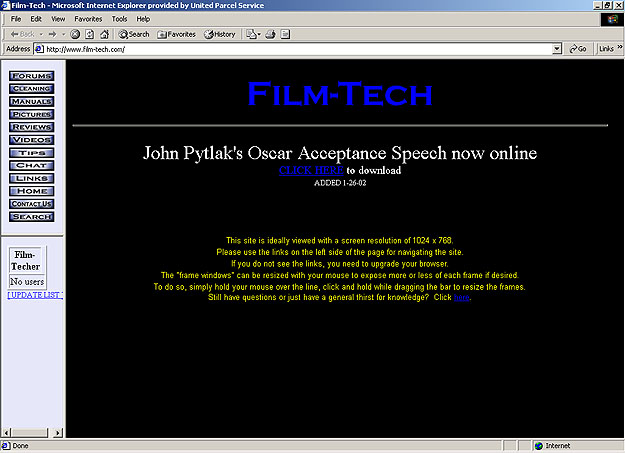
Also, is anyone having technical problems navigating the site as it is now? If so, please post the operating system you are using (Windows/Mac) and what browser you are using (Internet Explorer/Netscape/Opera). Again, if you are not experiencing problems, please do not post.
Posted by Randy Stankey (Member # 64) on 02-02-2002, 03:45 PM:
I'm getting this, using IE 5.1 (Mac):
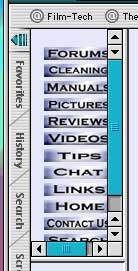
I can move the frames to make them right but when the site auto-reloads they jump back to the way they were.
Other than that, everything seems to be OK.
Posted by Joe Redifer (Member # 3) on 02-02-2002, 04:03 PM:
Randy-On IE 5 press Command-T to get rid of that crappy "Favorites/History/Search/Etc" column on the left. If you need it for any reason just press those same buttons again. There is no reason to have that column on the left side of the browser. it is very annoying. I RARELY use it and turn it back off when I am done.
It should look like this:
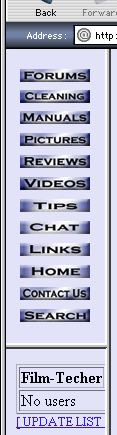
Or maybe you are using one of those iMacs that have a really pissy resolution. It shoud look fine at 800 x 600 or 832 x 624
Posted by Brad Miller (Member # 2) on 02-02-2002, 05:02 PM:
Randy, are you grabbing the actual vertical bar separating the navigational frame and the site, or are you just using the slider bar right where the "search" icon is on your picture above? I've tried this with Netscape and IE and the frame sizes stay put like they should if the user alters them.
Posted by Joe Redifer (Member # 3) on 02-02-2002, 05:32 PM:
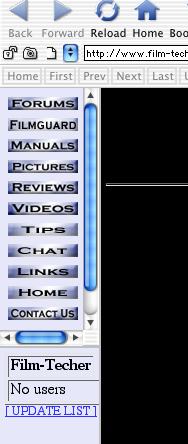
IE seems to be at fault. At least on the Mac, anyway. In both mac OS 9 and Mac OS X IE 5 will resizee the frames to the default setting when the screen refreshes. Why? 'Cause it's a crappy browser, especially at low resolutions. Netscape does not have this problem in any OS.Below is what Opera 5 looks like in Mac OS X. Opera doesn't even let you resize the frames if you want to. Why? Because Opera sucks... at least for the Mac. Actually I don't think the Mac has ANY browsers which you could call "good".
Posted by John Westlund (Member # 913) on 02-02-2002, 05:45 PM:
The site is very slow for me. It looks pretty good though. Im using Windows XP and IE. 6
Posted by Brad Miller (Member # 2) on 02-02-2002, 08:43 PM:
John, are you on a dialup or what kind of connection?
Posted by David Stambaugh (Member # 1102) on 02-02-2002, 09:24 PM:
I'm on dialup. The only thing "slow" I've noticed is the buttons on the vertical nav. bar are slow about appearing during a screen refresh or when I first link to the site. Other than that, which is a very minor issue, everything is working OK. WinME, IE6 (pls don't laugh).
Posted by Randy Stankey (Member # 64) on 02-02-2002, 09:46 PM:
I'm grabbing the thin frames, not the scroll bar sliders.
Doing so makes the scroll bars go away. (Because the image inside the frame doesn't need to be scrolled.) As soon as the page reloads it goes back to the original.I notice that the margin between the buttons and the left side of the frame is larger than the margin between the buttons and the right side. (When you move the frames to the smallest size where the scroll bars go away.) If that left margin was clipped a bit, it might fix the problem.
This in not just an IE problem. iCab does the same thing, only the page stays the same over the course of an auto-update. If you close the page and go back to it, then it resets itself.
Posted by Brad Miller (Member # 2) on 02-02-2002, 09:55 PM:
I find it interesting that users are actually seeing the ENTIRE page reload once a minute. Are you guys certain that the main frame (the one you are reading this in) as well as the navigational frame (the one with the 12 links) are reloading and not just the chat room monitor? There is nothing in the code to auto-refresh the other screens.
Posted by Adam Martin (Member # 641) on 02-02-2002, 10:05 PM:
I'm only seeing the chat frame refresh. No problem with the nav frame changing size once I drag them to size. Win98, MSIE5.5
Posted by Randy Stankey (Member # 64) on 02-02-2002, 10:21 PM:
Aah! The chat frame is auto-updating and THAT's what's causing the whole screen to APPEAR like it's being updated because when the frames move it makes the rest of your frames move over to fill in the space... I get it.Still doesn't explain why the image(s) don't fit inside the frames you gave them in the first place.
Posted by Brad Miller (Member # 2) on 02-02-2002, 10:32 PM:
Did ya notice the first line of text on the main page Randy? "This site is ideally viewed with a screen resolution of 1024 x 768. "
Posted by Adam Martin (Member # 641) on 02-02-2002, 11:14 PM:
Actually, because MSIE renders tables ever so slightly differently from NS, with my screen set to 1024x768, I still have to heighten the nav frame by about 10 pixels to fit everything properly. Not that I'm complaining about it or anything. (editing) Additionally, I just noticed the File/Edit/View toolbar is a little shorter in NS, giving just the perfect amount of room for the nav frame content.
Posted by Bob Healey (Member # 1003) on 02-03-2002, 01:51 AM:
I'm using Netscape 4.78 (Linux) at 1024x768 and have scroll bars on the navigation chat frames too. Doesn't bother me personally, just thought I'd let you know
Posted by Rachel Gilardi (Member # 4594) on 02-03-2002, 02:09 AM:
The site does seem a lot slower than normal lately, not Chipper at all! Dial-up, Windows XP, IE 6.0, I'm assuming this is because of the Chat room update? Anyway, I'd rather have the new changes and wait a bit more than normal.Good job Brad & Joe!
Posted by John Westlund (Member # 913) on 02-03-2002, 03:20 AM:
Brad, Im using a DSL connection.
Posted by Joe Redifer (Member # 3) on 02-03-2002, 03:56 AM:
It is interesting that people are saying that the site is slower. The new "button" JPEGs for the navigation frame take up about 50% of the memory as the original GIF files when they were just blue text on the bottom of the browser. Of course GIF files are naturally bigger than JPG files. Maybe it is the loading of the chat frame since it has to check with another part of the site before it can load?
Posted by John Westlund (Member # 913) on 02-03-2002, 04:46 PM:
Its not just the chat frame that is loading slow for me. The whole site it loading slow. Sometimes the page will come right up and sometimes it takes a long time for it to come up. All other sites I have been to are pretty zippy.
Posted by Gordon McLeod (Member # 33) on 02-03-2002, 05:44 PM:
the only thing I noticed is the menu frame is slow to load therest is very fast
the new menu frame is far better on the latop
Posted by Brad Miller (Member # 2) on 02-03-2002, 06:18 PM:
We'll keep looking into it. Both myself and Joe have been busy lately working on new additions to the site (for the members with pics only), so what spare time we have had has been minimal.Those of you who still haven't sent in your picture, you're about to miss out!
Posted by Randy Stankey (Member # 64) on 02-03-2002, 08:57 PM:
My monitor resolution is 1024X768 (12" LCD screen on this laptop.)Don't forget, unlike the majority of PC users (that I know of), Mac users don't usually work with all their windows expanded to the full size of their desktop. I often keep my mail app and my browser open on the screen at the same time, with the windows slightly offset, so that I can jump between them with a click.
If the left and top margins of that frame weren't as large as they are, it would be easier to work with a smaller window without them scroll bars popping up.
Posted by Joe Redifer (Member # 3) on 02-03-2002, 10:32 PM:
I just switch between apps using Command-TAB. It's quicker that way (for me). I hate using the mouse since it be slower than keyboard shortcuts. Obviously I have to use it sometimes, though.Anyway, the frame sizes are determined by percentage. The index frame may take up 15 percent of the width of your browser. If you size your browser smaller, the width of each frame compensates. That's why you get the scrollbars.
Posted by Randy Stankey (Member # 64) on 02-04-2002, 01:19 AM:
If you have more than 1 app running at the same time, pressing <CMD> <TAB> will cycle through the list. When at home on the modem, I often leave AIMM (an alternate IM client to AIM) running in the background in case somebody calls me and gets a busy signal. If they know me well enough, I tell them my screen name so they can IM me and I'll get the message. Tabbing through applications is a pain in the butt when there are more than a couple of them running.With the laptop, let my thumb hang out near the track pad and slide the cursor to the app I want. I don't even need to take my hands out of "home position". Just slip the cursor off the window and tap. Bing! Eudora is on-screen. Another tap and I'm back to the browser.
The frameset is 10/90 split Horiz. and 47/53 Vert. That's not where the problem occurs for me. It's the margins inside the frames. They won't go below a certain size on top and the left. When the main window gets to the point that the buttons won't move left anymore, the scroll bars pop up... even IF the buttons themselves would fit inside the current frame size.
Posted by Joe Redifer (Member # 3) on 02-04-2002, 02:43 AM:
Unfortunately there's nothing I can do about that. I know what you are talking about and I made sure that there were no borders on the frame or tables, but by default browsers seem to give the graphics a bit of "breathing room". Oh well.
Posted by Randy Stankey (Member # 64) on 02-04-2002, 11:03 AM:
Whatever...I have found a window size, about 3/4 screen, that allows some breathing room around the edges but is large enough that there are no scroll bars. I suppose, if I move things around a bit I can get another configuration that'll work with this huge window.
Posted by Adam Martin (Member # 641) on 02-04-2002, 11:05 AM:
Margin commands can be included in the BODY tag:code:
<body text=#ffffff bgcolor=#000033 leftmargin=1>
I believe the parameters are leftmargin and topmargin. I don't know if there is a rightmargin or bottommargin.
Posted by Colin Wiseley (Member # 247) on 02-04-2002, 12:44 PM:
Netscape doesn't support leftmargin and topmargin so you might have to include marginwidth=0 and marginheight=0 in the body tag. I don't think rightmargin or bottommargin is supported by either browser.------------------
Colin Wiseley
Lyric Theatre
Blacksburg, VA
www.thelyric.com
Posted by Brad Miller (Member # 2) on 02-05-2002, 08:58 AM:
F.Y.I. the people who have sent me emails over the last 72 hours about speed problems with the site, a change has been made which may or may not help your senarios. Please let me know if your setup shows a difference.Do not post about it here. Private emails from the people I have been speaking with recently only please.
Posted by Dave Macaulay (Member # 813) on 02-05-2002, 07:43 PM:
Joe obviously has some mystical power unknown to the rest of us mortals.
Only his picture shows in the forum! All the others are just a text box with "image" in it... (Opera 6)
Posted by Sean M. Grimes (Member # 445) on 02-05-2002, 09:16 PM:
Dave Macaulay,Does that happen also when you refresh the window? I only sometimes had that problem but only in Opera 5.12 not Opera 6.
Posted by Joe Redifer (Member # 3) on 02-06-2002, 03:51 AM:
Problem????? That's not a problem! It means I approve of your browser!
Posted by Christopher Santapaola (Member # 1015) on 02-06-2002, 05:55 PM:
I just want to say that on Windows XP Profesional And IE6.0_XP and a res of 1280x1024 the page is perfect(if not a wee bit small) but at 1024x768 the frames on the left are not quite the right size but that is a small problem perhaps Brad could increass the percentage to 15% or 20% that would be better.I love the Chat room.
As for the problaem with connection speed I would look at the total bandwidth limitations on the site and see if the refreshing chat list is using too much of it.
Great job Brad & Joe!
(Brad gets first billing just like the biger star in a movie.)
------------------
-Life is but a walking shadow, a poor player that walks, and struts its hour upon the stage, and then is heard no more. It is a tale told by an idiot. Full of sound and fury signifying nothing.
Posted by Andy Muirhead (Member # 712) on 02-06-2002, 06:40 PM:
Film-tech runs as fast as it always has for me with the modifications, in fact it's so consistently fast, i use it as a reference when i think i have a bad/slow connection, or have any other internet problems.I have a problem in the opening screen where you can download John Pytlak's speech though: If i click on that link, it asks me to identify myself, which i do, i then get a 'we have verified you, please click on this link' which i do, and then i get sent straight back to the 'verify yourself' page? very confusing.
Have no other problems to report, FYI IEv5, 800x600, dial-up56k, win95 on a p150.
Posted by Brad Miller (Member # 2) on 02-06-2002, 09:13 PM:
Email me directly so we can figure out why you are unable to get into the sneak preview section.