This is topic T1 vs. DSL in forum Film-Yak at Film-Tech Forum ARCHIVE.


To visit this topic, use this URL:
https://ft-forum.com/ft/cgi-bin/ubb/ultimatebb.cgi?ubb=get_topic;f=8;t=000734

Posted by Brad Miller (Member # 2) on 02-26-2002, 02:06 PM:
 
This thread is to continue a wandering discussion from the FHF titled "do you prefer DTS or Dolby ?"
 
Posted by Ian Price (Member # 14) on 02-26-2002, 06:39 PM:
 
Since I can't sample or afford T1, I guess DSL rocks!

We have had DSL for two years here at the Rialto office and we like it very much. We, however, don't download large programs or multimedia files that often. We have also not downloaded an entire feature film yet. Heck my hard drive only is 4 gigs.

I have not heard that the type of Internet connection that Joe Redifer has, is available where I live yet. But it does sound promising.

I have heard that wireless is a bit slower than a hard connection to DSL but Sebastopol (a town 8 miles from me) is experimenting with free wireless web connections. Now that would rock.

I still feel that I wouldn't pay for a fast Internet connection at my home. It is not very expensive for a business but it is still too expensive for individuals. This from a man who has the "Everything" package from Dish Network.


Posted by Joe Redifer (Member # 3) on 02-26-2002, 07:15 PM:
 
I would rather have good internet access than a ton of TV channels. I spend WAY more time on my ass in front of the computer than the time I spend on my ass in front of the TV. Sometimes I will do both at once, but I only watch TV if I don't feel like moving any muscle at all but am not in the mood to sleep.


Posted by Paul G. Thompson (Member # 655) on 02-27-2002, 01:08 AM:
 
You guys are lucky......up here on Whidbey Island, our smellaphone company is still using 1958 technology! I can't even hold a good connection on dial-up!!!!!!

22 miles away, I have my old Pentium II 300hz machine which I put on DSL with the radio station's ISP. Jeeze, it is like comparing a Model "A" Ford with a Rolls-Royce.

Paul


Posted by Pete Naples (Member # 761) on 02-27-2002, 04:42 PM:
 
Could someone please tell me what T1 or DSL is? You guys can actually get that in the US? Living in the UK, I'd always assumed they were a myth!
I read today that BT have slashed the monthly cost of an ADSL connection, BUT they've bumped up the price of installation. They site one reason for ADSL not being available to large parts of the UK as lack of interest from consumers, but at the prices they are asking, is it any wonder we don't all jump at once?
 
Posted by Ian Price (Member # 14) on 02-27-2002, 07:39 PM:
 
Modems run at 56K now but the phone lines mostly let you run at 28K to 44K. (Most people are paying $10 - $24 per month for their ISP)

ISDN runs at 128K (The last place I worked payed $300 per month for ISDN)

DSL runs at 384KB to 1.5MB depending on the level of service you buy. Upload speed is usually lower. PacBell offers 13KB to start. We haven't seen the need for more. We aren't serving the Web from our theatre. (We pay $70 per month for 5 IP addresses. Most people pay $40 per month and then scam the other computers.)

Can anyone tell us what Cable runs at and how much it costs?

T-1 runs 1.5MB full duplex which means it runs at that speed for uploads and downloads. Very handy if you have your own web server like Brad does. (Brad could tell us what this costs but I suspect it is about $1,000 per month.)

I don't know what Satalite is offering or Fiber to the Curb. (Satalite is $40 per month on top of your television package which I pay $60 per month for. Joe can tell us what he pays for Fiber to the Curb.)


Posted by Joe Redifer (Member # 3) on 02-27-2002, 08:36 PM:
 
Cable can vary GREATLY! My friend has AT&T cable modem and he gets about 1 or 2 megabits download and about 15KB upload (3 times faster than a typical modem) at best. But I have heard of other cable modem providers that offer full duplex speeds of a few megabits. Cable modems cost about $45 a month depending on the provider, plus some of them make you "rent" the modem.

My Fiber to da Curb connection is supposed to be 10 Megabits (1.25 megabytes) per second but it goes MUCH faster to some sites. I usually sit behind a router which only has a wimpy 10base connection to the internet. When I bypass the router I get a 100t connection and it flies at up to 4 MegaBYTES per second on some sites. I pay $45 a month for my access, which is actually the cost of a 3megabit connection. The 10 megabit connection is about $65 per month, but I know one of the guys at my ISP and he just hooked me up to the good line "by accident".

Can anyone recommend a good router than has a 10/100 connection to EVERYTHING, including the internet?


Posted by Bob Healey (Member # 1003) on 02-27-2002, 11:59 PM:
 
Wireless, at least as I know it, is not all that great. My campus has put it in several buildings where lots of people congregate. Each access point is rated for 11 Mbit/sec shared among all people using that access point. It is great till a large number of people hit it, then it slows to a crawl.
 
Posted by Jason Burroughs (Member # 68) on 02-28-2002, 12:03 AM:
 
I'm not sure if it varies by market but Cable Modem (AT&T Broadband) in the Dallas area is $50/month not including Cable Modem rental (available but not mandatory) 1 IP Address, Downstream speed of 1.5MB and upstream spead of 128KB. Cable Modem is good for surfing and downloading, but would not work well at all for hosting anything. I currently have about 10 computers behind a Linksys Broadband Router (~&100), providing NAT, allowing all computers to "share" the 1 IP Address. It also provides a minimal firewall since anyone accessing the IP Address will be accessing the router, no the computers.

Since AT&T's DNS service is lacking I have my own DNS servers pointed to a reliable source.

ISDN was about &70/month (not including ISP fee) unlimited usage (some locations meter usage)
128KB up and downstream

DSL is approx the same price as Cable Modem access, however many ISP's have gone to a PPPoE scheme which acts like a dialup connection. To access the intenet, you have to "connect" first. The DSL is always on, always there, but you have to initiate a session. Not good for hosting anything either, as the session CAN time out.

In Regards to DSL Vs T1's the Speeds can match and even Exceed T1 speeds both up and downstream. HOWEVER the way that the FCC has the laws written, DSL is considered an extra service, much like call waiting and callnotes (voicemail) they are under very lax restrictions as far as service level and repair times. The phone companies know this and the exploit it too.

Good source on different ISP's is http://www.dslreports.com they not only cover DSL but other boadband as well.


Posted by Scott Norwood (Member # 30) on 02-28-2002, 12:14 AM:
 
To answer Joe's request for a 10/100 router: I would be tempted to recommend a Cisco box (there are plenty of 2600-series and 3600-series models on Ebay at any given time), but I assume that the request is probably for something cheap. Also, assuming that NAT (network address translation) is a requirement, I'll point out that Cisco boxes don't exactly have a great reputation in that department.

For a combination of "cheap" and "good," I'd probably recommend a PC running FreeBSD or NetBSD with IPfilter, which can be configured to do NAT and, if desired, fairly complex firewalling as well. I've been very happy with FreeBSD and IPfilter and am using it on a network of about 100 machines (not at home, of course). I have something like five network interfaces in one mid-range Pentium box and some fairly complex firewall rules, yet the thing barely breaks a sweat. The configuration requires more work than would be necessary for a hardware router, but the flexibility and cost savings may well justify it.


Posted by Joe Redifer (Member # 3) on 02-28-2002, 01:12 AM:
 
I'd rather have "good" than "cheap". It needs to be able to clone a MAC address. I don't care if it has a built in switch since I already have an external switch (switches, by the way, are better than hubs). I really like the Linksys router I have now, but it's limited to 10Base on the internet connection. I don't think they'll make an upgraded version soon since most internet connections don't go beyond or even approach 10mb.


Posted by Brad Miller (Member # 2) on 02-28-2002, 02:21 AM:
 
"To access the intenet, you have to "connect" first. The DSL is always on, always there, but you have to initiate a session."

Jason, what is the deal with this? I was over at a friend's last week and they had DSL. Not only did it take forever to "connect", but there were POPUPS!!! Yes, POPUPS WHEN THE BROWSER WAS FIRST OPENED! To make matters worse, I did a test download from this site. I got a speed just barely better than an AOL dialup and I found out that the cost was $55/month. Egad!


Posted by Dave Williams (Member # 299) on 02-28-2002, 03:28 AM:
 
The problem with DLS at this point is that most of the country's broadband providers are bankrupt. The smaller companies that pick up the pieces are changing the rules. Pop ups, dial ups, etc. It will continue to get worse as the big companies spent too much money too fast wiring everywhere and not charging enough money to compensate shareholders.

Best bet, believe it or not, Digital Cable Modem. Its faster than DSL. If you have the money, and you had better make half a million a year to afford it, go for the T1 line.

Dave


Posted by Jason Burroughs (Member # 68) on 02-28-2002, 08:49 AM:
 
Brad,

The "connect" part is pretty standard now because of the PPPoE (The beloved WinPoET software usually , I'm not sure about the pop ups, were they using a free ISP, I know that there was once call FreeDSL for a while, but I don't know if they are still around.


Posted by Scott Norwood (Member # 30) on 02-28-2002, 09:23 AM:
 
BTW, Joe, I was joking about the Cisco stuff. That would be total overkill for your purposes.... You would probably be pretty happy with FreeBSD or NetBSD, though, and you might even be able to compile IPfilter on your Mac if you have OS X.
 
Posted by John Pytlak (Member # 331) on 02-28-2002, 09:26 AM:
 
Here's the link to Rochester's Time-Warner Road Runner cable service:
http://www.rochester.rr.com/faq/
http://help.twcable.com/html/policies.html

I've had it on my home system for almost two years and have been very satisfied. It does seem to slow down a bit during "prime time" use hours (evenings) when many neighbors may be on-line at the same time on the local node.

------------------
John P. Pytlak, Senior Technical Specialist
Worldwide Technical Services, Entertainment Imaging
Research Labs, Building 69, Room 7525A
Rochester, New York, 14650-1922 USA
Tel: +1 585 477 5325 Cell: +1 585 781 4036 Fax: +1 585 722 7243
E-Mail: john.pytlak@kodak.com
Web site: http://www.kodak.com/go/motion


Posted by Bob Maar (Member # 763) on 02-28-2002, 01:34 PM:
 
I am also with TW Roadrunner service in New York City apartment.. I have been extreemly happy since coverting over to Roadrunner. It fast and efficient. This weekend I am converting my Rhode Island home over to Cox Digital - so time will tell.
 
Posted by Joe Redifer (Member # 3) on 02-28-2002, 05:18 PM:
 
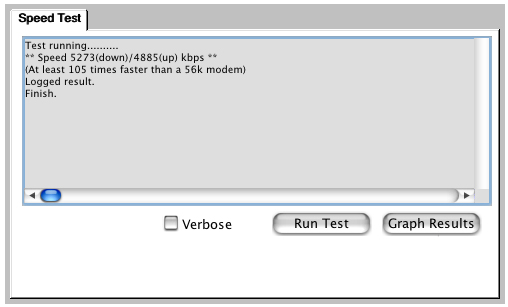
What kind of speeds do you guys get? Go to DSL Reports Speed Test, choose a server and let it rip. Here are my undoctored results:


This is from behind my 10base router using MAC OS X
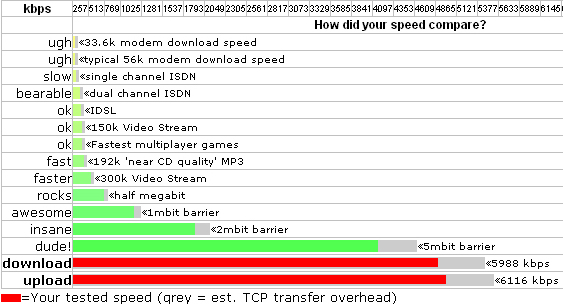
This is on another day using Windows 2000 after "graphing the results".
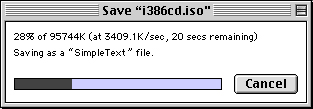

And this was yet another day bypassing the router going straight to the switch downloading a 93.5 Meg file in about 26 seconds from Mac OS 9.2! Don't know why it is saving as "Simpletext" but it will still work.


Posted by John Pytlak (Member # 331) on 02-28-2002, 05:27 PM:
 
Today at 6:35pm, 1065 kbps download, 355 kbps upload.
Rochester Time-Warner Road Runner.

------------------
John P. Pytlak, Senior Technical Specialist
Worldwide Technical Services, Entertainment Imaging
Research Labs, Building 69, Room 7525A
Rochester, New York, 14650-1922 USA
Tel: +1 585 477 5325 Cell: +1 585 781 4036 Fax: +1 585 722 7243
E-Mail: john.pytlak@kodak.com
Web site: http://www.kodak.com/go/motion


Posted by Ian Price (Member # 14) on 02-28-2002, 05:54 PM:
 
1211 Down which is just awesome!
98 Up which is bearable.

Pac Bell DSL

Of course is slighly better than dude!


Posted by Bob Healey (Member # 1003) on 02-28-2002, 07:43 PM:
 
I ran the test, and 700 down, 1333 up. Second try 762 down, 1515 up. Too bad I don't have any servers
 
Posted by John Pytlak (Member # 331) on 02-28-2002, 10:17 PM:
 
About 11:15pm: 1139 kbps down, 340 kbps up

------------------
John P. Pytlak, Senior Technical Specialist
Worldwide Technical Services, Entertainment Imaging
Research Labs, Building 69, Room 7525A
Rochester, New York, 14650-1922 USA
Tel: +1 585 477 5325 Cell: +1 585 781 4036 Fax: +1 585 722 7243
E-Mail: john.pytlak@kodak.com
Web site: http://www.kodak.com/go/motion


Posted by Steve Kraus (Member # 476) on 03-02-2002, 11:28 AM:
 
That business about popups sent by the ISP: Were those people getting them because they opened their browser with the homepage set to the ISP or was the ISP sending them regardless (not sure if that's even possible)? Isn't there a way to make a browser ASK before opening a new page?
 
Posted by Michael Brown (Member # 890) on 03-02-2002, 11:49 AM:
 
I'm at uni. Getting around 26 or 27 times a 56k modem speed.
 
Posted by Joe Redifer (Member # 3) on 03-02-2002, 12:43 PM:
 
Steve-

Having the browser ask before opening each page would be just as bad as the pop ups, since the browser would ask in pop up alerts and you'd just have to keep saying "No' to each page. No matter what you will be annoyed.


Posted by Ian Price (Member # 14) on 03-02-2002, 03:51 PM:
 
I finally got fed up with pop-up ads. I looked on CNET or some such place and found a couple of Banner Ad Blocker programs. I tried one out for the trial and liked it. When the trial ended and the first banner popped up I immediately went online and bought one of the programs.

The first one I tried beeped every time it blocked a banner. The one I purchased doesn't. At first the beeps are strangely satisfying. But now I am just blissfully banner free.

The one I bought is called Banner Zapper 3.0.

By the way, there are a few, (thankfully, very few) people who have fugured out a way to get their banners past the banner blocker programs. I think the Geo Cities one is the only one I have found.


Posted by John Moriarty (Member # 1153) on 03-02-2002, 03:59 PM:
 
** Speed 844(down)/2321(up) kbps **

On my university network connection, Cambridge UK.
10Mbps LAN, completely free, all three years of my degree.

Pity I don't do much up-loading.


Posted by Leo Enticknap (Member # 534) on 03-04-2002, 06:54 AM:
 
275 down, 1,440 up here at the University of Teesside...


Powered by Infopop Corporation
UBB.classicTM 6.3.1.2