This is topic Acrobat compression? in forum Film-Yak at Film-Tech Forum ARCHIVE.
To visit this topic, use this URL:
https://ft-forum.com/ft/cgi-bin/ubb/ultimatebb.cgi?ubb=get_topic;f=8;t=001196
Posted by Michael Barry (Member # 237) on 08-28-2002, 10:51 AM:
I've noticed that when I scan an A4 sized document using 200dpi and 24 bit color, for example, and save it as an uncompressed TIF or BMP file, it produces a file about 10 megs in size. With Adobe Acrobat, the image is about 800kb or so...and the difference is visible as can be expected.What I'm wondering is: does anyone know of a way in which one can control the level of compression that Acrobat applies? I'm guessing that the full version allows this control; I'm currently using the bundled scanning software that came with my scanner which 'automatically' writes to Acrobat format with no control at all.
Any help/tips would be appreciated! Thanks.
Posted by Adam Martin (Member # 641) on 08-28-2002, 11:01 AM:
Yes, the full version of Adobe Acrobat has settings for things such as compression quality and font and color management. It's all in the Distiller settings under Job Options or when you print to a pdf file.There is other software that can create a pdf file. It sounds like that may be what you have if it was bundled.
Posted by German Marin (Member # 918) on 08-28-2002, 10:15 PM:
I've took this from the Adobe Acrobat 5 help:"Applying compression and resampling:
When converting files, you can have Distiller compress text and line art, and compress and
resample color, grayscale, and monochrome images. Depending on the settings you
choose, compression and resampling can significantly reduce the size of a PDF file with
little or no loss of detail and precision.
• Line art, or vector graphics, is described with a mathematical equation; it is usually
created with a drawing program such as Adobe Illustrator®.
• Images are described as pixels and are created with paint programs or from scanners.
Monochrome images include most black-and-white illustrations made by paint
programs and any images scanned with an image depth of 1 bit. Adobe Photoshop, for
example, works with images.
About methods of compression:
Distiller applies ZIP compression to text and line art; ZIP or JPEG compression to color and
grayscale images; and ZIP, CCITT Group 3 or 4, or Run Length compression to
monochrome images.
Suitable compression methods for different source art types
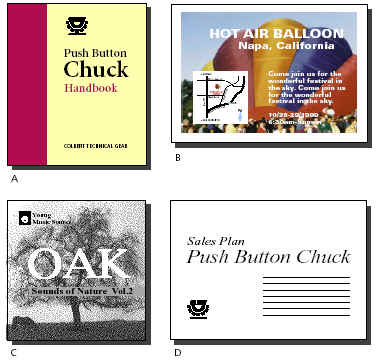
A. ZIP B. JPEG C. CCITT(*) D. Run Length(**)
• ZIP is a compression method that works well on images with large areas of single colors
or repeating patterns, such as screen shots and simple images created with paint
programs, and for black-and-white images that contain repeating patterns. Acrobat
provides 4-bit and 8-bit ZIP compression options. If you use 4-bit ZIP compression with
4-bit images, or 8-bit ZIP with 4-bit or 8-bit images, the ZIP method is lossless, which means it does not remove data to reduce file size and so does not affect an image’s quality. However, using 4-bit ZIP compression with 8-bit data can affect the quality,
since data is lost."
(*)• The CCITT (International Coordinating Committee for Telephony and Telegraphy)
compression method is appropriate for black-and-white images made by paint
programs and any images scanned with an image depth of 1 bit. CCITT is a lossless
method.
(**)• Run Length is a lossless compression option that produces the best results for images
that contain large areas of solid white or black.
Posted by Leo Enticknap (Member # 534) on 08-29-2002, 01:43 PM:
A word of warning: since I updated to Acrobat 5 I've had several complaints from people who have version 4 of the Acrobat reader, saying that they can't open the PDF files I've sent them, despite my selecting the 'Acrobat 4 compatible' option in the PDF Writer 'virtual printer' options. I guess that this is a glitch to do with the compression issue.