This is topic Bugbear virus warning in forum Film-Yak at Film-Tech Forum ARCHIVE.
To visit this topic, use this URL:
https://ft-forum.com/ft/cgi-bin/ubb/ultimatebb.cgi?ubb=get_topic;f=8;t=001302
Posted by Peter Berrett (Member # 672) on 10-03-2002, 02:36 AM:
Hi allJust a quick warning for people to be on the look out for the bugbear virus.
For most of this this will not be a problem - we either don't use outlook or we have a good virus scanner (this should be mandatory).
However even then software can be vulnerable. Recently I experienced a case of the bugbear virus on a standalone I was working on. I received an email titled 'greets' and as soon as I opened the email the virus was activated. It didn't require me to open an attachment. Just opening the email was sufficient to activate the virus.
The curious thing was that at the time there was a tsr-resident virus scanner running and it didn't pick up the virus, either immediately or on a scan.
At home I run an anti-virus program called AVT which is very effective. It is a tsr-resident scanner and does pick up the bugbear virus. I recommend it highly (no I don't have shares in the company). I received the bugbear virus today and the scanner killed it off immediately.
This is a particularly nasty virus in that it can copy keystrokes and give a hacker access to those keystrokes eg you might have typed your credit card number.
Full details are available on the following link. The page also includes a small program put out by sophos to clean your system of the virus. It would be worth downloading it and checking as your virus scanner may not have picked up the virus.
Click Here
I might add that the above virus has been spreading very rapidly over the past few days.
cheers Peter
Posted by Leo Enticknap (Member # 534) on 10-03-2002, 08:50 AM:
This one certainly seems to have spread very quickly: I've had two or three a day since Monday.However, according to the SARC write-up, the viral code cannot be executed other than by running the attachment. But the fact that I've had so many of them suggests to me that this one is somehow managing to run itself without the user needing to do anything. In Microsoft Outlook (which I use for email at work), I get a box saying 'do you want to open the attachment or save it to disc?' whenever I open an infected email. This message appears even if I don't click on the attachment. At home, Norton picks up the infected emails before they're downloaded, so I haven't seen how Eudora would react.
Does this mean that there is some HTML code or an ActiveX control built into the e-mail text instructing the computer to run the attachment even if the recipient does not click in it?
Posted by Daryl C. W. O'Shea (Member # 1303) on 10-03-2002, 08:44 PM:
Attatchements can be executed in Outlook by simply transfering focus to that message. This is especially bad if an infected virus is the last one to be downloaded, as Outlook will automatically switch focus to it when you open the Inbox. I know of many people that had problems with the virus being run because of this on Monday, before Symantec released updates Monday afternoon.
Posted by Paul G. Thompson (Member # 655) on 10-03-2002, 10:22 PM:
That's why I hate Outlook Express. The attachment comes in a form of a damn envelope. If the envelope is open, "surprise!"
Posted by Sam Hunter (Member # 1119) on 10-03-2002, 10:54 PM:
You can tell outlook to download the header only and also not to automaticaly open the message if its highlighted for 4-5 seconds or whatever.
I had to do this on my wifes account on my PC due to Klez here while back. Thank God for McAffee.------------------
Samual Hunter Sr.
KC5ZSL
Posted by Paul G. Thompson (Member # 655) on 10-04-2002, 12:50 AM:
Actually, I never picked up a virus in AOL's email. I had some crap come through my computer at work and it stole my AOL passwords, but that came through the network at work. I found the aggressive computer, and formatted the drive. Then I dumped the power and removed the CMOS battery for a few minutes to make sure the computer was "dead." I was not concerned with "Flash Bios", as the computer was too old, and didn't have that feature incorporated.Other than that, no problems.
Posted by David Rigby (Member # 1301) on 10-04-2002, 06:14 AM:
Another approach to this problem is to limit the security settings in outlook so HTML mails can't run script. Also, if you have a firewall, remove all rules related to outlook express and hit 'send/receive messages'. Recreate the rules only for your specific mail server and the exact ports used for mail, denying everything else. That way you don't have problems with things getting a hook in outlook and 'calling home'. Your mails will also open faster since any HTML mail with millions of images won't be able to contact the server to download the ***** things.David
Posted by Brad Miller (Member # 2) on 10-04-2002, 06:36 AM:
Sam, can you elaborate on the settings in Outlook please? You are speaking of Outlook, not Outlook Express, right?
Posted by Peter Berrett (Member # 672) on 10-04-2002, 07:36 AM:
I received yet another instance of the virus today. I didn't open the email but immediately AVT saw that the virus was trying to get access to my disk and queried me as to whether I should allow it or not. Naturally I said no and deleted the email.From my experiences over the past few days I'd say that this virus is spreading like wildfire.
Check out the following
Media Article 1
Media Article 2
Media Article 3
Media Article 4
I might add that the rating of the seriousness of the virus has been upgraded for the second time. Believe me - it's nasty.
If it continues at this rate can you imagine how many infected emails we will be receiving per day by the end of this week? At one stage I got up to about 7 Klez emails a day. This could surpass that.
cheers Peter
Posted by Leo Enticknap (Member # 534) on 10-04-2002, 01:17 PM:
Yes, I have an almost pathological hatred of Outlook and OE, too. That's why I use Eudora at home with the 'Disable exectuable content in HTML' option selected, but at work I don't have a choice.Brad: A PC's Internet security settings apply to both Outlook and OE. On Windows 2000 you get at it through Start - settings - control panel - Internet options. Click on the 'security' tab, select Internet and then press the 'custom settings' button. I'd then be inclined to disable (or set to 'prompt') pretty much everything in the list you'll then see.
Posted by Sam Hunter (Member # 1119) on 10-04-2002, 01:29 PM:
Sorry for the delay in getting back. Lili kept me a little busy.
Anyway, this is a couple of methods I used;
In Outlook Express click "Tools\Options\Read" uncheck the box marked "Mark message read after displaying for 5 Seconds" and also uncheck "Automatically download message when veiwing in the preview pane".
This should keep you from unitentally openening the door to these bad guys. 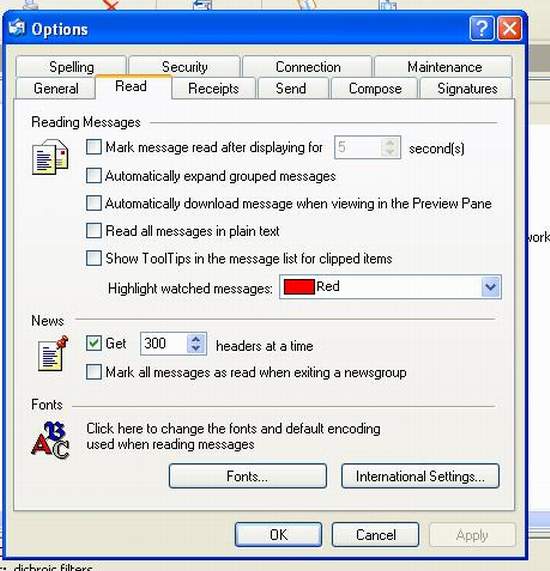
------------------
Samual Hunter Sr.
KC5ZSL
Posted by Gerard S. Cohen (Member # 994) on 10-05-2002, 03:44 PM:
My bugbear virus arrived today in an attachment to a message from Microsoft with a subject announcing a new policy in accessing newsgroups. Since I haven't been able to access them since I began with MSN a couple of years ago, and my inquiries were answered with "...Microsoft Network does not support newsgroups..." I was tempted to read this happy announcement. But the screen was framed
by a red McAffee virus warning around the attachment, asking me to clean it, or if that was found impossible, to delete it and substitute
a clean copy.[???how???] Needless to say, it couldn't be cleaned or deleted, until I closed the window and then deleted the message with the attachment inside. The message included an abstract of the content of the attachment, which was about users of a certain program being asked their passwords when trying to access newsgroups.
Not what I was hoping for, but I'm thankful to McAffee!
Posted by Jeffry L. Johnson (Member # 453) on 10-05-2002, 04:31 PM:
This is one reason that I like my ISP, APK Net Inc.. They offer virus scanning of my email before I ever receive it. I have received several notices in the past few days that I have received emails with Bugbear. But it is purged before I can possibly open it. Of course I also run antiviral software on my machines.
Plus it helps to use Macintoshes.
Posted by Ray Brown (Member # 1449) on 10-06-2002, 01:12 AM:
The #1 rule I learned is not to open attachments from anybody unless you are actually expecting them to send you a specific file.If you use Outlook/Outlook Express, be sure to disable the preview pane so the self executing viruses like Bad Trans don't infect your computer.
I use Poco Mail because I don't trust Outlook or Outlook Express. Poco mail lets you preview your headers on the server with out downloading. Anything that looks suspicious or spam gets deleted directly off the server. My main POP3 account got bomb with the Klez virus this summer and this feature really came in handy.
If you do download something accidently (like Bad Trans) it won't self execute like it does with Outlook/Outlook Express.
I think every ISP should have a virus and spam filter. It would really help to eliminate alot of these problems.
Posted by Paul G. Thompson (Member # 655) on 10-06-2002, 01:36 AM:
Just recently, I had someone squawking to me about how goofy their computer was running. Just for the heck of it, I ran a sysedit and discovered an entry in the load= (maybe it was the run=) line of the win.ini that didn't belong there. The command line was "rape.exe" - and when I asked him what the hell was that, he said the when the computer crashes, it says "you have been raped" or words to that effect.I didn't edit it out of there. Not yet, anyway.
OK.......well, I wonder what might have also been inserted in the registry.... 
This must be a new one - as I have not found anything on McAfee that talks aboout rape.exe - has anyone ever heard of it?
Posted by Daryl C. W. O'Shea (Member # 1303) on 10-06-2002, 02:15 AM:
Paul, I've seen that before (I think it was last winter), basically it shouldn't be there. I think it gets installed by some annoying website (probably 'warez') using even more annoying scripting.You can just remove it from the load or run entry and delete the file from the windows or windows\system(32) directory.
Posted by Steve Kraus (Member # 476) on 10-06-2002, 11:41 AM:
I stick to a couple of old versions of Eudora. Knock wood but I think I am pretty much immune to this sort of crap.I also hate HTML in email although if there is a plaintext version atop it then I guess it doesn't matter. Why would I want email that can include code that pulls an image from a distant server using a uniquely coded filename so the server can log not only that you've read the mail but the IP# of the machine you were on when you read it? What a huge invasion of privacy not to mention confirming for spammers that yours is an active address.
Posted by Leo Enticknap (Member # 534) on 10-10-2002, 02:31 AM:
A free utility that enables you to screen incoming mail (POP3 only) on the server before downloading it into your computer can be found at www.mailwasher.net . I've found it very useful being able to delete each day's half-megabyte of bugbears rather than waste online time downloading them. This program also has the facility to bounce spam back to its sender - graphics, attachments and all! It's very satisfying to be able to give the f***ers a taste of their own medicine...
Posted by Adam Martin (Member # 641) on 10-10-2002, 10:07 AM:
Wow, Leo, that's a great find! Oddly enough, it was just in time, too. There was almost 10 MB of virus crap from Greece in my inbox this morning. Luckily, I'm still pulling my mail over the satellite modem at work instead of dialup at home. I'm not able to set up web access on my mail server at this time, so it looks like MailWasher is the next best thing, especially since I can bounce spam with the click of the mouse!