This is topic Cluttered Desktop slows down Windows? in forum Film-Yak at Film-Tech Forum ARCHIVE.
To visit this topic, use this URL:
https://ft-forum.com/ft/cgi-bin/ubb/ultimatebb.cgi?ubb=get_topic;f=8;t=003528
Posted by Joe Redifer (Member # 3) on 08-30-2004, 07:24 PM:
At work today the videogame I was playing started dropping frames like no tomorrow. It was as if all of the memory was being eaten up by something else other than the game. I was eventually able to exit the game (the mouse movement was unbelievably choppy and slow as well when the game was running) and a co-workter noticed two JPG files sitting on my desktop. Not as wallpaper mind you, just the files: 1.jpg and 2.jpg. He said that having JPG files sitting on the desktop eats up memory and I should put them in a folder somewhere. WTF? That is the most retarded thing I have ever heard. I am using XP Pro, by the way.
Interestingly, I was getting anywhere between 60 and 100 frames per second until I pressed PRINT SCREEN, opened Paint and saved the JPEG files to my desktop. It was at that moment in time that my game began running horribly slow. No other applications were running. Long story short, I had to delete the game from my computer and then reinstall it. It runs better now, but it is nowhere near as smooth as it used to be.
So my question is this: Can having image files sitting on the desktop actually slow down Windows? Does Windows really suck THAT bad? I am having a hard time believing this.
Posted by Brian Michael Weidemann (Member # 2243) on 08-30-2004, 08:36 PM:
I think that anything on a desktop is treated differently. The system thinks that if it's on the desktop, it's going to be used (and probably really soon!), so everything is pre-loaded in memory, and ready at the drop of a hat. This is pretty much just speculation. It would make sense.
However, if nothing on the desktop itself loads particularly faster than from any other location, then this theory is shot. At which point I, too, am baffled at Windows' stupidity ... at least, moreso. ![[Confused]](confused.gif)
Another idea: saving a file wouldn't necessarily release the Print Screen capture from buffer memory (clipboard?), so that could be eating up stuff.
Posted by Bobby Henderson (Member # 840) on 08-30-2004, 08:43 PM:
First thing, check for spyware. I'm always suspicious of anything that mysteriously shows up on a desktop.
You should not have any memory problems from saving a couple JPEG files in the Desktop folder. I have co-workers who place all kinds of garbage on their XP Pro or Win2000 desktops, and they don't seem to have any bog downs from that. But those systems have between 768MB and 2GB of RAM.
I suspect something else running in the background. You may think nothing else is running, but then when you bring up Task Manager you'll see all kinds of processes running.
If your computer is hooked up to an always-on broadband/cable/dsl Internet connection, your machine could be trying to auto-download Windows XP Service Pack 2. Or it could be doing any number of other things. I hate the way Norton Anti Virus' auto-update feature works (you can count on that bitch of a program to only want to update and bog down your machine when you're in the middle of an important task, so I disable it and update my virus DATs manually).
Finally, what kind of hardware does this machine have? CPU? Amount of RAM? Are you using serial ATA hard disks in this machine? A friend of mine who builds PCs hates SATA drives with a passion. He's seen many of them fail. Even the expensive 10,000 RPM ones. Hopefully some of the issues with SATA might be cured or at least made to suck less when SATA II arrives.
Posted by Mark Gulbrandsen (Member # 72) on 08-30-2004, 10:42 PM:
Joe,
My desktop is about as cluttered as your bedroom closet is but I don't have any problems at all running anything here. And this is an old P-3 1 ghz machine at that!
XP has an automatic unused desktop icons feature that should pop up if you don't use some of them very often, but if you use all the icons alot then it may not pop up. I would also second that you check your drive for spyware, its a real memory eater. I had that same problem once and it was a load of spyware. If you search here you'll find my post on that and I think it was Adam that reccomended Adaware... so just download Adaware for free and check your drive out. Or manually check your Cookies for those Spybots in there, thats where they usually live.
Mark
Posted by Adam Martin (Member # 641) on 08-30-2004, 10:51 PM:
Using Print Screen for screen captures will eat up memory because Windows is never told to release it. You might be able to release it with the Clipboard Viewer, but I've never actually included that feature in a Windows install.
Posted by Bobby Henderson (Member # 840) on 08-30-2004, 10:55 PM:
Adobe Photoshop and Illustrator would really suck without a clipboard in Windows. Hell, most graphics applications would suck without the clipboard! I can't live without cut/copy/paste functions.
Oh wait. Where you talking about the clipboard itself, or just clipboard viewer?
Apps like Photoshop have commands to empty the clipboard. I'm also not aware of Windows being able to store any more than just one thing at a time to the clipboard (be it a screen shot, some vector paths from Illustrator, a passage of text from a document, etc.). I think one would need a third party utility to get mulitple items copied to the clipboard.
Posted by Brad Miller (Member # 2) on 08-30-2004, 11:17 PM:
quote: Bobby Henderson
Are you using serial ATA hard disks in this machine? A friend of mine who builds PCs hates SATA drives with a passion. He's seen many of them fail. Even the expensive 10,000 RPM ones. Hopefully some of the issues with SATA might be cured or at least made to suck less when SATA II arrives
That's so good to hear. The G5 has serial ATA drives.
Posted by Daryl C. W. O'Shea (Member # 1303) on 08-30-2004, 11:51 PM:
SATA, in it's current form, blows. Just like I've been saying for over a year.
Posted by Adam Martin (Member # 641) on 08-31-2004, 01:20 AM:
quote: Bobby Henderson
Where you talking about the clipboard itself, or just clipboard viewer?
I was talking about not installing the clipboard viewer.
I don't know how Windows manages the clipboard or if more than one item can be kept on the clipboard at all, but I've seen some applications ask which item from the clipboard you want to use when the paste command is called.
This page from the Microsoft Developer Network suggests that the clipboard can contain more than one object can reside on the clipboard. One would assume that software that deals with one clipboard item at a time would handle the most recent item placed on the clipboard.
Posted by David Buckley (Member # 2600) on 08-31-2004, 05:19 AM:
Its not more than one "thing" on the clipboard, its one or more representations (or formats) of the same thing, so when you do a "paste special..." you get a list of the formats you can paste.
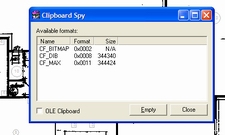
If you really wanna know how much memory and whats happening on the clipboard, then Clipboard Spy will tell you.
This is a screenprint of ClipSpy, displaying the clipboard attributes of doing a screenprint of itself:
Posted by Joe Redifer (Member # 3) on 08-31-2004, 08:00 AM:
I don't think it had anything to do with the clipboard. I restarted the computer at work several times and my videogame was still very choppy. They won't let us install any spyware checkers or anything from the internet on our computers. They are very specific about what goes on there, so I don't think I could get away with something like AdAware. I just want my shoot-em-up games to be smooth!
I is using some form of Dell computer with 256 whopping megs. I'm sure the drives are IDE.
What makes serial ATA so bad?
Posted by Dennis Benjamin (Member # 1137) on 08-31-2004, 08:57 AM:
They let you install games and play them at work...but...they won't let you install anything off the Internet?
I would like to work at a place where they let you install games on your workstation computer. Must be an easy job......
![[Razz]](tongue.gif)
just kidding.....but still....
Posted by Bobby Henderson (Member # 840) on 08-31-2004, 02:36 PM:
Joe, 256MB of RAM is just not enough memory for any WinXP Professional machine doing anything more than simple word processing tasks. I'll bet if you at least double the amount of RAM in that machine you'll see a significant improvement.
Our shop purchased one of those lower cost Dell systems for the front office with WinXP Pro loaded and 256MB of RAM. We had to add another 512MB DDR SDRAM DIMM to it to get good performance.
Regarding SATA, at first I thought it seemed to be a good advance for computers. The prospect of having affordable RAID, a smaller connector and faster data transfer seemed great. But then I started reading up about SATA and asking around. The custom PC builder friend of mine gave me an earful about toasted SATA 1 drives and how he was trying to buy up as many Ultra ATA 133 drives (7200rpm, 8MB cache) as he could find.
Here's an article I found online at this link:
http://www.ata-atapi.com/sata.htm
quote:
FIRST, THINGS YOU DO NOT DO WHEN USING SATA!
If you are setting up a system using SATA here are some things you must be aware of:
* DO NOT operate SATA devices outside of a sealed system unit. DO NOT operate SATA devices from a power supply that is not the system unit's power supply.
* DO NOT tie wrap SATA cables together. DO NOT put sharp bends in SATA cables. DO NOT route SATA cables near PATA cables. Avoid placing SATA devices close to each other such that the SATA cable connectors are close to each other.
* DO NOT operate a radio transmitter (such as a cell phone) near an exposed SATA cable or device.
Why all these warning? The basic problem is the SATA cable connector is not shielded. This has to be the number one most stupid thing that has been done in the SATA world.
SECOND, LETS TALK ABOUT SATA RELIABILITY!
Are you thinking about buying a Serial ATA system and drive? If yes, read this... The Serial ATA (or SATA) products that are now shipping and available in your local computer store may not be the most reliable products. Testing of SATA products with tools such ATACT program are finding a variety of problems. These problems are timeout errors, data compare errors, and strange status errors. These problems are being reported by a large number of people doing SATA product testing. Hale's advice at this time is be very careful - make sure you can return the SATA product your purchased if it does not perform as you expect. See the ATACT link above for some ATACT log files showing both normal testing of a parallel ATA (PATA) drive (no errors!) and testing of a SATA drive (lots of errors!).
The unshielded SATA cable connector is mostly like the source of many of these problems. Making things worse is the failure of the SATA specification to implement an equivalent to the ATA Soft Reset. On a PATA interface Soft Reset rarely fails to get ATA/ATAPI devices back to a known state so that a command can be retried. On a SATA interface the equivalent to this reset does not seem to reset anything and at some times it is basically ignored by the SATA controller and device.
And finally... Don't buy SATA because it claims to be faster than PATA. The marketing claims that it can transfer data at up to 150MB/second (making it faster than the fastest PATA Ultra DMA mode, mode 6 or 133MB/second) will not be seen with the SATA products that are shipping today (late 2003). Today's SATA products are actually 10% to 20% slower than PATA. This is because today's SATA products are really PATA products with an extra SATA-to-PATA 'bridge chip' in the device. These bridge chips add significant overhead to the SATA protocols. In time there will real 'native' SATA devices that do not need these bridge chips - Then we can see what the true performance of SATA. But remember SATA is a 'serial interface' and serial interfaces rarely live up to their marketing claims.
THIRD, BACK TO THE SATA BASICS...
THE SPECIFICATION MESS
Serial ATA or SATA may be the best thing to happen in the I/O interface world in a long time. But the way SATA has been developed has resulted in a huge confusing mess. We may be entering a period when not one but three or four separate organizations may be publishing SATA specifications and standards. Those organizations are: the SATA "secret society", the ANSI standards committee T13 (ATA/ATAPI), the ANSI standards committee T10 (SCSI) and a sub-group of T10 known as the Serial Attached SCSI (SAS) committee. Each of these organizations may publish versions of SATA that are slightly different.
How did we get to this state of affairs? First, several years ago Intel formed a "secret society" to work on a serial interface version of the traditional parallel ATA interface. That group of companies developed and published the SATA (now called SATA-1) specification. SATA devices that are shipping today (mid-year 2003) generally conform to this specification. Second, the SATA-1 specification has been given to the ANSI T13 committee and it has now become volume 3 of the ATA/ATAPI-7 standard. Third, the SATA secret society continues to work and now the SATA specification they have doesn't always match what is in ATA/ATAPI-7. And as you will see in the next section SATA and SAS may merge.
WHAT IS SATA?
SATA uses a 7 wire interface. Three of the wires are ground signals. The other 4 are two pairs of differential signals - one pair in each direction. SATA is using the transceiver technology used by Fiber (Fibre) Channel. Today's hardware runs at 1.5GHz and should be at 3GHz soon. ATA commands, status and data are transmitted in packets on this interface. This is done such that the traditional ATA command protocols are basically unchanged (more about this below).
How fast is SATA? Well... There are claims that it can transfer data up to 150Mbytes/second. Remember this is a burst data rate, not an average data rate. Parallel ATA using UltraDMA mode 6 (UltraDMA 133) claims it can transfer data up to 133Mbytes/second. Again this is a burst data rate and not an average data rate. Average data rates are probably less than 1/2 of these numbers, perhaps even as low as 1/3. Yes, SATA is in theory "faster" - but not by much.
SATA-1+ and SATA-2 (neither are part of ATA/ATAPI-7 at this time) include new data transfer and tagged command queuing schemes. It is unclear if these things will ever appear in future ATA/ATAPI-x standards. They may only appear in the SATA-2/SAS documents.
SATA supports a single device per SATA cable. A SATA cable can be longer than a parallel ATA cable (limited to 1.5 feet), perhaps up to 2 or 3 feet long.
SATA Programming (Today)
2003...
SATA-1, the SATA version that will be included in ATA/ATAPI-7, is designed to emulate traditiional parallel ATA. Most SATA host controllers shipping today look like and are programmed just like any other ATA host controller. These controllers are compatible with the Intel ICHx design and compatible with the T13 1510D document. This allows SATA controllers and devices to be used in systems without BIOS or OS driver changes.
The biggest problem with today's SATA host controllers is that SATA gets errors that never happened on PATA. And today's SATA host controllers do a very poor job of reporting these errors to the host software. Then there is the problem of having an OS device driver for SATA that understands these errors and knows how to recover from the error conditions. As of September 2003 T13 is just now starting to talk about these problems.
There are some SATA host controllers that are not ICHx compatible and these require proprietary BIOS or OS drivers. We can only hope that the Intel AHCI specification effort is successful in bringing us a new and better SATA host controller standard.
SATA Programming (Tomorrow)
2004 and beyond...
We don't know what SATA host controllers will look like a year from now. We can only hope that we will finally have controllers that will support four to eight or more SATA devices and that all devices will be able to transfer data at the same time. Basically this finally gives us the kind of I/O we want (and/or need), fully independent I/O for each mass storage device, no more waiting for one device to finish a command before we can start a command on another device.
The problem today is that there is no public standard for how future SATA controllers should be designed or programmed. Intel has announced that they something called the AHCI specification. But today (late 2003) this specification is under NDA.
Serial ATA-2 (SATA-2)
or is it
Serial Attached SCSI (SAS)?
Soon after completing the SATA-1 specification the SATA "secret society" continue working and have joined forces with the Serial Attached SCSI (SAS) sub-committee of T10 to merge SATA and SAS. The result so far is yet another version of SATA known as SATA-2. The end result is unclear. There are lots of poeple that would like to replace SCSI - remember 1394 was going to replace SCSI. It is fun to read some of the marketing hype: SATA and SAS have joined forces to "create the I/O interface that will solve every problem every known to exist in I/O interfaces". When have we heard this before?
Posted by Brad Miller (Member # 2) on 08-31-2004, 03:35 PM:
Oh yeah, the Mac people really know their stuff. Fortunately my SATA hasn't screwed up yet.
Joe, did you increase your resolution? Cheap video cards will display the problem you described when they are ran too high.
Posted by Dustin Mitchell (Member # 372) on 08-31-2004, 03:50 PM:
What game were you trying to play?
I have to agree with Bobby, not enough RAM. Windows XP uses up over 100 MB of RAM by itself, not to mention other running programs.
Posted by David Buckley (Member # 2600) on 08-31-2004, 04:45 PM:
The key point here though is that Joe's game used to work fine, and then it didn't. Although I agree XP likes memory, I think its unlikely that the said PC lost a few hundred meg of physical ram.
Something has changed.
Suggest use the System Restore tool to see if any system updates occured over the period of note.
As a general comment on Windows, registry stuffing and particularly registry contention can cause a otherwise fine machine to slug. This is less true with XP and S2003 than it was with previous windows, but the registry is still one of the foundations of windows performance.
Posted by Bobby Henderson (Member # 840) on 08-31-2004, 05:36 PM:
I'm under the impression the PC Joe is using is a newly aquired "office" PC. As applications are loaded (or Windows is automatically updated with various patches) the registry grows.
Also, there is the possibility Joe was lucky this game wasn't performing sluggishly from the start. As relatively cheap as system memory is anymore, I'm really surprised companies like Dell continue to sell PCs with as little as 128MB or 256MB of DDR SDRAM.
Those low amounts of memory are especially a big liability when it is "shared" memory. Many entry level office cubicle PCs come with no dedicated video card, just an integrated chip on the main board that siphons off system memory for its own use. Those little $499 Dell Dimension 2400 boxes also have no AGP port on the motherboard in case you want to upgrade to a real video card. Lots of budget PCs sold in retail stores have the same drawback as well.
My recommendation for any XP Pro system is to start with a minimum of 512MB of system memory. Move up to 1GB of RAM if you're going to be dealing with graphics. Gaming machines require dedicated video cards. The new graphics engines in games like DoomIII demand a really good 256MB AGP 8X card or even a more pricey PCI Express 16-lane card like nVidia's GeForce6950 or the Radeon X800XT.
Posted by Joe Redifer (Member # 3) on 08-31-2004, 06:26 PM:
Yes, it is the same computer that most everyone else in the office has... at least in my immediate area. My video game playing went smoothly today, but I still had to have a lot of the detail turned down when I used to have it turned up. I don't think they will let me have more RAM for this machine. At least I didn't have to reinstall the game today, and was able to play it all day at work without a hitch, even online. But why the performance decided to permanently degrade yesterday is beyond me.
I can't say what game it is otherwise I will be fired.
Posted by Michael Gonzalez (Member # 593) on 09-01-2004, 03:08 AM:
ANYTHING that is on the desktop will take up memory. For instance if the jpeg is 1MB big, than that is one less meg that will be available for games. Also if you create a folder on the desktop and put anything in it the whole thing will eat away at your RAM. The only thing that you should have on your desktop is shortcuts because they are usually less than 1k. So if you have anything other than shortcuts on your desktop (Windows stuff like the recycle bin and My Documents are really shortcuts so you don't have to worry about them), then move them somewhere else and create a shortcut to the folder to put on the desktop. Another tip is to right click and close any programs in the task manager that you are not using (such as realplayer) that also eats up memory and resources.
Hell here is another tip. Increase the size of your swap file (Virtual Memory). Go to Control Panel -> System -> Advance Tab -> Click on the Performance Settings button -> Click on the advance tab and Change your virtual memory. Change both the intitial size and the max size to three times your RAM. So if you have 256 megs than your swapfile should be 768. This will give you extra (but slower) memory to play games.
Posted by Daryl C. W. O'Shea (Member # 1303) on 09-01-2004, 03:24 AM:
Problem here. I've got 14 GB of data in files and folders on my desktop of my main Windows workstation. The machine only has 2 GB of RAM and a very small swap file. Could you please explain why this works? Thanks. ![[Smile]](smile.gif)
In reality, the only performace hits you take by placing files on the desktop are the following:
Any time Windows decides it needs to redraw the desktop it HAS TO read (at least the headers) of every single file on the desktop (not inside folders on the desktop) so that it can decide on what icon that file should have. This means that the machine is going to bog down while it seeks all over the disk reading each of these files that are physically scattered all over the hard drive.
The desktop icons, like any graphic, consume physical memory (RAM). The only memory taken up is the memory required to represent the icon (plus the small amount of info linking the icon with the file). The entire file isn't loaded into memory, so a 100MB file doesn't use a 100MB of memory, instead it only consumes a few KB at most.
In addition to the above two performance hits, it also takes processing time to calculate all of this stuff (more icons more calcs... but disk I/O is way more significant), that is generating the desktop graphic itself and including the icons. Active Desktop requires even more calculations. So turning off AD can help.
That's about it.
So, you might want to try turning of Active Desktop. Why did it used to be better? It may have been a change in graphics modes in any number of places, with either the game or Windows itself. Try running the game with either DirectX or Direct Draw if you can.
Also, unless the game software is ultra crap, uninstalling and reinstalling the software isn't going to do anything for you that you couldn't do a lot easier by changing some setting (somewhere).
Last, you may want to (if you can) try installing the game using a different user login. There are many problems (including performance problems) that can occur when an account takes a crap, to put it in technical terms.
Posted by Adam Martin (Member # 641) on 09-02-2004, 12:38 AM:
Active Desktop is evil, as are wallpaper images and screen savers.
Posted by Joe Redifer (Member # 3) on 09-02-2004, 08:04 AM:
Well I increased my pagine file as I left work yesterday. We'll see if that helps my video games when I play them today at work. We have lots to do today, so my games better run more smoothly!
Powered by Infopop Corporation
UBB.classicTM
6.3.1.2