This is topic Hardware for Computer DV Production in forum Film-Yak at Film-Tech Forum ARCHIVE.
To visit this topic, use this URL:
https://ft-forum.com/ft/cgi-bin/ubb/ultimatebb.cgi?ubb=get_topic;f=8;t=003535
Posted by Bobby Henderson (Member # 840) on 09-04-2004, 04:54 PM:
I'm helping a friend and business associate of mine get a lot of specs and pricing together to purchase some new computer hardware for his advertising agency. He's leased a pretty decent building he wants to have function as a real design studio.
I've already thrown together suggestions and pricing for computers used for print and web-based design. That's pretty easy. I just put together a couple decently equipped (yet moderately priced) Dell XP Pro packages.
Dealing with video is more complicated. I put together a dual G5 PowerMac package at the Apple Store online, as well as getting prices on the Apple Production Suite and Adobe's Creative Studio Suite standard edition. If you're dealing pretty much only with digital video, what other hardware are you going to need besides a well equipped PowerMac?
I'm a little concerned as well about the hard disc situation. The online store just lets you put together a basic SATA RAID configuration. It's not as complex as the RAID 0,1,3,5 & 10 choices you have for SATA and Ultra320 SCSI on Dell's Precision Workstation site.
Will Mac OS X fight against video captures on the main hard disc or RAID array the same way I have seen with Windows PCs? My home PC has two different hard discs and two different hard disc controllers because of this issue. What's the best path to take?
Posted by Brad Miller (Member # 2) on 09-04-2004, 05:19 PM:
I have had zero issues with capturing and editing video when using the one master OS X hard drive in my G5. I have an external ADS Technologies dual link drive kit which connects via firewire for my IDE drives. I haven't yet tried capturing and editing directly off of that yet though. My main intention was to use them to copy files for backup purposes.
Posted by Manny Knowles (Member # 1171) on 09-04-2004, 05:59 PM:
DV will be happy with just about any IDE/ATA hard drive that spins at 7200rpm. There are minimum specs for seek time and sustained data transfer rates but any 7200 drive today will meet those specs.
As a matter of organizational preference, I use external FireWire drives so that I can simply unplug when a project is completed and archive the whole drive.
It is considered "good form" to have separate hard drives for capture and rendering.
Capturing is a real PITA and I don't intend to use DV tapes as my primary medium anymore. Instead, I will use a device like FireStore and capture directly to the external hard drive. Connection to the FireStore is via the camera's FW output. You can still use a DV tape in the camera as a backup.
Posted by Joe Redifer (Member # 3) on 09-04-2004, 06:12 PM:
7200RPM is great. But even 5400 RPM drives can handle DV just fine. But go for 7200RPM anyway.
Brad, you should not have any problem capturing or especially editing to/from a firewire drive. I was able to do that using a freakin' eMac. Just don't daisy chain the camera and the drive. Make sure they use their own ports on the computer.
Posted by David Buckley (Member # 2600) on 09-04-2004, 06:18 PM:
On another forum I frequent someone who knows answered a similar question thus:
Video editing's my business - I use Premiere on PC platform (many other pro's use Avid - but I found Premiere is just as good and doesn't cost anywhere near as much). I do use Premiere on high end kit though (Matrox digisuite LX MAX) that allows 3 DV streams with effects, titles etc in real time. A decent complete system would set you back around 10KUKP. Premiere does work on all kinds of spec though although as Mark says - it does need a meaty PC to do it justice (and if you don't want to sit there waiting for many hours!).
[Note - I think he's got a P4 3.4GHz with 1GB ram, and multiple scsi disks]
If you are serious about all this - go for Premiere (a lot of
hardware-accelerated capture cards tend to bundle Premiere LE or full if they're aiming at the more serious end of the home market).
You can buy a firewire card with hardware accelerated DV playback, edit etc - Pinnacle are good (DV500 etc) but do cost a bit more
Edit: Heres the pic :-)
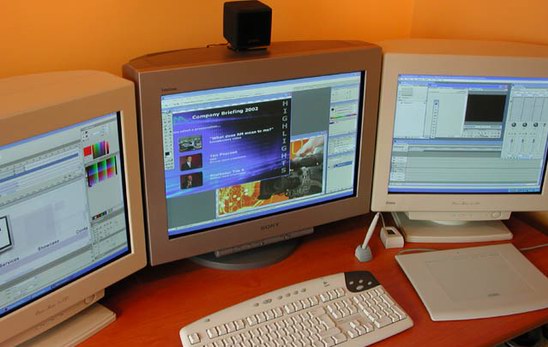
[ 09-05-2004, 03:21 PM: Message edited by: David Buckley ]
Posted by Manny Knowles (Member # 1171) on 09-04-2004, 06:54 PM:
No.
If you're serious you should use Final Cut Pro or Avid. Those are the professional standards nowadays. I don't know of anyone who is "serious" and still using Premiere. In fact, I don't know anybody who has ever used Premiere professionally.
Having never tried Avid I can still say that I prefer FCP because it allows me to do everything I want to do (and lots more) without costing a ridiculous amount of money.
PC or Mac?
Well, I'm biased but anyway, here goes: Macs are the way to go. Some would say that Macs are born for this type of thing. One thing's for certain: With a Mac, you will spend more time creating and less time jacking with your hardware and OS. And that applies to more than just video apps.
Posted by Bobby Henderson (Member # 840) on 09-04-2004, 07:49 PM:
I don't really care at all about the whole Mac versus PC debate, at least when it comes to hardware. The available software and other periphreals available to each platform are the real factors.
This is why I have no problem at all using Windows-based PCs for print graphics and web graphics. Lots of service bureaus and print houses use PCs now. And there's lots of color calibration and profiling tools and other pre-press tools available as well. Several years ago you had to own a Mac to get any of that. Aside from security issues, Windows2000 and XP are certainly a lot more reliable than their earlier counterparts.
The video production thing is different. On the Windows side, the situation is a stupid mess. I'm not happy with any of the offerings there, even the high end ones from companies like Avid. There's always some short-coming here or there. Adobe Premiere Pro is a decent, but not a truly great video editing program. Adobe Encore has a number of bugs and performance issues. It seems like Photoshop and After Effects are really the only great programs from Adobe to use for video. And now Apple's Motion program is a direct competitor with After Effects, and it integrates well with Photoshop.
5.1 surround encoding on the PC is another stupid problem. To do it on a PC, first you must have some audio editor like Vegas or Acid, or a video editor like Premiere Pro. Then you have to blow another $300 to get a Dolby Digital 5.1 encoder plug in. If you want to do DTS encoding for DVD, you're out a cool $2,000 for that SurCode stand-alone app. By comparison, Apple's DVD Studio Pro 3 offers built-in encoding for BOTH Dolby Digital 5.1 and DTS, all for under $500. Apple's production suite, which includes Final Cut Pro HD, DVD Studio Pro 3 and Motion costs $1200. This is probably the best bargain in professional level video production software on the market today.
Apple's Production Suite is the real reason why I would choose a Mac to do video. I don't give a rats ass about how much faster a G5 CPU is than a P4 on some isolated floating point performance test that has nothing to do with real computing performance. The applications are what matters, and Apple has some killer apps in their Production Suite.
Posted by Leo Enticknap (Member # 534) on 09-05-2004, 05:38 AM:
So far I haven't come across anything I can't do with Premiere that I could with Avid or Final Cut Pro, and therefore I'm yet to be convinced that the vastly increased cost is worth it. Admittedly I'm not in the broadcast business: mainly what I edit video for is putting together compilations of archive footage for sale to the public on DVD or for public screenings from DVCAM or DVD in venues which can't show film (conference centres, community venues and the like) or where we don't have the money to have 16mm or 35mm viewing copies made from our preservation elements.
For that purpose I'm totally satisfied with Premiere. It's all very well for Final Cut Pro devotees to tell me that it is the 'professional standard', but it costs three times as much, only works on a Mac and can't do anything which I need to do and which Premiere won't.
As for SATA RAIDs or any other type of RAID, a word of warning: unless you configure your discs as a mirrored RAID (i.e. you decide to buy twice as much HDD space as you need for security purposes), then you're at risk of losing the data from all the discs in the RAID if one of them should fail. This is exactly what happened to me about a month ago, and after the knackered HDD was replaced under warranty I formatted my two SATA drives in a standalone base configuration.
And while a 7,200rpm IDE drive is certainly fast enough to capture, I've found that the higher speed of a SATA 150 drive makes a big difference to the seek time when editing, especially if you're working with some pretty big (i.e. tens of gigabytes) DV files, and so would say that what is now only a marginal extra cost is well worth it.
Agreed entirely with Bobby - Encore is a bug-ridden pile of shite, even with the 1.0.1 patch applied. It's bequeathed me more coasters than you'd find in my local pub. A pity, really, as there are no other DVD authoring packages midway in the market between the giveaway crap that comes with burners and the professional packages costing over a grand.
Posted by Joe Redifer (Member # 3) on 09-05-2004, 11:12 AM:
Leo, try doing 3-way color correction/enhancement in Premiere. You can correct the colors accurately and fast in Final Cut Pro. You can even take a pink car and change it's color to blue (or whatever) without affecting the rest of the picture. Can't do that stuff in Premiere. Once you've discovered color-correction, then it becomes a must.
Posted by Leo Enticknap (Member # 534) on 09-05-2004, 04:00 PM:
The only colour adjustments I have tried in Premiere are to correct Eastmancolor dye fading on pink prints which have been telecined 'as is'. I've been astonished with the results: as a general rule, I've found that by reducing the red gamma to 90% and increasing the green and blue to 125%, the picture looks (subjectively, to my eyes) as if it's an unfaded Kodachrome from around the same time. I'll take your word for it that Final Cut Pro can work similar wonders to some parts of the picture but not others, but that's not something I need or want to do.
Posted by Bobby Henderson (Member # 840) on 09-05-2004, 05:12 PM:
quote: Leo Enticknap
It's all very well for Final Cut Pro devotees to tell me that it is the 'professional standard', but it costs three times as much, only works on a Mac and can't do anything which I need to do and which Premiere won't.
When you consider all the applications you have to buy to do DVD authoring on a PC, you wind up spending more there than you would if you bought Apple's Production Suite.
To compare specifically, Adobe's Video Collection Standard costs $999. You get Premiere Pro, the basic version of After Effects, Audition and Encore. But you have to add another $300 to the cost for the Surcode plug-in if you want to do Dolby Digital 5.1. And you have to spend a lot more than that to do DTS. For $1200 Apple's Production Suite gives you everything you need. The only other applications you might need in addition to it would be Adobe Photoshop and Illustrator.
The thing that is more expensive on the Mac side is the hardware. The Dual G5 system I configured online cost over $4000, and that is without a monitor.
Posted by Manny Knowles (Member # 1171) on 09-05-2004, 05:42 PM:
quote: Leo Enticknap
And while a 7,200rpm IDE drive is certainly fast enough to capture, I've found that the higher speed of a SATA 150 drive makes a big difference to the seek time when editing, especially if you're working with some pretty big (i.e. tens of gigabytes) DV files, and so would say that what is now only a marginal extra cost is well worth it.
I have edited projects with over 160GB of raw footage using 7200rpm drives with no problems whatsoever. I'm not arguing that the faster seek times aren't indeed faster...they just don't *seem* faster.
Joe is correct. The 3-Way Color Corrector has become a must-have for me.
I can recall an incident that took place shortly after the 3WCC was introduced to FCP. One particular shot went from being "unuseable" to becoming "the most interesting shot in the show" thanks to the 3WCC. In fact, the other surrounding shots had to be corrected in order to match that new level of quality.
Every single shot gets color corrected now.
Posted by Daryl C. W. O'Shea (Member # 1303) on 09-05-2004, 07:30 PM:
quote: Leo Enticknap
As for SATA RAIDs or any other type of RAID, a word of warning: unless you configure your discs as a mirrored RAID (i.e. you decide to buy twice as much HDD space as you need for security purposes), then you're at risk of losing the data from all the discs in the RAID if one of them should fail.
That's not really that accurate. Any RAID configuration (all but RAID 0) that is based on parity is also fault tolerant. RAID 0 is really only useful for scratch volumes, or non-critical volumes that require a fast read rate and a not-so-fast write rate.
Specifically,
RAID 0: Stripped Array without Fault Tolerance (Pretend0RAID)
Not fault tolerant. Useful for scratch drives requiring faster read than write speed. Also useful for caching servers like Squid.
RAID 1: Mirror & Duplexing (CheapoRAID)
Fault tolerant. Will sustain one or more drive failures. In-efficient. Very few hardware controllers will allow for any read performance increases. Many software controllers will actually see decreases in write performance. OK for any applications requiring high availability, with average performance, like accounting and other financial systems.
RAID 2: Hamming Code ECC Cool RAID
Fault tolerant. Very high performance can be achieved when your data to ECC disk ratio is low. Transaction rate equal to that of a single disk. Simpler than RAID3/4/5 but rather expensive to implement. There aren't any commercially available implementations that I know of. Most people don't even know RAID 2 exists, or if they do what it actually is. I've only ever seen TWO RAID 2 setups.
RAID 3: Parallel Transfer with Parity
Fault tolerant. Requires a minium of three disks. Will sustain the loss of about one drive per parity drive. High read and write transfer speeds. Transaction rate equal to that of a single disk.
RAID 4: Independent Data Disks with Shared Parity Disk Evil RAID
Fault tolerant but a total pain in the ass to recover after a drive failure. High read performance. The worst write performance around.
RAID 5: Independent Data Disks with Distributed Parity Blocks
Fault tolerant. Highest read rates. Average write rates. Rebulding is easier than RAID 4. RAID level which is most familiar to many IT professionals (good for when whoever setup the system disappears and things go bad).
RAID 6: Independent Data Disks with Two Independent Distributed Parity Schemes
Fault tolerant. An extension of RAID 5. Uses an additional set of parity blocks to sustain multiple disk failures. Performance can be as good as RAID 5 for a price. My RAID level of choice.
RAID 10: Mirror and Stripe LameRAID
Fault tolerant. Take a RAID 1 mirrored set and then stripe it with an additional RAID 0 stripe set. Fairly fast, requires 4 drives (inefficient use of drive capacity -- expensive), cheap to implement in hardware or software controllers.
RAID 50: RAID 3 and Stripe RAIDtarded
Fault tolerant. Take a RAID 3 set and then stripe it ala RAID 0. REQUIRES syncronized spindles. Ineffificent use of drive capacity. Don't even bother.
RAID 0+1: Stripe and Mirror 0+1 = 5, well sorta
Fault tolerant. Take a RAID 0 stripe set and mirror it. High performance read. Will sustain ONE drive failure before it becomes as reliable as a RAID 0 set (not fault tolerant). Similar to RAID 5, but not as scalable. Cheaper to implement the controller. OK for small volumes.
Posted by Brad Miller (Member # 2) on 09-05-2004, 07:46 PM:
For what it's worth, I have edited on the real Avid machines, Avid on Windows, Premiere on Windows and Final Cut Pro on Mac. I am still very much a newbie in regards to everything Mac, but already it is THE way to go. Once you get past the initial hurdle of why everything is "backwards" to what you are used to in the Mac OS, the software starts shining through.
I still find Windows a better solution for most everything else non-production, such as basic business work.
Posted by David Buckley (Member # 2600) on 09-05-2004, 08:26 PM:
quote: Daryl C. W. O'Shea
My RAID level of choice
Bit dangerous this; different RAID schemes serve different purposes, and a number of other factors come into play which can make what appears to be the best choice not always the best.
Where a system is random read heavy with several different applications or application types, mirroring almost always gives the best performance. For sequential processing from single application, mirroring does give a great advantage over schemes with less spindles.
But random write performance - boy, thats another story. A fact not appreciated by most IT folk is that a posix compatible "system" in practice can only have a single write outstanding at one time, and the whole system serializes around write performance. How do you get really fast write performance? you need battery backed fault tolerant cacheing disk arrays, to remove the mechanical time out of a write, so a write takes microseconds rather than milliseconds. Factor that in, and the need to write 200% of the data on a mirrored system is insignificant.
Of course, all this costs money, so most people dont have (nor in practice need) anything like high performance writes.
The other important thing with RAID arrays is backup. RAID doesn't remove the need to do proper backups.
From a message in another place entitled "utterly gutted":
I had build a raid 5 system around the promise sx6000 hardware raid card with 6 x superstore caddies (not cheap by any stretch of the imagination) thinking this would keep my data safe. One of the drives failed yesterday - I didn't panic - put in a replacement - the array rebuilt itself and all the lights went green. Rebooted XP and nothing..... the array appeared as un-partitioned space. All the data is gone including all our photos (including those of my newborn daughter) / videos all our documents. The 500 albums I ripped and god knows what else.
Fortunately this story had a somewhat happy ending, about 60% of the stuff was recoved, including all the really important stuff.
Posted by Daryl C. W. O'Shea (Member # 1303) on 09-05-2004, 08:39 PM:
quote: David Buckley
Bit dangerous this; different RAID schemes serve different purposes, and a number of other factors come into play which can make what appears to be the best choice not always the best.
My RAID level of choice for the type of systems I run. Not the RAID level I recommend. Recommending a single RAID configuration for everything would be silly.
quote: David Buckley quoted text
I had build a raid 5 system around the promise sx6000 hardware raid card
Anyone who depends on a Promise controller for reliabilty is a fool.
Posted by David Buckley (Member # 2600) on 09-05-2004, 08:57 PM:
I wouldn't put promise kit on a pedestal, but then again, I wouldn't deem a chap a fool so easily.
But there is a serious underlying point. If a RAID array busts, and they do bust, then its a mess to put them back together. For those occasions where you are lucky and the RAID software or firmware hasn't logically trounced the data or its organisation, you have a better chance of recovery if you have duplicate data, ie a mirror.
Posted by Bobby Henderson (Member # 840) on 09-06-2004, 12:26 AM:
Given the controversial problems with SATA I drives, and the added complexity and possible problems with RAID schemes, I am leaning against getting any drives wired up in RAID configuration in a new computer system.
When you add a second (or third or more) SATA hard discs into a PC or Mac, does it have to be configured in RAID 0 or 1? Can you have more than one SATA controller in a PC or Mac?
I still like the idea of having at least two hard discs in a computer system. It makes things easier when it comes to scratch volumes for apps like Photoshop, not to mention making things easier in having data organized, backed up and separated from the boot hard disc.
Posted by Ron Lacheur (Member # 1126) on 09-06-2004, 12:59 AM:
Is the reason why PCs are so out of the loop for anything to do with editing ( video or sound ) is do to the Windows operating system or the current software available to the PC?
I really like the PC hardware and if Linux was some how able to run FCP and all the rest of the Mac Suite, I think it could be unstoppable.
Posted by Leo Enticknap (Member # 534) on 09-06-2004, 03:11 AM:
quote: Bobby Henderson
When you add a second (or third or more) SATA hard discs into a PC or Mac, does it have to be configured in RAID 0 or 1?
Mine doesn't. The SATA controller on my motherboard (a Gigabyte GA-N400) allows you to use up to 2 HDDs as either 'base', 'striped RAID' or 'mirrored RAID'. In 'base' configuration, the OS recognises the two drives as entirely separate units, just like it would normal IDE drives. You don't have to use the SATA drives as a RAID.
Posted by David Buckley (Member # 2600) on 09-06-2004, 07:06 AM:
quote: Ron Lacheur
Is the reason why PCs are so out of the loop for anything to do with editing ( video or sound ) is do to the Windows operating system or the current software available to the PC?
Its a mindset thing. All the great graphics, video and sound programs started as mac products, so people bought macs to run these applications. So more and more great programs appeared on the mac. Circle of life and all that.
There is no technical reason why you cant have the same sort of great programs under windows.
In my opinion, the worst sort of programs are platforms designed for mac and "ported" to windows, or vice versa. A few years back I bought Logic Audio for Windows. Logic Audio is a great music recording tool, and as I have Windows machines not macs, it seemed a sensible thing to do. So LAW was duly installed, and it worked fine. The only problem was its wasn't Logic Audio for Windows, it was Logic Audio for Mac that was ported to run on Windows. So it didn't actually "feel" like a Windows program at all. I flogged the thing on eBay and got Cakewalk. Much more comfortable to use program, for a Windows user. It may not be a small patch on Logic, but I'd rather a good program I can use than a great one I have to fight with.
Anyway, Logic Audio got bought by Apple, and they (sensibly, in my humble opinion) dumped the Windows version.
Of course, the only reason Apple still exists today is that the evil empire gave apple a load of cash at a highly opportune moment in apples life. Perhaps had they not done so, there would now be a lot more great artistic software running under Windows...
Item of trivia - all this stuff about Windows and macs is fabulous, however the graphics used on many gameshows and tv programs worldwide including all the various countries "who wants to be a millionaire" shows are created using old Acorn computers generating real time video.
Posted by Bobby Henderson (Member # 840) on 09-06-2004, 12:40 PM:
quote: Ron Lacheur
Is the reason why PCs are so out of the loop for anything to do with editing ( video or sound ) is do to the Windows operating system or the current software available to the PC?
I'll take my stab at this one. But I think I may be repeating something I said in an earlier post.
The problem with video production on Windows machines is 100% to do with various software vendors not having their acts together at all. The offerings from Adobe, Pinnacle, Avid and others have various limitations, hassles and bugs. Many companies have their resources spread too thin concentrating on numerous market areas at one, like Adobe for instance. They're battling Macromedia on the web development front. They're tangling with Quark in the print graphics arena. They're trying to maintain a foothold in video, yet Photoshop and After Effects (and Illustrator for getting animated paths into After Effects) remain their only worthwhile apps to use in video.
To have anything "complete" on the Windows side to do video production typically means you have to mix and match a number of different applications together to have anything worthwhile. You wind up with something pretty complicated and time consuming.
Apple, on the other hand, has devoted a great deal of their software development resources on video production software. They took the "keep it simple" idea in marketing the Mac back in the 1980's and applied it to producing video. In the end they had a killer app in Final Cut Pro. They've added to that with DVD Studio Pro, and now Motion to complete their Production Suite. Apple has also added higher end production apps like Shake to the mix.
Apple's Production Suite is complete enough that one could get by only using that to produce some great quality work. I would probably still add Photoshop CS and Illustrator CS to the arsenal to get the most out of Motion's animated graphics capability. Overall it is just a much more simple and complete solution.
The only frustrating thing for me is there is probably little to no chance of Apple ever releasing a Windows version of FCP or their whole Production Suite. That software is a pretty way to entice a lot of professional video and graphics people to pony up money for Mac hardware. But mark my words, if Apple ever did port those apps over for PCs it would knock Adobe and Pinnacle completely out of the market for computer based video editing.
Posted by Scott Jentsch (Member # 1681) on 09-07-2004, 03:15 PM:
I'm just dipping my toes into digital video production, so I don't have the breadth of experience with the multiple products discussed here.
I'm curious to know if anyone can comment on Sony's Vegas+DVD product among the products mentioned? This product was purchased by Sony recently from Sonic Foundry. I attended a debut event of their latest version presented by Douglas Spotted Eagle, and it was quite impressive.
Vegas+DVD Product Page
In regards to Premiere, I've also attended a presentation done by Matrox for their RT.X100ExtremePro product, and it was quite impressive. The Matrox board accelerated Premiere substantially and gave it the ability to do things that seemed difficult if not onerous to do in Premiere without it. The real-time preview alone looked like it would make the product worth the money for a professional whose time was money.
For video capture on the PC, my understanding is that Canopus makes some of the best units. Audio sync over long captures can be a problem with some units, and the Canopus ADVC-100 avoids that. Canopus has other solutions based on the level of production you're getting into that might apply to your needs better.
On the hard drive front, I would be tempted to look at a decent IDE hard drive for the system drive, but then go with either SATA or SCSI for the data and temp drives, depending on your needs. Keeping the controllers separate may not be necessary, but why not do it when SATA is included on my motherboard and SATA drives aren't that much more expensive than IDE? SCSI gets pricier, but the performance also goes up. If time is money, the differences can be substantial.
On the Mac vs. PC front, I try to avoid getting religious about such matters. I choose to use PC's for the work that I do, but I also would keep my options open for certain dedicated purposes such as what Bobby's friend is doing.
It doesn't matter so much what the individual components are in a system, but rather how they help you achieve the goals you have as a system. If I had some money to throw around, I'd be willing to look at some OSX-based solutions! ![[Smile]](smile.gif)
I think that anyone looking to build a business around digital video editing should consult an integration shop that has experience with such matters. They are going to have experience with products that work well together and support you with questions and upgrade options in the future. I would think that this would be true no matter which platform was chosen.
Powered by Infopop Corporation
UBB.classicTM
6.3.1.2