This is topic Scanner question Epson Perfection 3170 in forum Film-Yak at Film-Tech Forum ARCHIVE.
To visit this topic, use this URL:
https://ft-forum.com/ft/cgi-bin/ubb/ultimatebb.cgi?ubb=get_topic;f=8;t=003724
Posted by Steve Kraus (Member # 476) on 11-26-2004, 10:47 AM:
I just posted a scan of an old roll of nitrate film over on the Ground Level / Film Preservation School thread. But it was a bitch to scan and I don't know why.
I tried scanning it as transparancy, positive, B&W settings as you might expect to try it. But with all attempts, both on preview and actual scan I would get something like this:
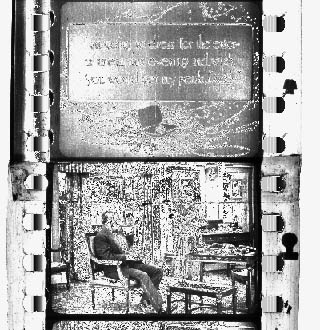
It looks like when you use a Photoshop effect to find edges. I tried various settings including color to no avail; always something like that or a color variation. I tried flipping the film between emulsion up or down. With the transparancy tray or without. With a glass plate to flatten the film or not. Always the same.
I finally put a scrap piece of ordinary color stock on the scanner and scanned that just to prove it was working ok. That looked normal. So left that in place and put the B&W nitrate across the scanner. That did the trick.
Here is a screen cap of the preview window. (The color frames are Super 35 framing leader from running The Matrix effects footage for the W. Brothers.) Without that color stock there the preview of the nitrate would look like the image above.
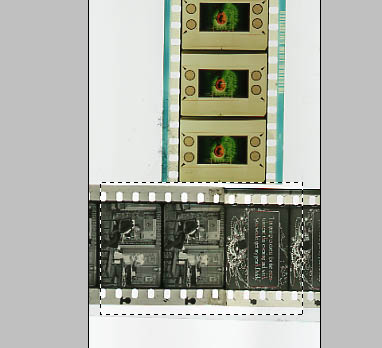
Any ideas what is going on?
Posted by David Stambaugh (Member # 1102) on 11-26-2004, 11:15 AM:
You didn't specifically mention it in your post, but is there a scanner b&w setting called "gray scale" or something like that? I'm sure you would have tried it though. It looks like what you were getting would be "line art".
Posted by Steve Kraus (Member # 476) on 11-26-2004, 11:39 AM:
Yes, gray scale was what I tried. Also color, even negative. Line art wasn't an option. Film is still sitting on the scanner so I reopened the program and did a preview scan. With it set on color positive transparancy I got the same image as the 2nd one above. OK...reached over and removed the Matrix clip. New preview...hmm...now it looks like proper scan. Now moving the nitrate film to a lengthwise orientation. Preview scan again. Now we are back to the line art look. So the presence of the other clip wasn't the issue but the vertical orientation was. The plot thickens.
Posted by Brad Miller (Member # 2) on 11-26-2004, 11:50 AM:
I have an Epson Perfection 3200 scanner. The scanner is really nice, but the software sucks. I have that same issue when scanning film. On the 3200, you HAVE to have one end of the film cut, or the software will not recognize it. However you can turn it sideways (only 4-5 frames worth) and it will scan perfectly. This is why the Reel ID section is only showing 4 frame lengths on reel changes like Spongebob, where it is preferred to show the last seen images on the reel, rather than black. For this purpose, it actually works out nicely, because having only 4 instead of 8 ID frames for reference is an obvious tip that you are dealing with a fadeout.
Posted by Randy Stankey (Member # 64) on 11-26-2004, 11:58 AM:
On some scanners I have seen, ther is a little "calibration window" that has to be perfectly clear in order for a scan to work. If part of that window is obstructed the scans won't come out.
Second, I wonder if the refractive index of nitrate stock is such that the scanner can't focus on the image. Then putting in another piece of film that the scanner CAN focus on makes the nitrate "read" where it didn't before.
Just spitballing...
Posted by Steve Kraus (Member # 476) on 11-26-2004, 12:51 PM:
When I'm in so-called professional mode I don't want it auto recognizing anything. Just show me what's there. Brad is right; the software sucks majorly.
Posted by Adam Martin (Member # 641) on 11-26-2004, 01:12 PM:
Amen, Steve. I should have full control in Pro mode, but I never do. I've got an HP Scanjet 3570c and the software is the worst! Why do they have to make user interfaces with Director? Why can't they just make real software any more?
Posted by Brad Miller (Member # 2) on 11-26-2004, 01:41 PM:
Steve - use "home mode". It's better.
Posted by Bobby Henderson (Member # 840) on 11-26-2004, 11:11 PM:
I haven't seen any scanning software for units under $1000 that was worth a damn. I have a slightly older Epson Perfection Photo 2450 model and get some of the same kinds of headaches.
Overall, it is tempting for me to buy a SCSI add-in card for my Dell machine. I still have this older Linotype-Hell Saphir scanner (which cost me $1100). It is a SCSI based unit. My old SCSI PC is dead, so basically this scanner is one expensive paperweight. It has only a 600 X 1200 optical resolution, which was decent for 1997. But the scanner was well built, captured color very well and the Color Factory Pro software that came with it was great.
Posted by Steve Kraus (Member # 476) on 11-26-2004, 11:34 PM:
Epson sez the issue is caused by obscuring the white reference area. I said that it was ridiculous that it couldn't see white in the remaining area that is not obscured by a strip only 35mm wide. Or that they simply allow one to choose a white point. They said...um...nope; don't expect that on any update. Shoulda bought an Epson Expression series, they said.
Powered by Infopop Corporation
UBB.classicTM
6.3.1.2