This is topic Networking two household personal computers... in forum Film-Yak at Film-Tech Forum ARCHIVE.
To visit this topic, use this URL:
https://ft-forum.com/ft/cgi-bin/ubb/ultimatebb.cgi?ubb=get_topic;f=8;t=003948
Posted by Andrew McCrea (Member # 674) on 03-13-2005, 08:43 AM:
Hello Everyone! Its been a while!
I have a quick question: I have 2 PCs. The one I'm one is Windows 2000 and the other is Windows 98SE.
-Is it possible to network these two computers together using the ethernet LAN port so that we can access the other computer's files from this one, for example?
-How do I go about setting it up?
-Can we share a dial-up internet connection?
I'm really computer illiterate, so if some of the questions are blatantly obvious, I'm apologizing right now!
Thanks!
Posted by Leo Enticknap (Member # 534) on 03-13-2005, 09:41 AM:
Theoretically yes, but it's a hassle. Asssuming that both machines have Ethernet cards in them, you need an Ethernet crossover cable to directly connect the two (not a PC to hub cable). The Microsoft Windows Networking protocol, which comes built into both versions of Windows, isn't very secure or sophisticated, but it's enough for transferring files back and forth and is the simplest to configure. I use this for swapping stuff between my laptop and main PC, but both are running XP Pro. 2000 has similar functionality, but you'll need to configure the folder sharing options manually (no wizard). 98, however, is a faff from what I can remember: and it's been so long since I've used a 9x PC that I really couldn't remember where to start. If you Google 'network two PCs' or some similar string you should find some step-by-step instructions somewhere.
Posted by Darryl Spicer (Member # 711) on 03-13-2005, 10:06 AM:
I have done it using XP home and Windows 98se. But I was also going through a router not directly computer to computer. As far as trying to explain it to you thoroughly here I can't since I really need to be physically working with them to figure it out. Basically keeping the information straight without confusing you is not possible from my stand point. I can say this that if you have a fire wall on your computers that you use you will have to do some messing around with it.
As far as accessing a dial up connection I would have to say probably not since there would probably be a conflict with IP addresses. However if you have DSL or cable modem and a router there will be no problems. I think there would be no problem with DSL I know there is no problem with cable. All the operating systems will work together from 98 on up there are just some differences in configuring there setups in the network neighborhood.
Posted by Andrew McCrea (Member # 674) on 03-13-2005, 10:22 AM:
Thanks!
Posted by Dustin Mitchell (Member # 372) on 03-13-2005, 10:51 AM:
If you have an external modem you should be able to share a dail up connection so long as you have a router.
Posted by William Hooper (Member # 71) on 03-14-2005, 06:37 AM:
Kermit was designed to transfer files between diverse computers.
If you're trying to get around a security problem, the files can be placed in cakes or loaves of bread.
Posted by Dominic Espinosa (Member # 2122) on 03-16-2005, 02:48 PM:
Sharing a dial-up line is kind of rediculous.
And using a router and external modem is kind of a pain.
Either you can use the borken ass internet connection sharing in the win2k box or use a program like Wingate.
Alternatively, order cable or DSL and hook it up to a decent router and you'll be cruzin' in no time.
Posted by Scott Norwood (Member # 30) on 03-16-2005, 02:54 PM:
I'm pretty sure that there is some sort of NAT functionality built into Windows now that will allow sharing a dialup connection.
I did something like this back in the 28.8 days (read: 1996ish) with a Linux box configured to dial on demand and then drop the connection after a specified period of network inactivity. It worked fine, but, of course, was slow.
Posted by Andrew McCrea (Member # 674) on 03-16-2005, 06:10 PM:
Dominic, I live in the middle of no where, which means I can't get high speed internet.
Thanks for the help Scott.
So far, I've been unsuccessful in networking them.
Posted by Monte L Fullmer (Member # 2797) on 03-16-2005, 09:51 PM:
Hooking up two PC's is quite simple: Have both PC's with NIC cards installed. get a "D-Link" 4 port switch, hook up both PCs with CAT-5 patch cable with the RJ-45 plugs on the ends, and then plug the other ends to the switch. Have an external modem attached to the router on the first socket using crossover CAT-5 cable for the "duplex" protocol, and there you go: a in-house network. The modem will only do the initial addressing protocol where the router will accept each machine's addresses, then return to the modem as one address.
Posted by Adam Wilbert (Member # 1184) on 03-16-2005, 10:24 PM:
back in the day of Warcraft II, my brother and I just used a serial cable to connect to eachother and a program called "laplink" to grab files from one computer to another. If you're going to go the "crossover" ethernet route (ie, direct connect without a router), you can buy RJ-45 connectors and a crimper at RadioShack. Make sure your connectors go something like:
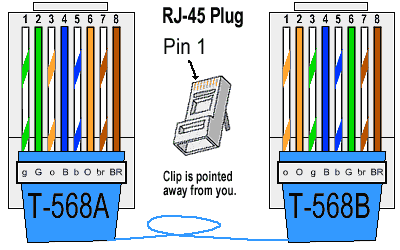
Basically, you just swap positions 1 & 3 and 2 & 6 on each end of the cable.
Posted by Jason M Miller (Member # 2597) on 03-16-2005, 10:25 PM:
This can be done:
Supplies needed:
Two NICs (Network Interface Cards)
Some Cat5 Cable: If you are going to use a switch or Hub use regular if not use a crossover cable
To share the connection check out this web site http://support.microsoft.com/kb/237254/EN-US/
I was going to type this big 'ol tutorial on how to set this crap up but I am too lazy and I am at work so I dont have time so check out this web site http://www.practicallynetworked.com/sharing/ Good luck
Powered by Infopop Corporation
UBB.classicTM
6.3.1.2